

BCBSMA MyBlue Member App
- 636.00
- 4.7
- Installs
- 100.00K
- Price
- Free

Screenshots
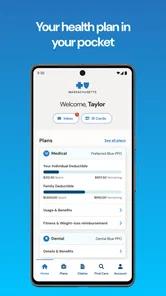
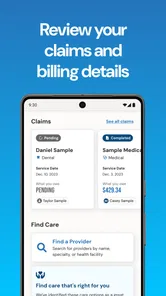
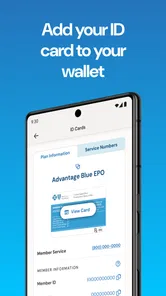
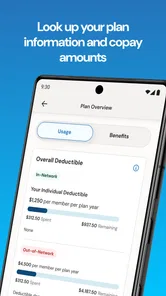
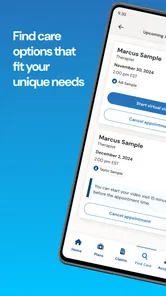
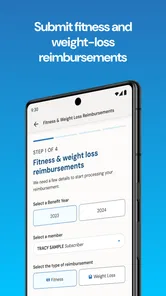
Analysis by Reviewed
When I need to deal with health insurance, I usually want one thing: a clear route from a question to an answer without searching through paperwork first. That is the role BCBSMA MyBlue Member App tries to fill for members of Blue Cross Blue Shield of Massachusetts. It is a free medical app from BCBSMA, aimed at everyday account and coverage tasks rather than diagnosis or treatment.
After spending time with it, my impression is that it works best as a practical starting point. It puts the member relationship in one place, which can be much easier than switching between an insurance card, a browser, saved documents, and a phone call. At the same time, it is important to understand what kind of tool this is. It is not a replacement for a doctor, an emergency service, or a detailed conversation with an insurance representative when a claim or coverage question becomes complicated.
From a health-insurance question to a usable answer
The most realistic way to judge this app is to follow a normal situation. Imagine I am leaving a medical appointment and want to check something about my plan before scheduling the next step. I may need to identify my member information, review what my coverage allows, or find the right place to continue the conversation. Instead of beginning with a general web search, I open the app and work from my member account.
That change in starting point matters. A public search engine can explain insurance terms, but it does not know my plan. A paper card provides important identification, but it cannot guide me through an account workflow. The MyBlue app sits between those two options: it is personal enough to organize member information, while still being focused on administrative tasks rather than medical advice.
I found that the app makes the most sense when I already know the question I am trying to answer. “I need to check something about my plan” is a useful starting condition; “I feel unwell and need medical guidance” is not. In the second case, I would contact a qualified healthcare professional or an appropriate emergency service instead of treating an insurance app as a care channel.
Getting oriented before taking action
The first useful habit is to open the app before I am standing at a reception desk or trying to arrange care under pressure. Insurance details are easier to understand when I have time to read them. I would also keep my physical insurance card available during the first few uses, because the app complements that card rather than making the card irrelevant in every situation.
Once inside, I approach the app as a member dashboard. I look for the information connected to my account, then decide whether my next step is simply checking a detail or moving toward help. This sounds basic, but it prevents a common mistake: opening an insurance app without a specific task and then assuming that every possible answer should be visible immediately.
More From Our News Desk

 Instagram
Instagram’s Power Comes From Its Place in Your Phone
A close look at how Instagram turns Meta’s reach, recommendation systems and everyday camera habits into durable platform power—and what that costs users.

 Gmail
GmailGmail in a Busy Inbox: Who Benefits Most?
From first account to crowded workday, Gmail earns its place through dependable search and flexible sorting—but its best fit depends on how much inbox maintenance you can tolerate.

 Prime Video
Switching to Prime Video: What Changes in Your Viewing Routine
Prime Video can make a compelling second home for streaming, but switching means learning a different catalog, rental layer, and route from browsing to playback.

 Universal TV Remote Control
Universal TV Remote Control Works Best as a Reliable Backup
A phone remote earns its place through quick setup and reliable habits. Here is how to get more from Universal TV Remote Control—and where its limits show.

 Weather - By Xiaomi
Weather by Xiaomi Review: Clear at a Glance, Less Clear Up Close
Xiaomi’s weather app makes everyday forecasts quick to scan, but its calm surface can leave useful details and recovery paths harder to find than they should be.

 X
XX Under Pressure: Can It Recover When Posting Goes Wrong?
A resilience-focused review of X, examining setup, mistaken posts, interruptions, weak connections, and the gaps that matter when recovery needs to be dependable.
Latest News



The app is rated for Everyone, which fits its administrative purpose, and it is available at no cost. Those points make it approachable for households that want a convenient digital option without adding another subscription to their monthly expenses. The more important question, though, is whether the person is covered by Blue Cross Blue Shield of Massachusetts. Without that member relationship, the app has little practical value.
Following the member workflow
My preferred workflow is short and deliberate. First, I identify the task: checking member information, reviewing a coverage-related detail, or finding the correct support path. Next, I open the relevant account area instead of browsing randomly. Then I read the information in context and save myself from making a decision based on a single isolated phrase.
That last step is where an insurance app needs more care than a normal shopping or banking app. A word such as “covered” does not always answer every practical question a patient has. The provider, service, plan conditions, timing, and personal circumstances may all affect what happens next. I use the app to prepare a question or confirm a direction, not to assume that a quick glance settles a complicated billing issue.
A useful tip is to treat the app as a pre-visit checklist. Before contacting a clinic, I can review the member information I may need and make a note of the exact issue I want to discuss. That reduces the chance of calling with only a vague concern. It also makes the handoff to a clinic or insurer representative more efficient because I can describe what I already checked.
Another practical use is checking information before a family member helps with an administrative task. If someone else is assisting me with an appointment or paperwork, I can use the app to gather the relevant account context first. I would still be careful about privacy and would not casually share account details just because the information is easy to view on a phone.
Where the handoffs really happen
The app does not exist in isolation. A typical insurance task moves through several hands: me, the app, a healthcare office, and sometimes BCBSMA support. The strongest part of the experience is the first handoff, from my memory or paperwork to a member-focused digital view. The weaker parts appear when the issue leaves the app and becomes a question about interpretation, billing, or a specific provider.
For example, I might use the app to prepare for a call with a medical office. The app helps me begin with organized information, but the office may still ask for details that must be confirmed directly. If the office gives me an estimate that does not match my understanding, I would not try to resolve the disagreement by repeatedly refreshing the app. I would write down the service, date, provider, and wording used, then contact the appropriate party with that information.
This is one of the app’s less obvious strengths: it can improve the quality of a handoff even when it cannot complete the whole process. A digital account view gives me a better starting point than a half-remembered card number or an old email. The app is therefore most valuable as a preparation and verification tool, not as a promise that every insurance conversation ends inside the same screen.
I also appreciate the distinction between information and action. Reading a plan detail is one action; arranging care, questioning a bill, or asking for an explanation may require another channel. Keeping those steps separate helps me avoid overestimating what the app has confirmed.
What the experience delivers
The result I want from MyBlue is not entertainment or a long session. It is confidence that I have started from the right member information and know what to do next. In that respect, the app is useful for people who regularly manage their own appointments, keep track of insurance documents, or prefer a phone-based account over a pile of printed material.
It also suits people who dislike calling immediately for every small administrative question. A quick account check can answer the first layer of uncertainty and help decide whether a phone conversation is necessary. That can be especially helpful outside normal office routines, when I am trying to prepare a question before the next business day rather than solve everything instantly.
The app’s audience is reflected in its scale: it has passed one hundred thousand installs and holds a 4.7 average from around 1.9 thousand ratings. I read those figures as evidence that the basic idea is resonating with many members, not as proof that every individual workflow will be smooth. Insurance experiences vary by plan and circumstance, so a strong overall score cannot remove the need for careful checking.
For a member who already uses digital tools comfortably, the app can reduce friction. I can begin with my own account instead of a generic information page, prepare for a conversation with a provider, and keep the administrative part of a healthcare task moving. That is a modest outcome, but it is exactly the kind of modest outcome that saves time when repeated over months.
Small habits that make it more useful
I would use the app before a planned appointment, not for the first time while checking in. That gives me time to notice whether I understand the information and to prepare a backup question. If something looks unclear, I can resolve it before a receptionist is waiting for an answer.
I would also keep a simple record of unresolved issues outside the app. For a billing or coverage question, I might note the service involved, the date, the provider, and the explanation I received. This is more reliable than assuming the app itself will preserve the whole story of a conversation. The app can provide the starting context; my notes preserve the follow-through.
A third tip is to compare the app’s information with the document or estimate that triggered the question, rather than reading either one alone. This catches misunderstandings early. If the two sources appear inconsistent, I treat that as a reason to ask for clarification, not as an invitation to choose whichever answer I prefer.
Finally, I would keep expectations realistic when helping another person. The app is designed around the member account, so using it on behalf of a spouse, parent, or child may introduce extra complications. In those situations, I would make sure the correct member context is being used and avoid assuming that one person’s coverage details apply to another person’s care.
Where the flow breaks down
The main limitation is that insurance administration is rarely simple enough to fit entirely into a mobile dashboard. A quick view may help me understand the starting point, but it may not explain why a particular service was handled a certain way. When the issue involves a disputed charge, an unusual treatment, a provider-specific question, or wording I cannot interpret, I still need a human explanation.
That is not a failure unique to this app, but it changes how I judge it. Compared with a paper card, the app is more convenient for account-based preparation. Compared with a full conversation with BCBSMA support, it is less suitable for nuance. Compared with a general health app, it is more relevant to member administration but less useful for symptom tracking, medication reminders, or clinical education.
I would skip it if I am looking for medical diagnosis, urgent guidance, or a broad wellness program. I would also be cautious about relying on it as my only record when a financial issue matters. A screenshot, document, or written note may still be useful for a later conversation, depending on the situation. The app can make information easier to reach, but easy access is not the same as a complete paper trail.
There is also a human-factors problem. A person who is already stressed by a medical bill may find even a well-organized account difficult to interpret. The best approach is to use the app in stages: identify the relevant detail, write down what remains unclear, and then use the appropriate support route. Trying to force a complicated question into a simple self-service answer usually creates more frustration.
Who should use it and who should choose another tool
I would recommend BCBSMA MyBlue to Blue Cross Blue Shield of Massachusetts members who want a convenient mobile entry point for their insurance information. It is particularly suitable for people who manage appointments independently, want to prepare before contacting a provider, or prefer checking an account digitally rather than searching through printed documents.
It is less suitable as a standalone solution for caregivers managing several people, unless they are comfortable carefully switching between the correct member contexts and confirming details directly when needed. It is also the wrong choice for anyone expecting a health-tracking app or a telemedicine-style clinical experience. The category matters: this is a medical insurance companion, not a general-purpose health coach.
The developer is BCBSMA, and the app has been available since June 26, 2015. Its current version is 7.46, with a minimum operating-system requirement of 7.1. Those details suggest a product with a long-running presence and ongoing version changes, while the operating-system requirement keeps it accessible to many older compatible devices. I would still keep the app updated when possible, especially before relying on it for an appointment-related task.
My final view is positive but practical. This app earns its place on my phone when I am a BCBSMA member and want to turn an insurance question into an organized next step. Its real value is not that it eliminates every handoff; it is that it gives me a better starting point for those handoffs. I would use it to prepare, check, and orient myself, then move to a provider or BCBSMA representative when the situation demands interpretation. Used that way, the free app is a sensible companion for everyday insurance administration, with the important reminder that healthcare paperwork still sometimes needs a real person.
BCBSMA MyBlue Member App Frequently Asked Questions
Does the BCBSMA MyBlue Member App work on both Android and iPhone?
The BCBSMA MyBlue Member App is available for mobile devices, with compatibility depending on your device and operating system. The listed minimum iOS requirement is 7.1, so check your device’s software and the relevant app store before downloading. Keeping your operating system current can also help with security and compatibility.
What should I have ready before signing in to MyBlue for the first time?
Have your Blue Cross Blue Shield of Massachusetts member credentials or MyBlue account details ready. The app is intended for members with an eligible health plan, and access to particular tools depends on your coverage and account status. If you do not yet have an account or cannot sign in, use the app’s support resources or the insurer’s official channels for assistance.
What is the BCBSMA MyBlue Member App used for?
The BCBSMA MyBlue Member App is designed for Blue Cross Blue Shield of Massachusetts members who want to manage health insurance information from a mobile device. Depending on your plan and eligibility, you can review coverage details, access member identification information, search for doctors and hospitals, check claims, view deductible or spending information, and find customer support resources without relying entirely on a desktop browser.
Who can use the BCBSMA MyBlue Member App?
The app is primarily intended for members enrolled in an eligible Blue Cross Blue Shield of Massachusetts health plan. You generally need an active MyBlue account or valid member credentials to sign in. Available tools may differ according to your specific plan, employer coverage, benefits, and account status, so some users may see different menus or information than other members. Dependents may also have access limitations.
Can I access my digital member ID card through the app?
In many cases, the MyBlue app allows eligible members to view or use a digital version of their Blue Cross Blue Shield of Massachusetts member ID card. This can be useful when visiting a doctor, pharmacy, or hospital and you do not have the physical card with you. Before depending on it, make sure the card information is current and confirm whether your provider accepts a digital ID card.
Pros
- Quick access to digital member ID cards when visiting providers.
- Secure messaging makes contacting member services more convenient.
- Coverage details and benefits are easier to review while traveling.
- Prescription information can help members check plan-related pharmacy details.
- Personalized account access keeps member information in one place.
Cons
- Some features may require a separate login or additional verification.
- Provider and facility information may not always reflect recent changes.
- Certain claims or benefit updates can take time to appear.
- The app is mainly useful to Blue Cross Blue Shield of Massachusetts members.
- Performance and availability may vary during maintenance or peak periods.











