Bayut KSA - Real Estate
- 12.00
- 4.2
- Installs
- 1.00M
- Price
- Free

Screenshots



Analysis by Reviewed
When I start looking for a home in Saudi Arabia, the hard part is rarely finding something attractive to tap on. It is working out which options deserve a closer look, what I need to ask, and when browsing should turn into a call or visit. Bayut KSA - Real Estate is useful at that early, sorting-out stage: it gives me a place to explore homes and compare listings before I commit time to following up.
For me, the useful starting point is not knowing exactly which home I want, but having a few practical boundaries: the part of town I can manage, whether I need a rental or a purchase, and the kind of property that fits daily life. Bayut KSA is a free House & Home app from Bayut ME (Middle East), aimed at property searches in Saudi Arabia. It has a 4.0 average from around 2,100 ratings, and more than a million installs. That scale makes it a familiar place to begin browsing, though I still treat any listing app as a discovery tool rather than a substitute for checking a property and its terms myself.
Getting Started with Bayut KSA
First things first, downloading and setting up the Bayut KSA - Real Estate app is a breeze. Available on both Android and iOS, you can find it on the Google Play Store or the Apple App Store. Once installed, you’re greeted with a sleek and user-friendly interface that’s all about helping you find what you need with minimal fuss. From the moment you open the app, it’s clear that usability is a priority, and I have to say, they’ve done a stellar job here. It is suitable for Everyone, and the current version is 3.20.0; Android users need version 8.0 or later.
I would approach the first search as a way to learn, not as a promise that the right home will appear immediately. A renter who is new to an area might compare a few locations before deciding what is practical, while someone who already knows the neighborhood can move directly to property type and budget. Those starting points are different, and keeping that distinction in mind makes it easier to judge whether the results are genuinely useful.
The first decision I make is whether I’m browsing broadly or trying to act quickly. If I’m still learning what different areas offer, I keep the search open and compare several neighborhoods before narrowing it down. If I already know the location and property type, I use those as my first filters, then bring in budget. This order helps avoid a common trap: setting a very tight price range too early and overlooking listings that might be worth comparing for their location or layout.
Browsing Properties Made Easy
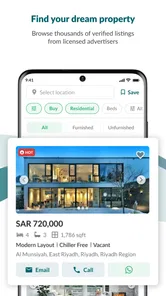
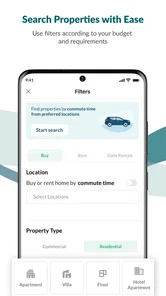
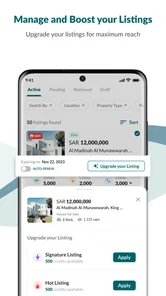
One of the standout features of Bayut KSA is its comprehensive search functionality. Whether you’re looking for a villa, apartment, or even commercial spaces, the app’s search filters let you narrow down your options by location, price, property type, and more. What I really appreciated was the detailed property listings, complete with high-quality images and essential details like amenities, nearby facilities, and the all-important price tag.
Another cool feature is the map view that lets you explore properties in your desired area visually. It’s like having a bird’s eye view of the real estate landscape around you, which can be incredibly helpful when you’re trying to get a feel for different neighborhoods.
More From Our News Desk

 Instagram
’s Power Comes From Its Place in Your Phone
A close look at how Instagram turns Meta’s reach, recommendation systems and everyday camera habits into durable platform power—and what that costs users.

 Gmail
Gmail in a Busy Inbox: Who Benefits Most?
From first account to crowded workday, Gmail earns its place through dependable search and flexible sorting—but its best fit depends on how much inbox maintenance you can tolerate.

 Prime Video
Switching to Prime Video: What Changes in Your Viewing Routine
Prime Video can make a compelling second home for streaming, but switching means learning a different catalog, rental layer, and route from browsing to playback.

 Universal TV Remote Control
 Works Best as a Reliable Backup
A phone remote earns its place through quick setup and reliable habits. Here is how to get more from Universal TV Remote Control—and where its limits show.

 Weather - By Xiaomi
Weather by Xiaomi Review: Clear at a Glance, Less Clear Up Close
Xiaomi’s weather app makes everyday forecasts quick to scan, but its calm surface can leave useful details and recovery paths harder to find than they should be.

 X
X Under Pressure: Can It Recover When Posting Goes Wrong?
A resilience-focused review of X, examining setup, mistaken posts, interruptions, weak connections, and the gaps that matter when recovery needs to be dependable.
Latest News



When I use map and list views together, I treat the map as a way to test a shortlist rather than as a verdict on a neighborhood. A candidate may look close to work on screen, yet the practical route or nearby services may not fit my routine. I would note the surrounding places I care about, then check the actual route independently and visit when possible. That extra step is especially worthwhile if I am comparing locations I do not know well.
A practical way to use those two views together is to shortlist by the facts that matter most, then switch to the map to test whether the options cluster in a useful area. For example, someone choosing between a flat near work and a larger home farther out can use the map to notice how much the shortlist spreads across town. Nearby facilities shown on a listing are useful prompts for questions, but I would still check the exact route and visit at the time of day I expect to travel. A map can put a property in context; it cannot tell me what a commute feels like.
For a realistic search, imagine I have a free evening to look for a rental before a lease decision. I can set a location and property type, scan prices and photos, and use the map to pick a handful of places to investigate further. Rather than treating every attractive photo as a visit-worthy option, I’d compare the details that affect routine—amenities, surroundings, and whether the listed price fits my budget—and make a short call-back list. This turns casual scrolling into a manageable next step without pretending the app can make the decision for me.
Keeping a Search Useful Between Check-ins
Alerts make most sense when I have a clear reason to return to a particular search: perhaps I am waiting for options in one area, or I have settled on a property type but still want to see what else appears. I would keep separate searches for genuinely different needs instead of combining every preference into one broad sweep. That makes new results easier to assess and helps me notice when my requirements, rather than the available homes, are the part that needs adjusting.
If you’re anything like me, you probably don’t have time to check the app every day. That’s where Bayut KSA’s alert feature comes in handy. You can set up alerts for specific searches, and the app will notify you whenever new listings that match your criteria are added. It’s a real time-saver and ensures you never miss out on a potential opportunity.
I’d keep an alert focused rather than piling every possible preference into one search. A broad alert can be useful while I’m learning the market, while a second, narrower search can help when I’m ready to contact someone about a specific kind of home. If the results stop being relevant, I’d revisit the location, price, and property type instead of assuming that more notifications mean better options. The trade-off is attention: alerts save repeated manual checks, but they can still interrupt a busy day if the search is too loose.
From Shortlist to Contact
The shortlist is where I would slow down. Before contacting an advertiser, I would write down what each listing appears to offer and what remains unclear. That keeps a promising photo from doing too much of the persuading and makes the conversation more useful: I can ask about availability, viewing arrangements, included items, and anything that could change whether the home works for me.
The app’s strongest role is helping me move from a vague idea to a set of listings worth following up. I would save or note the details that distinguish each candidate, then contact the relevant advertiser to clarify practical points before arranging a viewing. That handoff matters: the listing helps me decide what to ask, but the conversation is where I can check whether the property is available and whether its terms suit my needs. I would keep questions specific—such as what is included, when it can be viewed, and whether the location works for my routine—rather than relying on photos alone.
That handoff is also where expectations need to stay grounded. An app can bring a listing and its details together, but I still need to speak with the person handling it and decide what evidence is enough for me. I would not treat an appealing description as confirmation of every practical point. For a rental, I would clarify the terms that affect moving in; for a purchase, I would be careful to separate an initial browse from the later checks and decisions involved in buying.
Compared with starting on a general classifieds platform, a property-focused search is more convenient when I want to filter by home type and compare property details in one place. Compared with asking an agent to search for me, the app gives me more control over browsing times and lets me build my own shortlist. Neither approach removes the need to verify a listing or speak with the people responsible for it. If I already have a trusted agent and a narrow brief, direct communication may be faster; if I’m still exploring areas or weighing rent against purchase, browsing first is a sensible use of the app.
Who Gets the Most from the Search
As someone who’s always on the lookout for new investment opportunities, Bayut KSA has been a game-changer. The app’s intuitive design and the wealth of information available have made my property search much more efficient. Whether you’re a seasoned investor or a first-time homebuyer, this app has something for everyone.
For an investor, I’d use the app to compare asking prices, property types, and locations as an initial screen, not as proof that a property will perform well. For a first-time buyer, the same listings can help turn broad preferences into questions for a viewing. Renters may find it most useful when they need to scan options across a few neighborhoods quickly. The best fit is someone comfortable doing their own early research; a person who wants guaranteed recommendations, detailed financial analysis, or a fully managed transaction should not expect a search app to replace those services.
The app is less suited to someone who wants a curated answer without doing any sorting, or who needs a property assessed remotely before deciding. A local agent or another direct route may be the better first step if the brief is already precise and personal guidance matters more than browsing. I would also choose a different approach if my main need were a complete view of a property’s condition: listing images are a starting point, not an inspection.
One thing I’d love to see in future updates is perhaps a virtual tour feature. With technology advancing so rapidly, being able to ‘walk through’ a property from the comfort of your phone would be an exciting and useful addition.
That limitation affects how I’d plan viewings: photographs can help me reject obvious mismatches, but they cannot settle questions about room flow, noise, upkeep, or how a space feels in person. I’d use the app to spend less time on unsuitable candidates, then reserve time to inspect the strongest ones and confirm their details directly. If I need to judge a property remotely without a later visit, this would not be my only decision-making tool.
Turning Browsing into a Decision
By the time I am ready to choose which places to pursue, I want the app to have helped me reduce a large, vague search to a few concrete possibilities. The useful outcome is not simply a long list of attractive listings; it is knowing which ones merit a question, which deserve a viewing, and which I can dismiss without losing more time. That is a modest but valuable result when a move already involves plenty of decisions.
Before arranging a visit, I would compare each candidate against the same everyday needs rather than letting the newest listing reset my standards. Can I make the location work? Does the property type suit the people who will live there? Are there unanswered details that could change my choice? Keeping those questions consistent makes comparison fairer and helps me notice when a seemingly appealing option is actually a poor fit.
In conclusion, if you’re in the market for real estate in Saudi Arabia, the Bayut KSA - Real Estate app is definitely worth checking out. With its user-friendly interface, robust search capabilities, and handy alert system, it’s like having a real estate agent in your pocket. So why not give it a try and see how it can help you find your next home or investment?
I’d describe it more precisely as a convenient first stop than an agent in my pocket: it helps organize the search, while the important handoff to a viewing and direct checks remains yours. Its free access makes trying a few searches low-commitment, and its strengths are clearest when you know enough to filter but still want to compare choices. If you prefer someone else to curate every option or need a complete remote inspection, another route may suit you better. For everyone else, I’d start with a realistic location and budget, use the map to question the shortlist, and let alerts bring relevant new options back to me.
Bayut KSA - Real Estate Frequently Asked Questions
Will Bayut KSA work on my phone?
Bayut KSA is a real estate app for Android and iOS. On Android, it requires version 8.0 or later, so it is worth checking your device’s operating system before installing. The app is free to download, and its content rating is Everyone. Its current version is 3.20.0, making it a practical option to consider if you want to search for homes on a compatible phone.
Is Bayut KSA free to download, and who makes it?
Bayut KSA is free to download and is developed by Bayut ME (Middle East). Its focus is property searches in Saudi Arabia, and the app’s store summary describes it as a way to search, buy, or rent properties easily. The app has an average rating of 4.0 from around 2.1K ratings, which can offer a general sense of how users respond to it.
What is Bayut KSA and how does it work?
Bayut KSA is a comprehensive real estate app designed specifically for the Kingdom of Saudi Arabia. It connects buyers, sellers, and renters, offering a platform to search for properties across various cities in the region. Users can filter listings based on their preferences such as location, property type, price range, and more. The app also provides detailed information about each property, including photos, descriptions, and contact details for agents.
Can I use Bayut KSA to sell or rent out my property?
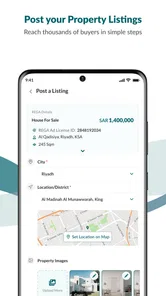
Yes, Bayut KSA allows property owners and agents to list their properties for sale or rent. By creating an account, you can upload property details, images, and set your preferred pricing. The app facilitates direct communication with potential buyers or renters, making it easier to manage inquiries and negotiate terms directly through the platform.
Is Bayut KSA available for both Android and iOS devices?
Bayut KSA is available for download on both Android and iOS platforms. Users can easily find and install the app from Google Play Store or Apple App Store by searching for 'Bayut KSA'. The app is regularly updated to improve user experience and add new features, ensuring compatibility with the latest device software.
Pros
- User-friendly interface simplifies searching.
- Comprehensive property listings available.
- Advanced filter options for precise searches.
- Regular updates with the latest property info.
- Localized content tailored for KSA users.
Cons
- Limited support for non-Arabic speakers.
- Occasional glitches in the map feature.
- Some listings lack detailed property info.
- Push notifications can be overwhelming.
- Requires a stable internet connection.