Base44: Build Apps with AI
- 254.00
- 4.0
- Installs
- 100.00K
- Price
- Free

Screenshots

Analysis by Reviewed
I approached Base44: Build Apps with AI as a productivity tool for people who have an idea but do not want to begin with code, a database schema, or a long setup process. The basic promise is easy to understand: describe the app you want in ordinary language and let AI turn that description into something functional. In practice, the interesting question is not whether it can produce a first version quickly. It is whether that first version can become a dependable part of your daily work instead of another experiment you forget after an afternoon.
That distinction matters. A quick prototype can be exciting, but sustainable productivity comes from a repeatable system: deciding what problem needs solving, capturing the right information, checking the result, and improving the workflow without creating more maintenance than the original task required. My experience with Base44 is strongest when I treat it as a fast way to shape a focused tool, not as a magic replacement for planning or judgment.
Turning an untidy workflow into a useful starting point
Before opening the app, I would normally have a vague problem rather than a finished specification. Perhaps I need a simple way to track freelance requests, organize household projects, collect ideas for articles, or record follow-ups after meetings. Traditional productivity apps usually ask me to adapt that problem to their existing structure. I choose a template, create folders, add fields, and then discover that the workflow does not quite match the way I actually work.
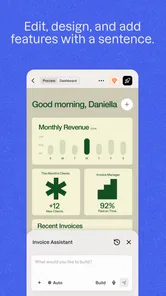
Base44 changes the starting point. Instead of asking me to learn a predetermined system, it lets me explain the system I have in mind. That is particularly useful when the process is specific enough that a standard notes app feels too loose, but too small to justify hiring a developer or learning a full no-code platform.
The quality of the result depends heavily on the quality of the request. A sentence such as “make me a task app” leaves too much open. I get a more useful foundation when I describe who will use it, what information must be recorded, what should happen first, and what I need to see at the end. I would write something closer to: “Create a lightweight request tracker for a solo consultant, with a title, client, due date, priority, status, notes, and a view that shows overdue work separately from completed work.” That kind of brief gives the AI a workflow to interpret rather than a vague category to imitate.
This is my first important recommendation: write the process before asking for the app. List the moment when information enters, the decision that follows, and the action that marks the work complete. It prevents a common disappointment in AI-built tools, where the result looks polished but does not support the small decisions that make the process useful.
For example, I might use it for a weekly content routine. On Monday, I capture article ideas. During the week, I add a source, an intended audience, and a next action. On Friday, I review unfinished ideas and either schedule them, merge them, or discard them. The app becomes valuable because it reflects that rhythm. Without the rhythm, I am simply collecting records in a new place.
More From Our News Desk

Weather by Xiaomi Review: Clear at a Glance, Less Clear Up Close

X Under Pressure: Can It Recover When Posting Goes Wrong?

Clash of Clans Is Won Between the Battles

Android Auto Makes the Case for Quieter Car Software

MobiOffice: Transforming Mobile Productivity with Seamless Integration

EA SPORTS FC™ Mobile Soccer: Redefining Mobile Sports Gaming
Starting small is more effective than describing everything
I found it tempting to ask for a complete business system immediately: user accounts, dashboards, reminders, reporting, multiple roles, and every possible exception. That approach makes the first result harder to evaluate. When too many requirements arrive together, it becomes difficult to tell whether a problem comes from the wording, the design, or an assumption I forgot to explain.
A better workflow is to begin with the smallest useful loop. For a reading tracker, that might be adding a book, changing its status, recording a note, and viewing what I want to read next. Once that loop feels natural, I can ask for refinements. This staged approach also gives me a clearer sense of whether building in Base44 is saving time compared with using an existing app.
The trade-off is that the app rewards active direction. It is not the ideal choice for someone who wants to press one button and receive a finished, perfectly tailored product. I still need to inspect what was created, identify awkward steps, and explain the correction clearly. The AI accelerates construction, but it does not remove the need to make product decisions.
Capturing information without creating another inbox
Once a first version exists, the next challenge is capture. A productivity tool can fail even when its interface is attractive if recording an item takes too much thought. I pay attention to the number of decisions required at the moment an idea appears. If I am walking between meetings or trying to remember a request before it disappears, I do not want to complete a miniature administrative session.
For Base44, I would design the capture path around the information I genuinely know at that moment. A title and a short note may be enough initially. Details such as priority, category, or due date can be completed during a later review. This separation between quick capture and deliberate organization is more sustainable than forcing every field at entry.
That leads to a useful design request: ask for a simple intake screen and a separate review view. The intake screen should make adding an item feel light; the review view should make missing details visible. This is more practical than trying to make a single screen serve both hurried capture and careful planning.
I also avoid using the app as a general dumping ground. If every thought, link, reminder, and personal note goes into the same generated tool, the system becomes difficult to trust. I decide in advance what belongs there. A project tracker should contain project actions, not every unrelated idea that crosses my mind. A research log should preserve sources and conclusions, not become a replacement for all my notes.
One non-obvious advantage of building a focused app is that the structure itself can teach me what information matters. If I repeatedly leave a field blank, that may mean the field is unnecessary or badly timed. If I keep adding the same detail in free text, that may indicate a missing field or a better grouping. I use those patterns to refine the workflow rather than assuming the first design is final.
Organizing for decisions instead of storage
Many productivity tools are good at storing items and weak at helping me decide what to do next. When shaping a Base44 app, I would prioritize views that answer practical questions: What needs attention today? Which items are blocked? What has been waiting too long? What can be closed? A long list of records is less helpful than a short view that supports the next decision.
For a home renovation project, for instance, I might capture tasks, supplier details, estimated costs, and the person responsible. But the most useful view may be “waiting for someone else,” because that tells me where a follow-up is needed. For a small team, a “needs clarification” view could be more valuable than a colorful dashboard. The right organization depends on the bottleneck, not on how impressive the screen looks.
I would also keep statuses concrete. “In progress” can hide several different situations: researching, waiting, drafting, or ready for review. If those stages lead to different actions, they deserve clearer labels. If they do not, extra statuses only create maintenance. Base44 makes it relatively approachable to test these choices, but the responsibility for keeping the vocabulary understandable remains mine.
Building a repeatable routine around the generated tool
The strongest way to use this app is as one step in a routine that already has a beginning and an end. I might capture new items throughout the day, review them once in the afternoon, and close the week by cleaning up stale records. The exact schedule is personal, but the principle is stable: the app needs a maintenance habit or it will slowly become an archive.
For a freelance workflow, I would use a short daily pass to check new requests, assign a next action, and confirm deadlines. At the end of the week, I would look for records with no movement and decide whether to reschedule, delegate, clarify, or remove them. This prevents the common problem where an AI-built tracker contains many accurate entries but offers no current picture of the work.
A useful technique is to make every active item answer one question: “What is the next visible action?” “Prepare website” is too broad. “Collect the two missing images” is easier to act on. When I design the app around next actions, the tool supports execution rather than merely documenting intentions.
I would keep the review routine deliberately short. If maintaining the system takes longer than the work it organizes, the design is wrong for the situation. This is where a conventional notes app or task manager may be better. Base44 is most compelling when a custom structure removes repeated friction, not when customization becomes a hobby.
Another practical tip is to test the workflow with real, slightly messy examples rather than ideal sample entries. Add an item with a missing deadline, a duplicate request, an unclear owner, and a task that changes direction. These cases reveal more than a clean demonstration. They show whether the app helps me recover from ordinary confusion or merely handles the happy path.
Where the workflow can break
AI-generated applications can feel finished before they are fully understood. A screen may present the right fields while the underlying process still contains ambiguity. I therefore check each important action from the perspective of a tired user: Can I tell what to do next? Can I find an old item? Can I distinguish completed work from abandoned work? Can I correct a mistake without losing useful context?
Ambiguous instructions are a frequent failure point. If I ask for “urgent tasks,” I should define what urgent means in my workflow. Is it a deadline within a certain period, a high-impact request, or something blocking another person? Clear definitions produce more dependable organization than attractive labels.
Another risk is overbuilding. Every extra field creates a future decision, and every extra status creates another thing to maintain. I have learned to remove fields that do not change an action. If knowing a category never affects how I sort, review, or complete work, the category may be decoration rather than structure.
I also treat generated output as something to verify before relying on it for important work. I test edits, additions, and changes to existing records. I check whether the wording of a request produced the behavior I intended. This is particularly important if the app will hold information that affects clients, deadlines, finances, or other people. Speed is useful, but confidence has to be earned through testing.
There is also a practical limitation for teams with strict technical requirements. If an organization needs a mature permission model, established integrations, formal audit controls, or a deeply standardized enterprise process, a dedicated platform may be the safer choice. Base44 is better suited to focused tools, prototypes, personal systems, and small workflows where flexibility matters more than a large ecosystem of established controls.
How it compares with familiar productivity choices
Compared with a notes app, Base44 offers a stronger chance of turning repeated information into a structured workflow. Notes are excellent for thinking freely and preserving context, but they usually require me to impose order manually. A generated app can make the important fields and actions more visible. The cost is that I must decide the structure earlier and maintain it afterward.
Compared with a standard task manager, it is more adaptable when the work does not fit a simple task-and-due-date model. A task manager is often quicker for ordinary personal reminders, recurring chores, and straightforward lists. I would not build a custom app for something that a familiar checklist already handles well. The custom route earns its place when the workflow includes relationships, stages, specialized records, or views that ordinary tasks cannot express comfortably.
Compared with a traditional no-code builder, the conversational approach lowers the barrier at the beginning. I can describe an idea before learning every control and configuration option. However, a conventional builder may offer more deliberate control for someone who already understands data models and wants precise, repeatable construction. Base44 favors exploration and iteration; experienced builders may prefer a tool where every structural choice is explicit from the first screen.
For that reason, I see the app as a bridge between an idea and a working internal tool. It is not automatically the best permanent home for every workflow. Sometimes the experiment proves that I need a standard application with broader capabilities. That is still a successful outcome if the prototype helps me understand the process before I invest more time.
Who will benefit and who should skip it
I would recommend Base44 to an independent professional who keeps rebuilding the same spreadsheet, a small group that needs a focused internal tracker, a student with a very specific study workflow, or a curious non-programmer who wants to test an app idea without beginning with software theory. It is especially appealing when the problem is real but modest: a process with enough repetition to justify structure, yet not enough complexity to demand a full development project.
It may also suit someone who thinks more clearly by describing a process in plain language. The conversational starting point can help turn an abstract idea into something visible, which makes it easier to notice missing steps. That is valuable for people who have avoided app building because the technical entry point felt intimidating.
I would advise caution to anyone who dislikes iteration or expects the first generated result to be production-ready for a demanding operation. People who only need quick reminders, simple notes, or a basic calendar may be happier with established tools that require no design work. Likewise, teams that cannot tolerate experimentation should evaluate a more mature, purpose-built system first.
The app is free, carries an Everyone content rating, and comes from Base44 LTD. Its current version is 2.130568.0, with a minimum operating system requirement of 10. That makes it approachable for many users, but compatibility is still worth checking before planning a workflow around it. The product has reached over 100 thousand installs, with a 4.0 average from around 1.5 thousand ratings and 252 reviews, which suggests a meaningful user base while also leaving room for individual experiences to differ.
My recommendation after using it as a system component
I like Base44 most when I use it to remove a specific recurring annoyance. I would begin with one workflow, define the smallest useful record, and test it during a normal week. After that, I would keep only the fields and views that change what I do. This keeps the generated app connected to real behavior instead of allowing it to become a decorative project.
The best results come from combining the app’s speed with human restraint. Let AI handle the initial construction, but supply the boundaries, examples, vocabulary, and review criteria. Test messy cases, separate quick capture from later organization, and schedule a small cleanup routine. Those steps are not obstacles around the technology; they are what turn a quick build into a dependable productivity practice.
My final view is positive but specific: Base44: Build Apps with AI is worth trying if you have a repeated workflow that standard productivity apps almost fit, but not quite. It can shorten the distance between an idea and a usable custom tool, especially for non-programmers. I would skip it for a simple checklist or a highly regulated, technically demanding system. Used thoughtfully, though, it offers something genuinely practical: a way to shape a tool around the work I actually do, then improve that tool as I learn where the work gets stuck.
Base44: Build Apps with AI Frequently Asked Questions
Is Base44 available for my device, and what should I check before installing it?
Base44: Build Apps with AI is a productivity app for creating applications through natural-language instructions. Before downloading, check that your device runs Android 10 or later, the stated minimum operating-system requirement. The app is free to download, and its content rating is Everyone. Once installed, you can explore whether its app-building approach suits the kind of project you have in mind.
What is Base44: Build Apps with AI, and who is it designed for?
Base44: Build Apps with AI is a no-code platform that helps users create functional applications by describing their ideas in natural language. It is aimed at entrepreneurs, small businesses, creators, students, and developers who want to prototype or launch an app without building every feature manually. It can be useful for dashboards, internal tools, directories, client portals, and other data-driven projects.
Do I need programming experience to use Base44?
No, Base44 is designed to be accessible to people with little or no traditional programming knowledge. You explain the app you want to build, and the AI helps generate the structure, interface, and functionality. However, understanding basic concepts such as user accounts, databases, permissions, workflows, and responsive design will make it easier to review the generated result and request useful improvements.
Can Base44 create a complete app or only a visual prototype?
Base44 is intended to create more than a static mockup, as projects can include interfaces, data handling, user flows, and other app functionality depending on the selected features and plan. Even so, AI-generated applications should be tested carefully before being used publicly. Complex business rules, payment systems, privacy requirements, integrations, and security-sensitive features may still require manual configuration or professional development.
Is Base44 free to use, and are there limits or paid features?
Base44 may offer a way to try its app-building tools, but availability, usage limits, publishing options, storage, AI credits, and advanced features can depend on the current subscription plan. Before starting a serious project, check the official pricing and plan details because limits can change. Also review whether deployment, custom domains, collaboration, integrations, or removing platform branding require a paid upgrade.
Pros
- Build functional app prototypes without coding experience.
- AI helps turn plain-language ideas into app components quickly.
- Useful for testing concepts before investing in full development.
- Supports rapid iteration through conversational changes and refinements.
- Can reduce early development costs for small projects and startups.
Cons
- Advanced customization may require technical knowledge or workarounds.
- AI-generated results can need testing
- debugging
- and manual correction.
- Complex apps may outgrow the platform’s available features.
- Pricing or usage limits could become costly as projects scale.
- Dependence on an online service may affect access and workflow continuity.











