

Baptist Health MyHealth
- 426.00
- 4.6
- Installs
- 100.00K
- Price
- Free

Screenshots
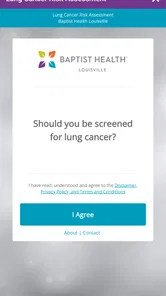
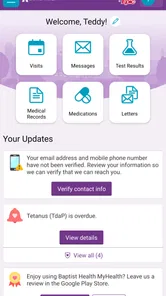
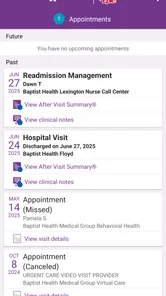
Analysis by Reviewed
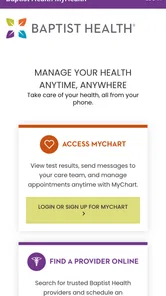
When I decide whether a healthcare app deserves a place on my phone, I start with one question: does it make the care I already receive easier to manage, or does it add another account and another task? Baptist Health MyHealth is clearly built for the first situation. It brings mobile access to Baptist Health’s online services, including MyChart and a way to find providers, so its value depends less on how many tools it claims to offer and more on whether Baptist Health is part of your regular care.
I would treat it as a focused medical app rather than a general health resource. If you already use Baptist Health, the app can make familiar tasks easier to reach. If your doctors belong to several unrelated systems, it may become one more portal alongside the others. That distinction is the best starting point for deciding whether to install it.
What Baptist Health MyHealth does well in everyday healthcare
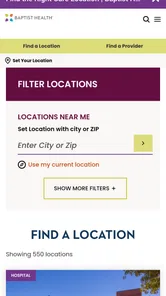
The clearest strength is concentration. Instead of opening a regular browser and searching through a healthcare organization’s pages, I can start with a single app designed around Baptist Health services. That matters when I am trying to do something simple but time-sensitive, such as checking a message, looking up a provider, or reaching the MyChart area without remembering which page to bookmark.
Baptist Health MyHealth feels especially sensible for patients who already use Baptist Health for appointments or ongoing care. The app is not trying to replace a doctor, diagnose symptoms, or turn a phone into a medical device. Its value is administrative and informational: it helps bring the online side of an existing healthcare relationship closer to hand.
That distinction is important. A general symptom checker may be more appropriate when I am only researching a health concern, while a pharmacy app may be better for prescription-specific tasks. MyHealth makes more sense when the question is connected to Baptist Health itself: where to find a provider, how to reach the patient portal, or how to manage healthcare information through the organization’s online system.
A realistic appointment-day workflow
Imagine that I have an appointment coming up and cannot remember the provider’s name or the exact location. I can open the app, use its provider-finding function, and then move toward the relevant Baptist Health online tools instead of searching the wider web. If I have already used MyChart, having that access available from the same healthcare app can reduce the number of separate routes I need to remember.
The benefit is not dramatic technology; it is reduced friction. Healthcare administration often becomes frustrating because every small action requires a different login page or a fresh search. A dedicated app can make the starting point more predictable. For a family member helping an older relative, that predictability may be more valuable than a long list of advanced features.
More From Our News Desk

 Instagram
Instagram’s Power Comes From Its Place in Your Phone
A close look at how Instagram turns Meta’s reach, recommendation systems and everyday camera habits into durable platform power—and what that costs users.

 Gmail
GmailGmail in a Busy Inbox: Who Benefits Most?
From first account to crowded workday, Gmail earns its place through dependable search and flexible sorting—but its best fit depends on how much inbox maintenance you can tolerate.

 Prime Video
Switching to Prime Video: What Changes in Your Viewing Routine
Prime Video can make a compelling second home for streaming, but switching means learning a different catalog, rental layer, and route from browsing to playback.

 Universal TV Remote Control
Universal TV Remote Control Works Best as a Reliable Backup
A phone remote earns its place through quick setup and reliable habits. Here is how to get more from Universal TV Remote Control—and where its limits show.

 Weather - By Xiaomi
Weather by Xiaomi Review: Clear at a Glance, Less Clear Up Close
Xiaomi’s weather app makes everyday forecasts quick to scan, but its calm surface can leave useful details and recovery paths harder to find than they should be.

 X
XX Under Pressure: Can It Recover When Posting Goes Wrong?
A resilience-focused review of X, examining setup, mistaken posts, interruptions, weak connections, and the gaps that matter when recovery needs to be dependable.
Latest News



There is also a useful separation between finding care and managing an existing relationship. Someone exploring Baptist Health providers is doing a different task from someone checking their MyChart account. Keeping both paths close together gives the app a broader purpose than a portal shortcut alone, while still keeping the experience tied to one healthcare network.
Why the provider search matters more than it first appears
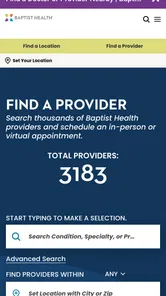
Provider discovery is easy to underestimate. Searching the open web can return outdated profiles, unrelated practices, or pages that do not clearly show whether a clinician belongs to the health system I need. A provider-finding tool inside the Baptist Health environment is more relevant when I already know that I want care within that network.
It can also help when my needs change. I might be looking for a new primary-care clinician, checking another specialty, or trying to understand which part of Baptist Health is relevant to a particular appointment. I would still verify practical details before traveling, but starting inside the organization’s own app is more efficient than relying on broad search results.
My advice is to use the provider search as a starting point, not as the only factor in choosing care. Availability, location, insurance, referral requirements, and clinical fit can all matter. The app can help narrow the field, but it does not replace a conversation with the office or insurer when those details affect the appointment.
MyChart access is the central reason to install it
For many users, MyChart will be the deciding feature. If I already depend on that patient-portal experience, reaching it through a Baptist Health mobile app is more convenient than treating it as an isolated website. The app gives the healthcare relationship a recognizable home on the phone, which is useful when I need to check something while away from a computer.
There is a practical tip here: before an appointment, I would open the app while I have a few quiet minutes rather than waiting until I am standing at the reception desk. That gives me time to sign in, confirm that I can reach the right area, and locate the information I expect to need. It is a small habit, but it avoids turning a healthcare visit into a password-recovery exercise.
I would also keep expectations realistic. Access to MyChart does not mean every healthcare task becomes instant or that every answer appears in the app. Some matters still require staff, a phone call, or an appointment. The app is best viewed as a front door to online care management, not a substitute for direct clinical communication.
Where the experience can become less convenient
The main weakness is that the app’s usefulness is tied closely to Baptist Health. If I live outside the network, rarely visit its facilities, or use several unrelated healthcare systems, MyHealth may add another app without removing any of the others. In that situation, a broader health-management solution or the individual portals already used by my clinicians may be more practical.
There is also a natural limit to what a healthcare organization’s app can streamline. Provider information and portal access are helpful, but they do not erase the complexity of insurance, referrals, scheduling rules, or communication between separate medical offices. I would not install this expecting one universal dashboard for every doctor, pharmacy, and hospital in my life.
Another point to consider is account dependence. The most useful parts are likely to matter after I am connected to Baptist Health’s online services. Someone downloading the app simply to browse general medical information may find less reason to return. That is not a flaw in the app’s purpose, but it does make the audience narrower than the general medical label might suggest.
What I would check before relying on it
I would first confirm that my Baptist Health account details are ready and that I know which portal credentials I use. If I am helping another person, I would make sure the account belongs to the correct patient and avoid casually sharing login information. Healthcare access deserves the same care I would give to banking credentials, even when the app itself feels simple.
I would also test the app before an urgent need. Opening it at home, finding the MyChart route, and checking the provider-search path is a better approach than discovering a sign-in problem during travel. This is one of the more useful ways to judge whether it fits my routine: not by its store description, but by whether it gets me to the specific Baptist Health task I actually perform.
For someone with limited phone storage, the decision is equally practical. The app is free, but free does not automatically mean essential. If I only use Baptist Health once a year and already have a reliable browser bookmark, that may be enough. If I regularly manage appointments or portal information, the dedicated app earns its place more easily.
Who should choose it, and who should look elsewhere
I would recommend Baptist Health MyHealth to people who receive care through Baptist Health and want a clearer mobile route to their online healthcare tools. It is also a good fit for caregivers who help a relative navigate provider information or portal access, provided they handle account access carefully and with the patient’s permission.
It is less compelling for someone seeking a nationwide provider directory, symptom education, medication reminders, or a single app that combines records from many unrelated healthcare systems. Those users should compare it with the portals supplied by their other providers or with a broader health-management service. MyHealth is specialized, and that specialization is both its advantage and its boundary.
The age rating of everyone makes it approachable from a content standpoint, but ease of use still depends on the person operating it. Older adults or users who are uncomfortable with portal sign-ins may need initial help. I would set it up together, explain where the MyChart area is, and write down the correct support route rather than assuming the app alone will solve every access problem.
Current version and long-term practicality
The current version is 11.8.3, and the app requires an operating system version of 11 or newer. That requirement is worth checking before installation, particularly if I am setting it up on an older phone belonging to a parent or family member. A healthcare app is only useful when the device can install and run it reliably.
Baptist Health IT is a more reassuring developer choice here than an unknown third party because the app is directly associated with the healthcare organization it represents. Still, I would judge updates by practical results: whether I can sign in, reach the correct portal area, and find current provider information. A recognizable developer does not remove the need for ordinary caution with any health-related account.
The app has passed the threshold of over one hundred thousand installs, which indicates that it is not an obscure experiment. Its review volume is also substantial, with more than four hundred written reviews. I see those figures as signs that people are using it in real healthcare routines, while remembering that individual experiences can vary with device, account status, and local care needs.
How it compares with other ways to manage care
The practical alternatives depend on what I need to do. For someone who only checks a portal occasionally, a browser shortcut may be enough and avoids installing a separate app. For a person whose care is spread across several health systems, each organization’s own portal may be unavoidable; a broad health-record tool could offer a wider view, but it may not replace direct access to Baptist Health services.
MyHealth’s advantage is therefore not that it covers every provider. It is that the provider search and MyChart route are associated with the same healthcare organization. I would choose that focused path when Baptist Health is where I expect to act, and choose a broader directory when I am still deciding among unrelated clinics. These tools solve different problems, so comparing them by feature count alone would be misleading.
A useful way to test the fit is to name the task before opening the app. If the task is “reach my Baptist Health portal” or “look for a provider in that network,” the app is a sensible starting point. If the task is “organize every appointment and record from every clinician I see,” I would not assume this app is designed to do that. That small distinction can prevent disappointment and unnecessary duplicate setup.
What the rating and audience suggest
The app’s average rating is 4.6 from around 2.3 thousand ratings. I take that as a positive sign that many people find it useful, but not as proof that every account or device will behave identically. With a healthcare app, the experience can depend on whether someone is already connected to the organization and whether the task they need is supported by its online services.
Its medical category and everyone age rating describe a broad audience, but the real audience is narrower: people with a reason to use Baptist Health’s digital services. It is free to install, which makes trying it a low-cost decision in money, though setup and account management still take time. If you are a regular patient, that time may pay off; if you rarely interact with the network, a bookmark may be more convenient.
My final recommendation
MyHealth succeeds because it understands a specific problem: Baptist Health patients need a convenient mobile starting point for their own healthcare network. The combination of provider discovery and MyChart access makes it more useful than a bare website shortcut, especially for people who return to the same system regularly.
Its limitation is just as clear. This is not a universal medical companion, and it should not be judged as one. It will not replace emergency services, a clinician’s advice, a pharmacy’s dedicated tools, or portals from other health systems. Users who expect one app to unify every part of their medical life may be disappointed.
For me, the decision comes down to connection and frequency. If Baptist Health is part of my regular care and I want quick access to its online services, I would install it and prepare the login before I need it. If my healthcare is spread across several unrelated organizations, I would probably keep using the individual portals that match each provider. My recommendation is clear: choose it for convenient Baptist Health access, not as a replacement for the rest of your healthcare toolkit.
Baptist Health MyHealth Frequently Asked Questions
Is Baptist Health MyHealth free, and what devices can run it?
Baptist Health MyHealth is a free medical app developed by Baptist Health IT. Before downloading, check that your device is running at least iOS 11 or Android 11, as supported by your device’s app store. The app is intended for managing healthcare online through MyChart and finding providers, so it is most useful to people who receive care through Baptist Health.
Who can use Baptist Health MyHealth, and is it available to people who are not Baptist Health patients?
Baptist Health MyHealth is designed for eligible Baptist Health patients who want to manage healthcare information online. Access to specific tools and records depends on your Baptist Health services, location, account permissions, and participating providers. People who do not receive care through Baptist Health may find that they cannot access patient-specific features, even if they can download and open the app.
What is Baptist Health MyHealth, and what can I use it for?
Baptist Health MyHealth is a patient portal and mobile app designed to help eligible Baptist Health patients manage healthcare information in one place. Depending on the services available in your region, you may be able to view medical records, review test results, manage appointments, request prescription refills, communicate with care teams, and access billing or insurance information. Available features can vary by Baptist Health location and your account permissions.
How do I create an account or sign in to Baptist Health MyHealth?
To use Baptist Health MyHealth, you generally need to register through the app or the official Baptist Health patient portal. Registration may require personal details, identity verification, and an activation code provided by Baptist Health. Existing users can sign in with their credentials, while some versions may support secure options such as Face ID, fingerprint authentication, or password recovery. Only use the official app and avoid sharing your login information.
Can I use Baptist Health MyHealth to make appointments and contact my doctor?
In many cases, Baptist Health MyHealth allows users to request, schedule, or manage appointments with participating providers. You may also be able to send secure messages to your care team, depending on the provider, appointment type, and portal configuration. The app is not intended for urgent medical concerns, and message responses may not be immediate. For emergencies, call your local emergency number or seek immediate medical care.
Pros
- Secure access to appointments
- test results
- and medical records in one place.
- Easy prescription refill requests and medication management from your phone.
- Direct messaging helps you communicate with participating Baptist Health providers.
- Appointment reminders can help reduce missed visits and scheduling confusion.
- Useful health tracking tools support better preparation for medical appointments.
Cons
- Features may vary depending on your Baptist Health location and care provider.
- Some records or results may take time to appear after a visit or test.
- Requires a Baptist Health account and identity verification to get started.
- Messaging is not intended for urgent medical issues or emergency care.
- The app may request sensitive permissions and handles highly private health data.











