

Banner Health
- 985.00
- 3.9
- Installs
- 100.00K
- Price
- Free

Screenshots
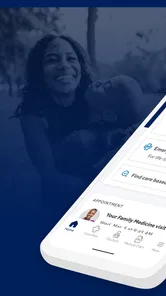
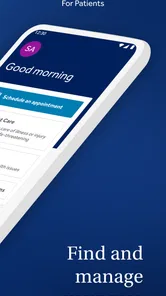
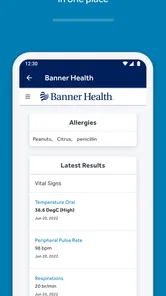
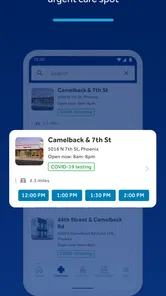
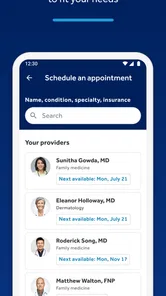
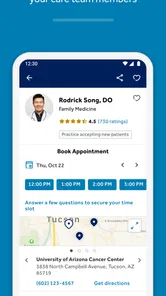
Analysis by Reviewed
I came away from Banner Health with a clear impression: it is most useful when you already interact with Banner Health and want a simpler way to manage ordinary healthcare tasks from your phone. It is a free medical app from Banner Health, aimed at making routine care easier rather than replacing a clinician, an urgent-care visit, or emergency services. That distinction matters. The app’s value depends less on novelty and more on whether it fits the healthcare system you already use.
In my experience, that makes it a practical companion for appointments, health information, and day-to-day organization. It is available for everyone, has passed the 100K+ install mark, and holds an average rating of 3.9 from around 2.2K ratings. Those figures suggest a useful but not universally smooth experience. I would recommend trying it if Banner Health is part of your care, while I would not install it expecting a general-purpose symptom checker or a replacement for every health app on your phone.
What using Banner Health feels like in everyday care
The strongest reason to use this app is convenience around an existing healthcare relationship. Instead of treating the phone as a separate place for health information, Banner Health brings the organization’s digital access into one medical-focused environment. That can reduce the small bits of friction that often surround care: remembering where to look, keeping track of an upcoming visit, or trying to handle a simple task while away from a computer.
I find this kind of app most valuable before and after an appointment. Before a visit, I can use the time to gather questions, check the relevant details, and make sure I am prepared rather than trying to reconstruct everything in the waiting room. Afterward, the same app can serve as a more convenient reference point for continuing with the next steps that belong to my care. The benefit is not dramatic in one tap; it is the cumulative effect of having fewer small obstacles.
A realistic example is a weekday appointment that I arranged weeks earlier. On the morning of the visit, I would rather check the app than search through old messages or open several browser pages. If I need to review what I am doing next, having a healthcare-specific place to start is less distracting than sorting through unrelated notifications. For someone managing recurring care, that repeated convenience can be more important than a flashy feature.
Banner Health also makes sense for people who help coordinate care for a household. Parents, adult children supporting an older relative, or anyone balancing several appointments often need reliable organization more than extra wellness content. The app can be part of that routine, although I would still keep a separate written backup for critical appointment details and medication information. A phone app should make care easier, not become the only place where an important detail exists.
The practical strengths are about access, not entertainment
What distinguishes this app from a generic health tracker is its connection to a healthcare provider. Fitness apps are good at steps, exercise, sleep, and trends. Medication reminder apps focus on schedules. Symptom tools may help users describe how they feel. Banner Health occupies a different space: it is intended to help people engage with Banner Health’s care services and information.
More From Our News Desk

 Instagram
Instagram’s Power Comes From Its Place in Your Phone
A close look at how Instagram turns Meta’s reach, recommendation systems and everyday camera habits into durable platform power—and what that costs users.

 Gmail
GmailGmail in a Busy Inbox: Who Benefits Most?
From first account to crowded workday, Gmail earns its place through dependable search and flexible sorting—but its best fit depends on how much inbox maintenance you can tolerate.

 Prime Video
Switching to Prime Video: What Changes in Your Viewing Routine
Prime Video can make a compelling second home for streaming, but switching means learning a different catalog, rental layer, and route from browsing to playback.

 Universal TV Remote Control
Universal TV Remote Control Works Best as a Reliable Backup
A phone remote earns its place through quick setup and reliable habits. Here is how to get more from Universal TV Remote Control—and where its limits show.

 Weather - By Xiaomi
Weather by Xiaomi Review: Clear at a Glance, Less Clear Up Close
Xiaomi’s weather app makes everyday forecasts quick to scan, but its calm surface can leave useful details and recovery paths harder to find than they should be.

 X
XX Under Pressure: Can It Recover When Posting Goes Wrong?
A resilience-focused review of X, examining setup, mistaken posts, interruptions, weak connections, and the gaps that matter when recovery needs to be dependable.
Latest News



That focus is a strength because it keeps the experience closer to real healthcare administration. If I am already a Banner Health patient, I do not need to translate a general wellness dashboard into a question about my care. The app’s purpose is narrower, but that narrowness can make it more relevant. I would choose it over a generic organizer when the task involves Banner Health directly.
There is also a useful psychological advantage to having medical information separated from entertainment and social apps. When I open a health app with a specific purpose, I am less likely to lose track of why I opened it. That sounds minor, but healthcare tasks are often delayed because they compete with everything else on a phone. A dedicated app creates a clearer starting point for the job.
The developer is Banner Health, which gives the app an obvious institutional connection rather than making it an independent tool that simply collects health-related information. That does not automatically make every interaction perfect, but it does help explain who the app is for and why its usefulness is tied to the provider’s ecosystem.
Small workflows that make the app more useful
My first practical tip is to use Banner Health as a preparation tool, not only as a place to react when something goes wrong. Before an appointment, I would write down symptoms, questions, and changes in routine while they are fresh. Then I could use the app as the access point for the related visit or care information. This separates remembering from rushing, which is especially helpful when a consultation is short.
A second tip is to check the app after a care interaction rather than waiting until the next problem appears. Reviewing what is available while the appointment is still fresh can help me notice whether I have understood the next step. If something is unclear, I can address it sooner instead of relying on memory. The app cannot replace a conversation with a medical professional, but it can make that conversation more organized.
A third, less obvious use is as a shared planning reference for a family member who helps with logistics. I would not treat it as permission to expose someone else’s private health information, and I would not assume that every account can be managed interchangeably. However, when the appropriate access is already in place, a single provider-focused app can reduce the confusion caused by scattered reminders, paper notes, and separate browser sessions.
Finally, I would keep notifications purposeful. Health reminders can be useful, but too many alerts quickly become background noise. I prefer enabling only the notices that help me act, then checking the app directly when I need broader context. That approach makes the app feel like a tool I control instead of another source of interruptions.
Where the experience can feel limited
The main weakness is that Banner Health is not equally valuable to everyone. Its usefulness is tied to Banner Health, so a person who receives care elsewhere may find little reason to keep it installed. A general health app can be more flexible for tracking habits across providers, while a provider-specific app can feel narrow if the user’s medical life is spread across several systems.
I also would not use it as my first choice for urgent medical decisions. An app can help me organize routine care, but it should not delay emergency assistance or professional advice when symptoms are serious. Someone looking for instant diagnosis, continuous monitoring, or a detailed personal wellness dashboard will probably be better served by a different category of tool, or by contacting a clinician directly.
Another point of friction is expectation. People often assume that a healthcare app will make every administrative task instantaneous. In reality, digital access still depends on the provider’s systems, the information attached to the account, and the user’s own setup. When an app is connected to real medical records and real appointments, it may feel less fluid than a simple notes app because the information has to be accurate and appropriately protected. I see that as a trade-off rather than a reason to dismiss it, but it can make the experience feel slower than ordinary mobile software.
The rating of 3.9 reflects that mixed picture. It is a respectable result, but it also tells me not to describe the app as flawless. Around 985 written reviews indicate that users have had enough experience to comment on it in detail, and the overall picture is more balanced than a perfect score would suggest. My advice is to judge it by the specific Banner Health tasks you need, not by the promise of having every healthcare function in one place.
Version 1.73 is the current version, and the app supports operating systems starting with version 9. That makes it accessible on a broad range of older devices, which is important for families who may not replace phones frequently. Still, anyone using an older phone should keep enough free storage and install system updates when possible. Medical apps are not the place where I would want to rely on a device that is struggling or no longer maintained.
Who should install it, and who should skip it?
I think Banner Health is a strong fit for current Banner Health patients who want a dedicated mobile route into their care. It is especially sensible for people with recurring appointments, busy schedules, or family responsibilities that make healthcare organization difficult. The free price removes the financial barrier to trying it, and the Everyone age rating makes it suitable as a general household app, although the medical information inside any account should still be handled carefully.
I would also suggest it to someone who dislikes managing healthcare through a desktop browser. A phone is often nearby when a question comes up, and a provider-specific app can be easier to reach than a saved web page. The best results will come from users who are willing to spend a few minutes setting up their routine and deciding when they want notifications, rather than expecting the app to organize everything automatically.
I would skip it if I have no relationship with Banner Health or if my main goal is wellness tracking. For steps, workouts, nutrition, sleep patterns, or broad habit building, a dedicated fitness or lifestyle app is likely to offer a deeper experience. I would also choose another option if I need one unified place for records from several unrelated healthcare providers. In that situation, a broader health-record solution may reduce the need to switch between provider apps.
People who want a symptom diagnosis should skip the idea of using Banner Health as a substitute for medical assessment. A symptom list can be useful preparation, but it is not the same as an examination. Likewise, anyone facing a possible emergency should use the appropriate emergency service rather than spending time navigating an app. The right tool depends on the urgency and the task.
My final view after weighing the trade-offs
Banner Health succeeds because it stays close to a real need: making contact with an established healthcare provider less cumbersome. I appreciate that its value is practical rather than exaggerated. It can help turn appointments and care-related organization into manageable phone tasks, particularly for people who already use Banner Health and want fewer steps between deciding to act and actually acting.
Its limitation is equally clear. This is not a universal medical command center, and it is not the best answer for fitness tracking, emergency guidance, diagnosis, or multi-provider organization. The provider connection that makes it useful for one person makes it less relevant for another. That is the central trade-off, and users should understand it before downloading.
Banner Health was released on January 17, 2019, and its continued presence, free availability, and 100K+ installs show that it has a meaningful audience. I would not choose it simply because I want another health app. I would choose it because Banner Health is already part of my care and I want a more direct way to manage that relationship.
My recommendation is straightforward: install it if Banner Health is your provider and you value mobile access to routine care organization. Give it a fair trial around an upcoming appointment, keep a backup for essential information, and compare its role with the other health tools you already use. For that audience, it can be genuinely helpful. For everyone else, the narrow focus is likely to outweigh the convenience.
Banner Health Frequently Asked Questions
What devices and operating systems can run Banner Health?
Banner Health is a medical app for Android and iOS devices, and its current version is 1.73. Check that your device meets the app’s minimum operating system requirement before downloading, and keep your phone’s software and the app updated for the best experience. The app is free to download, and its content rating is Everyone.
What is Banner Health, and what can I do with the app?
Banner Health is a healthcare app designed for patients using Banner Health services. After signing in, you can typically view upcoming appointments, request or manage visits, review parts of your medical information, check test results when available, communicate with care teams, refill eligible prescriptions, and access billing or insurance details. Available features may vary depending on your location, provider, account type, and the Banner Health services connected to your profile.
How do I sign in or create a Banner Health account?
You generally need an existing Banner Health patient account or must complete the registration process before using the app’s personal health features. Registration may require identity verification and information such as your date of birth, contact details, or medical record information. If you already use Banner Health’s online patient portal, your existing credentials may work. For security, avoid sharing your password and use the official recovery options if you cannot sign in.
Can I schedule appointments and communicate with my doctor through Banner Health?
The app may allow you to search for available providers, request or schedule certain appointments, review upcoming visits, and receive appointment reminders. Messaging features can also let eligible patients contact their care team about non-urgent questions. However, not every specialty, provider, appointment type, or location supports online scheduling or messaging. Do not use app messaging for emergencies; call emergency services or seek immediate medical attention when necessary.
Can Banner Health display test results, prescriptions, and medical records?
Depending on your account and the services provided by Banner Health, the app may show laboratory results, visit summaries, medication information, immunization records, and other portions of your health record. Results may not appear immediately because some information requires clinical review or processing. The app should be treated as a convenient access tool, not a replacement for professional medical advice. Contact your healthcare provider if you need help understanding a result or medication.
Pros
- Easy access to appointments
- test results
- and medical records in one place.
- Secure messaging makes it convenient to contact your care team remotely.
- Prescription refill requests can be submitted without calling the clinic.
- Appointment reminders help reduce the chance of missed visits.
- Supports virtual visits for eligible Banner Health patients.
Cons
- Features are mainly useful for patients within the Banner Health network.
- Some services may require separate logins or additional verification steps.
- Appointment availability depends heavily on the selected location and provider.
- Occasional loading issues may make records or messages slow to display.
- Not all health information or third-party records may appear in the app.











