BallparkDJ Walkout Intros
- 358.00
- 4.7
- Installs
- 100.00K
- Price
- Free

Screenshots
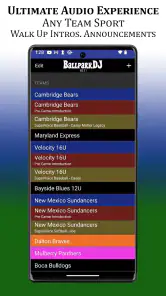
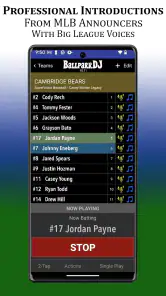
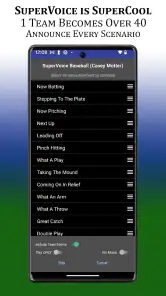
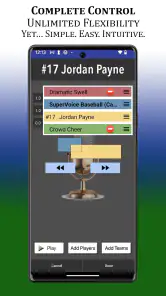
Analysis by Reviewed
When a youth baseball or softball game starts, the walk-up moment can feel surprisingly important. A player’s name, a short introduction, and a burst of music give the athlete a little spotlight before the next at-bat. BallparkDJ Walkout Intros is built around that exact moment, turning a phone or tablet into a practical announcement tool for teams that want more personality than a basic public-address callout.
I see it as a focused sports app rather than a general music player or a complete stadium sound system. The appeal is its preparation workflow: you organize player announcements, pair them with music, and use the finished setup when the team needs it. That narrow purpose is also its biggest strength. You are not digging through a streaming app during a game or trying to remember which audio clip belongs to which player.
The app is free to install, carries an Everyone content rating, and comes from BallparkDJ. It has reached over 100 thousand installs and holds a 4.7 average from around 3.9 thousand ratings, which suggests that the basic idea is connecting with the youth-sports audience it targets. I would recommend trying it if your team regularly announces batters or players. I would be more cautious if you only need occasional background music or a full professional PA solution.
How the current app fits into a team’s game day
More useful than pressing play at random
The everyday advantage is organization. A coach, parent, announcer, or team volunteer can prepare the lineup before the game instead of improvising between pitches. That matters because the person handling audio is usually doing another job at the same time: watching the field, checking the batting order, helping players, or communicating with the umpire and dugout.
A prepared player-by-player setup reduces those small decisions. Rather than searching for a song, finding the right recording, and speaking over the opening seconds, the operator can concentrate on selecting the correct player and starting the announcement. In my view, this is the real value of the app. The music is fun, but the repeatable workflow is what makes it practical.
It also gives a youth team a more consistent identity. A player can have an introduction that sounds different from a teammate’s, while the whole lineup still follows the same pattern. That can make a regular league game feel more organized without requiring a dedicated announcer or expensive equipment.
A realistic Saturday workflow
Imagine a Saturday afternoon game where one parent is responsible for the walk-up announcements. Before leaving home, that person can prepare the roster and check that each player has the intended introduction and music. At the field, the phone or tablet becomes the control point. When the next batter is called, the volunteer selects the player’s entry and starts it rather than searching through unrelated tracks.
More From Our News Desk

Clash of Clans Is Won Between the Battles

Android Auto Makes the Case for Quieter Car Software

MobiOffice: Transforming Mobile Productivity with Seamless Integration

EA SPORTS FC™ Mobile Soccer: Redefining Mobile Sports Gaming

How Microsoft OneDrive Became a Mobile Productivity Giant

How Google Translate Breaks Language Barriers Effortlessly
The important preparation step is not glamorous, but it is where the experience succeeds or fails. I would build the lineup in batting order, use names that are immediately recognizable, and test the first few entries before the team arrives. If several adults may operate the app, I would also agree on one simple routine: who selects the player, who handles the speaker, and when the audio should stop.
That kind of division prevents a common problem with sports audio: everybody assumes somebody else is ready. BallparkDJ cannot solve a dead battery, a misplaced cable, or a volunteer who has not seen the lineup, but its player-focused structure can make the handoff clearer.
Where it is stronger than ordinary alternatives
The usual alternative is a phone with a music app and a separate note containing player names. That approach can work, but it creates friction at exactly the wrong time. Music apps are designed for listening, not fast roster-based announcements. A playlist may contain the right songs, yet still leave the operator guessing which track belongs to which athlete.
Another alternative is a generic soundboard. A soundboard may be better for sound effects, crowd prompts, or a large library of short clips, but it often lacks the team-specific feeling of a player announcement workflow. BallparkDJ is more appealing when the main job is introducing athletes with music, not running every sound at an event.
A professional stadium or school PA setup remains the better choice for large venues, multiple microphones, and trained operators. This app is aimed at the lighter end of the job: a youth sports team that wants a polished touch without turning game day into a production project.
What I would prepare before the first game
I would not wait until the opening inning to learn the app. First, I would create a small test lineup and play every entry through the actual speaker that will be used at the field. A phone speaker can make the voice and music seem clear indoors while sounding weak outdoors, so testing the complete chain is more useful than checking the app alone.
Next, I would keep introductions short. A player announcement should support the game rather than delay it. Long recordings may be entertaining during practice but awkward when the next pitch, runner, or defensive change is ready. Short, consistent clips are easier for a volunteer to manage and less likely to create dead air.
I would also keep a simple backup plan. A printed batting order and a basic music playlist can cover the game if the device is unavailable. That is not a criticism unique to this app; any phone-based game-day tool depends on preparation. Still, the more central the announcements are to your event, the more important that backup becomes.
What the current version means for different users
The product’s development path
The app was released on February 11, 2019, and the current version is 24.5. That version history gives the product time to mature beyond a one-off novelty, although a version number alone does not tell me which individual functions changed in each update. I would treat the current release as the practical reference point and avoid assuming that an older tutorial or screenshot matches what appears on a present-day device.
For someone installing it now, the important point is that this is an established tool with a clear sports-specific purpose, not a newly launched experiment. The developer, BallparkDJ, has kept the app centered on team and player announcements with music. That focus is useful because it keeps the interface concept understandable: prepare the athletes, select the moment, and let the audio do its job.
The app supports Android 8.0 and later. That makes compatibility worth checking before a team chooses its dedicated game-day device. If an older phone is being kept in a team equipment bag, the operating-system requirement may be the first practical hurdle. I would install and test on the exact device intended for the field rather than assuming that every spare phone will behave the same way.
What existing users are likely to notice
People who have used the app for several seasons will probably value continuity more than novelty. Their main concern is whether established player setups remain convenient to access and whether a new version still fits the way their team operates. A version update can be positive when it improves reliability or compatibility, but it can also require a short relearning period if controls move.
My advice for an existing team is simple: update before a nonessential practice, not immediately before a tournament. Open the saved team material, run a few player entries, and confirm that the sound reaches the intended output. This is especially important when several parents share responsibility, because one person may update the app while another assumes the old routine still applies.
New users should approach the setup as a small production task rather than an instant-play toy. The free installation makes experimenting easy, but the best result depends on entering names carefully, choosing suitable audio, and rehearsing the sequence. The app can make the final moment quick; it cannot remove the need to prepare the content that the team wants to hear.
The cost question and what it changes
The app is free, with in-app purchases listed at $6.99 per item. That makes it reasonable to install and evaluate before committing a team to a workflow. I would first test the free experience with one practice lineup and one real speaker. That tells you more than deciding from the price alone, because the right value depends on how often your team uses walk-up announcements.
For a team that plays frequently and wants individual introductions throughout a season, a purchase may feel easier to justify than repeatedly improvising with generic playlists. For a casual group that only wants music at a few games, a shared playlist may be enough. The trade-off is convenience versus simplicity: a dedicated setup can save attention during the game, while a general music app avoids learning another tool.
I would also make the purchasing decision at the team level. If one parent buys an item on a personal device, that may not automatically solve the needs of another volunteer using a different device or account. Before spending money, agree on which device will be the main controller and who will maintain the team’s audio setup.
Limitations that matter in real use
The narrow focus can feel limiting if you expect a complete event-control system. Teams wanting a broad collection of sound effects, a full announcer console, or complex venue audio routing may outgrow it. In that situation, a general soundboard or dedicated PA software could be a better fit, even if it takes longer to configure.
There is also a human-factor limitation. A well-prepared announcement can add energy, but a rushed operator can still select the wrong player or start the wrong moment. The app reduces searching; it does not replace a clear batting order and a responsible operator. I would keep the interface in the hands of one person during an inning instead of passing the device around.
Music choice introduces another practical judgment call. The most exciting track is not always the most suitable one for a mixed-age team or a public field. Since the app is rated Everyone, I would still review every recording and introduction myself. The age rating describes the app’s general suitability, not the appropriateness of every piece of audio a team chooses to use.
Three less obvious ways to get better results
First, create a naming convention before entering the roster. If two players have similar names, include a clear distinction that the operator can recognize instantly. A short label such as a jersey reference or familiar nickname can reduce hesitation, provided the team and family are comfortable with it. The goal is not decoration; it is avoiding the wrong announcement in a fast inning.
Second, design around the operator’s attention, not the audience’s imagination. The person running the app should be able to identify the next player with one glance. Put the most frequently used lineup in the order it will actually occur, and avoid building a complicated collection of alternate versions unless there is a real reason. Every extra choice increases the chance of a pause during live play.
Third, rehearse transitions rather than only individual clips. A recording may sound fine by itself but feel too long after the previous player’s music ends. Practice the sequence with someone calling out the next batter. This reveals whether the operator can move from one introduction to the next without losing track of the game.
A fourth useful habit is to separate creative work from game-day work. Prepare names and audio at home, then use the field session only for a quick check and operation. Editing while players are warming up is when mistakes happen: misspellings, duplicated entries, and last-minute choices that nobody has time to test.
Who should use it, and who should skip it?
I think it is a strong match for youth baseball and softball teams that want player-specific walk-up moments, especially when a parent or coach can prepare the lineup in advance. It also suits teams that play often enough for a repeatable routine to matter. The app’s sports specialization is an advantage when the event revolves around introducing athletes one by one.
I would skip it if your main need is simply playing continuous music between innings. A standard music player is less specialized and may be quicker for that job. I would also look elsewhere if you need multiple live microphones, detailed mixing, or a large event soundboard. Those requirements point toward venue equipment or more advanced audio software.
It may not be ideal for a team that changes operators every game and has no time for handoff training. In that case, the simplest possible playlist may be more dependable. BallparkDJ rewards preparation, so its convenience appears after the setup is done rather than before it.
What I would watch as the app continues
For future updates, I would pay attention to how smoothly the app handles long-running team libraries, device changes, and shared operation. Those are the areas that matter after the novelty wears off. A team may begin with one lineup and later need to manage several age groups, seasons, or rotating volunteers, so organization becomes increasingly important.
I would also watch compatibility as phones and tablets move to newer operating systems. The current minimum of Android 8.0 is clear enough for planning, but teams should still test their actual hardware after updates. A dependable game-day tool is one that the least technical volunteer can operate without last-minute troubleshooting.
Finally, I would judge future changes by whether they shorten the path from “next batter” to “audio playing.” Extra customization can be welcome, but only if it does not bury the primary action. For this kind of app, a small improvement in clarity may be more valuable than a long list of flashy additions.
My recommendation after using it as a team tool
BallparkDJ works because it understands a specific sports ritual and gives it a dedicated home. I like it most when I imagine a busy youth game where a volunteer needs quick, player-specific announcements without managing a complicated audio desk. The free entry point makes it easy to test, while the current version and established presence suggest a product that has had time to settle into its role.
My recommendation is to try it during practice, prepare the roster away from the field, and test the complete speaker setup before relying on it in competition. If your team wants walk-up intros with music and is willing to spend a little time organizing them, it can add a memorable touch without much equipment. If you only need background music or professional venue control, a different option will probably be simpler.
The best reason to choose this app is not louder music; it is less game-day confusion. When the lineup is prepared, the operator knows what to select, and the audio has been tested, the app turns a small announcement into a smooth part of the team’s routine.
BallparkDJ Walkout Intros Frequently Asked Questions
What devices can I use BallparkDJ Walkout Intros on?
BallparkDJ Walkout Intros is available for Android and iOS, so you can choose the version that fits your phone or tablet. Before downloading, check that your device runs Android 8.0 or later if you are using Android, and make sure you select the appropriate app store for your platform. The app is free to download, with optional in-app purchases.
Is BallparkDJ Walkout Intros intended for baseball only?
Although its name and main use focus on ballpark introductions, the app is designed for youth sports teams and player announcements with music. It can suit baseball and softball settings where players are introduced before an at-bat or when entering the field. If your team plays another sport, consider whether player-by-player walkout music fits your event before downloading.
What is BallparkDJ Walkout Intros?
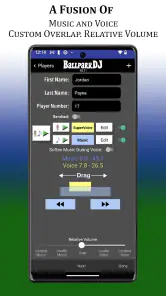
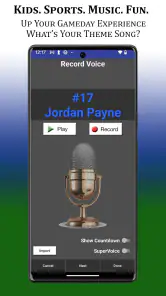
BallparkDJ Walkout Intros is a sports-focused app designed to create personalized walk-up and walkout music experiences for baseball and softball players. After testing its main features, I found that it lets users prepare player introductions with music, voice announcements, and custom presentation details, making it useful for teams that want a more professional and entertaining atmosphere during games.
How does BallparkDJ Walkout Intros work during a game?
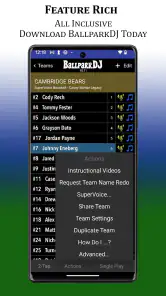
The app is generally used to organize player profiles and assign each athlete a walkout song or introduction. Once everything is prepared, the operator can select a player and play the corresponding audio when that player approaches the plate or enters the field. It is best to set up the roster and test the volume before game day to avoid delays or playback problems.
Can I use my own music and announcer recordings?
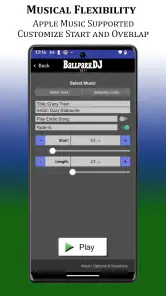
BallparkDJ Walkout Intros is built around customized player introductions, so users can typically personalize the experience with selected songs, player information, and recorded or generated announcements, depending on the device and available app features. Music licensing and access to locally stored audio may vary between platforms, so it is worth checking the current app permissions and store description before downloading.
Pros
- Easy way to create personalized player walkout introductions.
- Supports custom music
- voiceovers
- and sound effects.
- Useful for baseball and softball teams of different ages.
- Helps create an exciting
- professional game-day atmosphere.
- Player introductions can be organized for quick access during games.
Cons
- Some advanced features may require in-app purchases.
- Setting up many players and audio clips can take time.
- Audio quality depends on the device and stadium sound system.
- May require permission to use copyrighted music tracks.
- Limited usefulness outside baseball and softball events.
- Category
- Sports
- Version
- 24.5





