

Baby Tracker - Newborn Diary
- 0.00
- 0.0
- Installs
- 10.00K
- Price
- Free

Screenshots

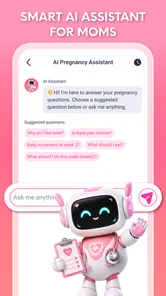

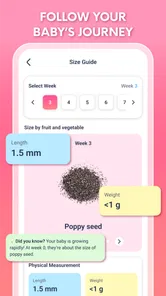
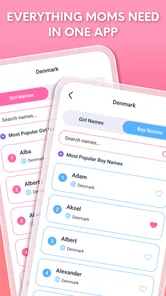
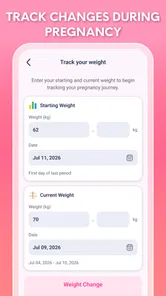
Analysis by Reviewed
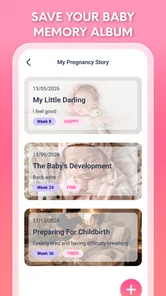
Pregnancy tracking is one of those jobs that sounds simple until daily life gets busy. There are appointments to remember, small changes to notice, photos to save, and plenty of moments that feel important even when they are difficult to describe later. Baby Tracker - Newborn Diary approaches that situation as a focused parenting app from Vu Ha Thi, built around following a pregnancy journey and keeping personal memories together.
I found the idea appealing because it is less intimidating than trying to manage everything through scattered notes, camera folders, and calendar entries. The app is free, aimed at Everyone, and available for devices running Android 7.0 or later. Its current version is 1.0.2, and it has passed the ten-thousand-install mark, so it is not an entirely unknown download despite being a relatively focused tool.
That said, I would not treat it as a replacement for medical care or a complete pregnancy-management system. Its value is more personal: it gives you a place to record the journey and preserve meaningful details. Whether that is enough depends on how much structure you need and whether you want a diary first or a medically oriented tracker first.
From a busy day to a usable pregnancy record
I find a pregnancy record most useful when it fits into an ordinary day, not just a quiet stretch of free time. A short note made while an appointment or family moment is still fresh can preserve context that a date or photo alone may lose. That practical rhythm also helps set realistic expectations for how quickly the record can grow.
Starting with the information you already have
The most realistic way to use this app is not to wait for a quiet afternoon. I would start after an appointment, during a calm evening, or whenever a particular memory is still fresh. The first useful habit is to enter only what I genuinely want to keep. A pregnancy diary becomes tiring when every entry feels like paperwork, so a short note about an emotional moment can be more valuable than forcing myself to write a full report.
This is where the app’s straightforward purpose works in its favor. It is designed for tracking the pregnancy journey, saving memories, and following special moments rather than presenting itself as a broad health platform. I can approach it as a private record of the experience instead of another dashboard demanding constant attention.
For someone expecting a first child, that distinction matters. There is already a lot of unfamiliar information coming from appointments, books, family members, and online searches. A diary-style app can reduce the pressure to turn every day into a data point. I would use it to capture the things I am likely to forget: how I felt after hearing important news, when a family member learned about the pregnancy, or what made a particular week memorable.
More From Our News Desk

 Gmail
GmailGmail in a Busy Inbox: Who Benefits Most?
From first account to crowded workday, Gmail earns its place through dependable search and flexible sorting—but its best fit depends on how much inbox maintenance you can tolerate.

 Prime Video
Switching to Prime Video: What Changes in Your Viewing Routine
Prime Video can make a compelling second home for streaming, but switching means learning a different catalog, rental layer, and route from browsing to playback.

 Universal TV Remote Control
Universal TV Remote Control Works Best as a Reliable Backup
A phone remote earns its place through quick setup and reliable habits. Here is how to get more from Universal TV Remote Control—and where its limits show.

 Weather - By Xiaomi
Weather by Xiaomi Review: Clear at a Glance, Less Clear Up Close
Xiaomi’s weather app makes everyday forecasts quick to scan, but its calm surface can leave useful details and recovery paths harder to find than they should be.

 X
XX Under Pressure: Can It Recover When Posting Goes Wrong?
A resilience-focused review of X, examining setup, mistaken posts, interruptions, weak connections, and the gaps that matter when recovery needs to be dependable.

 Clash of Clans
Clash of Clans Is Won Between the Battles
Its raids are quick; its community is a long-term project of coordination, teaching, rivalry, and shared responsibility—with all the friction that entails.
Latest News



A practical entry routine
My preferred workflow would be brief and consistent. After something worth remembering happens, I would open the app, record the detail while it is still clear, and then return to normal life. If I had a photo or a meaningful sentence, I would connect it with the same moment rather than leaving it in a separate camera folder. The outcome is not a perfect medical timeline; it is a chronological memory that becomes more useful over time.
A good rule is to separate facts from feelings. A note about an appointment belongs beside a note about how the day felt, but they serve different purposes. Keeping both makes the record more personal without pretending that a diary is a clinical document. If I needed medical guidance, I would still rely on a qualified professional and keep any important instructions in the appropriate place.
The less obvious benefit of this approach is that it creates a handoff between the present version of me and the future version who will look back. I do not need to remember why a photo mattered if I add one sentence at the time. That small piece of context can turn an ordinary image into a meaningful memory months later.
Using it around appointments and family moments
Appointments are a natural anchor for a pregnancy record, but I would avoid treating the app as a substitute for official appointment notes. Instead, I would use it to write down the personal side of the visit: what I was relieved to hear, what question I forgot to ask, or how my partner reacted afterward. For medical instructions, I would keep the original source and follow the clinician’s advice.
The same workflow works for family handoffs. If a partner or relative wants to understand how the journey has been going, a well-kept diary can provide context without requiring a long conversation every time. A short entry can explain why a particular date or photo matters. This is especially useful when one person attends an appointment and another person wants to stay emotionally connected to the experience.
I would still be careful about sharing a phone casually. Pregnancy notes can contain intimate feelings and personal details. The app’s usefulness as a memory space also means I would think before entering anything I would not want someone else to read if they picked up my unlocked device.
Saving memories without creating another chore
The strongest use case is gradual accumulation. I would not try to document every day. Instead, I would save milestones, surprising moments, changes in routine, and small details that would otherwise disappear. This makes the app easier to maintain and keeps the final record from becoming a wall of repetitive entries.
One practical trick is to write for the future reader, even if that reader is only me. Rather than typing “good day,” I would add the reason: a first conversation with a grandparent, a memorable scan day, or a quiet evening when the pregnancy suddenly felt real. Those details are more useful than vague labels and take only a little more effort.
I also like the idea of pairing emotional memories with ordinary ones. A dramatic milestone may be easy to remember, while a normal afternoon can become precious later because it shows what daily life actually felt like. A diary that includes both gives a more honest picture than a collection of only celebratory moments.
Where the handoffs become useful
A pregnancy experience rarely belongs to one person alone. Partners, close relatives, and future parents may all want different things from the same record. One person may care about dates, another about photographs, and another about the emotional story. The app can serve as a central place for the memories I choose to preserve, but I would not assume that every user should have unrestricted access.
For a partner, I would use selected entries as conversation starters rather than expecting the app to replace communication. Showing a note about a difficult day can make it easier to explain what support would help. Sharing a happy memory can also include someone who could not be present. The important handoff is from private recording to intentional conversation.
For a future child, the value is delayed. The record may not feel essential while it is being made, but later it can show the ordinary emotions surrounding the pregnancy. That is a different outcome from a reminder app, which is useful in the moment but often disappears from daily life once the task is complete.
How it compares with the usual alternatives
The most common alternative is a notes app. Notes are flexible and familiar, but they usually leave the user to invent the structure. A general note can hold a memory, yet it may not feel like part of a continuous pregnancy story. Baby Tracker - Newborn Diary is more appealing when I want the purpose of the record to stay clear every time I open it.
A calendar is better for appointments and deadlines. I would choose a calendar when missing a date has practical consequences, and I would choose this diary when the goal is remembering what the date meant. The two tools can work together, but they should not be confused. A calendar tells me where I need to be; a diary helps me remember what the experience felt like.
Photo storage is another alternative. A camera roll preserves images efficiently, but it rarely preserves the surrounding story unless I organize everything carefully. A diary can add meaning to a photo, although it will not replace a dedicated backup system for precious pictures. I would keep important images backed up separately and use the app as the narrative layer.
Specialized pregnancy trackers may be a better choice for someone who wants extensive educational material, detailed symptom logging, appointment tools, or medically oriented guidance. I would not choose this app expecting the breadth of a large pregnancy platform. I would choose it when a simpler, memory-centered workflow feels more comfortable than a crowded collection of tools.
Who will get the most from it
This app suits someone who wants a personal pregnancy journal without paying for access. It is also a reasonable fit for a partner who wants to contribute memories, a parent who enjoys recording milestones, or anyone who prefers short entries over long-form writing. The Everyone content rating makes it approachable for a broad audience, although the subject matter is naturally most relevant to expecting parents and their families.
It is particularly useful for people who often say, “I should write that down,” and then forget. A focused app lowers the distance between the moment and the record. Even an entry made once or twice a week can create a meaningful archive if the details are specific.
I would skip it if I need a complete medical organizer, detailed clinical interpretation, or a tool built primarily around reminders and appointment management. I would also skip it if I already maintain a reliable journal system and do not want to move memories into another place. Adding an app only helps when it removes friction rather than creating a second routine to maintain.
Everyday scenario: the evening after an appointment
Imagine coming home after an appointment with a head full of information. A partner asks how it went, a relative sends messages, and the day continues. Instead of relying on memory, I would open the app that evening and write a few lines about the visit, the mood afterward, and one detail I want to remember. If there is a photo from the day, I would save it with enough context to make sense later.
The next week, that entry can become a useful prompt for a conversation. Months later, it can explain why the photo mattered. The result is modest but valuable: the appointment is no longer only a date on a calendar or an image in storage. It has a personal story attached to it.
This workflow also shows the app’s main trade-off. It depends on the user to create the value. The app can provide a dedicated destination, but it cannot supply the memories, decide which details matter, or turn an empty record into a rich one without participation. That is not a flaw unique to this product, but it is important to understand before downloading it.
Where the flow breaks down
The first point of friction is consistency. Pregnancy can be exhausting, emotional, and unpredictable, so daily tracking may quickly become unrealistic. I would not judge the app by whether I use it every day. A lighter schedule is more sustainable, and missing a week should not feel like failure.
The second limitation is scope. A diary can preserve experiences, but it should not be treated as a source of diagnosis, emergency advice, or personalized medical decisions. If a symptom is worrying, I would contact a healthcare professional rather than searching through old entries or expecting a memory app to interpret it.
Another possible break occurs when a user wants highly structured comparisons across weeks. A personal journal is excellent for context but less convenient for systematic analysis unless the app provides dedicated tools for that purpose. If I wanted detailed trends, I would look for a specialist tracker designed around that workflow instead.
There is also a maintenance trade-off around memories. Saving everything can make the record noisy, while saving too little can leave gaps. I would solve that by choosing a simple rule: record moments that changed my understanding of the pregnancy, moments I would want to explain later, and moments that made an ordinary day feel different.
What the finished record gives you
Used with that expectation, the app can produce something more lasting than a checklist. It can become a compact story of the pregnancy, shaped by the person living it rather than by a generic schedule. The result may include practical notes, emotional reactions, family milestones, and photos that would otherwise be disconnected.
I also see value in the app as a pause button. Pregnancy often becomes a stream of appointments and preparations. Writing a short entry forces me to notice the experience instead of moving immediately to the next task. That reflective use is easy to overlook, but it may be the most meaningful reason to keep a diary.
Because it is free, the barrier to trying this workflow is low. The developer, Vu Ha Thi, has kept the concept focused enough that I can understand its purpose quickly: record the journey, preserve memories, and revisit special moments. I would still keep important information in reliable medical and backup systems, but that does not diminish the diary’s role.
My recommendation after using the workflow
I recommend Baby Tracker - Newborn Diary to expecting parents who want a simple memory-centered companion and are willing to add their own context. Its best quality is not complexity; it is the clear separation between a personal story and the many other tools used during pregnancy. I can imagine opening it after a meaningful day and feeling that the moment has been safely placed somewhere intentional.
I would recommend a different category of app to anyone seeking extensive health tracking, educational guidance, or appointment management. This one makes more sense when the desired outcome is a record of the experience rather than a complete command center. Knowing that distinction prevents disappointment and leads to a better routine.
For me, the right approach is occasional, specific entries, supported by separate calendar and backup habits. With that workflow, the app earns its place as a gentle parenting journal instead of becoming another obligation. If you want to remember the story behind the milestones, rather than only the milestones themselves, this free app is worth trying.
Baby Tracker - Newborn Diary Frequently Asked Questions
Is Baby Tracker - Newborn Diary free to download, and what devices can run it?
Baby Tracker - Newborn Diary is a free parenting app developed by Vu Ha Thi. It is listed for Android devices running version 7.0 or later, so checking your device’s operating system before downloading can help avoid compatibility issues. The app is intended for parents who want a convenient place to follow their baby’s routine and keep related information together.
What does the app offer beyond basic newborn tracking?
The app’s summary describes it as a way to track your pregnancy journey, save memories, and follow special moments, alongside its Baby Tracker focus. That makes it relevant to parents looking for both practical organization and a place to preserve meaningful experiences. Its content rating is Everyone, and its release date is July 31, 2026.
What is Baby Tracker - Newborn Diary used for?
Baby Tracker - Newborn Diary is designed to help parents record and organize everyday information about a newborn. You can usually log feeding sessions, bottle amounts, breastfeeding sides, diaper changes, sleep periods, pumping, growth measurements, medication, and other important events. Keeping these details in one place can make routines easier to understand and provides useful information to discuss with a pediatrician.
Can Baby Tracker - Newborn Diary track breastfeeding, bottles, and pumping?
Yes, the app is primarily useful for monitoring different types of feeding. Parents can record breastfeeding sessions, including the side and duration, as well as bottle feedings with the amount and type of milk. Pumping sessions can also be documented in many versions. These records help you compare patterns over time, although the app should not replace professional advice about nutrition or infant health.
Does the app track diapers and sleep schedules?
Baby Tracker - Newborn Diary includes tools for recording diaper changes and sleep. You can note whether a diaper was wet or dirty and keep track of when your baby falls asleep and wakes up. This information can be especially helpful during the first months, when routines change frequently. It may also help parents identify patterns to mention during medical appointments.
Pros
- Tracks feeding
- sleep
- diapers
- pumping
- and growth in one place.
- Quick-entry tools make logging practical during busy routines.
- Useful summaries help parents notice changes in daily patterns.
- Supports multiple caregivers for more consistent record keeping.
- Can simplify information sharing during pediatric appointments.
Cons
- Detailed tracking can feel time-consuming during exhausting newborn days.
- Some advanced features may require an in-app purchase or subscription.
- Shared data depends on reliable syncing between caregiver devices.
- Frequent reminders may become distracting if settings are not adjusted.
- Entering every routine event may increase screen time for new parents.











