Nara - Baby & Mom Tracker
- 1.75K
- 4.0
- Installs
- 100.00K
- Price
- Free

Screenshots
Analysis by Reviewed
When several adults take turns caring for a baby, the hardest part is often remembering what happened during the last handoff. I find Baby Tracker by Nara most useful as a shared reference point: feeding, sleep, diaper changes and other notes can give a caregiver something more reliable than a tired recollection. It is a parenting app from Nara Organics, and its focus is practical record-keeping rather than advice or a substitute for a pediatrician.
A handoff that feels less like guesswork
Picture a morning when one parent has handled an early feed and a grandparent takes over before lunch. Instead of asking the same questions repeatedly, the adults can use the recorded routine to understand what has already been logged and what still needs attention. That can be especially helpful when sleep is interrupted and the details blur together. The benefit is not that an app makes caregiving effortless; it is that a shared record can reduce avoidable uncertainty.
For households considering shared-device use, I would first decide whose phone or account will hold the record and how each caregiver will access it. A single device passed around can work for a small household, while separate phones may be more convenient when caregivers are in different places. I would not assume that any particular sharing or account arrangement is available without checking the current app setup. The practical rule is simple: agree on one consistent way to enter updates, so a feed or diaper change is not logged twice—or missed because everyone assumed someone else had done it.
Getting Started with Baby Tracker
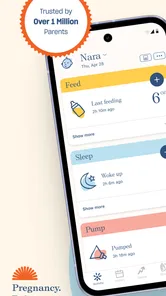
First off, I have to say that setting up Baby Tracker by Nara was a breeze. The user interface is as intuitive as it gets, and even if you're not particularly tech-savvy, navigating through the app is as easy as pie. You can quickly input data about your baby's feeding, sleeping, and diaper changes with just a few taps.
Features That Make Life Easier
One of the standout features for me was the feeding timer. Whether you're breastfeeding, bottle-feeding, or a combo of both, this app allows you to track the duration and time of each feeding session. Plus, it even reminds you which side you last nursed on, which, let me tell you, is a lifesaver during those sleep-deprived nights.
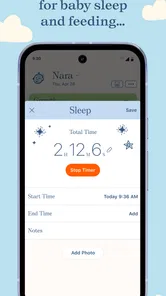
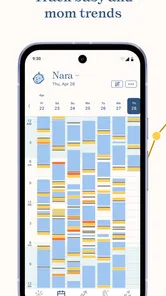
Sleep tracking is another feature that I can't praise enough. You can log your baby's naps and nighttime sleep, giving you a clearer picture of their sleep patterns. This has been incredibly helpful in identifying trends and making necessary adjustments to improve sleep quality for both the baby and me.
Make the record work for real routines
A useful habit is to log an event as soon as the caregiver has a free hand, rather than trying to reconstruct the day at bedtime. During a busy stretch, it can help to treat entries as a shared timeline, not a scorecard: a missed timestamp does not mean the day has gone wrong. If two people are logging events, a quick verbal handoff can prevent duplicate entries and keep the record understandable.
More From Our News Desk

 Gmail
Gmail in a Busy Inbox: Who Benefits Most?
From first account to crowded workday, Gmail earns its place through dependable search and flexible sorting—but its best fit depends on how much inbox maintenance you can tolerate.

 Prime Video
Switching to Prime Video: What Changes in Your Viewing Routine
Prime Video can make a compelling second home for streaming, but switching means learning a different catalog, rental layer, and route from browsing to playback.

 Universal TV Remote Control
 Works Best as a Reliable Backup
A phone remote earns its place through quick setup and reliable habits. Here is how to get more from Universal TV Remote Control—and where its limits show.

 Weather - By Xiaomi
Weather by Xiaomi Review: Clear at a Glance, Less Clear Up Close
Xiaomi’s weather app makes everyday forecasts quick to scan, but its calm surface can leave useful details and recovery paths harder to find than they should be.

 X
X Under Pressure: Can It Recover When Posting Goes Wrong?
A resilience-focused review of X, examining setup, mistaken posts, interruptions, weak connections, and the gaps that matter when recovery needs to be dependable.

 Clash of Clans
 Is Won Between the Battles
Its raids are quick; its community is a long-term project of coordination, teaching, rivalry, and shared responsibility—with all the friction that entails.
Latest News



The tracking is most valuable when it answers a specific question. For example, a parent can look back at feeding times or nap patterns before discussing concerns with a clinician, rather than relying on memory alone. I would use the history to support that conversation, not to diagnose a problem or make health decisions without professional guidance.
Diaper Duty Made Simple
Now, let's talk about diapers. Tracking diaper changes might not sound glamorous, but it's essential for monitoring your baby's health. With the app, you can log whether the diaper was wet, dirty, or both, helping you keep a watchful eye on your baby's digestive health and hydration.
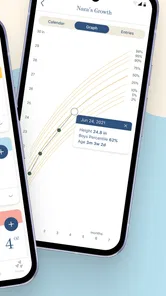
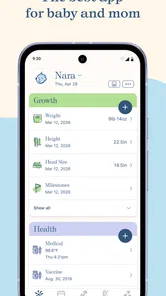
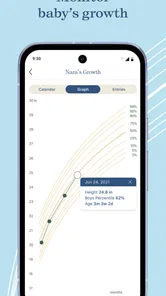
Another feature worth mentioning is the growth tracker. This tool allows you to record your baby’s height, weight, and milestones, creating a visual growth chart that you can share with your pediatrician during check-ups. It's a wonderful way to ensure your baby is growing just right.
Use the details without turning them into pressure
Growth records are easiest to use when measurements are entered carefully and in context. I would avoid reading too much into a single point or comparing a child’s chart with someone else’s; the useful role here is keeping a record that can inform a check-up. For milestones, the same principle applies: a log helps preserve what you want to remember, but it should not become a checklist that makes ordinary variation feel like a problem.
One trade-off with any detailed tracker is the effort of maintaining it. If recording every event starts to interrupt time with the baby, I would keep only the categories that answer a real need—perhaps feeds and sleep during a period of routine changes, or diapers when monitoring is important—and simplify later. A paper note or a caregiver’s direct conversation may suit a family better when phones are inconvenient or several people are unlikely to enter updates consistently.
The Little Extras
Beyond the basics, Baby Tracker by Nara also offers customizable reminders for appointments, medications, and more. These little extras might seem small, but they can make a huge difference in keeping your parenting game strong.
In terms of design, the app is aesthetically pleasing with a calming color palette that somehow soothes the chaos of parenthood. It's clear that a lot of thought has gone into making this app not only functional but also enjoyable to use.
Choosing it for your household
Compared with the usual alternatives—a notebook, a notes app, or a tracker focused on just one routine—this brings several kinds of baby-care records together, which is convenient if you want feeding, sleep, diaper and growth notes in one place. A notebook can be faster to pass around and does not require anyone to navigate an app; a simple notes list may be enough if you only need occasional reminders. I would choose this app when a structured timeline is genuinely useful, not because every family needs to document every moment.
It is free, rated for Everyone, and has a 4.8 average from around 5,400 ratings, with more than 100,000 installs. Those figures suggest it has found an audience, but they do not tell me whether its routine will suit your household. The app was released on January 30, 2019, and version 2.4.1 requires Android 7.0 or later. Nara Organics is the developer.
Age context matters too: the Everyone rating describes the app’s content suitability, not a recommendation for children to use it. This is a caregiver’s organizer for information about a baby. If you are deciding whether to enter personal family or health-related details, take a moment to review the app’s current settings and privacy information yourself, and keep access to the device appropriate for your household.
Deciding what belongs in the log
A tracker is most helpful when each caregiver agrees on what an entry means. For example, decide whether a feed is logged when it begins or ends, and whether a short nap counts as sleep worth recording. These small conventions make the timeline easier to interpret later. They also matter when a grandparent or babysitter is helping: a simple explanation of the few categories you rely on is more useful than expecting someone to learn every option while juggling care.
I would also separate routine notes from urgent communication. An app entry can preserve a detail for later, but it should not replace telling the next caregiver directly about something that needs attention now. That distinction is especially useful when the household uses one phone that might not be checked immediately, or when someone is taking over in a hurry.
When reminders help—and when they do not
Reminders can be useful for a parent managing appointments or medication alongside feeds and naps, because those tasks are easy to lose among the day’s interruptions. I would keep reminders focused on a few actions that are genuinely easy to forget. If every routine becomes an alert, notifications can become background noise, and the app may feel like another demand rather than a support.
For medication in particular, I would treat a reminder as a prompt, not as a complete medication-management system or a replacement for instructions from a clinician. Caregivers should communicate clearly about whether a dose has been given instead of relying on an ambiguous note. This is a practical boundary for any household record: it can help people remember, but the people caring for the baby remain responsible for confirming important actions.
Who will get the most from it
I think this app is a better fit for caregivers who have a concrete reason to compare events over time: parents sharing shifts, a family working through changing sleep routines, or someone who wants feeding and diaper notes ready for a conversation with a health professional. The combination of categories is useful if you would otherwise keep multiple scraps of information in different places. It is less compelling for a caregiver who rarely needs to look back or who finds routine logging irritating.
It may also be the wrong choice if your priority is a dedicated medical record, a detailed clinical assessment, or a highly customized household workflow. The tracker can organize observations, but I would not expect a general parenting app to settle health questions or automatically coordinate everyone’s responsibilities. In those situations, direct professional guidance or a simpler, agreed-upon family routine is more appropriate.
Questions to settle before relying on it
Before making it the household’s main record, I would check the current setup on the device you plan to use: who can open it, whether the account arrangement suits your caregivers, and how you want to handle access when a phone is shared. These are worth deciding before entering a long history. If multiple adults cannot comfortably use the same arrangement, a paper handoff or a direct message may be more dependable than trying to force a shared workflow.
Another reasonable question is whether you need to record everything. You do not. Start with one friction point—perhaps remembering the last nursing side, keeping track of naps, or noting diaper changes—and use only the relevant parts. After a few days, ask whether the record has made a handoff or a specific conversation clearer. That small trial gives you a more honest answer than trying to maintain a perfect diary from the start.
Overall, the Baby Tracker by Nara is like having a personal assistant dedicated to your baby’s well-being. It helps you stay organized, informed, and most importantly, less stressed. If you're a parent looking for a reliable and comprehensive baby tracking solution, this app is definitely worth a try. Trust me, it'll make your life a whole lot easier!
My household verdict
I would recommend it to parents and regular caregivers who benefit from a consistent record and are willing to keep it up to date. It is less compelling for someone who dislikes logging, needs a very minimal tool, or would rather keep records on paper. The best test is to pick one routine that currently causes confusion, use the tracker for that purpose, and see whether the record makes handoffs or conversations easier. If it adds work without helping, a simpler approach is the better choice.
Nara - Baby & Mom Tracker Frequently Asked Questions
Is Baby Tracker by Nara free to download, and what age rating does it have?
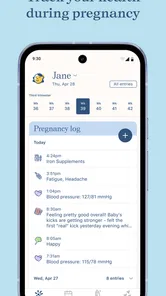
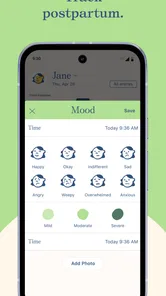
Baby Tracker by Nara is free to download and is rated for Everyone, so it is presented as suitable for a broad audience. Parents can try the app for tracking pregnancy, baby feeding, sleep, diaper changes, postpartum health, and more. Its simple focus on family routines makes it relevant to caregivers looking for a practical way to keep everyday information organized.
What is Baby Tracker by Nara and what features does it offer?
Baby Tracker by Nara is a comprehensive app designed to assist parents in monitoring their baby's daily activities and development. It offers features like feeding tracking, diaper change logs, sleep schedules, and growth charts. The app also allows you to set reminders for important tasks and provides insights to help you understand your baby's patterns and needs better.
Is Baby Tracker by Nara available for both Android and iOS devices?
Yes, Baby Tracker by Nara is available for download on both Android and iOS platforms. You can find it on the Google Play Store and Apple App Store. This ensures that you can access the app regardless of your device, making it convenient for all parents to keep track of their baby's activities.
How user-friendly is the Baby Tracker by Nara app for new parents?
The Baby Tracker by Nara app is designed with a user-friendly interface, making it easy for new parents to navigate and use. The intuitive design allows users to quickly enter data and view reports. Additionally, the app provides helpful tips and guidance to assist new parents in understanding how to use its features effectively.
Does Baby Tracker by Nara offer any data synchronization features?
Yes, Baby Tracker by Nara offers synchronization features, allowing data to be shared across multiple devices. This is particularly useful for parents who want to ensure that both partners have access to the same information, keeping everyone informed about the baby's progress and daily activities. It also supports backup options to prevent data loss.
Pros
- User-friendly interface for easy navigation.
- Comprehensive tracking of baby's activities.
- Customizable reminders for feeding and nap times.
- Secure data backup to cloud storage.
- Syncs across multiple devices seamlessly.
Cons
- Limited features in the free version.
- Occasional syncing issues reported.
- No support for multiple caregivers.
- In-app ads can be intrusive.
- Requires internet for full functionality.