Baby Buddy for Android
- 0.00
- 0.0
- Installs
- 100.00
- Price
- $1.99

Screenshots
Analysis by Reviewed
Hey there, fellow parents! Let me introduce you to an app that just might become your new best friend in the parenting journey. Say hello to Baby Buddy, a nifty little app for Android that promises to make tracking your baby’s milestones and daily activities a breeze. I’ve been using it for a while now, and I can’t wait to share my thoughts with you!
Why You’ll Love It
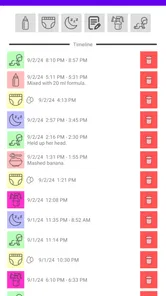
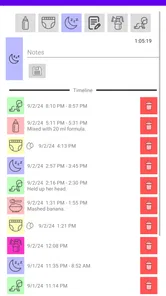
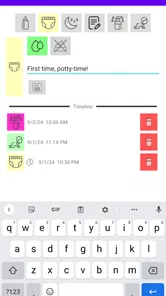
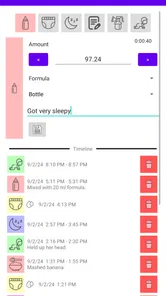
From the moment you open Baby Buddy, you’ll notice its clean and user-friendly interface. It’s like the developers knew exactly what sleep-deprived parents need—a straightforward way to log all those tiny but important details about your baby’s life. Whether it’s tracking feeding times, diaper changes, or sleep patterns, this app has got you covered.
Tracking Made Simple
One of the standout features of this app is how it organizes everything in a way that actually makes sense. You can record and monitor various activities with just a few taps. Trust me, when you’re in the middle of a 3 AM feeding session, the last thing you want is a complicated logging process. The app even allows you to set reminders for future feedings or medicine doses, which, let’s be honest, can be a lifesaver when your brain is running on fumes.
Insights at Your Fingertips
The app provides insightful summaries and graphs that help you see patterns over time. This is particularly useful for those doctor visits when they ask about your baby’s eating or sleeping habits. Instead of wracking your brain, you can pull up the data on your phone and impress your pediatrician with your organizational skills. Plus, it feels pretty satisfying to see those trends and know you’ve got a handle on things.
Community and Support
Another fantastic aspect of Baby Buddy is its community feature. You can connect with other parents, share tips, and even find support when you need it most. It’s like having a village of experienced parents right in your pocket. Whether you’re a first-time parent or you’ve been through the wringer before, it’s always nice to have a little extra support.
Who Benefits Most from a Shared Record
The practical value of a baby log becomes clearest when more than one caregiver is trying to keep the day straight. If one parent handles an early feed and another takes over later, a shared record can reduce the familiar “did we already do that?” exchange. I’d use the app as a running handoff note: record the event while it is fresh, then check the history before taking the next turn. That is more dependable than relying on a tired memory or a message thread that quickly fills with unrelated family updates.
It is also a sensible fit for parents who already use the open-source Baby Buddy website and want a quicker way to enter activity details from an Android phone. The app is an accompaniment to that website, rather than a reason to assume it replaces every part of a broader family organizer. Its developer is Paul Konstantin Gerke, and the app sits in the parenting category. That specific connection is important: if you do not use the website, first consider whether adding a companion app is worth the extra step in your routine.
More From Our News Desk

 Gmail
Gmail in a Busy Inbox: Who Benefits Most?
From first account to crowded workday, Gmail earns its place through dependable search and flexible sorting—but its best fit depends on how much inbox maintenance you can tolerate.

 Prime Video
Switching to Prime Video: What Changes in Your Viewing Routine
Prime Video can make a compelling second home for streaming, but switching means learning a different catalog, rental layer, and route from browsing to playback.

 Universal TV Remote Control
 Works Best as a Reliable Backup
A phone remote earns its place through quick setup and reliable habits. Here is how to get more from Universal TV Remote Control—and where its limits show.

 Weather - By Xiaomi
Weather by Xiaomi Review: Clear at a Glance, Less Clear Up Close
Xiaomi’s weather app makes everyday forecasts quick to scan, but its calm surface can leave useful details and recovery paths harder to find than they should be.

 X
X Under Pressure: Can It Recover When Posting Goes Wrong?
A resilience-focused review of X, examining setup, mistaken posts, interruptions, weak connections, and the gaps that matter when recovery needs to be dependable.

 Clash of Clans
 Is Won Between the Battles
Its raids are quick; its community is a long-term project of coordination, teaching, rivalry, and shared responsibility—with all the friction that entails.
Latest News



How It Fits a Real Day
Imagine a day when feeding times blur together and a caregiver asks when the last diaper change happened. Instead of reconstructing the morning from memory, you can check the activity record and use it to answer. Later, if you want to prepare for a conversation with a pediatrician, a history of logged events may help you describe a routine more clearly. I would treat those entries as an aid to recollection, not a diagnosis or a substitute for medical advice; a chart can show what you recorded, but it cannot explain why a baby is unsettled.
A useful habit is to keep entries brief and consistent rather than trying to capture every detail in perfect prose. Logging the same kinds of events in the same way makes later comparisons more meaningful. If you miss a moment, do not turn the app into another source of guilt: an incomplete record can still help with broad patterns, while a guessed timestamp can create false confidence. For occasional tracking, a note on paper may be faster; for repeated entries and a history you want to review, a dedicated log is easier to scan.
Trust, Choices, and Sensitive Details
Baby records can include intimate routines, so I would decide what belongs in any digital log before making it part of the household’s daily habits. A helpful trust check is to look at the permissions Android requests and consider whether each one makes sense for the task you want to do. I would not grant access automatically just because an app is about parenting. If a permission seems unrelated to your intended use, pause and review the choice rather than treating it as a requirement.
The website connection also makes it worth being deliberate about where you enter information and who in your household can access the relevant account. Before recording details you would rather keep private, check the account and sharing controls available in the service you use. I would avoid putting especially sensitive notes into a log unless I understood who could see them and how I could manage access later. That is a practical precaution, not a claim about how the service handles data.
What to Expect Before Installing
The app costs $1.99, has a Teen content rating, and lists a minimum Android OS of 8.1. Its current version is 2.6.0, and it was released on February 18, 2023. The average rating is 0.0, with over 100 installs, so there is little public rating history to lean on when judging how it will suit your routine. I would weigh those details against the main question: do you already want to use Baby Buddy on the web, and would quicker activity logging on your phone make that setup more useful?
Compared with a general notes app, Baby Buddy is the more focused choice when you want baby-related activities organized as a log instead of mixed into grocery lists, reminders, and family messages. Compared with a standalone tracker, its tie to an open-source website may appeal if that is already where you keep the record. The trade-off is that a companion workflow is less compelling if you want one self-contained app and do not plan to use the website. For someone who prefers a paper notebook, needs no ongoing history, or wants a different all-in-one family tool, another option may feel simpler.
A Cautious Recommendation
In conclusion, Baby Buddy is more than just an app; it’s a tool designed to make parenting a little less chaotic. It’s like that reliable friend who’s always there to remind you of the important stuff, so you can focus on enjoying those precious moments with your little one. If you’re looking for an app that’s easy to use and genuinely helpful, give Baby Buddy a try. You might just wonder how you ever managed without it!
My recommendation is narrower than that enthusiastic closing suggests: I’d consider it if the Baby Buddy website is already part of your routine and you want a phone-based way to keep activity records current. I would not choose it solely for community support, reminders, or graphs without checking that those are actually part of the version and setup I plan to use. The app has a modest footprint in the store, so I’d start with the smallest useful set of entries, review the permissions and account choices, and see whether the habit genuinely saves effort. If it does, the price may be worthwhile; if it becomes one more task to maintain, a simpler note-taking method is a perfectly reasonable alternative.
Baby Buddy for Android Frequently Asked Questions
Is Baby Buddy intended to work with the Baby Buddy website?
Yes. Baby Buddy for Android is designed to quickly edit and log activities on the open-source Baby Buddy website, so it is best understood as a companion to that service rather than a standalone baby-tracking system. If you already use the website, the app offers a mobile way to update activity records. Its usefulness depends on whether the website fits the way you organize your family’s information.
What should I know about the cost and age rating before downloading Baby Buddy?
Baby Buddy is listed at $1.99, so it is not a free download. It has a Teen content rating, which is worth checking if a younger family member will use the device. The app is in the Parenting category and is developed by Paul Konstantin Gerke. Consider whether its website-connected activity logging suits your needs before purchasing.
What is Baby Buddy and how can it assist new parents?
Baby Buddy is a comprehensive app designed to support new parents by tracking and managing various aspects of their baby’s health and development. It allows users to log feedings, diaper changes, sleep schedules, and milestones, providing insights and reminders to help parents establish routines. This app acts as a digital companion, ensuring that all essential information is organized and easily accessible.
Is Baby Buddy available for both Android and iOS platforms?
Currently, Baby Buddy is available for Android devices. Parents using Android smartphones or tablets can download the app from the Google Play Store. While the current focus is on Android, potential users should keep an eye on future updates for any announcements regarding an iOS version, as developers often expand to other platforms based on demand.
How secure is my baby’s data on Baby Buddy?
Baby Buddy takes data security seriously, implementing encryption and secure storage practices to protect users' information. Parents can trust that personal data and activity logs are kept confidential. The app does not share data with third parties without explicit user consent, ensuring a safe environment for tracking your baby’s development.
Pros
- User-friendly interface
- Tracks baby activities efficiently
- Customizable reminders
- Supports multiple children
- Detailed statistics
Cons
- Limited free features
- Occasional sync issues
- Lacks offline access
- No integrated health data
- Ads in free version