Breastfeeding & Baby Tracker
- 4.23K
- 4.9
- Installs
- 100.00K
- Price
- Free

Screenshots
Analysis by Reviewed
When a newborn’s routine is changing by the day, the hardest part of tracking care is often remembering what happened while you were tired, feeding, or settling the baby. I look for a tracker that makes quick notes easier than relying on memory, without turning every part of parenting into a data project. Baby & Breastfeeding Tracker is aimed at that practical middle ground: recording everyday care so I can answer questions later and share a clearer picture with another caregiver.
What I would decide before installing
The key question is whether you want one place for several routines or just a simple feeding timer. This parenting app, made by ParentLove Baby Tracker by Coquisoft, brings feeding, pumping, diapers, and sleep into the same tracking routine. It is free to install, with in-app purchases listed from $9.99 to $39.99 per item, so I would try the basic workflow first and decide whether any paid option is worth it for my household.
It has a 4.9 average from around 11,000 ratings, and more than 100,000 installs. Those figures suggest that many families find it useful, but they cannot tell me whether its approach suits a particular home. It is rated for Everyone, and the current version is 10.5.2, with Android 5.0 as the minimum operating system. I would still check that my phone meets the requirement before planning to use it as a shared routine log.
Questions I would settle before making it the household record
Before depending on any tracker, I would agree with the other caregiver on what counts as a useful entry. A timestamp and the type of event may be enough for a handoff; recording every detail can become tedious if nobody will review it later. This small decision makes the app more practical because it gives both people a manageable standard instead of an unspoken expectation to document everything.
I would also decide what information is worth keeping for appointments. A record can help me recall the sequence of feeds, sleep, or diaper changes, but the value is in having a clearer conversation with a clinician, not in treating a chart as a verdict. If something seems concerning, I would contact a health professional rather than waiting for enough app entries to form a pattern.
Keeping Track Made Simple
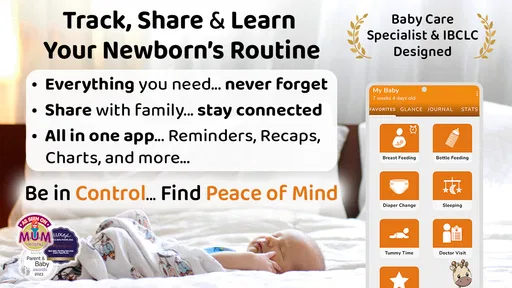
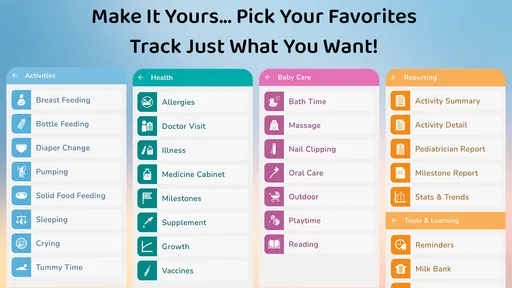
In the early days of parenthood, sleep-deprived and juggling a million tasks, I found myself constantly questioning, "When did I last feed the baby?" That's where the Baby & Breastfeeding Tracker comes to the rescue. This app is like having a personal assistant in your pocket, keeping track of feedings, diaper changes, sleep patterns, and even growth milestones.
Features Galore
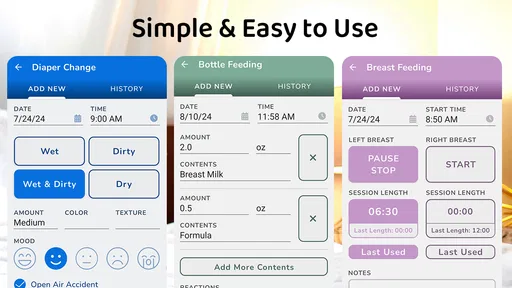
One of the first things that caught my eye was the app's intuitive design. It's super user-friendly, which is a blessing when you're trying to log a feeding session with one hand while holding a baby in the other. You can easily record breastfeeding, bottle feeding, and even solid food intake. The timer feature for breastfeeding sessions is a game-changer, allowing you to monitor how long your baby feeds on each side.
More From Our News Desk

 Gmail
Gmail in a Busy Inbox: Who Benefits Most?
From first account to crowded workday, Gmail earns its place through dependable search and flexible sorting—but its best fit depends on how much inbox maintenance you can tolerate.

 Prime Video
Switching to Prime Video: What Changes in Your Viewing Routine
Prime Video can make a compelling second home for streaming, but switching means learning a different catalog, rental layer, and route from browsing to playback.

 Universal TV Remote Control
 Works Best as a Reliable Backup
A phone remote earns its place through quick setup and reliable habits. Here is how to get more from Universal TV Remote Control—and where its limits show.

 Weather - By Xiaomi
Weather by Xiaomi Review: Clear at a Glance, Less Clear Up Close
Xiaomi’s weather app makes everyday forecasts quick to scan, but its calm surface can leave useful details and recovery paths harder to find than they should be.

 X
X Under Pressure: Can It Recover When Posting Goes Wrong?
A resilience-focused review of X, examining setup, mistaken posts, interruptions, weak connections, and the gaps that matter when recovery needs to be dependable.

 Clash of Clans
 Is Won Between the Battles
Its raids are quick; its community is a long-term project of coordination, teaching, rivalry, and shared responsibility—with all the friction that entails.
Latest News



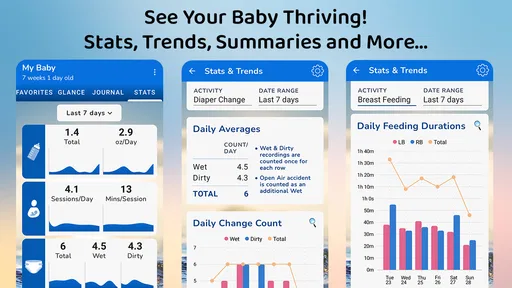
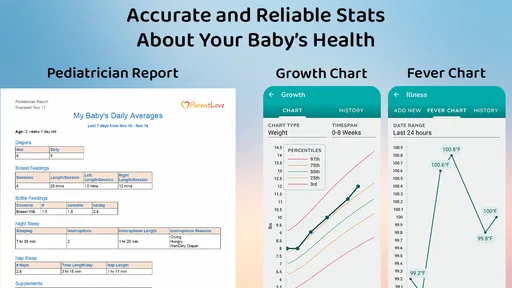
But that's not all! The sleep tracker helps you identify patterns and maybe, just maybe, figure out how to get a few extra minutes of rest. Plus, the diaper change log ensures you're on top of your baby's health and hygiene. The app even offers insights into your baby's growth, with charts that track weight, height, and head circumference over time.
Making detailed tracking useful rather than burdensome
The less obvious benefit of bringing several routines together is being able to look at events in context. If a day feels unusually unsettled, I can compare feeding, sleep, and diaper notes instead of trying to remember each one separately. That does not prove one event caused another, but it can give me a more precise starting point for a conversation with a partner or clinician.
For breastfeeding, I would use the timer as a memory aid, not as a scorecard. A session’s duration can be useful to recall, but a longer or shorter entry on its own does not tell me whether feeding is going well. The same principle applies to sleep tracking: patterns are worth noticing, while treating every variation as a problem could make an already tiring period more stressful.
One practical way to reduce friction is to log only what will answer a real question later. For instance, if I mainly forget which side I started on, I would focus on the feeding record and avoid turning every other routine into a detailed project. If I am sharing care, I would add the events the next person needs for a smooth handoff. The tracker is most useful when its level of detail matches the household, not when the household tries to satisfy the tracker.
Using the log in a real routine
A useful habit is to record an event as soon as the moment allows, rather than trying to reconstruct the day at bedtime. If one caregiver handles a night feed and another takes over in the morning, a shared record can help them avoid repeated guesswork. For a pediatrician visit, I would treat the growth chart and care history as an organized reference to discuss, not as a diagnosis or a substitute for professional advice.
There is a trade-off: detailed tracking helps most when the people caring for the baby enter information consistently. If logging becomes another source of pressure, I would simplify what I record to the items I actually need to remember. Families who prefer paper notes, or who only want a basic timer and do not need a broader log, may find a lightweight alternative less demanding.
How it compares with simpler and narrower options
A paper diary gives me freedom to write anything in my own shorthand, and a general notes app can be quick when I only need a reminder. Their drawback is that entries may be harder to compare or scan when feeding, sleep, and diaper changes are mixed into an unstructured page. A dedicated tracker is a better fit when I expect to revisit those different kinds of records together.
On the other hand, a feeding-only timer may be the calmer choice for someone who wants to note breastfeeding sessions and nothing else. A broader log can feel like overkill if I never check its sleep or diaper history. I would choose based on the question I keep asking myself: if it is simply “when was the last feed?”, a narrow tool may do; if I also need reliable handoffs and a wider routine history, this app’s range has a clearer purpose.
There is also a difference between a tracker and a family calendar or messaging thread. Messages can coordinate a one-off change, but they are not always easy to scan as a continuous care history. A tracker can provide a more consistent record, provided everyone uses it. It cannot replace an explicit conversation about who is taking over, especially when plans change suddenly.
Syncing and Sharing
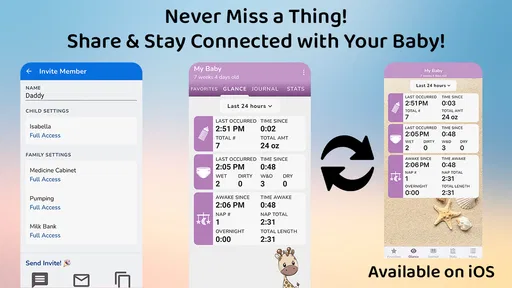
What I found particularly impressive is the app's ability to sync data across multiple devices. This means both parents can stay updated on the baby's schedule, making life a tad bit easier. Sharing information with your pediatrician is also a breeze, as you can export data in a neat format whenever needed.
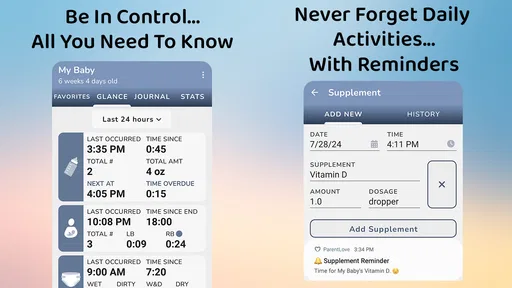
Another feature worth mentioning is the reminder alerts, which gently nudge you when it's time for the next feeding or diaper change. It's like having a trusty sidekick reminding you of what to do next, which is incredibly helpful during those sleep-deprived nights.
Keeping shared use practical
For a two-caregiver household, I would test the handoff before relying on it during a busy day: have one person enter a feed, then ask the other to check the record and add the next event. That simple trial reveals whether the shared routine is understandable to both people. If either caregiver finds the process awkward, agreeing on a shorter list of entries is often more effective than asking them to log more carefully.
Reminders can be helpful when a routine is easy to lose track of, but I would treat them as prompts rather than instructions. A baby’s needs and a family’s day do not always follow a neat schedule. If alerts start to add noise, I would reconsider which reminders are genuinely useful instead of letting notifications become another task to manage.
When preparing for an appointment, I would review the relevant entries beforehand and choose a few examples or questions to raise. A history is easier to discuss when I know what I want the clinician to help me understand. Exporting information can support that preparation, but it does not make the app a medical record or guarantee that a particular format will answer every professional’s questions.
Choosing it over another approach
Compared with a notes app or a paper diary, a dedicated baby tracker can keep common care entries together and make patterns easier to review. Those simpler options may still be better if you want fewer prompts, prefer writing by hand, or do not want to maintain a detailed digital history. Before switching from another tracker, I would check which records I need to keep and whether I can transfer them; if not, I would save or export important history first so the new log starts with useful context.
For a realistic day, imagine one parent logging a morning feed and diaper change, then handing off care before leaving the house. The other caregiver can check what has already happened, record a nap, and keep the routine moving without relying on a text message exchange. The benefit depends on both people using the same record, so I would agree on a simple logging habit rather than expecting the app alone to coordinate everything.
The small cost of changing trackers
Switching is not just a matter of installing a different app; the bigger cost is losing continuity. If I have been recording for a while, I would preserve any entries that matter for upcoming discussions before starting a new log. I would not try to recreate every old detail unless it serves a clear purpose. A fresh start can be perfectly workable, but it means the new history will take time to become useful.
I would also avoid running two detailed trackers indefinitely. Duplicating every feed or diaper change adds effort and can leave conflicting records when one entry gets missed. If I am uncertain whether this approach suits us, I would test it for a short, manageable stretch using only the routines we care about, then make a deliberate choice about which record to keep.
Final Thoughts
All in all, the Baby & Breastfeeding Tracker is a must-have for new parents. It simplifies the overwhelming task of tracking your baby's daily activities, leaving you with more time to enjoy those precious moments. It’s not just an app; it’s a tool that brings peace of mind in the whirlwind of parenthood.
So, if you're looking for a reliable partner in your parenting journey, give this app a go. Trust me, you'll wonder how you ever managed without it!
Who is likely to get the most from it?
I would recommend it to parents who want one place to follow feeding, pumping, sleep, and diaper routines, especially when care is shared or details need to be recalled at an appointment. The app has been available since October 31, 2015, and its continuing version history makes it a familiar option in this niche; that does not mean every family needs its full range. I would skip it if tracking itself feels intrusive, if you are looking for medical guidance, or if you only need occasional notes.
It is particularly suited to a household where one person handles some feeds and another needs a dependable account of what happened in between. It can also help a parent who wants to keep feeding and pumping notes in the same general routine rather than scattering them across a timer, a notebook, and messages. If I were caring for a baby alone and rarely needed to review earlier entries, however, the extra logging might offer less value than a very simple personal note.
I would be cautious about choosing any comprehensive tracker during a period when recording itself feels emotionally loaded. Some parents find reassurance in seeing a clear history; others find that watching every duration and interval makes them more anxious. If the latter is true, I would use only the entries that answer practical questions, or step away from tracking. A tool should reduce mental effort, not create a new standard to judge yourself against.
A practical way to try it
Start with the entries that answer your most common questions, such as the last feed or a sleep period, and leave less useful details alone. After a few days, notice whether the record makes handoffs and conversations easier. If it does, keep the habit; if you find yourself maintaining the log for its own sake, a simple shared note may be a better fit. That is the clearest test I would use before committing to a more detailed routine.
I would make that trial specific: decide on one or two questions the log should answer, such as what happened during the last handoff or what I want to remember at the next appointment. Then see whether the entries actually answer them without interrupting care. If the information is easy to find and both caregivers can keep up, the broader tracker has earned its place. If not, there is no shame in choosing a notebook, a shared note, or a narrower feeding tool instead.
My recommendation is to try it when you want feeding, pumping, diaper, and sleep records gathered in one place, and to keep the habit intentionally light at first. Its strongest case is not that every parent needs more tracking; it is that a shared, organized history can spare a tired family from repeatedly reconstructing the day. If that is a problem you recognize, this is a sensible option to test. If you prefer minimal logging or feel better without reminders and charts, a simpler approach is likely the better fit.
Breastfeeding & Baby Tracker Frequently Asked Questions
Is Baby & Breastfeeding Tracker free to download, and are there optional purchases?
Baby & Breastfeeding Tracker is free to download, so parents can try it without paying upfront. It also offers in-app purchases, with listed items ranging from $9.99 to $39.99 each. If you are considering a purchase, check the options in the app and decide whether they suit your needs before buying; the basic download and optional purchases are separate.
What features does the Baby & Breastfeeding Tracker app offer?
The Baby & Breastfeeding Tracker app provides a comprehensive suite of tools to help new parents manage their baby's daily routines. It includes features like feeding trackers, diaper change logs, sleep schedules, and growth charts. Additionally, it offers reminders for medications and doctor appointments, making it easier to track your baby's health and development.
Is the Baby & Breastfeeding Tracker app user-friendly for new parents?
Yes, the app is designed with new parents in mind. It boasts an intuitive interface that simplifies tracking your baby's activities. The dashboard is easy to navigate, allowing users to quickly input data and access information. The app also offers helpful tips and tutorials to guide parents through each feature, ensuring a seamless user experience.
Does the app offer any community or support features for parents?
Indeed, the Baby & Breastfeeding Tracker app includes a community feature where parents can connect with others for support and advice. This feature allows users to share experiences, ask questions, and get tips from fellow parents. Additionally, the app provides access to professional advice from pediatricians and lactation consultants, enhancing the support network available to users.
How secure is the data stored in the Baby & Breastfeeding Tracker app?
The app prioritizes user privacy and data security. It employs robust encryption protocols to safeguard personal information and ensure that all data is stored securely. Users can also set up password protection or biometric authentication for an additional layer of security, providing peace of mind when using the app.
Pros
- Intuitive interface for new parents.
- Comprehensive tracking of baby activities.
- Syncs data across multiple devices.
- Customizable reminders and alerts.
- Offers detailed breastfeeding statistics.
Cons
- Limited features in free version.
- Occasional syncing issues reported.
- No offline mode available.
- Lacks integration with health apps.
- Ads can be intrusive at times.