Automatic Mileage Tracker App
- 12.00
- 4.5
- Installs
- 10.00K
- Price
- Free

Screenshots
Analysis by Reviewed
I usually judge a mileage app by one question: does it reduce the work I have to do after a trip, or does it simply move that work into another screen? Automatic Mileage Tracker App, developed by Easy Expense Tracker, is aimed at the first problem. It is a free business app for Android that records driving automatically and turns those journeys into something more useful for reports, reimbursements, and tax preparation. After spending time with it, I see the appeal clearly, although I also think the best choice depends on how much control you want over every trip.
The app has a straightforward identity. Its short store description calls it a mileage tracker, while the longer summary focuses on automatic trip tracking. That distinction matters: this is not primarily a full accounting package, a route planner, or a general personal-finance tool. Its job is to help you maintain a usable record of business driving without relying on memory at the end of a busy day.
What I looked for before trusting it with mileage
My first decision criterion was accuracy in ordinary life rather than on an ideal test drive. A mileage tracker has to cope with short errands, several stops, a commute mixed with a client visit, and days when I forget to open an app before leaving. Automatic recording is valuable because it removes one of the easiest failure points: remembering to start and stop a manual log.
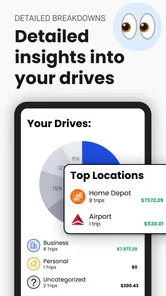
The second criterion was whether the resulting record is understandable. A list of routes is not automatically a useful business record. I want to know which journeys need a business label, which ones are personal, and which entries deserve a quick correction before I use them in a report. The practical value comes from turning driving history into organized information, not merely collecting movement in the background.
I also considered the setup burden. Any automatic tracker needs enough access to notice travel, and that can make some people hesitate. Even when the app is simple, the phone itself may restrict background activity or battery use. In my experience, the best workflow is to configure the app carefully once, then check it after the first few drives instead of assuming every phone model will behave identically.
Finally, I looked at the cost of changing habits. Someone moving from a paper notebook needs a quick way to correct forgotten entries. Someone coming from a spreadsheet needs a reason to accept automatic tracking. Someone already using a complete expense platform may not want another separate record. Those are different decisions, and this app makes the most sense when mileage is the specific problem rather than one small part of a much larger financial system.
How the everyday workflow feels
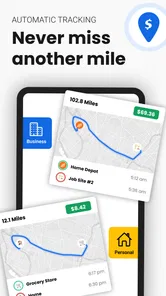
The most useful scenario is a normal workday with several stops. Imagine leaving home for a supplier, driving to a customer, and then stopping at an office before returning. With a manual method, I would have to remember the starting and ending mileage for each leg, note the purpose, and later reconstruct anything I missed. An automatic tracker can capture the travel while I concentrate on the meeting and the road. I would still review the entries, but the review is much easier than rebuilding the day from memory.
More From Our News Desk

Weather by Xiaomi Review: Clear at a Glance, Less Clear Up Close

X Under Pressure: Can It Recover When Posting Goes Wrong?

Clash of Clans Is Won Between the Battles

Android Auto Makes the Case for Quieter Car Software

MobiOffice: Transforming Mobile Productivity with Seamless Integration

EA SPORTS FC™ Mobile Soccer: Redefining Mobile Sports Gaming
That review step is important. I would not treat an automatically recorded journey as finished simply because it appears in the history. A personal detour, a shared car, or a trip that combines business and private errands can change how an entry should be classified. My practical advice is to check the day’s trips while the purpose is still fresh. A two-minute review is more reliable than waiting until the end of the month.
For freelancers and independent contractors, that habit can make reporting less stressful. The app is particularly useful when driving is frequent but not the main business activity. A photographer, property professional, home-service worker, or sales representative may not need a large accounting suite just to maintain mileage. In that situation, a focused tracker can be easier to open and maintain than a broader finance app filled with features unrelated to driving.
It can also help employees who submit reimbursement claims. The key benefit is not that the app decides what your employer will accept; company policies still control that. The benefit is having a consistent personal record to compare with a reimbursement form. I would use it as the source for reviewing dates, destinations, and business purpose before submitting anything, rather than assuming an automatically created report removes the need for checking.
Small habits that make the record more dependable
One non-obvious strength of automatic tracking is that it changes the timing of the task. Instead of treating mileage as an administrative project, I can treat it as a short daily maintenance routine. That is a better fit for people who are good at reviewing recent activity but poor at remembering an entire month of driving.
I would also separate “captured” from “ready to submit.” A trip can be captured correctly but still need a category, purpose, or correction. Keeping that distinction prevents a common mistake: exporting or reporting everything without checking whether personal journeys were mixed in. The app saves time, but it does not replace judgment about why a trip took place.
Another useful trade-off is deciding when to correct an entry. If the app records a short stop as one continuous journey, I would fix it immediately while I know what happened. If I am unsure whether a trip was business-related, I would leave myself a note or mark it for review rather than guessing. This approach keeps the record honest and avoids turning convenience into careless bookkeeping.
People who drive across several work locations may benefit most from this workflow. Their problem is not usually a lack of mileage information; it is the accumulation of small trips that become impossible to reconstruct later. The app’s automatic approach addresses that gap directly. It is less compelling for someone who drives only once or twice a month and can comfortably maintain a simple manual log.
Where this app has a clear advantage
The strongest reason to choose it is reduced memory work. Manual mileage logs depend on discipline at exactly the moment when I am busy, tired, or moving between appointments. Automatic trip tracking shifts the burden toward review, which is generally the easier task. That is a meaningful advantage for anyone whose workday contains repeated driving.
The app’s focus is another advantage. Because it is presented as a business mileage tool rather than an all-purpose money manager, the experience is easier to evaluate: if your priority is mileage records, you do not have to adopt a complete budgeting system first. Easy Expense Tracker has kept the product connected to a specific administrative need, and I think that focus is more useful than a long list of unrelated tools.
Its accessibility also lowers the barrier to trying it. The app is free to install, is rated for Everyone, and runs on Android devices using version 6.0 or later. That makes it approachable for a wide range of users, including people who do not want to commit money before understanding whether automatic tracking suits their routine. The current version is 5.46.7, so I would still check that the phone is compatible before planning a work process around it.
There is some evidence that the app has found an audience: it has passed ten thousand installs and holds a 4.5 average from around one hundred ratings. I read that as encouraging rather than conclusive. It suggests that the basic idea works for many users, but mileage accuracy and convenience can depend heavily on phone settings, driving patterns, and personal expectations.
The app is also a sensible middle ground between a paper notebook and a full expense platform. A notebook is cheap and private but easy to forget. A spreadsheet offers control but requires manual entry and maintenance. A broad accounting service may connect mileage with invoices and expenses, but it can feel excessive if all you need is a dependable driving log. This tracker earns its place when automatic capture matters more than having every financial feature in one place.
Where another category may be a better fit
I would not recommend choosing this app solely because it is free. Free installation is helpful, but the right question is whether the workflow matches your responsibilities. If your employer requires a particular reporting system, an approved corporate tool may be more appropriate even if it involves more manual work. A personal mileage record can support your preparation, but it should not be assumed to replace an official process.
A spreadsheet may be better for someone who drives very little and wants complete control over columns, formulas, and archival habits. It is also a reasonable choice for people who do not want automatic background tracking. The trade-off is obvious: spreadsheets are flexible, but every trip depends on deliberate entry. I would choose the spreadsheet when privacy and customization matter more than convenience.
A full expense or accounting platform may win for a small business that already manages invoices, receipts, categories, and reimbursements in one place. Keeping mileage separate can create an extra reconciliation step. In that case, the tracker’s narrow focus becomes a limitation rather than an advantage. I would only add it if the existing system handles mileage poorly or if automatic capture solves a problem the larger platform leaves open.
There is also a personal preference issue. Some drivers want to approve every trip before any record is created. Automatic tracking will feel less comfortable to them than a manual start-and-stop tool. Others may dislike reviewing multiple entries after a day of mixed personal and business travel. The app is designed around convenience first, so users who want maximum control at the moment of departure may prefer a more hands-on alternative.
Battery and background behavior deserve a practical mention without turning them into a reason for alarm. Automatic tracking depends on the phone being allowed to operate as intended. Aggressive battery-saving settings can interfere with many background apps, and different Android devices handle those settings differently. I would test the app during a normal week before relying on it for an important reimbursement or tax record. That is not a criticism unique to this product; it is a basic reality of automatic mobile tracking.
Free access, optional spending, and the cost of changing
The app is free, but it includes in-app purchase items ranging from $7.99 to $144.99 each. That wide range means I would inspect the upgrade screen carefully before building a long-term workflow around paid capabilities. The free starting point is useful for testing whether trips are captured in a way that fits your phone and your work, while the potential purchase cost matters more to frequent professional users than to occasional drivers.
My advice is to test the complete routine before paying: drive a familiar route, review the resulting entry, check how you handle a personal trip, and see whether the report process suits your needs. Do not evaluate it only from the first successful automatic trip. The real question is whether the app reduces monthly administration after corrections and classification are included.
Switching from a notebook has a different cost than switching from a spreadsheet. With paper, the main adjustment is remembering to review digital records. With a spreadsheet, the adjustment is trusting automatic capture while accepting that the app’s structure may not match your custom columns. I would keep the old method temporarily during the trial period, then compare a few completed workdays before retiring it.
Switching from another mileage app can be more complicated because historical records and reporting habits may not move neatly between systems. I would preserve old reports and export or store important records before changing tools. Even if the new app is easier day to day, business mileage is the kind of information I would rather archive twice than discover later that an old period is difficult to reconstruct.
There is also a human cost to changing: colleagues, accountants, or employers may already understand the format of your current reports. A new tracker is worthwhile when it prevents repeated missed trips or saves substantial review time. If your present method is already accurate and quick, switching may create more learning work than benefit.
Who should install it first
I would start with this app if I drove for work several times a week, often moved between appointments, and regularly postponed mileage logging. It is also a good candidate for people who need a dedicated business record without adopting a complete accounting environment. The automatic approach is especially attractive when the main failure is forgetting, not a lack of understanding about mileage.
I would be more cautious if I needed a unified system for mileage, receipts, invoices, payroll, and client billing. In that situation, I would first see whether the existing business platform already provides the necessary mileage workflow. Adding a separate tracker can be useful, but it can also split information between two places and create another reconciliation task.
I would also skip it if I rarely drive for business, dislike background tracking on principle, or need a company-mandated format. A simple manual record may be enough for occasional use. The app’s value grows with frequency and forgetfulness; it does not automatically become the best option for every driver.
For tax-related use, I would treat the app as an organized recordkeeping aid, not as tax advice. Rules and acceptable documentation can vary by location and situation. I would review the entries, retain the reports I rely on, and confirm the required details with a qualified adviser when the amounts are significant. Automatic capture makes preparation easier, but responsibility for accurate classification remains with me.
My recommendation after weighing the trade-offs
My overall view is positive, with a clear condition: choose Automatic Mileage Tracker App when your biggest problem is consistently recording work trips, not managing every part of your business finances. Its automatic approach addresses a real everyday weakness in manual logs, and its focused business purpose makes it easier to use than a large financial suite for a narrow task.
I would begin with the free version and test it across ordinary workdays rather than a single drive. Check the captured journeys, correct mixed-purpose trips, and make sure the resulting records fit your reimbursement or tax routine. If that process feels lighter than your current method, the app has earned a place on your phone. If it creates uncertainty about background tracking or still requires too much cleanup, a spreadsheet or integrated accounting tool may be the better answer.
Easy Expense Tracker has made a practical tool for a specific audience: people whose business driving is frequent enough to become administrative clutter, but who do not necessarily need a complete financial platform. The 4.5 average and more than ten thousand installs make it worth considering, while the optional purchases and the need for regular review are good reasons to test before committing.
I recommend it as a focused mileage companion, not as a replacement for accounting judgment. Used with a short daily review and a careful check of phone behavior, it can turn forgotten trips into a manageable record. Used without checking classifications or reporting requirements, it may provide convenience without providing the dependable documentation you actually need.
Automatic Mileage Tracker App Frequently Asked Questions
Is Automatic Mileage Tracker App free to download, and are there paid features?
The app is free to download, so you can try its basic mileage-tracking experience without an upfront purchase. It also offers in-app purchases, with items ranging from around $8 to $145. Before relying on a paid option for regular reporting, check what it includes and whether it suits the way you plan to track work or personal driving.
Which phones can run Automatic Mileage Tracker App?
Automatic Mileage Tracker App is available for Android devices running Android 6.0 or later. The current version is 5.46.7, and the app is rated for Everyone. If you use a different mobile platform, check the relevant app store for availability and compatibility before downloading, since operating system requirements and features can vary by platform.
What is Automatic Mileage Tracker App used for?
Automatic Mileage Tracker App is designed to record your journeys without requiring you to start and stop every trip manually. It can help you monitor driving distance, travel time, routes, and estimated mileage for work or personal use. This makes it useful for employees, freelancers, delivery drivers, business owners, and anyone who needs an organized driving history.
How does the app track my trips automatically?
The app generally uses your phone’s location services, GPS, and motion detection to recognize when you begin and finish a drive. After granting the required permissions, it can run in the background and identify trips automatically. Accuracy may vary depending on GPS reception, battery-saving settings, phone placement, and whether location access is allowed continuously.
Can I edit, categorize, or export mileage records?
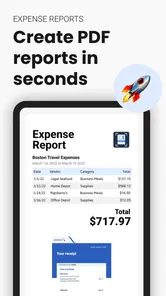
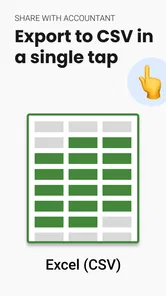
Most users choose this type of app because recorded journeys can be reviewed and corrected when necessary. You can typically adjust trip details, label journeys as business or personal, add notes, and remove incorrectly detected drives. Depending on the version and subscription plan, mileage reports may also be exportable for reimbursement, accounting, tax preparation, or business documentation.
Pros
- Automatically records trips without manual start and stop actions.
- Provides accurate mileage data for work
- tax
- and reimbursement purposes.
- Separates business and personal journeys for easier expense tracking.
- Offers trip history that can be reviewed and corrected when needed.
- Can reduce paperwork for frequent drivers and mobile professionals.
Cons
- Background tracking may noticeably increase battery consumption.
- GPS accuracy can drop in tunnels
- garages
- or areas with weak signal.
- Some advanced reports or exports may require a paid subscription.
- Frequent short trips can create duplicate or incorrectly split records.
- Location tracking raises privacy concerns for users sensitive to data collection.












