

Autism 360: Parenting
- 23.00
- 3.4
- Installs
- 10.00K
- Price
- Free

Screenshots
Analysis by Reviewed
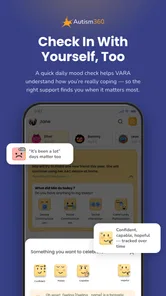
Parenting a child with autism often means turning scattered observations, questions, appointments, and daily challenges into a routine that the whole family can understand. Autism 360 is designed for that starting point: it is a free parenting app from Autism 360 that brings autism-focused guidance into a mobile format. I found its main value in helping a parent pause, organize what is happening, and decide what to try next instead of searching randomly whenever a difficult moment appears.
This is not an app I would treat as a replacement for a clinician, therapist, school team, or individualized assessment. I see it more as a companion for the space between those conversations. The app belongs to the parenting category, carries an Everyone age rating, and is available for Android devices running version 7.0 or later. Its current version is 2.0.3250, and the free entry point makes it easy to explore before deciding whether its deeper material fits your family.
From a difficult moment to a more organized parenting routine
The most useful way to approach this app is to begin with a real situation rather than browse it passively. Imagine a parent whose child becomes overwhelmed during the evening transition from screen time to dinner. The immediate problem may look small, but it can involve communication, sensory needs, expectations, timing, and the parent’s own uncertainty. Opening a parenting app in that moment is only helpful if it turns that uncertainty into a manageable next step.
My suggested workflow starts with a short description of the situation in your own words. Avoid trying to diagnose the cause while you are upset. Note what happened immediately before the difficulty, what your child did, how you responded, and what helped the moment settle. Then use the app’s autism-focused material as a way to frame the question. The point is not to find a perfect label for one incident; it is to look for a practical pattern that can be discussed, tested, and reviewed.
That distinction matters. Many parenting resources offer broad advice that sounds reassuring but is difficult to apply at home. An autism-specific resource can be more useful when the parent needs help thinking about communication, routines, behavior, or support needs through a more relevant lens. At the same time, I would resist treating any single suggestion as universally suitable. Children respond differently, and a strategy that helps one family may increase pressure for another.
Autism 360 works best when I use it before or after a predictable challenge, not only during a crisis. Before school, I might review a relevant topic and choose one small adjustment to try. After school, I could reflect on whether the change made the transition easier. This creates a simple input-to-outcome loop: observe, choose, try, and review. That loop is more valuable than collecting a long list of advice that never reaches daily life.
Turning advice into one small experiment
A practical mistake is to change several things at once. If a parent alters the schedule, introduces new language, changes rewards, and adds a visual routine on the same day, it becomes impossible to know what made a difference. I prefer selecting one manageable action from the material and keeping the rest of the evening familiar. That approach also reduces the burden on the child, who may already be coping with a difficult transition.
More From Our News Desk

 Gmail
GmailGmail in a Busy Inbox: Who Benefits Most?
From first account to crowded workday, Gmail earns its place through dependable search and flexible sorting—but its best fit depends on how much inbox maintenance you can tolerate.

 Prime Video
Switching to Prime Video: What Changes in Your Viewing Routine
Prime Video can make a compelling second home for streaming, but switching means learning a different catalog, rental layer, and route from browsing to playback.

 Universal TV Remote Control
Universal TV Remote Control Works Best as a Reliable Backup
A phone remote earns its place through quick setup and reliable habits. Here is how to get more from Universal TV Remote Control—and where its limits show.

 Weather - By Xiaomi
Weather by Xiaomi Review: Clear at a Glance, Less Clear Up Close
Xiaomi’s weather app makes everyday forecasts quick to scan, but its calm surface can leave useful details and recovery paths harder to find than they should be.

 X
XX Under Pressure: Can It Recover When Posting Goes Wrong?
A resilience-focused review of X, examining setup, mistaken posts, interruptions, weak connections, and the gaps that matter when recovery needs to be dependable.

 Clash of Clans
Clash of Clans Is Won Between the Battles
Its raids are quick; its community is a long-term project of coordination, teaching, rivalry, and shared responsibility—with all the friction that entails.
Latest News



For the screen-to-dinner example, the experiment might be as simple as making the transition more predictable and using the same short instruction each evening. The app does not need to become a command center filled with tasks. Its role is to help the parent think clearly enough to make a consistent choice. After several ordinary attempts, the parent can bring a clearer account to a therapist or teacher: what happened, what was tried, and under which conditions it seemed useful.
The strongest habit is not reading more; it is connecting one piece of guidance to one observable change at home. That is the difference between an app that merely occupies a phone and one that supports a parenting process.
How the handoff to family and professionals can work
Autism support rarely belongs to one person. A parent may notice a pattern at home, while a teacher sees it during group activities and a therapist sees something different in a structured session. The app is most helpful when it supports communication among those people rather than encouraging the parent to work in isolation.
I would use it as preparation for a conversation. Before an appointment, write down the situation that led you to open the app, the guidance that seemed relevant, and the part that did not fit your child. This makes the discussion more concrete. Instead of saying that evenings are difficult, you can explain when the difficulty begins, what you changed, and what happened afterward. The professional still makes the clinical judgment, but the parent arrives with better observations.
The same principle applies within the family. If two caregivers use different responses to the same behavior, the child may receive mixed signals and the adults may conclude that a strategy is failing before it has been used consistently. I would agree on one plain-language response and share the reasoning behind it. The app can be a common reference point, but it should not become a source of arguments about who is following the “right” method.
There is also a useful handoff to the child’s own preferences. Parents sometimes focus so heavily on stopping a behavior that they miss what the behavior communicates. When reading about a challenge, I would ask what the child might be trying to avoid, request, regulate, or express. That question does not excuse unsafe behavior, but it can lead to a more respectful and effective response than simply demanding compliance.
What the free starting point offers, and where payment enters
The app is free to install, which is important for parents who want to assess its tone and usefulness before spending money. It includes in-app purchases ranging from $3.99 to $199.99 per item, so I would not assume that every part of the experience is included at no cost. Before committing to a purchase, I would first check which material is accessible without payment and whether the available content already matches the problem I am trying to solve.
That pricing range also changes how I judge the app. A parent should compare any paid material with alternatives already available through a pediatrician, school support team, local services, books, or established therapy resources. A higher-priced option may be worthwhile if it gives a family a clear, repeatable routine that they actually use. It is poor value if it simply adds more reading without helping the parent make decisions.
I would also avoid purchasing during an emotional low point. A difficult week can make any promise of support feel urgent. A calmer approach is to use the free portion, identify a specific need, and decide whether the app addresses that need better than the resources already available. This is especially important because autism parenting is long-term work; a tool should reduce confusion, not create financial pressure.
What daily use can look like
Consider a family preparing for a weekly grocery trip. The child struggles with noise, waiting, and unexpected changes. The parent opens the app earlier in the day, reviews material related to routines or communication, and chooses one preparation step. The family then uses the same expectation at home, carries it into the trip, and observes which part of the outing causes the most difficulty.
The outcome is not necessarily a perfectly calm shopping trip. A useful result might be identifying that the hardest point is the checkout line rather than the store itself. That information can change the next plan: shorten the visit, choose a quieter time, prepare a clearer transition, or discuss the pattern with a professional. The app has done its job if it helped transform a vague complaint into a specific question.
Another realistic use is bedtime. A parent may read guidance in the afternoon, decide not to introduce a large new routine, and instead make one part of the existing sequence more predictable. The parent can then compare the child’s response over ordinary nights rather than judging the strategy after one unusually difficult evening. This kind of slow testing is less dramatic than a quick fix, but it is more honest and more likely to produce information the family can use.
I also see value for relatives who want to help but do not understand the child’s needs. Rather than handing them a long collection of internet links, a parent can use the app as a starting point for explaining why consistency, preparation, and careful observation matter. The relative still needs guidance tailored to the child, but a shared resource may make the conversation less personal and less defensive.
Where the workflow becomes difficult
The app’s average rating is 3.4 from around ninety ratings, with around twenty reviews, and it has passed ten thousand installs. Those figures suggest that interest exists but that the experience has not been universally convincing. I would read that as a reason to test the app carefully rather than dismiss it or assume it will solve every parenting problem.
The first point of friction is the gap between general guidance and a child’s individual profile. Autism is not one uniform experience. A suggestion may be sensible in principle but unsuitable because of language level, sensory sensitivity, anxiety, medical needs, developmental stage, or the child’s relationship with the caregiver presenting it. If the app’s advice feels too broad for your situation, that is a signal to take the idea to a professional rather than force it at home.
The second difficulty is timing. A parent in the middle of a meltdown may not have the attention or emotional space to read, compare, and interpret guidance. I would not rely on the app as an emergency tool. Prepare when the household is calm, save the useful idea mentally or in your own notes, and agree on a simple response before the next difficult moment. The app can support preparation; it cannot remove the pressure of real-time parenting.
A third limitation is the risk of turning observation into constant monitoring. Tracking every reaction can make family life feel like a research project. I would record only what helps answer a current question. If the family is testing a change to morning transitions, focus on that transition for a reasonable period and then stop collecting details once the next decision is clear. More notes are not automatically better notes.
There is also a practical question of fit. Parents looking for appointment scheduling, direct professional consultation, school communication, or a comprehensive developmental record may prefer a dedicated service or a tool recommended by their care team. A parenting app with autism-focused guidance is not the same as a clinical platform. Choosing the wrong type of tool can create extra work, especially if the family must copy the same information into several places.
Who should try it and who may be better served elsewhere
I would recommend trying Autism 360 to a parent who wants a focused starting point for learning, reflection, and everyday problem-solving. It may suit someone who is newly seeking autism-related parenting guidance, a caregiver who wants a structured way to prepare questions, or a relative who needs a more relevant framework than general parenting advice. The free access makes that first evaluation less risky.
I would be more cautious for a parent who expects diagnosis, individualized treatment, immediate crisis support, or guaranteed results. The app should not replace medical advice, therapy, safeguarding support, or urgent help when a child is at risk. It is also not the best choice if your main need is coordinating a large care team or maintaining formal records. In those cases, a professional service or a purpose-built organizational tool may be a better match.
Families should also consider whether their child reacts poorly to adult-led changes. If previous attempts at new routines have increased distress, move slowly and discuss the plan with someone who knows the child well. The app can offer ideas, but the parent remains responsible for judging whether an idea is safe, respectful, and realistic in that household.
My overall assessment after following the workflow
I like the idea of Autism 360 most when it is used as a bridge between a parent’s concern and a more informed next conversation. Its value is not in replacing the people who know the child personally. Its value is in helping a parent arrive at those conversations with clearer observations and a smaller, more practical question.
The developer, Autism 360, has positioned the product as an autism parenting app rather than a general family organizer, and that focus is its clearest advantage. The Everyone rating and support for older Android devices make it approachable for a broad audience. Still, the in-app purchase range means I would explore first and spend later, and the middling average rating is a reminder that personal fit matters more than the app’s description.
My recommended routine is simple: start with one recurring situation, review the relevant material while calm, choose one small change, explain it to the other caregiver, observe the result without overreacting to one bad day, and take the pattern to a professional when needed. If that process helps you feel less scattered, the app is doing something worthwhile. If it leaves you with more reading but no clearer action, stop and use a different resource.
For me, Autism 360 is best understood as a guided parenting reference, not a complete support system. I would give it a fair trial when I needed autism-specific ideas and a way to organize my thinking, while keeping expectations realistic. The right outcome is not a flawless routine; it is a better-informed parent who can notice what is happening, respond with more consistency, and know when the next step belongs with a qualified professional.
Autism 360: Parenting Frequently Asked Questions
Is Autism 360: Parenting free to download, and what might I pay for?
Autism 360: Parenting is free to download, so you can install it without paying upfront. The app also offers in-app purchases, with listed items ranging from $3.99 to $199.99 each. Before purchasing, check what a particular item includes and whether it renews, along with its billing and cancellation terms in the app store. That helps you decide whether its paid resources suit your family and budget.
Which devices can run Autism 360: Parenting?
The app requires Android 7.0 or later, which covers many Android phones and tablets that meet that minimum. Before downloading, check your device’s operating-system version and make sure you have enough available storage for the installation and updates. Autism 360: Parenting is a mobile parenting app, so its suitability may depend on the device you prefer to use for reading or accessing its resources.
Who makes Autism 360: Parenting, and how widely is it used?
Autism 360: Parenting is developed by Autism 360 and is listed in the Parenting category. It has more than 10,000 installs, with an average rating of 3.4 from 91 ratings and 23 written reviews. Those figures can offer a broad sense of its audience, but individual families’ needs and experiences differ. Reading recent user feedback alongside the app’s description can help you decide whether it seems relevant to your needs.
What is Autism 360: Parenting, and who is it designed for?
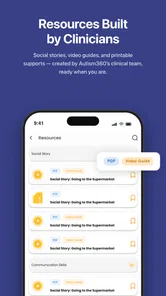
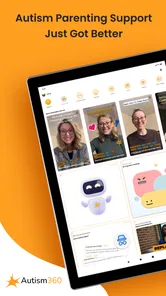
Autism 360: Parenting is a support and guidance app created for parents and caregivers of children on the autism spectrum. It brings together educational resources, practical strategies, developmental guidance, and tools intended to help families understand autism and manage everyday situations. The app may be useful for families at different stages, but it should complement—not replace—personalized advice from qualified healthcare, behavioral, or educational professionals.
What kind of content and tools are available in the app?
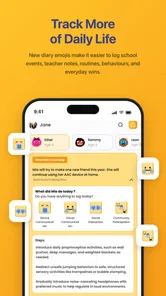
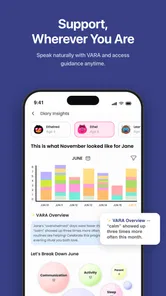
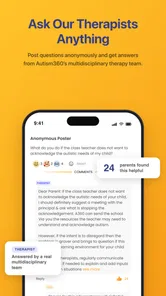
The app generally focuses on practical parenting support, including learning materials, developmental information, behavior-management ideas, communication guidance, and suggestions for handling common daily challenges. Depending on the version and subscription plan, users may also find structured programs, progress-related resources, expert-led content, or activities that can be used at home. Available features can vary by platform, region, and app updates, so checking the current store description is recommended.
Pros
- Offers practical guidance tailored to parents of autistic children.
- Helps organize routines
- goals
- and developmental activities in one place.
- Provides accessible resources for learning about autism and support strategies.
- Can encourage more consistent communication between caregivers and professionals.
- Useful for tracking progress and identifying changing support needs.
Cons
- Some features or resources may require a paid subscription.
- Content may not fully reflect every child’s individual needs or abilities.
- Requires regular input from parents to keep plans and progress information useful.
- Advice should complement
- not replace
- guidance from qualified specialists.
- The amount of information may feel overwhelming for parents new to autism support.











