AuroraMe: Northern Lights App
- 14.00
- 4.4
- Installs
- 10.00K
- Price
- Free

Screenshots
Analysis by Reviewed
Planning a northern-lights trip usually involves checking several sources, guessing whether a clear sky will stay clear, and trying to understand what a space-weather number actually means. AuroraMe: Northern Lights App takes a more focused approach: it puts aurora forecasting, alerts, the Kp index, a three-dimensional map, and a long-range trip-planning view in one weather app. After using it as a planning tool rather than treating it like a magical prediction machine, I found its biggest strength is helping me decide when watching the sky is worth the effort.
The app is made by Adventure Walkers and is available free of charge for everyone, with optional in-app purchases ranging from $4.99 to $54.99 per item. It has reached over ten thousand installs and holds a 4.4 average from roughly 490 ratings, which suggests a positive early reception without making it feel like an established mainstream weather service. It was released on September 9, 2025, and version 1.9.2 works on Android 8.0 and later.
Why the forecast matters more than a simple yes-or-no alert
The central capability here is not merely displaying a colorful aurora graphic. It is connecting several pieces of information that normally require separate searches. The forecast gives me a reason to watch, the Kp index gives the activity a familiar scale, the map adds geographic context, and the trip planner helps me think beyond tonight. That combination changes the question from “Will there be northern lights?” to “Where and when should I make the effort?”
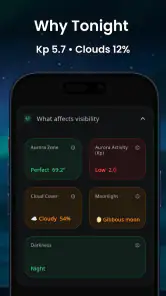
That distinction is important because an aurora forecast is not the same as a guaranteed sighting. Even a promising activity level can be spoiled by clouds, nearby lights, poor visibility, or a location with a weak view of the horizon. I appreciate that the app’s value is strongest when I use it as a decision aid. It can narrow down promising opportunities, but I still need to look at local conditions and physically get somewhere dark enough to see the sky.
The Kp index is particularly useful for newcomers who have heard the term but never known how to apply it. In the app, it works as a quick way to judge how far south auroral activity may become visible. I would not use it alone to choose a viewing site, though. A higher index does not automatically mean a better experience from every location, and a lower reading does not make every observation impossible. The practical lesson is to treat the index as context, not as a promise.
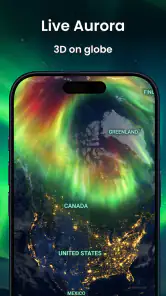
The three-dimensional map is another meaningful part of the experience. A flat forecast can be difficult to interpret when I am trying to understand whether activity is relevant to my position. A spatial view makes the information easier to connect with a real journey: where I am, where I might travel, and whether a different area deserves attention. The map is most helpful before leaving home, when I am comparing possible viewing areas rather than standing outside in the cold.
Turning a forecast into a workable evening plan
In practice, I would begin by checking the forecast before deciding whether an outing is worth arranging. If the outlook looks promising, I would then use the map to think about my position and the direction of the activity. After that, I would check ordinary weather information separately, because aurora strength and cloud cover answer different questions. This simple order prevents one of the most common mistakes: seeing a strong aurora forecast and assuming the sky will automatically be visible.
More From Our News Desk

Weather by Xiaomi Review: Clear at a Glance, Less Clear Up Close

X Under Pressure: Can It Recover When Posting Goes Wrong?

Clash of Clans Is Won Between the Battles

Android Auto Makes the Case for Quieter Car Software

MobiOffice: Transforming Mobile Productivity with Seamless Integration

EA SPORTS FC™ Mobile Soccer: Redefining Mobile Sports Gaming
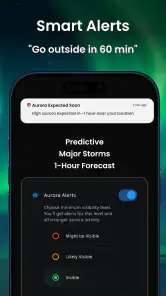
The free alerts are useful for reducing the need to repeatedly open the app. That matters because aurora watching often involves waiting. I do not want to spend an entire evening refreshing a screen, especially when conditions may change while I am commuting or preparing equipment. An alert can act as a prompt to check the details, rather than replacing the details themselves.
My advice is to avoid treating an alert as an instruction to immediately drive somewhere unfamiliar. When one arrives, I would verify the local forecast, choose a safe place with a clear view, and allow enough time for my eyes to adjust. The alert is best used as the first step in a short checklist. That workflow makes the feature more useful and also keeps expectations realistic.
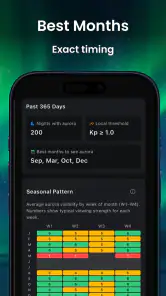
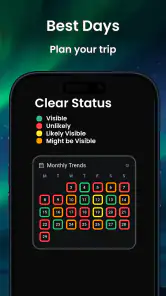
The twenty-seven-day trip planner gives AuroraMe a different role from a standard hourly weather app. A normal forecast is usually excellent for deciding what to wear tomorrow or whether a walk is practical this afternoon. A long-range aurora view is more useful for people choosing between travel dates, arranging accommodation, or deciding whether a planned northern getaway has a reasonable chance of including night-sky viewing.
I would be careful with that longer horizon. It is valuable for comparing windows, but it should not be read with the same confidence as a short-term outlook. Space weather can change, and a month-ahead suggestion is better for planning flexibility than for making a final promise. The best workflow is to use the trip planner to identify a few possible nights, then revisit the forecast closer to the journey and make the final decision later.
A realistic use case: choosing the night to go out
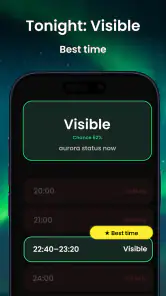
Imagine I am staying in a northern town for a weekend and have one evening available for a drive away from streetlights. Rather than going out automatically after sunset, I could open AuroraMe and check whether the forecast gives me a sensible reason to try. If the activity looks encouraging, I would examine the map, compare it with the places I can safely reach, and set an alert so I do not have to monitor the screen continuously.
Before leaving, I would check cloud conditions, road safety, and whether the chosen location has a broad view. Once there, I would give the sky time instead of judging the experience after a few minutes. This is where the app has a real effect: it turns an uncertain outing into a more deliberate one. It does not create the aurora, but it can reduce wasted travel and help me use a limited evening more intelligently.
For a traveler arranging a holiday, the planner can be even more useful. I might compare several possible dates rather than locking myself into one night. That flexibility is more important than chasing a single impressive-looking forecast. If the trip has other purposes, such as hiking or visiting family, the aurora information becomes an extra planning layer rather than the only reason to travel.
There is also a good use case for casual observers who live in a region where auroras are occasional rather than routine. They may not want to learn specialist space-weather websites or follow technical discussions. The app gives them a more approachable starting point. I can understand the appeal of seeing the Kp index beside a map and forecast instead of trying to translate several unfamiliar charts on different services.
Where the app is genuinely convenient
The main convenience is concentration. I do not have to begin with a search engine, open a separate map, find a specialist index, and then remember to check again later. AuroraMe brings those parts together around one purpose. That focused design is more useful to me than a general weather app that happens to include a small aurora panel.
The app also suits a gradual learning curve. At first, I can simply look for a favorable period and read the basic forecast. Later, I can pay more attention to the Kp index, geographic position, and the difference between long-range planning and immediate conditions. This makes it approachable without forcing every user to understand space weather before getting any value from it.
Another non-obvious strength is that the planner encourages better travel decisions. A person who only checks tonight’s forecast may become disappointed after one unsuccessful attempt and conclude that aurora chasing is random. Looking across a wider window makes it easier to keep plans flexible. I would rather use the app to identify several opportunities than build an entire trip around one dramatic-looking moment.
The map can also change how I choose a viewing location. Instead of asking only whether activity is expected, I can think about orientation and distance from the city. That encourages me to consider the actual viewing environment: open horizons, less artificial light, and a safe route home. The app does not remove those responsibilities, but it makes them part of the planning conversation.
The tradeoffs I noticed while using it
The first tradeoff is precision versus simplicity. AuroraMe is easier to approach than a collection of specialist tools, but a simplified view may not satisfy an experienced aurora observer who wants every technical detail. If I already use advanced space-weather dashboards and know how to interpret them, I may prefer those services for deeper analysis. This app is strongest as an accessible decision layer, not necessarily as a replacement for every expert source.
The second tradeoff involves alerts. Free alerts are convenient, but notifications can encourage passive watching if I assume that receiving one means the display will be spectacular. I would use them as reminders to investigate, then confirm the sky and local conditions myself. That extra step is essential for anyone traveling a long distance or spending money on a special excursion.
The long-range planner has a similar limitation. Its value is strategic, not predictive certainty. I can use it to compare possible travel windows, but I would not cancel a reservation solely because one distant period looks quiet. Weather, location, darkness, and changing space conditions all affect the final experience. The planner helps me manage choices; it cannot remove uncertainty from nature.
The free download also comes with optional purchases, priced from $4.99 to $54.99 per item. I would pay attention to what is included before buying anything, especially if I only want occasional alerts or one trip’s worth of planning. For a regular aurora enthusiast, paid options may make sense if they improve the workflow enough to justify the cost. For a casual user who checks the sky a few times each winter, the free experience may be the sensible place to start.
There is a practical issue with relying on any dedicated aurora app: it cannot replace a normal local weather forecast. Cloud cover, precipitation, wind, temperature, and road conditions remain important, and I would still use the weather service I trust for those details. AuroraMe answers the specialized question of activity and viewing opportunity, while a conventional weather app is usually better for the immediate conditions around my home or destination.
I would also skip it if I am looking for a complete travel organizer, a camera-control tool, or a general daily weather replacement. Its purpose is narrower. That narrowness is a benefit for aurora planning, but it means the app is not the right choice for someone who wants one application to manage every part of an outdoor trip.
Who gets the most from AuroraMe
The best match is a curious beginner, a traveler with flexible dates, or someone who repeatedly hears about auroras but never knows when to go outside. The combination of alerts, the Kp index, the three-dimensional map, and the twenty-seven-day view gives those users a practical path from interest to action. I especially recommend it to people who want guidance without spending time learning a collection of technical websites.
It is also useful for photographers and experienced observers as a planning companion, even if they continue using other sources. The app can provide a quick overview before they move to more detailed checks. The map and longer planning window are helpful when deciding where to position themselves or which part of a trip deserves extra flexibility.
Families and groups may find the planning angle valuable too. An aurora outing is harder when several people need to coordinate transport, clothing, food, and a late return. An alert can help the group decide whether to prepare, while the forecast can stop everyone from making an unnecessary trip on a poor night. The app cannot make the outing comfortable, but it can make the decision more organized.
On the other hand, I would not recommend making it the only source for a serious expedition. If the trip involves expensive travel, remote roads, or a once-in-a-lifetime schedule, I would cross-check the forecast with local weather information and a more detailed space-weather source. That is not a criticism unique to this app; it is the sensible response to forecasting a natural event that depends on several changing conditions.
My final view after using it as a planning companion
AuroraMe succeeds because it focuses on the part of northern-lights watching that often causes the most frustration: deciding whether a possible sighting deserves time, travel, and patience. The Kp index gives the forecast some useful context, the map makes the information easier to relate to a real place, alerts reduce constant checking, and the long-range planner supports flexible travel decisions.
I like it most when I use it as the center of a simple workflow: compare possible dates, watch for a promising update, inspect the map, check ordinary weather, and choose a safe dark location. That approach makes the app more reliable in everyday use than simply opening it and waiting for a dramatic prediction. The most important habit is to treat its forecast as a reason to prepare, not a guarantee that the sky will perform.
With a 4.4 average and more than ten thousand installs, it has already found an audience, while its Everyone rating makes it approachable for general users. The free entry point is welcome, although the optional purchases mean I would review the available upgrades carefully before committing. Adventure Walkers has built something more focused than a standard weather app, and that focus is exactly why it can be useful.
My recommendation is straightforward: install it if you want an accessible way to plan aurora outings or compare travel windows. Keep a regular weather app beside it, stay realistic about long-range forecasts, and use alerts as prompts rather than promises. If you follow that approach, AuroraMe becomes a practical companion for turning a vague hope of seeing the northern lights into a better-timed, better-prepared attempt.
AuroraMe: Northern Lights App Frequently Asked Questions
Who is AuroraMe: Northern Lights App best suited for?
AuroraMe is aimed at people who want to follow aurora activity, whether they are planning a dedicated Northern Lights trip or simply checking conditions near a possible viewing spot. Its weather-app focus and combination of forecasts, alerts, a Kp index, a 3D map, and trip-planning features may appeal to travelers and sky watchers. Forecasts can help with decisions, but they cannot guarantee a sighting.
What devices and operating systems can run AuroraMe?
AuroraMe is a mobile app for Android and iOS, so you can look for it in the app store used by your device. The Android version requires Android 8.0 or later. Before downloading, check that your phone or tablet meets that requirement and has enough available storage. The app is rated Everyone, making its content suitable for a general audience.
What is AuroraMe: Northern Lights App used for?
AuroraMe: Northern Lights App is designed to help users follow and plan potential Northern Lights sightings. It typically combines aurora forecasts, solar activity information, location-based visibility data, weather conditions, and notifications in one place. The app can be useful for travelers, photographers, and anyone hoping to see the aurora, although forecasts indicate probability rather than guaranteeing that lights will appear.
How accurate are AuroraMe’s Northern Lights predictions?
Aurora forecasts are helpful but cannot be completely precise. AuroraMe relies on changing space-weather conditions, cloud coverage, darkness levels, and your location to estimate viewing opportunities. Solar activity can change quickly, and local weather may prevent visibility even when aurora activity is strong. For the best results, use the forecast as guidance and check it again shortly before going outside.
Does AuroraMe require my location, internet access, or notifications?
The app may request location access to provide forecasts tailored to your current area or a selected viewing destination. Internet access is generally needed to refresh space-weather, cloud, and aurora data. Notifications can alert you when conditions become favorable, but they are usually optional. Before accepting permissions, review the app’s settings and enable only the features you actually intend to use.
Pros
- Clear aurora forecasts with useful visibility and cloud-cover details.
- Location-based alerts help you know when viewing conditions may improve.
- Interactive maps make it easier to explore aurora activity in nearby areas.
- Helpful educational content explains the science behind the northern lights.
- Clean interface is easy to navigate for both beginners and enthusiasts.
Cons
- Accurate predictions depend heavily on your location and local weather data.
- Some advanced forecasting features may require a paid subscription.
- Aurora sightings cannot be guaranteed
- even when activity levels are high.
- Frequent notifications may become distracting without careful customization.
- The app is less useful in regions with little chance of aurora visibility.
- Category
- Weather
- Version
- 1.9.2











