Ask Me Anything - AI Chatbot
- 438.00
- 3.8
- Installs
- 5.00M
- Price
- Free

Screenshots

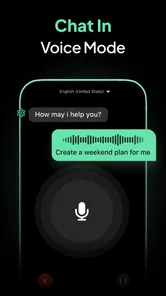
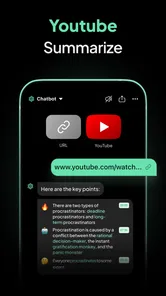
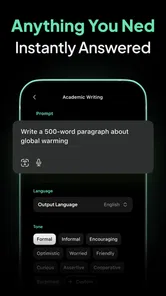
Analysis by Reviewed
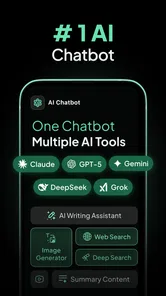
I started using Ask Me Anything - AI Chatbot as a quick helper for the small questions that interrupt an ordinary day. It is a free productivity app from EVOLLY HK, built around conversational AI rather than a traditional notes, calendar, or search interface. The idea is simple: type a request in everyday language and receive a useful starting point without opening several different tools.
That simplicity is its strongest appeal, but it also requires sensible boundaries. I found it most useful when I treated the chatbot as a flexible assistant for drafting, explaining, organizing, and brainstorming—not as an authority that should make important decisions for me. If you share a phone or tablet at home, that distinction becomes even more important because different people may use the same conversation for completely different purposes.
How it fits into a shared household routine
A realistic example is a busy evening when one person needs help turning a rough shopping idea into a checklist, another wants a confusing school topic explained in simpler language, and someone else needs a polite message written quickly. Instead of switching between a writing app, a search engine, and a separate question-and-answer service, each person can open the chat and describe what they need.
I like this kind of shared-device use because the app does not force every task into a rigid template. A request can be short, such as asking for a packing list, or more detailed, such as asking for a three-step explanation of a subject. The quality of the response generally improves when the request includes the intended audience, tone, length, and constraints. “Write a message” is vague; “write a friendly two-sentence message to a neighbor about collecting a parcel” gives the assistant a much clearer job.
There is a practical catch: a shared conversation can quickly become confusing. A child’s homework question, an adult’s work draft, and a personal planning request should not be treated as one continuous thread. Before starting a new task, I recommend checking what is already visible in the conversation and opening a fresh chat when the subject changes. That small habit reduces accidental carry-over, where the assistant uses an earlier context that no longer applies.
The best household workflow is one person, one purpose, and one clearly worded request at a time. This is not a substitute for separate user profiles or a family management system. It is simply a convenient general-purpose assistant that can be passed between people if everyone understands that the conversation itself may contain context from the previous user.
What I would prepare before handing it to someone else
On a shared device, I would avoid leaving sensitive drafts, private questions, addresses, financial details, or personal documents in an open conversation. Even when the request seems harmless, the response may repeat information that the next person can see. I would also avoid asking it to handle passwords, identity numbers, medical records, or confidential work material.
More From Our News Desk

Weather by Xiaomi Review: Clear at a Glance, Less Clear Up Close

X Under Pressure: Can It Recover When Posting Goes Wrong?

Clash of Clans Is Won Between the Battles

Android Auto Makes the Case for Quieter Car Software

MobiOffice: Transforming Mobile Productivity with Seamless Integration

EA SPORTS FC™ Mobile Soccer: Redefining Mobile Sports Gaming
This is not a criticism unique to this app. It is a normal rule for conversational AI, but it matters more when several people use the same screen. The app feels informal, so it is easy to forget that a casual chat can still contain information worth protecting.
Setup, boundaries, and the way I use its answers
Ask Me Anything - AI Chatbot is available at no charge, which makes it easy to try without committing to a subscription at the beginning. The app is rated for Everyone, runs on Android starting with version 6.0, and its current version is 2.0.2. EVOLLY HK presents it as a pocket assistant powered by current AI models, and the experience is clearly centered on asking rather than navigating through a large collection of separate productivity tools.
The free entry point is helpful for occasional use, but the app also includes in-app purchases ranging from $2.99 to $114.99 per item. I would not assume that every useful task requires payment, but I would check the purchase details carefully before relying on the app for frequent household use. The wide range means the cost can be very different depending on what is offered in the version available on your device.
My first setup step would be deciding what the app is allowed to do in the household. For me, that means using it for drafts, explanations, lists, idea generation, and rewriting. I would not use it as the final source for legal, medical, financial, emergency, or safety-critical advice. A fluent answer can sound confident even when it needs checking, so the pleasant conversational style should never be confused with guaranteed accuracy.
One useful technique is to ask for uncertainty to be made visible. Instead of requesting a direct answer to a complicated question, I might ask it to separate established points from assumptions, list what should be verified, or explain the reasoning in plain language. This does not make the response automatically correct, but it gives me a better basis for reviewing it.
Another technique is to use a two-pass workflow. First, I ask for a rough result. Then I ask the assistant to shorten it, make it warmer, identify weak points, or adapt it for a particular person. This works especially well for household coordination because the first answer often provides structure, while the second pass makes the wording usable in real life.
Where it saves time—and where it does not
For writing, the app is more convenient than starting with a blank page. I can provide a few facts and ask for a message, a checklist, or a simple outline. I still read the result before sending it because the assistant may choose a tone that feels too formal, add an assumption, or miss a detail that was obvious to me but absent from the prompt.
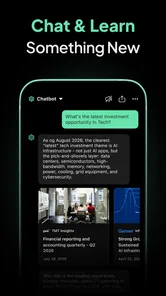
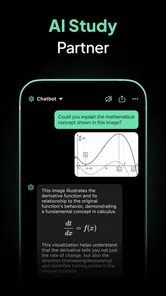
For learning, I found the conversational format more approachable than searching through several pages of results. A user can ask for a simpler explanation, a comparison, or an example after the first response. That follow-up ability is valuable for a child or adult who feels uncomfortable asking a teacher or colleague to repeat something. Still, it should support learning rather than replace the original textbook, teacher, or reliable reference.
For planning, the app can turn an unstructured thought into steps. I might ask it to arrange errands by priority or convert a weekend idea into a checklist. The result is best treated as a draft because it does not know the household’s real travel time, availability, preferences, or obligations unless I explain them. The more personal the plan, the more carefully I need to supply the relevant context.
Compared with a conventional search engine, this app is better at shaping information into a requested format and continuing a conversation. Search is usually better when I need a specific source, current local information, official wording, or several independent references. Compared with a notes app, the chatbot is better at transforming material but worse at being a dependable long-term archive. Compared with a dedicated family calendar or task manager, it is more flexible but less suitable for shared ownership, reminders, and visible responsibility.
Coordination without pretending it is a family organizer
For household coordination, I would use the chatbot at the beginning of a task, not as the final place where the task lives. It can help create a grocery checklist, draft a message about a schedule change, or turn a messy list into categories. After that, I would move the finished information into the household’s normal calendar, notes system, or messaging group.
This separation is important. A conversational answer can be helpful in the moment, but it is not automatically a shared source of truth. If one person asks for a plan and another person later needs to know what was agreed, a dedicated shared tool remains clearer. The chatbot can prepare the wording; the household still needs a reliable place to store the decision.
A particularly useful prompt pattern is to identify the audience and the action separately. For example, I might ask for a short message to two household members, state who needs to do what, and request a neutral tone. This reduces the chance of receiving a vague paragraph that sounds pleasant but does not make the next step clear.
I would also avoid putting several unrelated household decisions into one request. Asking for a meal plan, a school explanation, and a repair message together may produce an answer that is difficult to use. Separate prompts make it easier to review, copy, and pass each result to the right person.
Age, trust, and shared-device expectations
The Everyone age rating makes the app approachable for a broad audience, but an age label is not the same as supervision or judgment. Younger users may accept a confident answer too quickly, while older users may assume that a polished response has been checked. In both cases, a simple household rule helps: use the chatbot for assistance, then verify anything important.
For children, I would encourage prompts that ask for explanations, examples, and practice questions rather than finished homework answers. That approach makes the app a study companion instead of a shortcut. I would also ask the child to show the response when the topic involves health, safety, strangers, money, or anything emotionally serious.
For older relatives who are less comfortable with technology, the plain-language interaction can be less intimidating than a complex productivity suite. They can ask for a message to be rewritten, a list to be organized, or a technical term to be explained. The main teaching point is that the app is generating assistance, not confirming truth. A family member can help by showing how to ask for a simpler answer and how to check the result elsewhere.
Trust also includes emotional boundaries. A chatbot may respond in a warm and reassuring style, but it is not a family member, professional counselor, or emergency service. If a conversation involves immediate danger or serious distress, the right response is to contact an appropriate person or service rather than continuing to refine prompts.
Privacy habits I consider essential
Because the app is designed for open-ended questions, I would make privacy part of the setup conversation. Everyone using the device should know not to paste private correspondence, confidential documents, account credentials, or identifying information unless they fully understand the consequences and have a legitimate reason to do so.
A safer approach is to replace names with roles, remove unnecessary details, and summarize sensitive situations rather than copying the original text. For example, a user can ask for help making a message more polite without including a full address or personal history. This usually gives the assistant enough context while limiting exposure.
I would also review generated text before sharing it with another household member. The assistant can accidentally sound more certain, personal, or demanding than intended. A quick human edit is especially important when the message concerns chores, money, appointments, or disagreements, where tone can create more friction than the original problem.
My household verdict after using it as a general assistant
Ask Me Anything - AI Chatbot has attracted more than 5 million installs and holds an average rating of 3.8 from around 22 thousand ratings, so it is clearly reaching a substantial audience while leaving room for mixed experiences. I can understand both sides. The app is immediately approachable and useful for turning vague requests into drafts or explanations, but the quality depends heavily on the prompt and on the user’s willingness to check the answer.
I would recommend it to a household that wants a flexible helper for everyday writing, learning support, brainstorming, and rough planning. It is particularly handy when someone is stuck on how to begin. A short request can produce a structure that the user then edits, verifies, and moves into the proper app for storage or coordination.
I would skip it as the main household system if your priority is shared calendars, assigned tasks, reminders, document organization, or clear account separation. A dedicated productivity service is a better choice for those jobs because it is designed to preserve commitments rather than generate suggestions. I would also choose a standard search tool when source links, official information, or current local details matter more than conversational convenience.
The app’s free availability makes experimentation easy, but households should discuss whether optional purchases are worthwhile before several people begin using it regularly. I would start with a few specific workflows, such as drafting messages or organizing lists, and judge whether the results save enough time to justify any later spending. That is more sensible than paying simply because the assistant feels impressive during a first conversation.
My final view is positive but measured. This is a useful pocket companion, not a household manager and not a replacement for human judgment. Used with separate conversations, careful prompts, privacy awareness, and a habit of verification, it can reduce everyday friction for adults, students, and older family members. Used casually with sensitive information or treated as automatically correct, it can create confusion. Its real value comes from giving people a better starting point while leaving the final decision, check, and responsibility with the person using it.
Ask Me Anything - AI Chatbot Frequently Asked Questions
Can I try Ask Me Anything - AI Chatbot before paying?
Ask Me Anything - AI Chatbot is free to download, so you can explore its basic experience before deciding whether to make a purchase. Some features or access may require an in-app purchase, so check the terms shown in the app before paying. This is a practical way to see whether its conversational assistant suits your needs before spending money.
Who develops Ask Me Anything - AI Chatbot, and what kind of app is it?
Ask Me Anything - AI Chatbot is a productivity app developed by EVOLLY HK. It is designed to put a virtual AI assistant in your pocket, with a conversational format for asking questions and working through everyday tasks. If you are looking for a general-purpose chatbot rather than a specialized tool for one profession, its broad question-and-answer approach may be a useful fit.
What is Ask Me Anything - AI Chatbot and what can I use it for?
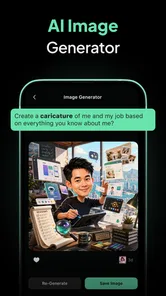
Ask Me Anything - AI Chatbot is an artificial intelligence assistant designed to respond to questions and help with everyday tasks through a conversational interface. You can use it to brainstorm ideas, summarize or rewrite text, explain difficult topics, draft messages, generate creative content, and receive general guidance. Its usefulness depends on the quality of your prompt and the information provided by the app’s AI service.
Does Ask Me Anything - AI Chatbot provide accurate and reliable answers?
The chatbot can produce helpful, well-written responses, but its answers should not be treated as automatically correct. AI systems may misunderstand questions, provide outdated information, or confidently generate inaccurate details. Always verify important facts using trustworthy sources, especially for medical, legal, financial, academic, or safety-related topics. The app is best used as an assistant for ideas and explanations rather than as a replacement for professional advice.
Is Ask Me Anything - AI Chatbot free to download and use?
The app is free to download, though it offers in-app purchases priced from $2.99 to $114.99 per item. That means the initial download does not necessarily include every feature or unlimited access. Check the purchase details and terms shown in the app before paying, particularly if you plan to use premium features regularly. Consider whether the free experience meets your needs before making a purchase.
Pros
- Provides quick answers across a wide range of everyday topics.
- Simple chat interface makes it easy for first-time users.
- Useful for brainstorming ideas
- drafts
- and creative writing.
- Can help summarize or rephrase text in seconds.
- Available whenever you need on a mobile device.
Cons
- AI responses may occasionally be inaccurate or outdated.
- Some features may require a subscription or in-app purchases.
- Long or complex conversations can lose important context.
- Privacy policies should be checked before sharing sensitive information.
- Answer quality depends heavily on how clearly prompts are written.











