ArtRage Vitae Mobile Painting
- 50.00
- 3.8
- Installs
- 10.00K
- Price
- $4.99

Screenshots
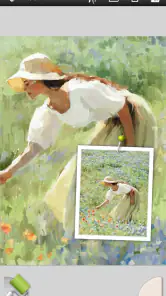
Analysis by Reviewed
I find mobile painting apps most useful when they let me spend more time making marks and less time wrestling with menus. ArtRage Vitae Mobile Painting is aimed at that hands-on kind of work: it gives digital artists a space to sketch and paint while leaning into the feel of physical materials. It’s an Art & Design app from Ambient Design Ltd., with a 3.8 average from around 280 ratings and over 10,000 installs. The one-time price is $4.99, and its Everyone age rating makes it accessible to a broad audience. I’d consider it for studies, visual notes, and finished paintings, but its particular appeal is the tactile approach rather than an all-purpose design workflow.
Why a paint-first mobile workflow appeals
My main reason to choose a painting app on a phone or tablet is that I can work wherever an idea appears, without having to turn a quick observation into a full desktop session. This app suits that kind of portable practice because its character is built around the sensation of applying paint, not simply drawing clean outlines. The difference matters: I’m more likely to use it for a color study, a small still life, or a loose landscape than for a poster that needs carefully aligned text and shapes.
A useful everyday test is a short break with a subject already in front of me: a mug beside a bright window, for example. I can begin by noting the large silhouette and the direction of the light, then add a few broad areas of color. Rather than trying to finish the whole image before the break ends, I can save the rough idea and return when I have time to refine the shadow edges. That kind of staged session makes a mobile canvas feel practical rather than cramped.
Unleashing Creativity with a Swipe
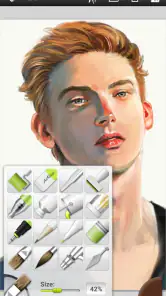
When I first opened ArtRage Vitae Mobile Painting, I was immediately greeted with a sleek, user-friendly interface. The app boasts an impressive array of tools that mimic traditional art supplies, from oil paints that blend seamlessly on the canvas to delicate watercolors that flow just right. It’s like having an art studio in your pocket, though I’d think of it as a focused painting space rather than a replacement for every tool on a desktop.
A practical painting routine
For a quick session, I’d start with a loose sketch, block in the broad color shapes, then save the smaller details for the end. That order suits a paint-centered app: it keeps early decisions flexible and helps me avoid polishing a tiny area before the whole composition works. A useful habit is to pause after the first color pass and check the image at a glance. If the main shapes read clearly then, the final texture is more likely to support the picture instead of hiding a weak layout.
Latest News
This can fit an ordinary day, too. I might sketch a cup and window light during a break, save the rough idea, and return later to develop the shadows and surface marks. That is a more natural use than expecting to finish a complex illustration in one sitting on a phone. If I’m working with a stylus, I can make more deliberate strokes; if I’m using a finger, I’d keep the drawing looser and choose broader marks rather than trying to imitate precise pen work.
For someone building a regular habit, I’d also keep a brief visual record of what is working in each study. That could be as simple as remembering which brush gave the soft edge I wanted or which colors blended cleanly. Repeating a small setup across several sketches makes it easier to compare the results and learn from them, instead of changing everything between sessions and not knowing why one painting feels more successful.
Features That Stand Out
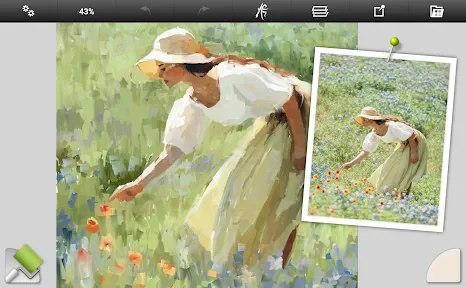
One of the standout features of ArtRage Vitae Mobile Painting is its realistic color mixing. You can blend colors as you would in real life, which gives your digital paintings a depth and authenticity that’s rare in mobile apps. The texture of the canvas and the behavior of the paint are so lifelike, it’s easy to forget you’re working on a digital platform. I’d use that quality deliberately: mixing on the canvas can create softer transitions, while keeping neighboring colors distinct is better when I want a crisp, graphic result.
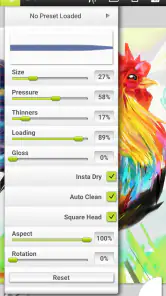
Another feature that I found particularly useful was the ability to customize brushes. Whether you want a thick, textured brushstroke or a thin, precise line, this app has got you covered. The level of customization available is impressive, allowing for a truly personalized art-making experience. I’d settle on a small set of brush choices for a piece rather than changing settings constantly; a repeatable palette of marks can make a study feel cohesive and keeps the session moving.
Settings are worth checking before a longer painting, especially if the canvas or brush behavior feels different from what you expected. I’d test a few strokes in an inconspicuous area before committing to a detailed passage, then adjust the brush to suit the job: broad coverage for blocking shapes, more controlled strokes for edges. This small check is useful because realistic paint effects are a strength, but they can also make a mark harder to treat like a clean, uniform digital line.
When I want more control over a brush, I’d change one setting at a time and make a short test mark before continuing. That makes it easier to tell whether the new behavior actually helps, and it avoids losing the feel of a brush that was already working. I’d also decide on the intended role of each tool before a session: one for broad passages, another for softer transitions, and a more controlled option for the final accents. This is a simple way to make customization serve the painting rather than become a project of its own.
The same principle applies to color. If I’m after a quiet, cohesive study, I’d limit the colors I introduce early and let mixing create intermediate tones. If the image starts looking muddy, I’d stop blending and place a cleaner neighboring color instead. That choice is a practical trade-off: soft transitions can make a surface feel natural, but too much mixing can reduce the contrast that gives a small mobile painting its clarity.
Usability, layers, and pace
Using ArtRage Vitae is a breeze. The app is smooth, with minimal lag even when working on complex pieces. The intuitive layout means that even those new to digital art can find their way around without a steep learning curve. Plus, it supports stylus input, which is a huge plus for those who prefer a more traditional drawing experience. Its current version is 1.1.5 and it runs on Android 4.4 or later, so it can suit some older devices as well as newer ones.
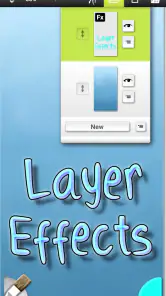
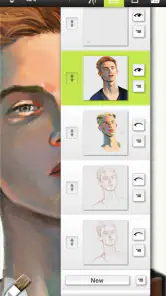
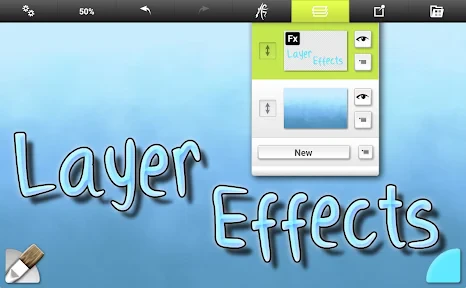
One thing I particularly appreciated was the support for layers and blending modes. This feature allows for intricate compositions and effects, giving you control over every aspect of your artwork. It’s a feature that you often find in desktop software, so having it in a mobile app is fantastic. A practical way to use layers is to keep a sketch separate from the painted pass; that lets me develop color without having to preserve every construction line. I’d still keep the layer plan simple on a small screen, where too much separation can slow down a casual study.
Layers can also help when I want to try a change without disturbing the passage underneath. I’d use that flexibility sparingly: a separate sketch and paint pass are easy to understand, while splitting every small detail into its own layer can make a quick study harder to manage. For a painting that is still uncertain, separation gives me room to revise. For a loose exercise, painting more directly can be faster and keeps the focus on observation instead of organization.
Compared with general drawing apps, the appeal here is the emphasis on paint-like handling and the image-making process. A vector or layout-focused tool is a better fit for logos, precise interface assets, or artwork that must stay sharply editable at any size. A broad illustration app may offer a more familiar choice for users who prioritize clean line art and a large collection of digital effects. I’d choose Vitae when blending, texture, and the character of a brushstroke matter more than a perfectly sterile finish.
That comparison also helps answer whether it is a good first digital art app. If a beginner wants to explore color and brush marks without aiming immediately for polished line art, its material-focused approach can be inviting. Someone learning comics, lettering, or technical diagramming may be better served by an app designed around crisp strokes and exact placement. The best choice depends less on skill level than on what the person wants to make most often.
On a compact screen, I’d work in passes rather than trying to judge every detail at full focus. First I’d check the overall composition, then zoom in only for places where an edge or mark needs attention, and finally zoom back out to see whether those details still belong. This habit is particularly valuable for textured painting: a convincing close-up can become distracting when it dominates the whole image, so the final glance at the complete canvas is a useful quality check.
Where the trade-offs show
The tactile approach is not automatically right for every task. If I need exact geometric shapes, typography, or a highly repeatable set of graphic elements, I’d reach for a design-focused app instead. Likewise, anyone who depends on a keyboard-heavy desktop workflow may find working on a mobile canvas slower. The app is best judged as a portable painting tool: its natural-media character is the reason to use it, and also the reason it may feel less direct for crisp, production-oriented graphics.
It is also worth thinking about the size and ambition of a project before settling in. A quick color note or a small painting is a natural fit for a mobile session; a complex piece that needs many precise revisions may be more comfortable on a larger screen with a desktop workflow. The phone format encourages short, deliberate passes, but it can make prolonged detail work tiring. I’d use the app to capture and develop an idea, then choose a larger setup if the project grows beyond what feels comfortable to manage on mobile.
For a beginner, I’d start with one small study rather than trying to learn every brush option at once. For an experienced painter, the more rewarding habit is to build a short, consistent workflow: rough sketch, broad color, selective blending, then details. That makes the app’s customization useful without turning each session into brush testing. It also gives a fair sense of whether its physical-media feel matches your own style before you commit to a larger piece.
One question people often have is whether they need a stylus to get value from it. I’d say a stylus is helpful when I want controlled lines or careful edge work, but it isn’t a requirement for loose color studies. Finger painting can be enjoyable for larger marks and quick thumbnails; it simply asks me to work at a broader scale and accept less precision. If the main goal is meticulous line art, a stylus-centered drawing app may feel more comfortable.
Another practical question is whether the purchase makes sense for occasional use. At $4.99, I’d find it easier to justify if I expect to return to the painting tools regularly, even for short sessions. If I only need to jot down an occasional clean sketch, the tactile features may not matter enough to make this the right choice. The 3.8 average from around 280 ratings suggests a mixed but established response, so I’d treat a small personal study as a better test than assuming its style will suit everyone.
Parents may also wonder whether it is appropriate for younger artists. Its Everyone age rating makes it broadly accessible, and the basic appeal of painting is easy to understand, but I’d still guide a child through choosing tools and keeping a simple workflow at first. A modest subject with a few large shapes is less frustrating than an ambitious, highly detailed scene. That approach lets the child explore color and texture without turning the session into a hunt through options.
Final Thoughts: A Must-Have for Artists on the Move
In conclusion, ArtRage Vitae Mobile Painting is a stellar example of how far mobile art applications have come. Its realistic tools, user-friendly interface, and robust feature set make it an excellent choice for anyone looking to create art on the go. Whether you’re sketching a quick idea or working on a detailed painting, this app has the capability to handle a range of creative sessions. I’d recommend it most to people who enjoy the feel of painting and want that process close at hand, rather than to someone shopping for a universal design suite.
For anyone passionate about art, this app doesn’t just offer a platform to create—it encourages a more considered, material-led way of working. The $4.99 price makes sense if you expect to return to those paint-like tools, while someone who only needs occasional clean sketches may be happier with a simpler option. If you’re curious, try a small still-life or color study first and see whether the blending and brush feel make you want to keep going. That is the clearest test of whether Vitae belongs in your everyday creative routine.
My strongest recommendation is to judge it by a complete small exercise rather than by the number of tools you can explore. Pick a familiar subject, decide which few brushes will carry the image, and stop to assess the overall read before adding detail. If the process feels enjoyable and the marks help you think through color, the app is doing its most important job. If you keep wishing for exact shapes, more formal layout controls, or a faster desktop-style workflow, that is a useful sign to choose a different kind of creative tool.
ArtRage Vitae Mobile Painting Frequently Asked Questions
How much does ArtRage Vitae Mobile Painting cost, and what is its age rating?
ArtRage Vitae Mobile Painting is a paid Art & Design app, priced at $4.99. Its content rating is Everyone, making it suitable for a broad audience. If you are deciding whether to download it, consider whether its painting and sketching tools fit the way you like to create; the app is aimed at making traditional-looking art on a mobile canvas.
What is ArtRage Vitae Mobile Painting?
ArtRage Vitae Mobile Painting is an app designed for artists who want to create realistic paintings and sketches on their mobile devices. It offers a wide range of tools, such as brushes, pencils, and other artistic instruments, mimicking real-life techniques and textures. The app’s focus is on painting with oils and sketching with natural tools on a virtual canvas, allowing users to create wherever they go.
Is ArtRage Vitae Mobile Painting suitable for beginners?
Yes, ArtRage Vitae Mobile Painting is suitable for beginners as well as experienced artists. It comes with a user-friendly interface that simplifies the learning curve. For beginners, there are various tutorials and guides available within the app to help understand the features and tools, enabling them to start creating art right away.
What devices are compatible with ArtRage Vitae Mobile Painting?
ArtRage Vitae Mobile Painting is compatible with both Android and iOS devices. It requires a relatively recent operating system version to ensure optimal performance. Users should check the app's compatibility with their specific device model and OS version before downloading to avoid any issues. On Android, the listed minimum operating-system requirement is version 4.4.
Does ArtRage Vitae Mobile Painting support stylus input?
Yes, ArtRage Vitae Mobile Painting supports stylus input, making it ideal for professional artists who prefer using a stylus for precision. The app is optimized for various stylus brands, providing a natural drawing experience. This feature enhances the app's versatility and caters to users seeking detailed and controlled artistry.
Pros
- Intuitive and user-friendly interface.
- Wide range of realistic brushes.
- Advanced layer blending options.
- Customizable canvas textures.
- Offline use without internet.
Cons
- Limited export file formats.
- Occasional lag on older devices.
- No built-in tutorial for beginners.
- Premium features require payment.
- Lacks some desktop features.

- Category
- Art & Design
- Version
- 1.1.5











