Artful Agenda - Plan in Style!
- 2.27K
- 4.0
- Installs
- 500.00K
- Price
- Free

Screenshots
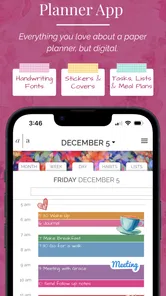
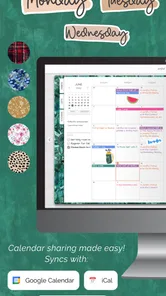
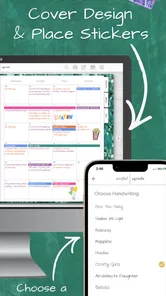
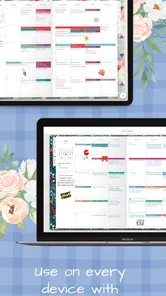
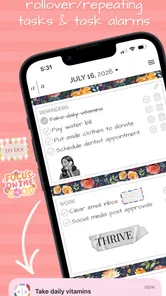
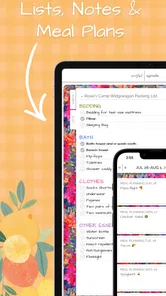
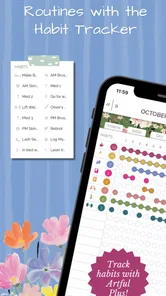
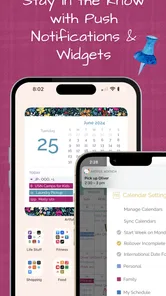
Analysis by Reviewed
I have a recurring planning problem: a digital calendar is excellent at remembering appointments, while a paper planner is much better at showing the shape of my day. I often want both, but switching between a calendar app, a task list, and a notebook creates its own work. Artful Agenda - Plan in Style! approaches that gap by giving online planning the visual character of a paper agenda. After spending time with it, I found that its main value is not simply making schedules look attractive. It is reducing the small amount of mental sorting needed before I can decide what to do next.
This is a free productivity app from Artful LLC, aimed at people who think spatially and enjoy writing plans in a more personal format. It is available to users rated Everyone, and it runs on Android devices using at least Android 6.0. The app has reached over 500 thousand installs, with an average rating of 4.0 from around 4.8 thousand ratings and about 2.3 thousand written reviews. Those figures suggest a useful, established tool rather than an experimental notebook, although they also set a reasonable expectation: this is a focused planner, not a complete replacement for every task-management or calendar service.
Why this kind of planner is useful in everyday life
The recurring problem Artful Agenda addresses is the difference between events and intentions. A conventional calendar tells me that I have a meeting at a particular time, but it does not naturally show the errands I want to fit around it, the personal priorities I want to remember, or the notes that make the day feel manageable. A task app has the opposite weakness: it can hold many items, but a long list does not always help me understand how those items fit into the day.
The paper-planner style creates a more human overview. I can look at a day and think in terms of appointments, tasks, notes, and available space rather than opening several separate screens. That change is especially helpful when my schedule is not packed with fixed events but still contains many small obligations. Planning a grocery trip, a call, a household job, and an hour of focused work feels less abstract when everything sits inside the same daily view.
I also like that the app does not force productivity into a severe, business-only design. The visual approach makes planning feel closer to writing in a notebook, which can make the habit easier to maintain. That matters because the best planner is usually the one I will open consistently. A sophisticated system with too much setup is less useful than a pleasant one that becomes part of my morning routine.
There is a trade-off, though. A paper-like interface can feel more expressive than a standard calendar, but it may not be the fastest choice for someone who only wants to enter an appointment and receive a reminder. If your entire planning style is based on short lists, automated scheduling, or strict project management, this app may feel decorative where another tool feels direct.
Getting to a useful first setup
My advice is to avoid trying to recreate your entire life in the app on the first day. Start with the next few days and add only the commitments that genuinely affect how you use your time. The point of the first setup is to see whether the planner’s layout helps you make decisions, not to create a perfect archive of every task you have ever written down.
More From Our News Desk

Weather by Xiaomi Review: Clear at a Glance, Less Clear Up Close

X Under Pressure: Can It Recover When Posting Goes Wrong?

Clash of Clans Is Won Between the Battles

Android Auto Makes the Case for Quieter Car Software

MobiOffice: Transforming Mobile Productivity with Seamless Integration

EA SPORTS FC™ Mobile Soccer: Redefining Mobile Sports Gaming
I would begin with fixed events, then add flexible tasks around them. This order matters. If I enter every task first, the page can look busy before I know how much time is actually available. Once the immovable parts of the day are visible, I can judge whether a task belongs today, later in the week, or nowhere near the current schedule.
A useful habit is to keep task wording short and action-based. “Prepare documents for appointment” is easier to scan than a paragraph of background information. Longer context can stay in notes, while the visible plan remains readable. This is one of the quiet strengths of a paper-style layout: it encourages me to edit my own commitments instead of treating the planner as a storage box for every thought.
The app is also a better fit when I decide on a planning rhythm. I found it more useful when I checked the day at a consistent time, then made a small adjustment later rather than constantly rewriting the schedule. A planner should reduce friction, not become another activity that consumes the time it is meant to organize.
Because the current version is 1.27.4, the app feels like a maintained product rather than a one-off concept. Still, I would treat any digital planner as a working surface, not the only place where important information exists. For critical appointments or deadlines, I prefer keeping the underlying calendar entry or another dependable reminder as well. The visual plan helps me act; it should not be the sole safeguard against forgetting something important.
A realistic morning and workday
Imagine a weekday with a school drop-off, a remote meeting, a pharmacy stop, and a report that needs attention before dinner. In a basic calendar, the meeting and perhaps the drop-off are visible, while the pharmacy and report may live elsewhere. In Artful Agenda, I can view the fixed events alongside the practical tasks that give the day its shape. That makes the gap between meetings feel real instead of appearing as empty time.
My preferred workflow in that situation is to place the report in the most realistic work period, then attach the pharmacy stop to an existing route rather than pretending it is a separate block of free time. This is a small planning decision, but it is exactly where a combined agenda becomes more useful than a list. The app does not make the errand disappear; it helps me notice its cost before the day is underway.
At lunchtime, I can review what has moved and decide whether the report still belongs in the afternoon. This is where I think the paper-planner presentation has a practical advantage over a task list. A list often makes unfinished work look equally urgent. A dated page encourages a more honest question: is this still appropriate for today, or am I carrying it forward without thinking?
For students, the same approach can help separate classes from study intentions. For families, it can provide a shared mental picture of appointments and household jobs, even when each person ultimately manages their own responsibilities. For freelancers, it can place client calls beside the less visible work of invoicing, preparation, and follow-up. These are not dramatic automation features; they are improvements in seeing the whole day.
Where the paper feel saves effort
The biggest friction removed is the need to translate between different planning formats. When events are in a calendar, tasks are in a checklist, and personal notes are in a notebook, I have to remember to reconcile them. That reconciliation is easy to postpone, and once it is postponed, the system stops reflecting reality. Artful Agenda gives those parts a common visual home.
That does not mean every entry should be moved into it. I would still keep a dedicated task manager for a large project with dependencies, recurring work, or detailed status tracking. I would also keep a conventional calendar as the source of truth for invitations and time-sensitive events when that is how my work is organized. The app works best as the layer where I interpret commitments, not necessarily as the deepest database for them.
Another useful insight is that visual appeal can have a functional role. A planner that feels pleasant is easier to revisit, and a planner that is revisited is more likely to contain current information. I would not choose an app solely because it looks like stationery, but in this case the style supports the behavior: pause, look across the day, and make a sensible adjustment.
There is also a hidden discipline in the format. A paper page has limited attention, even when the digital canvas can hold more information. When I treat the daily view as a page rather than a dumping ground, I naturally distinguish between what must happen, what would be helpful, and what can wait. That distinction is more valuable than filling every available space.
Handling busy weeks without overplanning
For a busy week, I would use the weekly view as a planning conversation with myself rather than a detailed timetable. First I identify the fixed commitments, then I choose a small number of priorities for each day. If I assign every minute, an unexpected call or delayed errand can make the entire plan feel broken. Leaving breathing room is not wasted space; it is what makes the plan resilient.
One practical technique is to move unfinished tasks deliberately instead of copying them automatically. Before carrying something forward, I ask whether it is still relevant, whether it needs a smaller next step, or whether it should be removed. This prevents the familiar planner problem where the same task appears repeatedly until it becomes visual noise.
I also found it helpful to separate planning from reflection. During the morning, I want quick decisions. At the end of the day, I can look at what actually happened and adjust tomorrow. Mixing long notes into the active schedule makes scanning harder, while keeping every thought out of the planner makes it feel sterile. The app’s paper-inspired approach works best when I give each kind of information a clear purpose.
Someone deciding whether to use it will probably wonder if it is genuinely free. The app itself is free to install and use as a product, but it includes in-app purchases ranging from around one dollar to around fifty dollars per item. I would therefore explore the basic experience before committing to any paid extras. The free entry point makes it easy to test whether the visual planning method suits you, while the purchase range means the complete cost depends on which optional items you choose.
What it feels like beside ordinary alternatives
Compared with a standard calendar, Artful Agenda is more inviting for broad daily planning. A calendar wins when I need quick event entry, invitations, established notification behavior, or a clean view of appointments. The planner wins when I need to combine appointments with personal intentions and notes without mentally switching tools.
Compared with a basic checklist, it gives tasks a stronger sense of place and time. A checklist is often quicker for capturing ten small items, especially when order does not matter. Artful Agenda is better when the order and context matter: which day, around which appointment, and with what amount of energy or travel involved.
Compared with a physical paper planner, it offers the convenience of online access and easier editing without carrying a notebook. The physical version still has advantages for people who enjoy unrestricted handwriting, drawing, or a completely offline ritual. The digital version is more practical for someone who wants the planner’s feel but does not want to rewrite a schedule every time an appointment changes.
Compared with a full project-management app, this is intentionally lighter. I would not choose it to manage a complex team workflow, assign work across many people, or inspect detailed dependencies. Its strength is personal context. It helps me decide how I want to use my day; it is not trying to become an enterprise dashboard.
Small limitations that affect the decision
The paper-like presentation can introduce a little more visual interpretation than a plain list. Users who prefer dense rows, quick keyboard entry, and minimal decoration may need time to adjust. The same design that makes a day feel approachable can make a crowded schedule feel less immediately sortable than a strict table.
There is also a risk of confusing planning with completion. A beautiful page can create the feeling of progress before the work is done. I get better results when I use the app to make fewer, clearer commitments and then judge the day by what I completed, not by how attractive or full the page looks.
People who need advanced automation should examine their expectations carefully. If your ideal system automatically breaks down projects, reschedules missed tasks, or coordinates a complicated team, this is probably not the right center of your workflow. A conventional calendar plus a specialized task manager may be more efficient in that situation, even if it feels less personal.
Reliability also depends on maintaining a simple routine. No planner can compensate for never reviewing it. I would make the app part of a morning check and a short evening reset, while keeping especially important appointments in the calendar system that created them. That combination protects against the weakness of relying on one attractive overview for every kind of reminder.
Who should try it and who should skip it
I would recommend Artful Agenda to someone who likes paper planners but wants the flexibility of an online tool. It is particularly suitable for people whose days contain a mixture of scheduled events, errands, personal goals, and notes. It can also help anyone who repeatedly opens a calendar and still feels unsure what to do with the spaces between appointments.
I would be more cautious recommending it to a person who wants a bare-bones checklist, a highly automated scheduling assistant, or a shared project workspace. Those users may spend more time adapting to the planner’s style than they save through its unified view. The same applies to someone who dislikes visual customization and wants every screen to be as compact and utilitarian as possible.
The age rating of Everyone makes it broadly approachable, and the low barrier of a free download means there is little reason not to test the planning method with a real week. I would not judge it from a few minutes of tapping through screens. The useful test is whether, after several days, I am making fewer duplicate notes and moving fewer tasks blindly from one list to another.
My verdict after using it as a daily planning tool
Artful Agenda succeeds because it addresses a modest but persistent problem: digital schedules often tell me where I must be, while paper planners help me understand how the rest of the day can work. By bringing those ideas together, it removes some of the mental friction between appointments, tasks, and personal notes.
I especially value it as a visual decision-making tool. It encourages realistic spacing, makes unfinished work easier to reconsider, and gives flexible tasks a place beside fixed commitments. Those benefits are easy to miss if I judge it only as another calendar. Its real purpose is to make planning feel tangible without requiring a physical notebook.
My recommendation is positive, with a clear boundary. Choose it when you want an online planner that feels personal and helps you see the whole day. Keep a conventional calendar or a dedicated task system alongside it when you need formal reminders, complex projects, or team coordination. With that expectation, the app is a thoughtful productivity choice from Artful LLC, and its current version 1.27.4 is worth trying for anyone who has missed the clarity of paper but does not want paper’s limitations.
After testing the workflow, I would describe Artful Agenda - Plan in Style! as less about squeezing more tasks into a day and more about making better choices about the tasks already there. That is a useful distinction. It will not solve an overloaded schedule, but it can make the schedule easier to read, easier to revise, and more honest about what fits.
Artful Agenda - Plan in Style! Frequently Asked Questions
Can I use Artful Agenda without an internet connection?
Artful Agenda is an online planner, so its connected features and access to planning information across devices depend on internet functionality. If you often plan while offline, consider how that fits your routine before downloading. The app’s appeal is the combination of digital convenience and the look and feel of a paper planner, with online functionality supporting that experience.
Is Artful Agenda free to download, and what might cost extra?
Artful Agenda is free to download, so you can try it without paying upfront. The app also offers in-app purchases, which means some content or features may involve additional costs. Review the purchase options shown in the app before confirming a transaction, particularly if you are deciding whether its paid extras suit the way you plan.
What is Artful Agenda - Plan in Style!?
Artful Agenda is a digital planning app designed for people who enjoy the look and structure of a stylish paper planner but want the convenience of using a phone or tablet. It combines calendars, tasks, notes, habits, and journaling tools with decorative themes, stickers, colors, and handwriting-inspired designs. The app is intended to make everyday planning feel more personal and creative rather than purely functional.
Which devices and platforms support Artful Agenda?
Artful Agenda is primarily available for mobile devices running Android or iOS, and it may also offer access through compatible web or desktop versions depending on the current service configuration. Before downloading, users should check the official store listing for supported operating-system versions and device requirements. Features and appearance can vary slightly between platforms, especially where handwriting, widgets, notifications, or synchronization are concerned. The Android version requires Android 6.0 or later.
Does Artful Agenda require a subscription?
Artful Agenda offers in-app purchases, with options ranging from $0.99 to $49.99 per item. Check the choices presented in the app to see which options fit your needs before confirming payment. Some users may be able to explore the app first, but premium designs, planning tools, or synchronization features may require payment. The app is free to download, but that does not mean every item is included at no cost.
Pros
- Beautiful
- customizable layouts make planning feel more personal and enjoyable.
- Multiple calendar views help organize daily
- weekly
- and monthly commitments.
- Mood tracking adds a reflective element to everyday planning.
- Works across devices
- keeping plans available wherever you go.
- Useful reminders help reduce the chance of overlooking important tasks.
Cons
- Most advanced features require a paid subscription.
- The decorative style may feel distracting for minimalist users.
- Initial setup can take time because of its many customization options.
- Some users may prefer a faster
- more functional calendar interface.
- Limited offline functionality may affect planning without an internet connection.











