

ArriveCAN
- 1.38K
- 4.9
- Installs
- 5.00M
- Price
- Free

Screenshots
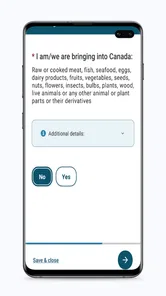
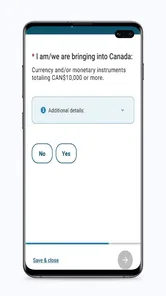
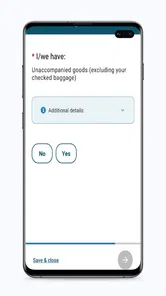
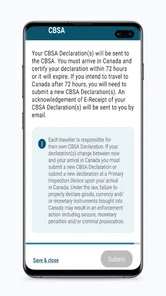
Analysis by Reviewed
When a household is preparing for a trip to Canada, the practical challenge is often less about finding one more travel app and more about keeping each person’s part straight. I found ArriveCAN most useful as a focused place to handle the Canada-entry task, while the family’s tickets, identity documents, transport plans, and packing still need their own checks. That division keeps one person from mistaking a completed phone task for a fully prepared trip.
When one person is organizing the trip
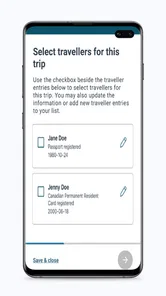
I can see the app being most useful in a household where one traveler takes the lead on planning. Imagine a parent or partner preparing for a Canadian trip while everyone else is sorting out bags and transport. Keeping the entry task in the same place as the travel planning can make it easier to remember, but I would still treat each traveler’s required information as their own responsibility. A shared phone is convenient for coordination; it shouldn’t blur who is supplying or checking personal details.
That distinction matters when several people are traveling together. Before anyone submits information, I’d agree on who is handling each traveler’s part and ask each person to review their own details where possible. This avoids the common household mix-up of one person assuming another has finished everything. The app helps with the Canada-entry task, but it is not a substitute for a family checklist covering tickets, identity documents, and other travel arrangements.
Getting Started with ArriveCAN
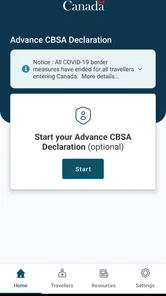
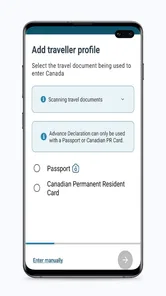
First things first, downloading the app is a piece of cake. Available on both Android and iOS, you just hop onto the Google Play Store or the App Store, search for ArriveCAN, and you’re good to go. Once installed, the setup process is pretty straightforward. You’ll need to input some personal information, but don’t worry, it’s all secure. The app follows strict privacy protocols, so your data is in safe hands.
Setup boundaries and practical checks
ArriveCAN is a free travel and local app from CBSA-ASFC. It has an Everyone age rating, and its current version is 3.6.11. I’d think of setup as an individual travel task rather than something to complete casually on behalf of the whole household. If someone else helps with the phone, keep the traveler involved in checking the information before it is sent. That simple division of roles is especially useful when a parent is assisting an older relative or a less confident phone user.
The app’s release was on April 21, 2020, and it requires Android 7.0 or later. That makes checking the device before departure a sensible step, particularly if a family member uses an older phone that rarely gets updated. The app is available for iOS too, but I would not leave installation and account-related setup until the departure queue. A calmer moment at home is better for reading prompts carefully and resolving basic device problems.
User-Friendly Interface
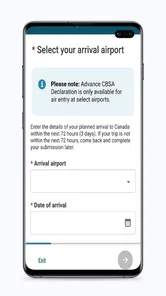
The user interface is clean and intuitive, which is a relief because, let’s face it, nobody wants to wrestle with a complicated app when you’re trying to relax and enjoy your trip. I found navigating through the different sections to be quite simple. Whether you’re tech-savvy or not, you’ll get the hang of it in no time.
More From Our News Desk

 Prime Video
Switching to Prime Video: What Changes in Your Viewing Routine
Prime Video can make a compelling second home for streaming, but switching means learning a different catalog, rental layer, and route from browsing to playback.

 Universal TV Remote Control
 Works Best as a Reliable Backup
A phone remote earns its place through quick setup and reliable habits. Here is how to get more from Universal TV Remote Control—and where its limits show.

 Weather - By Xiaomi
Weather by Xiaomi Review: Clear at a Glance, Less Clear Up Close
Xiaomi’s weather app makes everyday forecasts quick to scan, but its calm surface can leave useful details and recovery paths harder to find than they should be.

 X
X Under Pressure: Can It Recover When Posting Goes Wrong?
A resilience-focused review of X, examining setup, mistaken posts, interruptions, weak connections, and the gaps that matter when recovery needs to be dependable.

 Clash of Clans
 Is Won Between the Battles
Its raids are quick; its community is a long-term project of coordination, teaching, rivalry, and shared responsibility—with all the friction that entails.

 Android Auto
 Makes the Case for Quieter Car Software
The car interface is no longer judged by how much it can do, but by how quietly it helps. Android Auto shows what drivers now expect—and what still gets in the way.
Latest News



That ease has a practical limit: a simple layout cannot decide which traveler’s details belong to which submission, or whether the information is correct. My useful habit is to pause at each review screen and compare it with the traveler’s own documents instead of rushing through familiar-looking fields. In a group, that small check is more valuable than having the fastest typist do everything from memory.
Features That Stand Out
One of the standout features of this app is its ability to save your information for future trips. This means you don’t have to re-enter your details every time you plan a visit. How cool is that? Plus, it sends you notifications about travel restrictions and updates, so you’re always in the loop. Just what you need in these uncertain times!
Saved information can make repeat planning less tedious, but I would treat it as a starting point, not a guarantee that every detail remains right for a later journey. Before using it again, take a moment to review what is carried forward and make any needed corrections. That is a useful trade-off: less repetitive typing, with a little attention still required to avoid relying on stale details. If your household shares a device, do not assume saved information belongs to the next person using it.
Real-Time Updates
The ArriveCAN app provides real-time updates about your travel status and any changes in entry requirements. This is super handy because regulations can change overnight, and you don’t want to be caught off guard. It’s like having a mini travel advisor right in your pocket.
I would use those updates as one part of preparation, not as the only source for every travel decision. A notification can prompt you to check what applies to your trip, but it does not replace confirming your plans and documents before leaving. Compared with relying only on saved screenshots, old messages, or a relative’s memory, an app intended for Canada-entry information gives the task a clearer home. For broader itinerary planning, maps, bookings, and general destination advice, a regular travel app is still the better companion.
Age, trust, and choosing the right helper
The Everyone rating makes the app broadly suitable for household devices, but the task itself involves personal travel information, so I would not treat age suitability as a reason to let a child manage an adult’s details alone. A young traveler can be included in the process, while a responsible adult checks that the information is accurate. For an older relative who wants help, I’d sit beside them, explain each step, and let them confirm their own answers rather than quietly taking over.
The app has an average rating of 4.8 from around 146,000 ratings, with over 5 million installs. Those figures suggest many people have found it useful, though they do not tell me whether it suits every traveler’s circumstances. If you are not entering Canada, or you only need route planning and sightseeing tools, this is not the app I would install for that purpose. It is focused on the entry-information part of a trip, not on replacing a general-purpose travel organizer.
A Few Tips for New Users
If it’s your first time using the app, I recommend setting it up a couple of days before your trip. This gives you ample time to get familiar with its features and ensure all your information is correctly inputted. Trust me, you don’t want to do this last minute at the airport!
For a realistic travel-day routine, I’d have the person coordinating the household check that each traveler has completed their own part, then make sure everyone knows where to find the relevant information on the device they will actually carry. If the phone belongs to someone else, agree beforehand who will have it available and avoid assuming another family member can retrieve details at the last moment. This is a modest bit of coordination, but it prevents a shared-device plan from becoming a bottleneck when people are moving through an airport or border crossing.
Where it fits among travel tools
I wouldn’t compare this with a map app or a booking organizer as if they solve the same problem. Those tools help me navigate, reserve a stay, or keep an itinerary in view; this one is for a narrower Canada-entry workflow. That focus is a strength when the task is relevant, because it gives the household a clear place to direct attention. It is also the reason I would not install it expecting a complete trip dashboard or a substitute for checking official travel requirements.
For a family flying together, for example, I’d use a shared planning conversation to assign responsibility, but I’d avoid passing one phone around without a clear handoff. The traveler should know which device has the information and be able to review their own details. If members are traveling separately or at different times, each person should make sure their own preparation is complete rather than assuming the lead planner’s screen covers everyone.
A useful small habit is to check the saved details when starting a later trip, even if the same traveler used the app before. Reuse reduces repetitive entry, but the convenience can make old information feel more trustworthy than it deserves. I’d treat every fresh journey as a fresh review: confirm the person, the trip context, and the entered information before moving on. That extra pause is especially worthwhile when a household uses one device for more than one traveler.
Who should use it—and who should look elsewhere
If Canada is part of your upcoming journey and you need to handle the entry-information task, I think this focused app is worth having ready. It can also help a household coordinator keep that task visible while other people handle transport and packing. The best arrangement is not for one person to silently do everything, but for the coordinator to organize the process and each traveler to check their own information.
I’d skip it if your trip does not involve entering Canada, or if what you actually need is turn-by-turn navigation, hotel bookings, or a shared sightseeing itinerary. A general travel planner is better for those jobs. I would also avoid relying on a family member’s device as the only plan if that person may be separated from the group; agree in advance who will carry the phone and where the relevant information can be accessed.
With 1.1 thousand reviews and a free price, it is easy to try without adding a purchase decision to trip preparation. Still, I would skip it if you have no Canada-entry task to complete, and I would not rely on it as your only travel-planning tool. The strongest fit is a traveler—or a household coordinating travelers—who wants a dedicated place for this specific part of the journey and is willing to check details carefully.
In a nutshell, the ArriveCAN app is a must-have for anyone traveling to Canada. It’s efficient, easy to use, and takes away a lot of the stress associated with travel these days. So next time you’re planning a trip, make sure this app is on your checklist. You’ll thank me later!
ArriveCAN Frequently Asked Questions
Can I use ArriveCAN before I travel to Canada?
Yes. ArriveCAN is intended for incoming travellers to Canada to submit necessary information. It may be useful to install it before your journey so you can open the app and complete the steps relevant to your trip. Its purpose is focused on travel to Canada, so it is not a general trip-planning or booking app for other destinations.
Who develops ArriveCAN, and how can I identify the right app?
ArriveCAN is published by CBSA-ASFC. When choosing an app, check that the name and publisher match before downloading, particularly if search results show similarly named travel tools. The app’s stated purpose is to help incoming travellers to Canada submit necessary information, which distinguishes it from apps for bookings, maps, or general travel planning.
Is ArriveCAN free to download, and who publishes it?
ArriveCAN is free to download, and it is published by CBSA-ASFC. It is a Travel & Local app for people travelling to Canada, with a straightforward purpose: helping incoming travellers submit necessary information. Before installing it, check that the publisher shown in your app store is CBSA-ASFC so you select the intended app.
What is ArriveCAN and what does it do?
ArriveCAN is a mobile application designed to streamline the entry process for travelers entering Canada. It helps users submit their travel and health information before arriving in the country, ensuring compliance with Canadian public health requirements. The app is mandatory for all travelers, including Canadian citizens and permanent residents, to use before entering Canada. This helps speed up processing times at the border and ensures that the necessary health information is collected efficiently.
Is ArriveCAN mandatory for all travelers entering Canada?
Yes, ArriveCAN is mandatory for all travelers entering Canada, including Canadian citizens, permanent residents, and foreign nationals. Travelers must use the app to submit their travel and contact information, quarantine plan, and COVID-19 self-assessment before boarding their flight to Canada. Failure to use ArriveCAN may result in delays at the border and potential fines, so it's important for travelers to comply with this requirement to ensure a smooth entry process.
Pros
- Streamlines travel documentation process
- Supports multiple languages
- Easy-to-use interface
- Saves traveler information for future use
- Secure data handling
Cons
- Requires internet connection
- Limited to Canadian borders
- Some users face login issues
- Doesn't support all devices
- Occasional app crashes











