Arkansas Weather Network
- 51.00
- 4.3
- Installs
- 10.00K
- Price
- Free
Screenshots
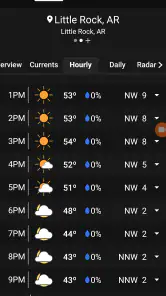
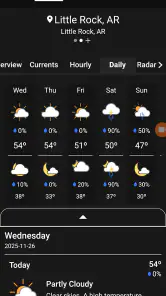
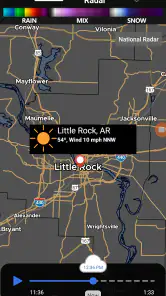
Analysis by Reviewed
When I need a weather check for Arkansas, I usually want something more useful than a broad national forecast. I want to know whether conditions are changing nearby, whether a local outlook makes sense for the place I am actually visiting, and whether the information feels connected to the state rather than copied from a distant general forecast. That is the space where Arkansas Weather Network makes its strongest impression.
This free weather app comes from Arkansas Weather Network LLC and is aimed at people who want Arkansas-focused coverage in a simple mobile format. Its store summary emphasizes real-time statewide coverage, and that focus is important: this is not an all-purpose app I would choose for worldwide travel planning or a deep climate dashboard. I see it more as a practical local companion for checking the day ahead, preparing for changing conditions, and keeping an eye on weather across different parts of Arkansas.
My overall view is positive, but specific. The app’s value is not that it replaces every weather service on a phone. Its value is that a state-centered forecast can feel more relevant when a national app gives me a wide, generalized picture. The main benefit is local context: I can approach an Arkansas forecast as a regional question instead of treating the entire state as one identical weather zone.
Why Arkansas-focused coverage changes the daily weather check
The most useful capability here is the app’s emphasis on Arkansas weather and statewide, real-time coverage. That sounds straightforward, but it changes how I use the forecast. A national weather app often encourages quick glances at one selected location. Arkansas Weather Network is better suited to thinking about movement between places, local differences, and the practical question of what is happening across the state.
That matters because Arkansas is not a single weather experience. A morning that feels calm in one area may not tell me much about conditions somewhere else. When I am planning a drive, checking on relatives, deciding whether an outdoor errand can wait, or watching the outlook for a weekend visit, a state-focused source gives the forecast a more useful frame.
I would not describe this as a replacement for official emergency instructions or a guarantee that every local change will be represented instantly. Weather can shift quickly, and no app should be treated as the only source during dangerous conditions. Still, the app’s regional identity gives it a clear purpose. It is designed around the kind of repeated checking that Arkansas residents and frequent visitors actually do.
In my experience, that makes the app easier to understand than a cluttered service that tries to cover every country, map layer, and specialist measurement at once. The trade-off is equally clear: people wanting a universal weather toolbox may find the experience less compelling than a larger, broader platform. People who mainly care about Arkansas can benefit from the narrower focus.
More From Our News Desk

Weather by Xiaomi Review: Clear at a Glance, Less Clear Up Close

X Under Pressure: Can It Recover When Posting Goes Wrong?

Clash of Clans Is Won Between the Battles

Android Auto Makes the Case for Quieter Car Software

MobiOffice: Transforming Mobile Productivity with Seamless Integration

EA SPORTS FC™ Mobile Soccer: Redefining Mobile Sports Gaming
Turning a forecast into a decision
A forecast is only useful when it changes what I do. The app works best when I use it before a decision rather than opening it only after conditions have already become uncomfortable. I might check it before leaving for work, again before a longer drive, and once more before an outdoor plan. The point is not to stare at weather information all day; it is to use a local source at the moments when timing and location matter.
One practical habit is to check the app for both the place I am leaving and the place I am going. That is more useful than assuming the weather will remain the same along the route. If I am crossing a significant part of Arkansas, I treat the forecast as a planning aid rather than a single yes-or-no answer about the whole journey.
Another useful habit is to compare what the app says with what I can see outside. If the sky, wind, or temperature feels different from my expectation, I do not dismiss the difference immediately. I use that mismatch as a reason to check the forecast again and reconsider the timing of the plan. This is a small workflow, but it prevents the common mistake of treating one morning glance as a permanent prediction.
The app is also more useful when I give it a specific purpose. For example, I may be checking whether to carry rain gear, whether an outdoor appointment needs a backup plan, or whether a drive should start earlier. That approach keeps the information grounded. Instead of asking, “What is the weather?” I ask, “What do I need to prepare for in this location today?”
A realistic Arkansas travel scenario
Imagine I am leaving home for an afternoon appointment in another Arkansas community. The weather at home looks manageable, so a quick glance outside might suggest that the trip will be uneventful. Before leaving, I open the app and check the destination as well as my starting point. The difference between those two locations becomes more important than the conditions in my driveway.
If the destination looks less settled, I can adjust the plan in ordinary ways: leave more time, pack something suitable, move an outdoor stop indoors, or contact someone who is waiting for me. I am not expecting the app to make the decision for me. I am using its Arkansas-centered coverage to avoid making a decision based on one narrow view of the state.
On the way back, I would check again rather than relying on the earlier forecast. That second check is especially sensible when the day has already shown signs of change. It is one of the app’s strongest everyday use cases because it turns a regional weather service into a repeatable routine for commuting, errands, appointments, and family plans.
This workflow also reveals a limitation. The app can help me prepare, but preparation still depends on my judgment. I should not use a weather app as permission to ignore official warnings, road closures, or direct instructions from local authorities. For severe conditions, I would want to consult authoritative emergency information as well.
What the current app details tell me about access
Arkansas Weather Network is free, which removes the most common barrier to trying a local weather service. It is listed for Everyone, so its intended audience is broad rather than limited to a specialist group. The app has passed the early discovery stage with more than ten thousand installs, while its average rating is 4.3 from a little over a hundred ratings and several dozen written reviews.
I read those figures as a sign of useful interest, not as proof that the app will suit every person. A rating can tell me that many users are satisfied, but it cannot decide whether a state-focused forecast matches my routine. Someone living in Arkansas or regularly traveling there has a clearer reason to install it than someone who only needs occasional international forecasts.
The app was released on November 26, 2025, and its current version is 6.7.1.7. It requires Android 7.0 or later, which makes it accessible to many older Android phones as well as newer devices. That is helpful if I am keeping an older phone in a vehicle, using a spare handset, or avoiding an upgrade solely for a weather app.
At the same time, I would still pay attention to how the application behaves on my particular phone. An older operating system may support installation, but that does not automatically mean every modern interface choice will feel equally smooth. The sensible approach is to install it, try the checks I actually need, and decide whether it fits my daily rhythm.
Where the app fits—and where it does not
The clearest comparison is with the default weather service already on a phone. Built-in weather tools are convenient because they are always nearby and often provide a quick glance without requiring another app. If I only want the temperature for one location, that convenience may be enough. Arkansas Weather Network becomes more attractive when I want a more deliberate, Arkansas-specific check instead of a generic glance.
It also differs from large national weather platforms. Those alternatives may be better for people who frequently travel between states or countries, want a wide range of specialized information, or prefer one account and one interface for every destination. Their breadth can be valuable. The drawback is that a broad service may feel less tailored when my main concern is what is happening across Arkansas.
I would choose the Arkansas app over a general alternative when local relevance is my priority and over a built-in tool when I want to make a more considered regional decision. I would choose the broader service when Arkansas is only one stop among many, when I need extensive international coverage, or when the other app already provides a workflow I cannot replace.
There is also a psychological trade-off. A focused app can reduce distraction because it has a clear job, but it may feel limited if I expect a full weather laboratory. I do not want to invent capabilities that are not established here, so I judge it by the role it clearly presents: a dedicated Arkansas weather resource rather than an everything-in-one meteorological suite.
Small habits that improve the experience
First, I would make location deliberate. When planning a trip, I would check the destination rather than simply opening the last place viewed. That sounds obvious, but it is one of the easiest ways to turn a weather app into a misleading reassurance tool.
Second, I would use repeated checks at decision points. A forecast viewed before breakfast is not automatically the right forecast for an afternoon event. Checking before departure and before the activity itself gives me a better basis for changing plans.
Third, I would separate routine planning from safety decisions. For clothing, errands, and travel timing, this app can be a convenient local reference. For severe-weather action, I would pair it with official alerts and instructions. That is not a criticism of this particular app; it is a sensible boundary for any forecast service.
Finally, I would judge the app over several ordinary days instead of one dramatic weather event. The real question is whether its Arkansas focus helps me make faster, clearer decisions during my normal week. A local weather app earns its place through repeated usefulness, not through one impressive forecast screen.
Who will gain the most from it?
Arkansas residents are the obvious audience, especially people who regularly check conditions in more than one part of the state. Parents coordinating activities, commuters, outdoor workers, travelers, event organizers, and anyone with family spread across Arkansas can all benefit from a source built around the region.
It may also suit visitors who are staying in Arkansas long enough for local conditions to affect their plans. A traveler passing through for a few hours may be perfectly happy with a familiar national app, but someone driving between communities or spending several days outdoors has more reason to use a state-focused service.
I would be more cautious about recommending it to someone who lives outside Arkansas and rarely visits. The free price makes experimentation easy, but an app centered on one state is not automatically the best choice for a person who needs worldwide coverage. In that situation, a broader weather platform may be more efficient.
I would also suggest skipping it if the only requirement is an instant glance at one saved location and the phone’s existing weather tool already handles that perfectly. Installing another app only makes sense when its Arkansas emphasis adds value to the way I plan, travel, or monitor conditions.
My final assessment
Arkansas Weather Network has a clear identity, and I appreciate that. It does not need to compete by being everything to everyone. Its strongest reason to exist is the Arkansas-centered approach: a practical way to think about weather across the state instead of relying only on a broad, one-location snapshot.
I would recommend it to an Arkansas resident or frequent visitor who wants a free local reference and is willing to check conditions as part of planning. I would use it for everyday decisions, destination checks, and repeat monitoring before travel or outdoor activities. I would not treat it as a substitute for official emergency guidance, and I would not choose it over a broader service when my weather needs are mostly outside Arkansas.
For the right user, that focus is not a limitation; it is the point. Arkansas Weather Network is most convincing when local relevance matters more than having the largest possible collection of weather tools. That makes it a sensible addition to an Android phone for people whose routines are tied to Arkansas, while leaving room for other services when their needs extend far beyond the state.
Arkansas Weather Network Frequently Asked Questions
Who develops Arkansas Weather Network, and is it intended for the whole state?
Arkansas Weather Network is developed by Arkansas Weather Network LLC and focuses on weather coverage in Arkansas. Its statewide focus may make it useful whether you live in the state, travel across it, or want to keep an eye on conditions in different Arkansas communities. The app’s short description is “Arkansas Weather,” while its summary highlights real-time statewide coverage.
What is Arkansas Weather Network?
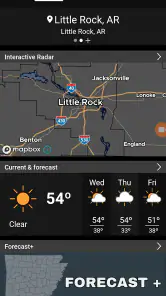
Arkansas Weather Network is a weather-focused app designed to help users follow current conditions, forecasts, and weather developments across Arkansas. It can be useful for checking temperatures, precipitation chances, radar information, severe weather updates, and local alerts. The app is especially relevant for residents, travelers, outdoor enthusiasts, and anyone who wants weather information tailored to Arkansas communities.
What weather information can I find in Arkansas Weather Network?
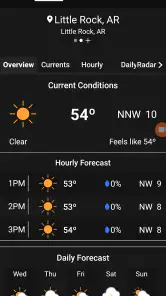
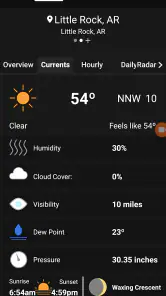
The app generally brings together several types of weather information in one place, including current conditions, hourly forecasts, extended forecasts, radar views, temperatures, wind details, humidity, and precipitation chances. Depending on the selected location and available services, users may also find severe weather coverage, storm updates, local observations, and information that helps them prepare for changing conditions throughout Arkansas.
Does Arkansas Weather Network provide severe weather alerts?
Arkansas Weather Network may provide severe weather information and notifications, but the exact alert features can depend on your device settings, location permissions, app configuration, and the data sources used by the service. Users should enable notifications and review alert preferences after installation. For life-threatening emergencies, always rely on official emergency authorities and the National Weather Service rather than using the app as your only warning source.
Does the app require my location, and can I follow multiple Arkansas locations?
The application may request location access to display weather conditions and forecasts for your current area. You can usually choose whether to allow precise location access or enter a city manually, depending on the platform and app version. This is convenient for monitoring places such as home, work, family locations, or travel destinations, although available location-management features may vary between Android and iOS.
Pros
- Provides localized Arkansas forecasts and weather alerts.
- Useful radar views for tracking storms across the state.
- Simple layout makes key conditions easy to find.
- Covers changing weather with frequent forecast updates.
- Helpful for planning travel
- outdoor activities
- and commutes.
Cons
- Some features may depend on an active internet connection.
- Forecast accuracy can vary during fast-changing severe weather.
- The app may feel less useful outside Arkansas.
- Frequent alerts could become distracting for some users.
- Radar and map data may use additional mobile data.
- Category
- Weather
- Version
- 6.7.1.7











