App Lock - Applock Fingerprint
- 4.41K
- 4.7
- Installs
- 100.00M
- Price
- Free

Screenshots

Analysis by Reviewed
I find app locks most useful when the problem is specific: I’m comfortable lending someone my unlocked phone, but I don’t want them opening a particular conversation or photo app. That is the role App Lock - Applock Fingerprint is designed to fill. It adds a checkpoint around selected apps, which can be handy, but it also puts another step into everyday phone use. I’d decide which apps genuinely need that boundary before installing it, rather than locking everything just because the option is there.
Choose a small, useful lock list
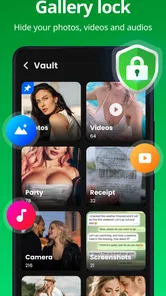
My first setup would focus on apps where a quick glance could reveal something personal: messages, a gallery, or an app that holds private information. I would leave frequently used, low-sensitivity apps alone. That makes the protection more practical, because every extra lock can interrupt a routine—checking a notification, switching between messages and a calendar, or handing the phone back after showing someone a picture.
A useful test is to think through the last few times someone else handled your phone. If you only needed to show one photo, protecting the gallery may be enough; if you often lend the device for a longer stretch, a small group of protected apps may make more sense. I’d review that group after my habits change. A lock list that suited a one-off situation can become needless friction if I keep using the phone differently.
Where users can get stuck
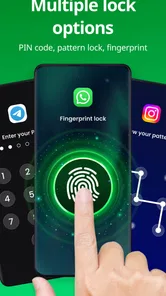
The first practical question is what to do if fingerprint access does not work as expected. The app offers fingerprint, password, PIN, and pattern methods, so having a backup method ready matters; a fingerprint reader may not be available or convenient every time. I’d also check that the phone itself can use fingerprint unlocking before relying on it here. This is an extra barrier around selected apps, not a replacement for securing the device.
I would choose the backup before locking anything important. A PIN or pattern that is easy to remember is more useful than a complicated one I might forget when I am in a hurry. If I use different methods for different apps, I’d keep the arrangement simple and deliberate. More variety can feel customizable, but it also creates more chances to pause at the wrong screen or forget which method I chose.
Check the phone before changing the setup
If the fingerprint route is unreliable, I’d test the phone’s own fingerprint unlock first, outside the app. That helps separate a device-level issue from a problem with the app’s extra checkpoint. I’d also confirm that the specific app I meant to protect is actually on the lock list and that I’m selecting the method I expect. These basic checks are less disruptive than immediately changing several settings at once, which can make it harder to tell what fixed the problem.
When a protected app opens without the extra check, I’d repeat the test carefully: close it, open it again, and confirm I’m testing the same app I selected. If I’ve recently changed which apps are protected, I’d check the selection again before assuming the phone’s fingerprint reader is at fault. A calm, one-step-at-a-time check is especially helpful when the phone is in someone else’s hands and I’m tempted to rush through the settings.
More From Our News Desk

Weather by Xiaomi Review: Clear at a Glance, Less Clear Up Close

X Under Pressure: Can It Recover When Posting Goes Wrong?

Clash of Clans Is Won Between the Battles

Android Auto Makes the Case for Quieter Car Software

MobiOffice: Transforming Mobile Productivity with Seamless Integration

EA SPORTS FC™ Mobile Soccer: Redefining Mobile Sports Gaming
Security at Your Fingertips
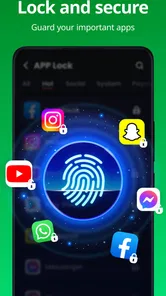
One of the standout features of App Lock - Applock Fingerprint is, as the name implies, the fingerprint lock. Integrating this feature means you can ditch those pesky passwords and patterns. Just tap your finger, and voila! Your apps are secured. As someone who's always on the go, the convenience of using my fingerprint instead of typing a password is a game-changer.
That convenience depends on the phone and the moment, so I would not build my whole routine around fingerprint access alone. A backup unlock method is important when the reader is unavailable, when my finger does not register, or when I simply need to use a different method. The app’s password, PIN, and pattern choices give me alternatives, but the best one is the option I can enter reliably without making the protected app feel like a chore.
User-Friendly Interface
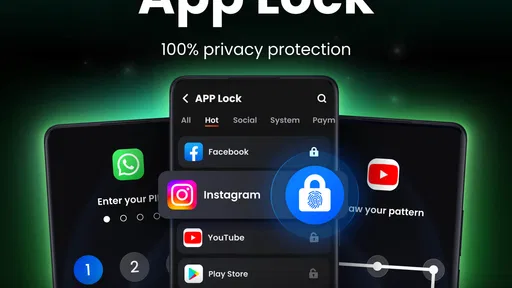
Upon opening the app, I was greeted with a clean and intuitive interface. No more fumbling around trying to figure out how to lock my apps. Everything is straightforward and easy to navigate. You can lock apps with just a few taps, ensuring your privacy is maintained with minimal fuss.
That uncomplicated approach is useful when I want to make a quick, careful change rather than spend time learning a complicated security dashboard. I would still make changes when I can check the result immediately: lock one app, leave the settings, and test whether the extra step appears when I open it again. Testing one choice at a time makes it easier to spot a mistaken selection and avoids turning setup into guesswork.
Customization Options
If you're anything like me, you love a bit of customization. App Lock - Applock Fingerprint doesn’t disappoint in this department. You can choose from a variety of themes to match your mood or style. Plus, there's an option to set different locks for different apps, which I found quite nifty. Want a pattern for your gallery but a PIN for your messages? No problem!
I’d use different methods only when there is a real reason. For example, an app I open often might be more convenient with fingerprint access, while a less frequently used one could have a PIN or pattern I can recall. The trade-off is mental overhead: every extra variation is another thing to remember. If I find myself hesitating at unlock screens, simplifying the setup is a better fix than adding still more customization.
Making the Lock Useful Day to Day
A realistic use is handing your phone to a friend to show them a photo while keeping message apps behind a separate check. I’d unlock the gallery, leave other protected apps alone, and avoid treating the lock as a substitute for deciding what is safe to share. Different methods for different apps can also make sense when one is opened often and another only occasionally, though too many combinations are easy to forget. I’d choose a memorable PIN or pattern for the less-used option and keep the setup simple enough to use consistently.
Another everyday case is letting a family member use the phone briefly to look something up while keeping personal conversations out of view. I’d decide which apps matter before handing it over, rather than trying to adjust the lock list in a hurry. If I expect to pass the device around often, I would also consider whether repeatedly unlocking protected apps is actually easier than simply keeping the phone to myself. An app-level lock helps with boundaries; it does not remove the need to make sensible choices about what is open on screen.
Compared with relying only on the phone’s screen lock, this app is aimed at adding another checkpoint for chosen apps after the device is already in use. That distinction is useful if someone briefly borrows an unlocked phone, but it can also mean extra friction whenever I switch between protected apps. If my main concern is keeping the entire device private, the built-in screen lock is the more direct tool; if I need separate boundaries around a few apps, an app-level lock is a better fit.
There is also a middle ground: use the phone’s built-in privacy or app-lock tools if they already meet the need. Those options may be simpler because they are part of the device experience, while a separate app can be attractive when I specifically want an additional layer around selected apps. I would compare the actual day-to-day steps, not just the number of security options. A tool is only useful if I can unlock the right thing without confusion and still feel comfortable lending the device.
Intruder Alert!
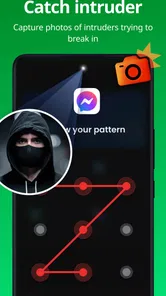
Here's a feature that I found particularly amusing. If someone tries to snoop around and enters the wrong password, the app snaps a photo of the culprit. It's like having a little detective in your pocket! This feature not only adds a layer of security but also gives you peace of mind knowing you’ll be alerted if someone tries to access your apps without permission.
I would treat that photo feature as a possible extra clue, not as the main reason to install the app or a guarantee that every attempt will be recorded. The more dependable everyday value is the additional check before a protected app opens. If the photo option is part of my setup, I’d think about whether I actually want that kind of record and whether it fits the way I use my phone, rather than assuming it replaces a screen lock or careful handling.
When a Problem May Be Elsewhere
If a protected app does not behave as expected, I would first check whether the lock is enabled for that particular app and whether I am using the intended unlock method. Then I’d test the phone’s own fingerprint or screen unlock outside App Lock. If that also fails, the issue may be with the device’s unlock setup rather than the app. A forgotten pattern or PIN is another reason to pause before locking important apps: choose a method you can reliably recall instead of assuming fingerprint access will always be available.
If the phone’s own unlocking works but one protected app does not, I’d narrow the test to that app and the method assigned to it. I would avoid making several changes at once, because then I would not know which one mattered. If the difficulty affects several protected apps, I’d step back and review the overall setup rather than repeatedly changing individual choices. That approach is slower than tapping through everything, but it is less likely to leave me with an even less familiar configuration.
A lock can also feel like a problem when it is doing exactly what I asked but no longer suits my routine. If I keep opening a protected app dozens of times a day, the interruption may outweigh the privacy benefit for that particular app. I’d remove it from the protected group or choose a more convenient unlock method, then keep stronger friction for the apps where the boundary matters most. The point is not to maximize the number of locks; it is to make the phone comfortable to use while protecting the places I care about.
Who will get the most from it
I see the strongest case for this app if I sometimes hand over an already-unlocked phone and want a quick boundary around a few personal apps. It is also a reasonable fit for someone who prefers an app-level checkpoint rather than relying only on the device screen lock. The ability to choose among fingerprint, password, PIN, and pattern gives room to pick a familiar method, while themes and per-app choices let the setup feel less rigid.
I’d skip it if I never share my phone, am already satisfied with the phone’s built-in protections, or get irritated by repeated authentication. It is also not the right answer if I want to secure the entire device: the screen lock is the more direct first step for that. Anyone who is likely to forget a secondary PIN or pattern should keep the setup especially simple and test it before protecting important apps.
App Lock - Applock Fingerprint is a free productivity app from Trusted Tools, with a 4.7 average from around 577,000 ratings and over 100 million installs. It is rated for Everyone, and the current version is 1.5.6, with Android 6.0 as the minimum requirement. Optional in-app purchases range from $3.99 to $30.99 per item, so I’d check the purchase details in the app before deciding whether any paid option is worthwhile. Those figures suggest it has broad reach, but popularity alone does not remove the need to test whether its extra checks suit your routine.
It was released on November 1, 2022, and its wide adoption makes it easy to understand why people look at it for a simple privacy boundary. I would still judge it by how it works on my own phone, especially whether the chosen unlock method feels dependable and whether the extra prompt is tolerable during a normal day. The free starting point makes it possible to consider the app without paying upfront, while optional purchases are something I’d evaluate only after deciding whether the basic workflow suits me.
A practical verdict
My advice is to begin with one or two apps, pick a backup method I can remember, and test the setup before relying on it. If the extra step feels useful after a few days, I can expand the list carefully. If it becomes an interruption, I can keep only the most sensitive apps protected or return to the phone’s built-in screen lock as my main safeguard. That small trial tells me more than locking every app on the first day.
Overall, I think this is a useful option for people who want a separate checkpoint around selected apps and are comfortable managing another layer of unlocking. Its appeal is the combination of familiar access methods and a straightforward setup, but the same extra barrier can become tiring if applied too broadly. I’d recommend trying it for a focused privacy need, not treating it as a complete security solution, and keeping the setup simple enough that I can use it consistently.
In conclusion, if you're looking for a reliable and easy-to-use app to protect your private information, I highly recommend giving App Lock - Applock Fingerprint a try. With its seamless integration of fingerprint technology and a host of other features, it's a solid choice for anyone wanting to keep their apps safe and secure. So, why wait? Give it a go and enjoy that much-needed peace of mind!
App Lock - Applock Fingerprint Frequently Asked Questions
What should I check before installing App Lock - Applock Fingerprint on my Android phone?
Check that your device runs Android 6.0 or later, since that is the minimum operating-system requirement. App Lock - Applock Fingerprint is a productivity app from Trusted Tools for adding a lock to selected apps. If your phone meets the requirement, you can install it and choose the apps and lock method that suit your privacy needs.
Who develops App Lock - Applock Fingerprint, and is it widely used?
The app is developed by Trusted Tools and is listed as a free app for protecting access to other apps. It has more than 100 million installs, alongside an average rating of 4.7 from around 577,000 ratings. Those figures suggest it has reached a large audience, though your own experience will depend on your device and how you choose to use its locking features.
Does App Lock - Applock Fingerprint support fingerprint, PIN, password, and pattern protection?
The app is designed to lock apps using fingerprint, password, PIN, or pattern protection. Which option feels most convenient can depend on the capabilities of your phone and the method you prefer. You can select a lock approach for protecting the apps you choose, giving you an extra privacy barrier when someone else might otherwise open them.
Is App Lock - Applock Fingerprint suitable for someone who only wants to protect a few private apps?
Yes. App Lock - Applock Fingerprint is intended to let you choose which apps need an extra privacy barrier, rather than requiring you to lock every app on your phone. That can be useful if you mainly want to protect private conversations, photos, or email while leaving everyday apps readily accessible. You can select the apps you want to secure and choose an available lock method.
What is App Lock - Applock Fingerprint and how does it work?
App Lock - Applock Fingerprint is a security application designed to protect your privacy on your mobile device by locking apps with a password, pattern, or fingerprint. Once installed, you can choose which apps to lock, ensuring that only you can access them. This is particularly useful for safeguarding sensitive information in apps like messaging, gallery, or email.
Pros
- Easy to use interface.
- Supports fingerprint unlocking.
- Lightweight and fast performance.
- Customizable lock themes.
- Secure app and data protection.
Cons
- Ads can be intrusive.
- Some features require payment.
- Limited support for new devices.
- May drain battery quicker.
- Occasional crashes reported.











