AOL: Email News Weather
- 54.21K
- 4.1
- Installs
- 10.00M
- Price
- Free

Screenshots







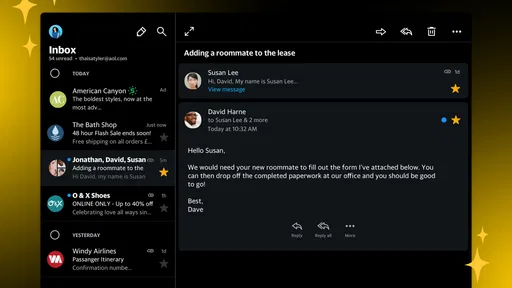
Analysis by Reviewed
I get the most out of AOL when I treat it as a compact daily dashboard rather than a place to do every digital task. The appeal is straightforward: I can check messages, get a sense of the weather, and scan news without opening several apps. That is useful on a busy day, but the combination works best when I give each section a purpose and resist turning a quick check into an endless scroll.
A practical routine for a busy day
I find the strongest case for AOL is not that it replaces every specialist app, but that it makes a quick daily check feel simpler. In the morning, I can look at the forecast before deciding what to wear, scan headlines while having breakfast, and then check for messages without hopping between separate apps. That small routine is useful when I want an overview rather than a deep session with any one service.
A realistic use is a commute or a short break: check whether rain could affect the trip, glance at a few news stories, then search for the message that needs a reply. I would treat the news feed as a convenient starting point, not a complete picture of a developing story. When a subject matters, opening more reporting from different sources is a better habit than relying on a single feed.
For example, before leaving home I might check the forecast, read one headline that helps me understand the day, and search for a message about a meeting. I would then close the app rather than keep browsing simply because more content is available. That small boundary is a practical way to preserve the convenience without letting a combined feed take over a short break.
All-in-One Convenience
Imagine having your email, the latest news, weather updates, and trending videos all in one place. That’s exactly what the AOL: Email News Weather app delivers. This app seamlessly integrates these services, allowing you to switch between reading an email from your boss to catching up on current events without breaking a sweat. The user interface is intuitive, making navigation a breeze.
The trade-off is that an all-in-one layout can feel less focused than a dedicated email client or news reader. I’d choose AOL when convenience matters more than customising every part of my workflow. If I need a highly specialised inbox, extensive news-reading controls, or a distraction-free experience, I’d compare it with apps built specifically for that one job.
Where the combined approach helps
The biggest benefit is reducing the small bits of friction between tasks. When I am waiting for a reply, for instance, I can check the inbox and then look at the weather without changing apps or deciding which service to open next. That does not necessarily save a large amount of time each visit; it makes routine checks feel more contained, which is valuable when I only have a spare minute.
More From Our News Desk

Weather by Xiaomi Review: Clear at a Glance, Less Clear Up Close

X Under Pressure: Can It Recover When Posting Goes Wrong?

Clash of Clans Is Won Between the Battles

Android Auto Makes the Case for Quieter Car Software

MobiOffice: Transforming Mobile Productivity with Seamless Integration

EA SPORTS FC™ Mobile Soccer: Redefining Mobile Sports Gaming
This setup also suits someone who wants a familiar starting point on a phone shared between personal errands and general information. A parent checking a message before heading out, or a commuter deciding whether to bring a coat, may appreciate having basic information close together. It is less suited to someone who wants a carefully organised research system or a work inbox with a specialised set of rules and tools.
Stay Updated with News and Weather
For those of us who can’t get enough of the latest headlines, this app serves up personalized news stories tailored just for you. Whether it’s politics, entertainment, or tech, you’ll find articles that pique your interest. Plus, with real-time weather updates, you’ll never be caught without an umbrella again. It’s like having a personal weather station right in your pocket!
Settings that make the routine yours
My advice is to spend a little time checking the available news and notification settings rather than accepting every prompt as-is. The useful balance is different for everyone: someone who checks headlines occasionally may prefer fewer interruptions, while a person waiting for time-sensitive email may want to keep message alerts noticeable. I also find it helps to decide in advance which sections I actually want to check; otherwise, the convenience of having several kinds of content together can turn a quick check into aimless scrolling.
Weather is most helpful when treated as a planning aid, not a promise about every moment of the day. I’d check it before leaving and revisit it if plans change, especially when conditions could affect a walk or commute. Pairing that check with a quick look at the day’s headlines gives the app a repeatable purpose instead of making it another screen to open out of habit.
I would also think about where notifications fit into my day. If I mainly open the app at set times, frequent alerts can make the all-in-one convenience feel more demanding than helpful. If I rely on it to notice new email, I would keep message notifications useful while limiting less urgent interruptions where the available settings allow. The goal is not to silence everything, but to make an alert mean something when it appears.
Email on the Go
Managing your emails has never been easier. The app supports multiple email accounts, so whether you’re checking work emails or personal messages, everything is streamlined. The notification system is spot on, ensuring you never miss an important message. Plus, the search function is robust, making it easy to dig out that one email from months ago without any hassle.
For a more deliberate inbox routine, I’d separate the moments when I scan for urgent messages from the time I set aside to clear older mail. Search is especially handy when I remember a sender or a topic but not the date; a specific search term is generally more useful than scrolling through a long inbox. If I’m managing work and personal accounts together, I’d still pause before replying to confirm which account is active, since a convenient combined view makes that small check worthwhile.
That account check matters most when a message could easily be sent from the wrong address. I would build a brief pause into the reply habit: verify the sender identity, read the recipient line, and then send. It is a simple safeguard for anyone switching between personal and work correspondence on the same phone, and it costs very little time compared with correcting a mistaken reply.
Faster habits, without expecting hidden tools
The best shortcut here is a habit, not a secret feature: check email, news, and weather in the same order each time. That makes it easier to get what I need and leave, rather than repeatedly switching sections. I’d also use search as a retrieval tool for older messages instead of trying to keep every important email at the top of the inbox. These simple choices make the app more useful without assuming it offers advanced automation or controls that may not suit every user.
Another useful habit is to decide what a successful visit looks like before opening the app. Perhaps I need to confirm one message and check whether the weather could change my plans. If those two things are done, I can leave the headlines or videos for another moment. This keeps AOL acting as a practical shortcut rather than a default destination whenever I unlock my phone.
Video Content at Your Fingertips
When you need a break from reading, the app’s video section has got you covered. From viral videos to in-depth news reports, there’s something for everyone. The video player is smooth, and videos load quickly, which is perfect for those times you need a quick dose of entertainment or information.
Video is also the part I’d be most selective about when I only have a minute. It can be a pleasant change from reading, but it is easier to lose track of time when entertainment sits beside practical tools. If my priority is just catching up on messages or checking conditions outside, I’d stick to those tasks and leave videos for a break when I can give them attention.
Choosing it over separate apps
Compared with using a dedicated email client, a standalone weather app, and a separate news reader, AOL offers fewer app changes at the cost of specialisation. I would choose separate apps if my work depends on advanced inbox organisation, if I want to shape a news-reading routine in detail, or if weather is central to outdoor planning. AOL makes more sense when the goal is a convenient general check and I am comfortable with a broad mix of content.
That distinction also answers whether it can serve as a main email app: it can be a practical option for ordinary checking and replying, especially across multiple accounts, but people with demanding work routines should judge it against the specific tools they depend on. Likewise, the news section is handy for discovery, but a reader who follows a topic closely may prefer to consult a range of sources directly. The right choice depends on whether simplicity or control matters more to you.
Who will get the most from it
AOL is a sensible fit for someone who wants everyday email access alongside a quick news and weather check, and who values having those basics together. It may be less appealing to readers who curate news closely, people who want a dedicated email app with a very specific workflow, or anyone who prefers to keep entertainment away from workday tasks. I’d also consider whether I’m comfortable with a combined experience before making it my main app; convenience is only helpful if the mix of sections suits the way I use my phone.
AOL is a free productivity app from AOL Media LLC, with optional in-app purchases priced from $1.99 to $19.99 per item. It has a 4.2 average from around 181,000 ratings, and has been installed over 10 million times. Its Everyone 10+ age rating is worth noting for families choosing apps, even though the everyday functions are straightforward.
The app has been available since July 22, 2010, and that long presence gives it a familiar, established role for people who already use AOL email. I would not treat longevity as proof that it will suit every modern workflow, though: the practical test is whether its combined layout and everyday email tools match how I actually use my phone. The rating reflects a broad response from users, but my choice would still come down to fit, not popularity alone.
For a family deciding whether to install it, I would consider both the age rating and how the phone will be used. The content rating is Everyone 10+, so it is sensible to review the app in the context of a child’s overall device use rather than assuming that an everyday utility has no content considerations. For an adult using it for basic information and messages, the main decision is more likely to be whether the mixed feed feels helpful or distracting.
For an experienced user, the sensible approach is to keep the app’s role clear: use it for a quick daily overview and dependable email checks, then turn to a dedicated alternative when a task calls for more depth. The main limitation is not a single missing tool so much as the compromise that comes with bringing different content together. I’d recommend it to a friend who wants fewer app switches, but not to someone looking for a fully specialised workspace.
In conclusion, the AOL: Email News Weather app is a versatile tool that caters to a wide range of needs. Whether you’re catching up on emails, staying informed with news, checking the weather, or watching videos, this app has it all. It’s a powerful companion for anyone looking to stay connected and informed, no matter where they are. Give it a try, and you might just wonder how you managed without it!
AOL: Email News Weather Frequently Asked Questions
Can I use the AOL app if I do not have an AOL email address?
The AOL app brings email, news, and weather together, so it can be useful even if email is not the feature you plan to use most. Its summary highlights fast email alongside news and weather in one place. If you already use AOL Mail, the app offers a convenient way to access it; you can also explore the other parts of the app that interest you.
Does the AOL app combine its main features in one place?
Yes. The AOL app is designed to bring email, news, and weather together, which can make it a practical choice if you would rather check these services in one app than move between separate ones. Its focus is on offering a convenient, all-in-one place to stay connected and informed. Consider whether that combination fits the way you use your phone.
Who develops the AOL app, and how popular is it?
AOL Media LLC develops the AOL app. It has an average rating of 4.2 from around 181,000 ratings, and it has been installed over 10 million times. Those figures give a broad sense of its reach and user feedback, but individual experiences can differ depending on which features matter most to you.
What features does the AOL app offer?
The AOL app provides a comprehensive suite of features designed to keep users informed and connected. It includes access to email services, the latest news, weather updates, and a variety of videos. Users can manage their inbox, stay updated with breaking news, and check local weather forecasts, all from a single app.
Is the AOL app free to use?
Yes, the AOL app is free to download and use on both Android and iOS platforms. While the basic features are available at no cost, there might be some advanced features or ad-free experiences that require in-app purchases or subscriptions. Always check the app store for the most up-to-date pricing information.
Pros
- User-friendly interface.
- Comprehensive email management.
- Real-time news updates.
- Weather forecasts included.
- Integrated video content.
Cons
- Frequent ads disrupt experience.
- Limited customization options.
- Occasional app crashes.
- Slow loading times.
- In-app purchases required for premium.











