AnyList: Grocery Shopping List
- 8.21K
- 4.8
- Installs
- 1.00M
- Price
- Free

Screenshots
Analysis by Reviewed
I started using AnyList because grocery planning had become a small but constant source of friction. I would remember one item while cooking, another on the way to work, and a third only after returning from the shop. Notes, messages to myself, and scraps of paper all worked briefly, but none created a dependable routine. AnyList turns that scattered process into a shared shopping and meal-planning system, which is where I think its real value lies.
It is a free productivity app from AnyList, rated 4.8 on average from around 30 thousand ratings, with over 1 million installs. Its Everyone age rating makes it suitable for ordinary household use, and the basic idea is easy to understand: build shopping lists, organize recipes, and plan meals. The app is more useful when treated as a habit rather than a place to dump occasional reminders.
From scattered reminders to a reliable grocery workflow
Before using it, I had no single place for food-related decisions. A handwritten list might contain groceries, household supplies, and a reminder to check the freezer. A phone note was faster, but it became a long block of text. When shopping with another person, we sometimes bought the same thing or forgot an item because the list was not visible to both of us at the right moment.
AnyList gives that process a clear home. I can capture an item as soon as I notice it, then deal with the details later. That separation matters. If I am cooking and realize that olive oil is nearly empty, I do not need to stop and organize the entire week. I add the item immediately and return to the recipe. Later, I can place it in a sensible section or adjust the wording before shopping.
That simple capture habit is more important than making a perfect list. A grocery app cannot help with an item that never gets recorded. I found it useful to add things at the moment they become relevant: when opening the last package, planning a recipe, or noticing that a staple is missing. The list then becomes a memory aid instead of another task I have to remember to maintain.
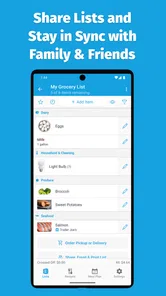
For a household, the shared-list approach is especially practical. One person can add ingredients while the other is already at the store. This avoids the awkward routine of sending a second message with “one more thing” after the shopping trip has started. It also makes the list a common reference point rather than a private note that has to be copied between people.
Organizing items so the list works in a real store
A long alphabetical list is technically complete but not pleasant to use. I get more from AnyList when I organize items according to the way I actually move through a shop. Produce, refrigerated items, pantry goods, frozen food, and household supplies are easier to scan than a mixed stream of words. This reduces backtracking and makes it less likely that I will overlook something near the bottom.
More From Our News Desk

Weather by Xiaomi Review: Clear at a Glance, Less Clear Up Close

X Under Pressure: Can It Recover When Posting Goes Wrong?

Clash of Clans Is Won Between the Battles

Android Auto Makes the Case for Quieter Car Software

MobiOffice: Transforming Mobile Productivity with Seamless Integration

EA SPORTS FC™ Mobile Soccer: Redefining Mobile Sports Gaming
The useful insight here is that organization should follow behavior, not theory. If a particular store places bread before dairy, I can structure my list around that route. If I shop at more than one store, separate lists are more practical than trying to force every purchase into one universal list. The app becomes much less cluttered when each list has a clear purpose.
I also avoid overly detailed entries. “Tomatoes” may be enough for one trip, while “canned tomatoes for chili” is better when several varieties are possible. The right amount of detail depends on the risk of buying the wrong thing. Adding every brand preference can make a list slow to maintain, but leaving out an important distinction can create a second trip. I use detail where it prevents a genuine mistake.
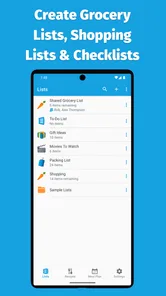
Another effective routine is to keep a small number of active lists rather than creating a new one for every occasion. A regular grocery list, a list for a particular store, and perhaps a special event list are usually easier to manage than a collection of temporary lists with unclear names. The goal is to make the next action obvious when the app opens.
Recipes and meal planning as the planning layer
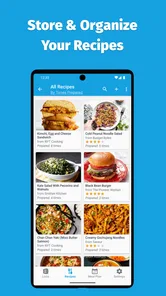
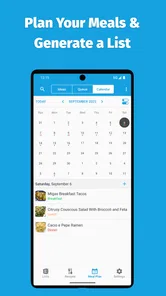
The recipe side changes the app from a simple checklist into a planning tool. Instead of deciding what to buy only after arriving at the store, I can think through meals first and then build the shopping list around those choices. That helps reduce the familiar problem of buying ingredients without a plan and later discovering that they do not fit together.
I find meal planning most helpful when it remains flexible. I do not need to schedule every meal with perfect precision. Planning a few dependable dinners, keeping room for leftovers, and leaving one day open is more realistic than creating a rigid menu that collapses after a busy afternoon. AnyList supports that style because the list can serve both planned recipes and spontaneous essentials.
A practical workflow is to review the coming days, choose meals that share ingredients, and then check what is already at home before adding anything. This is where the app can support a more sustainable productivity system: it connects intention with action. The recipe plan says what I want to cook, the shopping list says what I need, and the pantry check prevents unnecessary purchases.
There is a trade-off, though. Recipe organization is only valuable if I am willing to maintain it. People who rarely cook from recipes may gain more from a straightforward list than from building a detailed meal library. The app does not remove the thinking involved in deciding what to eat; it makes the decisions easier to store and reuse.
A repeatable weekly routine that does not become a chore
The most effective way I found to use AnyList is to give it a regular review point. Before shopping, I look through the current list, remove items that are no longer needed, check planned meals, and add anything missing. During the week, I capture new items immediately instead of trusting memory. After shopping, I clear or update the list so it is ready for the next cycle.
This routine works because each stage has a different purpose. Capture is quick and messy. Review is where I organize. Shopping is where I mark progress. Resetting prevents old reminders from becoming background noise. Trying to perform all these steps at once makes the app feel like administrative work, while separating them keeps each interaction short.
For shared use, I would agree on a simple household rule: add an item when it is running low, not only when it is completely gone. That gives the shopper time to notice the entry and prevents emergencies. It is also useful to agree on how specific entries should be. “Coffee” may be clear to one person and ambiguous to another, so a short note about size or type can save an unnecessary conversation in the aisle.
Meal planning can follow the same rhythm. I prefer choosing meals after checking existing ingredients, rather than starting with an ideal menu and buying everything from scratch. This creates a natural connection between the recipe collection and the shopping list. It also makes leftovers easier to use because the next meal can be planned around what is already available.
One non-obvious benefit is reduced decision fatigue. The app does not merely help me remember groceries; it moves small decisions out of the busiest moments. I can decide at home whether a meal is worth making, instead of standing in the shop trying to reconstruct a plan from memory. That is a modest change, but it makes the entire errand calmer.
Where the system can fail
AnyList is not automatically organized just because it is digital. If I add vague items, leave outdated entries untouched, or create too many overlapping lists, the same confusion returns in a different form. The app rewards consistent habits, so users looking for a completely automatic solution may be disappointed.
Shared lists also depend on everyone using the same system. If one person continues sending grocery requests through text messages and another adds them only to the app, information becomes fragmented again. The best results come when the household treats the list as the default channel for shopping requests.
There can also be a temptation to over-plan. A beautifully arranged meal schedule may look productive but become a burden when plans change. I would avoid filling every day with a complicated recipe. A useful plan should survive a late finish at work, an unexpected invitation, or a change in appetite. Keeping familiar fallback meals in the rotation makes the system more resilient.
The free starting point is helpful for trying the workflow without committing money. Optional in-app purchases range from $9.99 to $14.99 per item, so anyone considering paid capabilities should first confirm that the added tools match their needs. I would not pay simply because the list looks tidy; I would pay only if the app has become part of a routine I use consistently.
Another limitation is category fit. AnyList is focused on shopping, recipes, and meals. It is not the right replacement for a broad task manager when I need project deadlines, work assignments, notes, or complex reminders. A general notes app may be better for occasional lists, while a dedicated task manager may be stronger for tasks that have owners, dates, and dependencies. AnyList is at its best when the problem is recurring household planning.
Who will benefit most from adopting it
I would recommend AnyList to couples, families, roommates, and anyone who regularly shops for more than one person. The shared workflow reduces duplicated messages and makes responsibility clearer. It is also a good fit for people who cook at home and want recipes, ingredients, and meal decisions connected rather than stored in separate places.
It suits busy shoppers who need a quick capture method during the day. The value is not limited to large weekly trips. A short list for a midweek top-up can be just as useful, especially when it prevents several small errands. People trying to reduce wasted food may also appreciate the planning connection: checking what is available, choosing meals deliberately, and buying only what supports them.
I would be more cautious recommending it to someone who buys groceries spontaneously, rarely cooks, or already has a shared notes system that everyone follows reliably. In those cases, AnyList may add another place to check without solving a real problem. It is also not ideal for a user who wants a full household-management platform rather than a focused grocery and meal tool.
For first-time users, I suggest starting with one active shopping list and a small number of recurring meals. Do not import every possible recipe or build a complicated category structure on the first day. Use the app during one normal shopping cycle, notice where confusion appears, and adjust the list around that experience. This keeps setup proportional to the benefit.
It is worth deciding in advance how the app will fit into an existing system. I use it for food and household purchases, while broader reminders remain elsewhere. That boundary prevents AnyList from becoming an overloaded inbox. The strongest productivity systems are often made of a few focused tools with clear jobs, not one app forced to manage everything.
My final assessment after making it part of the routine
AnyList is convincing because it handles the full path from “we are running out of this” to “the meal is planned and the item is bought.” Its individual functions are straightforward, but the combination is more useful than a basic checklist when I use it consistently. The app encourages a calmer shopping process and gives shared households a common place to coordinate.
Its weaknesses are mostly behavioral rather than technical. A neglected list becomes cluttered, an unrealistic meal plan becomes pressure, and a household that does not share the habit will still communicate in fragments. Those are important limitations, but they are also clear warnings: keep the system simple, review it regularly, and use it for the kind of planning it was designed to support.
As a free productivity app with optional purchases, an Everyone rating, and a strong average of 4.8 from around 30 thousand ratings, it is easy to try without making a major commitment. AnyList was released on April 29, 2019, and its continued presence alongside over 1 million installs suggests that the focused approach has found a substantial audience.
My recommendation is to adopt it as a shared grocery routine, not merely as another place to write reminders. If your current process involves forgotten items, duplicated purchases, scattered recipe notes, or repeated “what should we buy?” conversations, it can make those problems noticeably smaller. If your needs extend far beyond food and household shopping, a broader task or notes app may be the better choice. For the right household, though, AnyList provides a practical bridge between planning at home and making a more deliberate trip to the store.
AnyList: Grocery Shopping List Frequently Asked Questions
Can I use AnyList to plan meals and keep recipes organized?
Yes. AnyList brings meal planning and recipe organization together with shopping lists, so it can help you decide what to make and keep the ingredients you need in one place. You can use it to organize recipes and make grocery planning feel more connected to your weekly meals, rather than treating each shopping trip as a separate task.
Is AnyList useful for coordinating grocery shopping across a household?
It can be helpful when more than one person contributes to household shopping. AnyList is built around grocery lists that can be shared, so people can keep track of needed items and update a list as plans change. That can make the app a practical option for households that want their shopping information together instead of scattered across separate notes.
Can I use AnyList for more than one kind of shopping list?
Yes. AnyList is intended to help organize grocery and household shopping, and you can create multiple lists for different needs. For example, you might keep grocery items separate from other household purchases, then check items off as you shop. This setup can make it easier to see what belongs on each trip and avoid mixing unrelated errands into one list.
Is AnyList suitable for someone who wants a simple productivity app?
AnyList is a practical choice if you want a focused way to manage grocery lists, recipes, and meal planning. Its main appeal is keeping those everyday tasks together, rather than trying to cover a broad range of unrelated productivity needs. The app is free to download, and its content rating is Everyone, so it may suit a range of household shoppers.
What is AnyList: Grocery Shopping List, and what can I use it for?
AnyList is a grocery and household shopping-list app designed to make planning purchases easier. You can create multiple lists, add items quickly, organize products by category, and check them off while shopping. It is also useful for recipes, pantry planning, recurring purchases, and sharing lists with family members or other people in your household.
Pros
- Quickly add items with smart suggestions and autocomplete.
- Supports shared lists for easy coordination with family or roommates.
- Organizes groceries by category to make shopping more efficient.
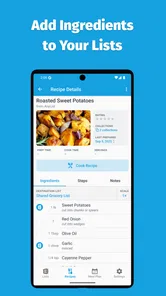
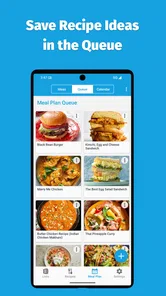
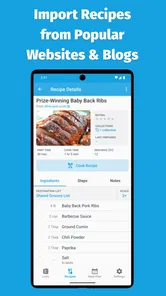
- Includes recipe storage and lets you add ingredients to lists.
- Syncs lists across supported devices with a clean
- simple interface.
Cons
- Many advanced features require an AnyList Pro subscription.
- Some users may find the category organization difficult to customize.
- Recipe and meal-planning tools may feel limited for serious cooks.
- Sharing works best when everyone uses the AnyList ecosystem.
- The app may be more functionality than needed for very simple lists.











