Any.do - To do list & Calendar
- 36.07K
- 4.4
- Installs
- 10.00M
- Price
- Free

Screenshots
Analysis by Reviewed
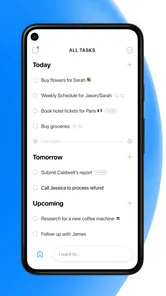
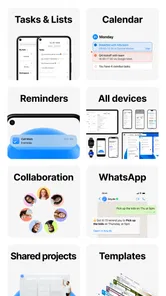
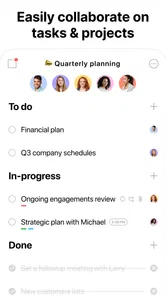
I use a planner differently from a simple notes app. I want to capture something quickly, find it again when the day becomes busy, and feel confident that reminders will not turn into another source of noise. Any.do is built around that practical problem: it combines tasks, checklists, reminders, a calendar, and an agenda in one productivity app. After spending time with it, I see it as a friendly middle ground between a basic to-do list and a more demanding project-management system.
That middle ground is important. Any.do is free to start, suitable for Everyone, and available on devices running Android 7.0 or later. It comes from Any.do To-do list & Calendar, the developer behind the app, and its long presence in the productivity space helps explain why it feels more mature than a quick checklist tool. It has been available since November 10, 2011, and the Android listing shows more than 10 million installs, with a 4.4 average from roughly 505 thousand ratings.
How I judge Any.do when trust matters
A task manager often contains more personal information than people realize. My lists can reveal appointments, shopping habits, work deadlines, family responsibilities, travel plans, and private intentions. That makes trust less about a polished interface and more about whether I can decide what to record, how prominently it appears, and when the app is allowed to interrupt me.
Any.do earns a reasonable first impression because its purpose is easy to understand. The app is not pretending to be a social network or an elaborate workspace. Its central job is helping me organize actions and dates. That narrow purpose makes it easier to evaluate: I can see where information belongs, choose whether a task needs a reminder, and avoid turning every thought into a permanent calendar event.
The app is also popular enough to have a substantial user base. That does not prove perfect reliability or settle every privacy question, but it does give me useful context. A productivity tool used by many people has had time to encounter ordinary problems such as duplicated tasks, forgotten reminders, crowded schedules, and the need to move between quick capture and detailed planning.
I would still avoid treating popularity as a guarantee. A large install count cannot tell me whether every workflow suits my habits, and a high average rating cannot replace reading the app’s current permission and account choices before I commit important information. My approach is to begin with low-risk lists, examine the controls available on my device, and only then decide whether Any.do deserves to become my main planner.
A gentle starting point rather than a project-management maze
The strongest part of the experience is the low barrier to entry. I can create a task without first designing a complicated system of folders, tags, dependencies, or dashboards. That matters when the thought I need to capture is more urgent than the organization around it. A short task list can remain short, while a busier week can be connected to calendar planning instead of living in a separate place.
More From Our News Desk

Weather by Xiaomi Review: Clear at a Glance, Less Clear Up Close

X Under Pressure: Can It Recover When Posting Goes Wrong?

Clash of Clans Is Won Between the Battles

Android Auto Makes the Case for Quieter Car Software

MobiOffice: Transforming Mobile Productivity with Seamless Integration

EA SPORTS FC™ Mobile Soccer: Redefining Mobile Sports Gaming
This simplicity is also a limitation. If I am managing a large software launch, a research project with many dependencies, or a team process that needs detailed status reporting, Any.do is unlikely to replace a dedicated project-management platform. Its appeal is strongest for personal planning, household coordination, study routines, errands, appointments, and work that can be expressed as clear next actions.
The free entry point makes testing straightforward. I can learn whether the basic workflow fits me before paying. At the same time, the app includes in-app purchases ranging from $0.99 to $598.80 per item, so I would check the exact offer presented on my device rather than assuming every useful function is included at no cost. The broad range means the purchase screen deserves attention, especially for anyone who prefers predictable software expenses.
The controls I actually care about
My first practical test is whether I can choose the difference between a task and a reminder. “Buy batteries” may only need to sit on a list. “Call the clinic” may need a specific prompt. Treating every item as an alarm creates notification fatigue, while treating every item as passive text makes deadlines easy to miss. Any.do works best when I make that distinction deliberately.
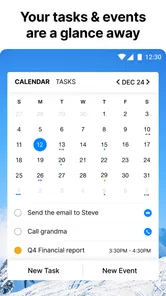
I also look at the calendar connection as a control rather than a decoration. A task list tells me what remains unfinished; an agenda tells me where the day has room for it. When I place a task beside existing appointments, I can spot unrealistic plans before they become failures. I recommend scheduling fewer items than the available time seems to allow, because travel, interruptions, and simple transitions are real parts of a day.
Checklists are useful for another reason: they let me keep a repeatable process inside one larger task. Packing for a trip, preparing a weekly grocery run, or closing down a workday can be represented as one item with smaller steps. That reduces visual clutter, but it also creates a trade-off. If each subtask needs its own separate date or reminder, splitting the work into individual tasks may be clearer.
A less obvious habit that improves the experience is separating “waiting for” items from actions I can perform myself. I might write “send invoice” as an action, but “waiting for payment confirmation” is a follow-up. Keeping those ideas distinct prevents my active list from filling with tasks that are not currently actionable. Any.do does not need to dictate that method; its flexible task structure lets me apply it manually.
What happens during a normal busy day
Imagine a Monday morning with a grocery need, a work deadline, a dentist appointment, and a message I must remember to send after lunch. I would capture the grocery item immediately, give the deadline a clear date, place the appointment where it belongs on the calendar, and assign the message a reminder only if timing matters. The agenda then becomes a reality check: if the afternoon is already crowded, I can move the message instead of pretending I will complete everything at once.
By evening, the value is not that the app has magically made me more disciplined. The value is that it gives unfinished work a visible home. I can review what remains, delete tasks that no longer matter, and move genuine commitments without rewriting them from memory. That small reduction in mental bookkeeping is where Any.do feels most useful.
I would not use reminders as a substitute for reviewing the list. A reminder can tell me that an item exists, but it cannot decide whether the item is still relevant. A weekly cleanup is especially important for recurring errands and vague intentions. Otherwise, the app can become a museum of abandoned plans, which damages trust in the list itself.
Data-sensitive moments and account choices
The most sensitive moment is usually task creation, not the colorful part of the interface. If I type a medical appointment, a confidential work detail, or a family matter, I pause before adding unnecessary context. A task usually needs an action and perhaps a time; it rarely needs a full private narrative. Writing “prepare questions for appointment” is often safer and more useful than recording detailed personal information in the task title.
I apply the same restraint to shared or visible devices. A reminder appearing on a lock screen can expose more than I intended, depending on the notification settings chosen on the phone. Before relying on Any.do for private appointments, I review the operating system’s notification display options and decide whether the task text should appear in previews. This is a device-level choice worth checking rather than assuming the app’s default is ideal.
Account control matters as well. I prefer to understand whether I am using the app as a local scratchpad, a synchronized planner, or part of a broader account-based workflow. Before building a large archive, I would inspect the account settings, sign-in method, synchronization choices, and any available options for managing or removing information. These are not exciting steps, but they determine how comfortable I am putting personal plans into the service.
I also read the privacy and permission explanations presented in the current app and operating-system settings. I do not infer safety from the app’s category, its age rating, or its popularity. The Everyone rating tells me the app is presented for a broad audience, not that every possible use is equally private. My rule is simple: grant only the access needed for the functions I actually choose to use, and revisit those decisions if my workflow changes.
Where Any.do gives me real agency
The app’s best form of user agency is the ability to decide how much structure I want. I can keep a minimal list for errands, or combine tasks with dated planning when the week becomes complicated. That flexibility is more valuable to me than a large collection of advanced labels I may never maintain.
I can also choose the level of interruption. A task without a reminder remains available for review without demanding immediate attention. A dated item can support planning, while a timed reminder is reserved for something that truly needs a prompt. The distinction helps me protect concentration during work and avoid the common mistake of turning productivity into constant notification handling.
There is a useful boundary between calendar events and tasks. A meeting has a fixed place in time; “prepare for meeting” is work that must fit around it. Keeping those separate makes the agenda more honest. I can see the commitment and the preparation without pretending they are the same kind of item. This is one of the reasons I prefer Any.do to a calendar alone for busy weeks.
Compared with a plain notes app, Any.do gives unfinished actions a clearer identity. Compared with a paper list, it can support dates and reminders without requiring me to rewrite the page. Compared with a full project-management suite, it asks for less setup and imposes less process. The trade-off is that I give up some depth, reporting, and specialized collaboration tools. Choosing it is less about finding the most powerful option and more about avoiding unnecessary complexity.
Who should use it, and who should look elsewhere
I would recommend Any.do to someone who wants one approachable place for personal tasks, checklists, reminders, and calendar-based planning. It suits students balancing assignments and appointments, parents coordinating errands, freelancers tracking follow-ups, and anyone whose current system is a mixture of memory, scattered notes, and a calendar that only contains fixed events.
It is especially practical for people who need a quick capture habit. If I can add an item in the moment and later give it a date or a checklist, I am more likely to preserve the thought before it disappears. The app also suits users who want to start small. I can begin with a single list and gradually introduce planning instead of designing a productivity philosophy on the first day.
I would suggest a different tool for someone who needs deep team coordination, complex dependencies, detailed project views, or specialized professional workflows. I would also hesitate if I strongly dislike account-based services, recurring purchase prompts, or the responsibility of reviewing privacy and notification settings. A paper notebook may be better for a person who wants no digital interruptions, while a calendar-first app may be better for someone whose life is almost entirely appointment-driven.
People who expect the app to organize their priorities automatically may also be disappointed. Any.do can hold the information and present it in useful ways, but I still have to decide what matters, estimate how long work will take, and remove stale tasks. That human judgment is not a flaw unique to this app; it is simply the boundary between a planner and an automatic life manager.
My cautious verdict after using the workflow
Any.do is a convincing productivity app because it focuses on the point where many planning systems fail: moving from “I should remember this” to a visible action with an appropriate place in the day. Its combination of lists, checklists, reminders, calendar planning, and agenda review feels natural for everyday use, especially when I resist the urge to schedule every minor thought.
I like its approachable structure, but I would not call it universally complete. The simplicity that makes it comfortable can feel restrictive for complex projects, and the in-app purchase range means I would inspect upgrade screens carefully before committing. I would also treat privacy, notification previews, permissions, and account settings as active choices rather than background details.
With that cautious approach, Any.do is a strong fit for people who want a practical daily planner without the weight of a full project-management system. I would start with ordinary errands and low-risk reminders, test the calendar workflow for a week, review which notifications are genuinely helpful, and only then move sensitive or important planning into it. The app cannot make decisions for me, but it can give those decisions a dependable place to live.
Any.do - To do list & Calendar Frequently Asked Questions
Can I use Any.do without creating an account?
Any.do is designed to help you keep tasks and plans organized, and signing in is useful when you want your information to sync across devices. If you mainly need a simple list on one device, consider how you prefer to manage your account and information before downloading. The app’s core purpose is straightforward: capture tasks, plan your day, and keep reminders and calendar items together.
Does Any.do work offline?
Any.do is built around task lists and daily planning, so it can be useful when you need to review or manage your routine on the go. For changes to appear across devices, synchronization may require an internet connection. If reliable access while offline is important to you, check how the app behaves on your device and make sure your changes have synced once you are connected again.
Can Any.do help me plan my day and keep track of errands?
Yes. Any.do brings together a to-do list, tasks, reminders, checklists, a calendar, and an agenda for daily planning. You can use it to collect errands, appointments, and other responsibilities in one place, then refer to your plan as the day unfolds. It suits people who want a practical overview rather than keeping separate notes and lists across several apps.
Is Any.do available on Android and iOS?
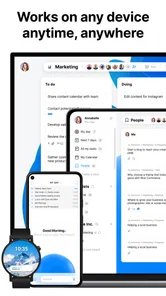
Any.do is a productivity app for organizing tasks and daily plans, and it is available for Android and iOS users. Its mobile format makes it practical to check a list, add a task, or review your schedule while away from a computer. The app is free to download, though some features are offered through in-app purchases.
Is Any.do appropriate for children, and what is its age rating?
Any.do has an Everyone content rating, so its intended content is suitable for a general audience. It is a planning and task-management app rather than an entertainment game, with tools for keeping track of responsibilities, reminders, and schedules. Parents can still review the app’s features and any purchase options with younger users before allowing them to install it.
Pros
- Simple interface makes tasks quick to add and organize.
- Combines to-do lists
- reminders
- calendar events
- and notes.
- Supports recurring tasks for routines and regular responsibilities.
- Available across Android
- iOS
- web
- and desktop platforms.
- Voice entry and smart suggestions can speed up task creation.
Cons
- Many advanced features require a Premium subscription.
- Calendar and task views can feel crowded with busy schedules.
- Some useful customization options are limited compared with rivals.
- Occasional sync delays may appear when switching between devices.
- Power users may find project and dependency tools too basic.











