Antivirus - PhoneMaster
- 315.00
- 3.2
- Installs
- 10.00M
- Price
- Free

Screenshots


Analysis by Reviewed
I first reach for a phone security app when something changes: I install an unfamiliar app, download a file, or notice that my device has become harder to manage. That is the practical appeal of Antivirus - PhoneMaster: it puts security and everyday phone upkeep under one roof. Whether that makes it worth keeping after the first scan depends less on how reassuring a dashboard looks and more on whether its tools solve problems I actually have.
The first-week appeal
When a phone utility puts scanning, cleaning, and app management in one place, the appeal is easy to understand: you can take stock of a device that has quietly accumulated downloads and clutter without jumping between tools. PhoneMaster is a free productivity app from dokelike, and its broad toolkit is aimed at people who want a simple starting point rather than a collection of separate utilities. It has a 3.2 average from around 14,000 ratings and over 10 million installs, so it is widely tried, though that reach is not a guarantee that its approach will suit everyone.
The All-In-One Protector
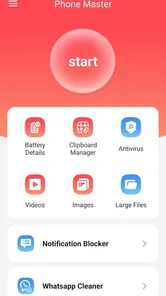
When I first opened Antivirus - PhoneMaster, I was greeted with a clean and intuitive interface. It's always a relief when an app doesn't overwhelm you with too many options right off the bat. Everything is neatly organized, making it easy to navigate even if you're not the most tech-savvy person around. The app combines antivirus protection with a phone booster, junk cleaner, and app manager. It's like having a Swiss army knife for your phone.
Antivirus Protection
The core feature, of course, is its antivirus protection. The app runs a quick scan of your device and, let me tell you, it was surprisingly fast. Within seconds, it had already scanned through my apps and files, looking for any potential threats. It even gives you a detailed report of what it found, which is quite reassuring. Knowing that my phone is being actively protected gives me some peace of mind.
Making a scan useful beyond the green light
I find a scan most useful as a checkpoint after a change in habits, not as a ritual to run every time I unlock the phone. For example, if I have installed an app from an unfamiliar source or received a file I was not expecting, I would use the result to decide whether to investigate further. A clean result is reassuring, but it is not a reason to ignore Android updates, careful download choices, or the warning signs of a suspicious message. Antivirus tools can complement those habits; they cannot replace them.
What to do when a scan raises concern
A security result is most helpful when it leads to a calm next step rather than a reflexive tap. I would read what the report identifies, check whether I recognize the app or file, and avoid removing anything I depend on until I understand the warning. If a message asks me to install something urgently, I would treat that request as suspicious regardless of whether a scan has just completed. PhoneMaster can be part of a cautious routine, but it is not a substitute for checking the source of a download or keeping Android’s own protections in use.
Boosting and Cleaning
Now, aside from keeping your device safe, Antivirus - PhoneMaster also helps in boosting performance. The booster feature works like a charm, closing unnecessary apps running in the background that might be hogging your RAM. I noticed a slight improvement in my phone's speed after using it, which is always a plus. As for the junk cleaner, it does its job well, clearing cache and unwanted files that tend to pile up over time.
More From Our News Desk

Weather by Xiaomi Review: Clear at a Glance, Less Clear Up Close

X Under Pressure: Can It Recover When Posting Goes Wrong?

Clash of Clans Is Won Between the Battles

Android Auto Makes the Case for Quieter Car Software

MobiOffice: Transforming Mobile Productivity with Seamless Integration

EA SPORTS FC™ Mobile Soccer: Redefining Mobile Sports Gaming
When cleaning becomes extra maintenance
I would use the cleaner selectively rather than treating every suggested cleanup as essential. Cache often helps apps reopen content more quickly, and clearing it can mean that some apps need to rebuild temporary files or load information again. Before removing anything, I would read the item descriptions and avoid deleting files I recognize as important. The same goes for boosting: closing background processes may feel satisfying, but repeatedly doing it can turn a one-tap convenience into another routine without a lasting speed benefit. If a phone is already running smoothly, the best maintenance may be leaving it alone.
A low-risk way to test the cleaner
When storage is the immediate problem, I would first look at what is taking up space rather than choosing the broadest cleanup option. Review the proposed items, leave anything whose purpose is unclear, and see whether the phone feels better afterward. That makes it easier to tell whether the tool helped or merely cleared data that an app would soon recreate. It also reduces the chance of turning a small storage issue into a longer round of signing back in or waiting for content to reload.
Managing Your Apps
This app doesn't stop at just cleaning and protecting; it also helps you manage your apps. With the app manager, you can easily uninstall apps you no longer need, freeing up valuable space on your device. It's quite handy if you're like me and tend to download apps on a whim and forget about them later. It's like having a spring cleaning session for your phone anytime you want.
A practical monthly check-in
The app manager gives this utility a use beyond the first scan: it can prompt a quick review of apps I installed for a one-off task and no longer open. A sensible workflow is to check the list when storage feels tight, remove only apps I recognize and no longer need, then scan if I have a security concern. That is more useful than opening a cleaner every day. If an app stores documents or offline content, I would check it directly before uninstalling, since removing an app can take its local data with it.
Who will appreciate the all-in-one approach?
I can see this being handy for someone who prefers one approachable dashboard and likes having a scan, cleanup, and uninstall tools together. It may also suit a less confident Android user who wants a visible prompt to review device clutter. The trade-off is that an all-in-one utility can make routine maintenance feel more necessary than it is. Android already provides built-in security and storage controls, while a dedicated security app may be a better fit for someone who wants to focus on protection rather than extra cleaning tools. If you install PhoneMaster, I would compare its suggestions with the phone’s own settings instead of assuming every alert calls for action.
A realistic day-to-day use
Imagine downloading a document for a short-lived task, then installing an app to open it. A few weeks later, storage is running low and you no longer remember which downloads or apps you still need. I would use PhoneMaster’s app manager as a prompt to review what can safely go, check the relevant app for anything saved locally, and reserve a scan for a genuine security question. That is a more convincing routine than running every tool on a schedule: it ties each action to a reason and makes the utility easier to judge.
Where it sits among alternatives
Compared with relying only on Android’s built-in security and storage controls, PhoneMaster brings several maintenance tasks together, which can feel more approachable if you prefer one place to begin. The built-in tools are the simpler choice if all you need is a basic review and you do not want another utility on the phone. A dedicated antivirus app makes more sense if your priority is security alone and you would rather avoid cleaner and booster features. PhoneMaster’s advantage is convenience; its trade-off is that convenience can blur the line between useful upkeep and optional busywork.
Living with it after the novelty
PhoneMaster is free, runs on Android 6.0 and later, and is currently version 1.2.6. Its age rating is Mature 17+, a detail worth checking if you are choosing apps for a family device. I would also pay attention to how often I actually use its tools: if scans and occasional app reviews are helpful, it can earn a place on the phone; if its prompts become noise or its cleaning adds little, there is no need to keep a utility out of habit. The lasting value comes from using it deliberately, not from repeatedly pressing every maintenance button.
Who should leave it off the phone?
I would skip it if your phone is already easy to manage, you rarely install apps outside familiar sources, and Android’s own controls cover what you need. It is also a poor fit if you expect a booster to make an older or heavily loaded phone feel permanently faster; closing background apps is not the same as fixing the cause of sluggishness. Someone who wants a narrowly focused security tool may prefer a dedicated option, while someone who dislikes extra prompts may be happier with occasional manual checks in the phone’s settings.
Long-term verdict
Antivirus - PhoneMaster earns a lasting place only when its combined tools match a real habit: checking an unfamiliar download, reviewing forgotten apps, or taking stock when storage feels cramped. I like that it gives less confident users an approachable starting point, but I would not treat every scan, cleanup, or boost as necessary maintenance. Its Mature 17+ age rating is relevant for family-device decisions, and the 315 written reviews offer another perspective alongside its overall rating. For me, the sensible approach is to keep it only if its occasional, deliberate use feels more helpful than the extra activity it adds. If that balance holds, it can be a useful companion; if not, the built-in controls may be enough.
Antivirus - PhoneMaster Frequently Asked Questions
Can Antivirus - PhoneMaster help protect my phone from malware?
Antivirus - PhoneMaster is designed to help protect a phone against viruses and other types of malware. Its store summary focuses on this security purpose, while the app also brings together additional phone utilities. It can be considered by users seeking a security-focused tool, but installing it should not replace careful habits such as checking app permissions and avoiding suspicious downloads.
What should I consider about the app’s audience rating before downloading?
Antivirus - PhoneMaster has a Mature 17+ content rating, so it may not be suitable for younger users. If you are choosing apps for a family device, check that rating before installing and consider whether the app is appropriate for the person who will use it. The app is free to download, but its age rating is still worth noting.
Who develops Antivirus - PhoneMaster, and what is its main purpose?
Antivirus - PhoneMaster is a productivity app developed by dokelike. Its main purpose is to help protect a phone against viruses and other types of malware. The app combines its antivirus focus with additional phone utilities, so it may appeal to people looking for security and everyday device-maintenance tools in one place.
Is Antivirus - PhoneMaster free to download?
Yes, Antivirus - PhoneMaster is free to download. Before installing, keep in mind that it is intended for a mature audience and has a Mature 17+ content rating. The app has a 3.2 average rating from around 14 thousand ratings, which can help set expectations, though individual experiences may differ.
What features does Antivirus - PhoneMaster offer for device protection?
Antivirus - PhoneMaster provides comprehensive protection for your device through features such as real-time virus scanning, malware detection, and regular security updates. It also includes a powerful junk cleaner, phone booster, and app manager to enhance your device's performance. With these utilities, users can keep their devices secure and running smoothly.
Pros
- Comprehensive virus scanning capabilities.
- User-friendly interface for easy navigation.
- Optimizes phone performance efficiently.
- Regular updates for latest virus definitions.
- Lightweight app
- doesn't slow down device.
Cons
- Contains ads in the free version.
- Some features require in-app purchases.
- May drain battery on prolonged use.
- Limited customer support availability.
- Occasional false positive detections.











