

Angel Eye Mobile
- 807.00
- 4.2
- Installs
- 100.00K
- Price
- Free

Screenshots
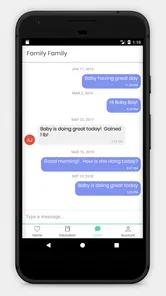
Analysis by Reviewed
Angel Eye Mobile is a medical app from AngelEye Health, and its purpose is more focused than the average health download. It forms part of the Angel Eye Camera Systems Communication Platform, so I would not approach it as a general symptom checker, medication tracker, or wellness dashboard. Its value depends on being connected to the communication system used by the relevant care environment.
That distinction matters immediately. I found the app most interesting as a bridge between clinical care and family communication, rather than as a standalone tool that can do much on its own. If you are looking for an app to count steps, store blood-pressure readings, or book an appointment, this is not the right category. If your care team uses the Angel Eye system and has directed you to the mobile app, it can make that relationship easier to follow from a phone.
How Angel Eye Mobile fits into real medical communication
The current version is 5.13.1, and the app has been available since September 25, 2018. That history gives it a more established feel than a newly launched hospital companion, while the ongoing version number suggests that the product has continued to receive attention. I would still judge it by the practical question that matters most: whether it works smoothly within the specific Angel Eye setup supporting your care.
AngelEye Health is the developer, and the app is listed as free. That makes trying it less complicated from a cost perspective, although “free” does not mean it works independently of a participating care setting. The platform relationship is the key. A person can install the app and still find it unhelpful if the hospital, neonatal unit, clinic, or care team has not enabled the appropriate communication path.
In my view, this is one of those medical apps where the surrounding service is just as important as the software. A polished interface cannot replace an active connection with clinicians or an enrolled patient account. Before installing, I would ask the care team whether Angel Eye Mobile is the correct app for your situation, how access is issued, and which family members can use it. That short conversation can prevent the most common disappointment: downloading it without knowing how activation works.
The app has a Teen content rating, which is sensible for a healthcare communication product that may be used by families and caregivers. It is not entertainment, and I would not treat the age label as a substitute for adult supervision or clinical guidance. The person using it still needs to understand that messages, images, or updates within a care platform are not automatically the same thing as urgent medical advice.
A realistic family scenario
Imagine a parent whose baby is receiving specialized hospital care while the parent is temporarily away from the unit. In a normal situation, the parent may rely on phone calls, wait for visiting hours, or ask another family member to pass along updates. A platform such as Angel Eye can provide a more direct communication route when the care team has configured it for that family.
More From Our News Desk

 Instagram
Instagram’s Power Comes From Its Place in Your Phone
A close look at how Instagram turns Meta’s reach, recommendation systems and everyday camera habits into durable platform power—and what that costs users.

 Gmail
GmailGmail in a Busy Inbox: Who Benefits Most?
From first account to crowded workday, Gmail earns its place through dependable search and flexible sorting—but its best fit depends on how much inbox maintenance you can tolerate.

 Prime Video
Switching to Prime Video: What Changes in Your Viewing Routine
Prime Video can make a compelling second home for streaming, but switching means learning a different catalog, rental layer, and route from browsing to playback.

 Universal TV Remote Control
Universal TV Remote Control Works Best as a Reliable Backup
A phone remote earns its place through quick setup and reliable habits. Here is how to get more from Universal TV Remote Control—and where its limits show.

 Weather - By Xiaomi
Weather by Xiaomi Review: Clear at a Glance, Less Clear Up Close
Xiaomi’s weather app makes everyday forecasts quick to scan, but its calm surface can leave useful details and recovery paths harder to find than they should be.

 X
XX Under Pressure: Can It Recover When Posting Goes Wrong?
A resilience-focused review of X, examining setup, mistaken posts, interruptions, weak connections, and the gaps that matter when recovery needs to be dependable.
Latest News



The useful detail here is not simply “remote access.” It is the reduction of repeated handoffs. Instead of several relatives calling different people for the same update, the intended users can work from one recognized communication channel. That can make conversations less fragmented, particularly when a family is trying to keep track of changing circumstances while also managing travel, work, sleep, and other responsibilities.
I would not use the app to interpret a worrying symptom or decide whether a situation is an emergency. The safer workflow is to use the platform for the communication purpose assigned by the care team, then contact the appropriate clinical service when something needs immediate attention. That boundary is easy to overlook because a medical app can feel authoritative simply because it is installed on a phone.
What the present version means for users
Version 5.13.1 is the clearest current marker for the app’s state. It tells me that users should keep the application updated rather than assuming an older installation is equivalent to the current release. Updates can matter for compatibility with the wider communication platform, especially when hospitals or care teams change the systems supporting their services.
At the same time, a version number alone does not promise a particular feature or guarantee that every user will see the same workflow. Access may depend on the institution’s configuration, the patient relationship, and the account details supplied by the care team. I would therefore avoid judging the app after installation alone. The meaningful test is whether the correct organization has connected your account and whether the expected communication appears in the app.
Existing users should treat an update as part of maintaining access, not as a reason to expect a complete redesign. The safest practical habit is to update when prompted, keep the phone’s operating system supported, and confirm that notifications or account access still behave as expected afterward. If a change affects communication, contact the care team rather than repeatedly reinstalling the app and risking more confusion.
The minimum operating system is Android 5.0. That is a relatively broad compatibility range, which is helpful for people using older Android phones. However, compatibility is not the same as a good experience. An older device may have limited battery life, slower performance, or outdated notification behavior. For a medical communication tool, I would prioritize a phone that reliably receives alerts and remains connected over one that merely meets the minimum requirement.
Small workflow choices that make a difference
One useful habit is to decide in advance who in the family actually needs access. More users do not always mean better communication. A smaller, agreed group can reduce duplicated questions and prevent private medical conversations from spreading farther than intended. The right arrangement should follow the care team’s rules and the patient’s privacy preferences, not convenience alone.
A second practical tip is to check the app at a calm moment rather than waiting until a stressful update is expected. Confirm that you can sign in, recognize the correct patient or care context, and understand where communication appears. This is especially important for relatives who are less comfortable with smartphones. Learning the basic route before a difficult conversation is far easier than troubleshooting under pressure.
A third trade-off concerns notifications. Immediate alerts can be valuable when a family is waiting for communication, but constant phone notifications can also increase anxiety. I would use the phone’s notification controls thoughtfully while making sure that important messages are not silenced accidentally. If the care team has specific expectations about response times, those instructions should take priority over personal notification preferences.
Another overlooked issue is shared-device privacy. A family member may use a tablet or phone that others can pick up, and a notification preview could reveal sensitive information. I would review lock-screen previews and the device’s general privacy settings before using the app in a shared household. That is not a criticism unique to Angel Eye Mobile; it is an important consequence of moving medical communication onto personal devices.
Where it is stronger than ordinary alternatives
The usual alternative to a specialized communication platform is a mixture of phone calls, text messages, general video-chat apps, and occasional in-person updates. Those tools are familiar, but they are not designed around one recognized healthcare communication context. Texting can scatter information across several phones, while a general video app may be convenient without being connected to the care team’s workflow.
Angel Eye Mobile’s strength is therefore not that it replaces every medical interaction. Its strength is that it belongs to a dedicated platform rather than forcing families to improvise with consumer messaging tools. That can make the communication feel more organized and more appropriate for a sensitive care situation, provided the institution is actively using the system.
Compared with a broad patient portal, the app also appears more specialized in purpose. A portal may cover appointments, test results, billing, prescriptions, and records, whereas Angel Eye Mobile is tied to the Angel Eye Camera Systems Communication Platform. If your main need is managing routine healthcare administration, a conventional portal will probably be more useful. If your main need is the communication function supported by Angel Eye, a general portal may not offer the same fit.
This specialization is both the advantage and the limitation. A focused tool can avoid the clutter of an all-purpose health app, but it cannot serve every medical need. I would not install it expecting a complete view of a patient’s history, a replacement for a nurse call system, or a universal way to contact any hospital.
What may frustrate new and returning users
The biggest potential friction is dependency on the surrounding service. With ordinary apps, installation usually leads directly to use. Here, installation is only one step in a larger process. If the care team has not explained enrollment, the app may feel inactive or confusing even though nothing is wrong with the download itself.
That also means the app is not equally useful to everyone. Families outside an Angel Eye-supported setting should skip it rather than treating it as a general medical communication solution. People who want independent monitoring, health education, or emergency advice will be better served by an app built for those purposes. The same applies to users who prefer a single comprehensive patient portal and do not need a separate communication channel.
Another limitation is emotional rather than technical. Remote communication can reassure a family, but it can also encourage frequent checking. When a person is worried, opening the app repeatedly may become a source of stress instead of clarity. I would agree with the care team on realistic expectations about when updates arrive and what the app can communicate. Software cannot remove uncertainty from a difficult medical situation.
There is also a learning curve for relatives who are not regular app users. Even a simple communication path can become difficult when several people share responsibility, accounts are confused, or the wrong device is being used. A short written family plan—who checks, who responds, and who contacts clinicians—can be more helpful than simply telling everyone to install the application.
How the app’s evolution affects trust
The release history and current version suggest a product that has had time to mature, which is encouraging for an app connected to healthcare communication. I value that more than flashy extras. In this kind of software, dependable access, understandable account handling, and compatibility with the care environment matter more than a long list of consumer features.
Still, I separate that reasonable confidence from assumptions about future development. A later release could improve navigation, notifications, accessibility, or the way families understand communication status, but I would not make a decision based on features that are not currently visible or confirmed. The best expectation is steady maintenance of the existing platform relationship, not a promise that the app will expand into a full medical record system.
For existing users, the practical question is whether updates preserve the workflow they already understand. A change can be technically positive and still feel disruptive if important controls move or notifications behave differently. After updating, I would perform a quick check: open the app, verify access, review the communication area, and confirm that the phone has not changed notification permissions. If something looks different, ask the care team for clarification before assuming the account is broken.
For new users, I would watch how clearly the onboarding explains the connection between the mobile app and the Angel Eye platform. That relationship is central, so it should be obvious who grants access and what the app is intended to do. Clearer guidance would reduce unnecessary support requests and help families distinguish a setup issue from a genuine service interruption.
Who should use it, and who should choose something else
I would recommend Angel Eye Mobile to a patient or family member who has been specifically directed to use Angel Eye’s communication platform and wants a phone-based way to stay connected within that arrangement. It is particularly suitable for people who need a focused channel rather than a large healthcare dashboard filled with unrelated tools.
I would also consider it a good fit for families coordinating communication across distance, as long as everyone understands the app’s role. The benefit is not unlimited access to clinicians; it is a more structured way to participate in the communication process supported by the care setting.
I would skip it if you are searching for a standalone medical reference, emergency service, fitness tracker, prescription manager, or symptom diagnosis tool. I would also choose a standard patient portal when the main task is viewing records, scheduling appointments, or handling administrative details. Those alternatives are better matched to those jobs, while Angel Eye Mobile is deliberately narrower.
The app’s free price removes one barrier, and its broad Android compatibility may help people with older phones. Its average rating is 4.2 from around two and a half thousand ratings, with over eight hundred written reviews, which indicates a generally positive reception without making the app universally suitable. I read that kind of response as encouragement to investigate the fit, not as proof that every hospital workflow or family experience will be identical.
My recommendation after weighing the trade-offs
I see Angel Eye Mobile as a specialized medical communication companion, not a complete healthcare app. Its best quality is its connection to the Angel Eye Camera Systems Communication Platform, because that gives it a clearer purpose than generic messaging in the situations it supports. The most important limitation is the same connection: without an active, properly configured care relationship, the app has little reason to be on your phone.
If your care team has told you to use it, I would install it, confirm access early, and agree with your family on sensible notification and privacy habits. Keep the app updated, but judge each release by whether your communication workflow remains clear and reliable. If you have not been invited into the platform, I would not download it simply because it is listed under medical apps.
My bottom line is simple: Angel Eye Mobile makes sense when it is part of your care team’s communication process, and almost no sense when treated as an independent health tool. That focused role may feel limited beside a full patient portal, but it can be exactly what a family needs when ordinary calls and scattered messages are not enough. I would recommend it for the right supported users, while being clear that the surrounding clinical service—not the app alone—determines most of its real-world value.
Angel Eye Mobile Frequently Asked Questions
Is Angel Eye Mobile free to download, and what devices can run it?
Angel Eye Mobile is free to download, so there is no purchase price for installing the app. It is a medical app from AngelEye Health, with a Teen content rating. The Android version requires Android 5.0 or later. Before downloading, check that your device meets that requirement and remember that installing the app alone does not provide access to a camera system.
What is Angel Eye Mobile, and what is it used for?
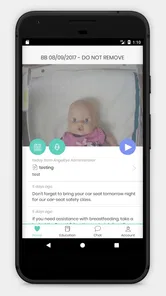
Angel Eye Mobile is designed to help authorized users remotely view and monitor compatible Angel Eye camera systems, commonly used in healthcare environments such as neonatal or pediatric units. After signing in, users may be able to watch an assigned camera feed, depending on the hospital’s setup and permissions. It is not a general-purpose camera app and normally works only with supported Angel Eye services.
Who can access Angel Eye Mobile, and do I need an invitation or account?
Access is generally limited to approved parents, guardians, healthcare professionals, or other users connected with a participating hospital or care facility. You typically cannot use the app simply by downloading it and creating a public account. Your hospital or provider may need to register you, send an invitation, verify your identity, and assign viewing permissions before the camera feed becomes available.
Does Angel Eye Mobile work without an internet connection?
Angel Eye Mobile normally requires an active internet connection because it connects to a remote camera and the associated Angel Eye service. Wi-Fi is usually preferable for longer viewing sessions, while mobile data may also work if your carrier and plan support video streaming. If the connection is weak, you may experience buffering, reduced video quality, delayed updates, or difficulty signing in.
Is Angel Eye Mobile secure and does it protect privacy?
Because the app may provide access to sensitive video involving infants or patients, security and privacy are important parts of its use. Access is generally controlled through account authentication, facility permissions, and the participating organization’s policies. Users should keep login details private, use a secure device, avoid sharing screenshots or streams, and follow all instructions provided by the hospital or care team.
Pros
- Live video lets you check your baby remotely from almost anywhere.
- Motion and sound alerts can notify you when activity is detected.
- Two-way audio helps you soothe or speak to your baby from another room.
- Multiple camera support is useful for monitoring more than one room.
- Night vision keeps the video usable in dark nursery conditions.
Cons
- Video quality depends heavily on your home Wi-Fi and mobile connection.
- Continuous monitoring can drain the phone battery quickly.
- Cloud features or advanced options may require a paid subscription.
- Privacy depends on secure account settings and a protected home network.
- The camera may need to stay connected to power during extended use.











