

Amex Travel
- 129.00
- 4.9
- Installs
- 100.00K
- Price
- Free

Screenshots


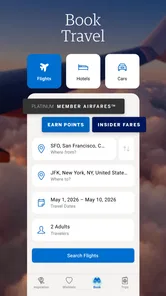

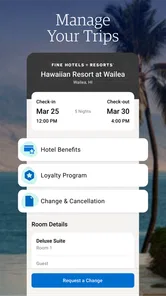
Analysis by Reviewed
Planning a trip often means switching between airline sites, hotel pages, maps, booking emails, and a dozen browser tabs. Amex Travel is designed to bring that travel activity into one place, and after spending time with it, I found its strongest appeal is not flashy entertainment but a more focused way to manage travel decisions. It is a free travel and local app from American Express, available to everyone by age rating, and its role is clear: help you approach travel arrangements through the Amex experience rather than through a loose collection of unrelated services.
That focus matters because travel apps can easily become overwhelming. Some try to cover flights, accommodation, maps, translation, local recommendations, currency conversion, loyalty programs, and trip journals all at once. This app takes a narrower path. I would describe it as a companion for people who already value the American Express travel ecosystem and want a dedicated mobile place to explore and manage travel-related choices. It is less convincing as a universal replacement for every travel tool on a phone.
The app is currently listed as version 1.14.0, carries a 4.9 average from around 2.2 thousand ratings, and has passed the 100 thousand install mark. Those figures suggest a positive reception, but I would not treat them as a substitute for checking whether its approach matches your own travel habits. A high average can tell you that many users are satisfied; it cannot tell you whether the app is ideal for a traveler who prefers independent booking sites, offline planning, or a single dashboard covering every provider.
Trust starts with knowing what role the app plays
The first thing I noticed is that trust here comes from clarity of purpose. The developer is American Express, and the app is presented as a travel companion rather than as a general-purpose social travel network. That makes the relationship easier to understand. You are not opening an anonymous deal board or an app whose main purpose is unclear. You are entering a travel service associated with a recognizable financial-services company.
That does not mean I would hand over personal information without thinking. Travel planning can involve names, destinations, dates, preferences, and account details, so the sensible approach is to treat any travel app as a place where careful account habits matter. I recommend reading each sign-in and permission screen instead of tapping through automatically. The practical question is not simply whether the app looks polished; it is whether you understand what you are agreeing to at each step.
The store classification also sets reasonable expectations. This is a Travel & Local app, not a game or a general productivity tool. Its value depends on whether it helps you make travel decisions more comfortably. I found that framing useful because it encouraged me to judge the app by organization, clarity, and control rather than by the number of unrelated features it might contain.
American Express also gives the product a particular audience. Existing cardmembers may feel more at home because the app belongs to a broader brand relationship. A person who has never used American Express may still be interested in the travel experience, but should first make sure the sign-in path and available services suit their situation. I would not install it merely because it is free; I would install it if I wanted to explore travel through this specific provider.
More From Our News Desk

 Weather - By Xiaomi
Weather by Xiaomi Review: Clear at a Glance, Less Clear Up Close
Xiaomi’s weather app makes everyday forecasts quick to scan, but its calm surface can leave useful details and recovery paths harder to find than they should be.

 X
XX Under Pressure: Can It Recover When Posting Goes Wrong?
A resilience-focused review of X, examining setup, mistaken posts, interruptions, weak connections, and the gaps that matter when recovery needs to be dependable.

 Clash of Clans
Clash of Clans Is Won Between the Battles
Its raids are quick; its community is a long-term project of coordination, teaching, rivalry, and shared responsibility—with all the friction that entails.

 Android Auto
Android Auto Makes the Case for Quieter Car Software
The car interface is no longer judged by how much it can do, but by how quietly it helps. Android Auto shows what drivers now expect—and what still gets in the way.

 MobiOffice: Word, Sheets, PDF
MobiOffice: Transforming Mobile Productivity with Seamless Integration
MobiOffice: Word, Sheets, PDF is redefining mobile productivity with a surprising blend of functionality and innovation.

 EA SPORTS FC Soccer Mobile 26
EA SPORTS FC™ Mobile Soccer: Redefining Mobile Sports Gaming
Dive into EA SPORTS FC™ Mobile Soccer, where immersive gameplay and strategic depth transform mobile sports gaming.
Latest News



Account access deserves a deliberate first look
One of my more useful habits with an app like this is to pause before creating or connecting an account. I check which details are requested, whether the app offers a clear way to review account information, and whether I can sign out when I finish. These are small actions, but they are especially important when an app relates to both travel and a financial-services brand.
I also prefer using a unique, strong password when a service allows one, and I avoid saving account details on a shared device. If I use the app while traveling, I make sure the phone itself has a screen lock. That advice is not a criticism of this particular product; it is a sensible boundary whenever an app may connect planning activity with an account.
The latest version, 1.14.0, is another reason to keep the app updated through the official store. Updates can improve compatibility and fix problems, but I still read the change information when it is available. Version numbers are useful markers, not proof that every experience will be smooth on every phone.
What I look for in controls and visible choices
When I review a travel app, I pay attention to the choices that are visible rather than assuming that a polished interface automatically means strong control. I want to know where account settings live, how easily I can leave a session, and whether optional requests are explained in plain language. In Amex Travel, the most important test is whether the app lets me understand the boundary between browsing travel information and taking an action connected to my account.
That boundary is worth respecting. Looking at a destination is a low-commitment activity. Moving toward a reservation, saving personal details, or connecting an account is more consequential. I would slow down at those points, read the screen carefully, and confirm that the dates, traveler information, and destination are correct before proceeding. A travel app can make planning faster, but speed should not replace review.
I also recommend checking the device’s app settings after installation. The operating system is where you can see and adjust permissions that have been granted. If a permission seems unnecessary for the task you want to perform, I would leave it disabled until the app clearly explains why it needs it. This is one of the simplest ways to preserve user agency: make the decision yourself rather than treating every request as mandatory.
For privacy-sensitive users, the best workflow is to start with the minimum information needed to browse and then add details only when a specific action requires them. That reduces the amount of personal information sitting in the app before you have decided to use it seriously. It also makes it easier to understand which parts of the experience are genuinely useful to you.
Three moments when I would be especially careful
The first is during sign-in. I would verify that I am using the official app-store installation and that the sign-in screen looks consistent with the American Express experience. I would not enter account credentials after following an unexpected message or a link from an unknown source. Travel plans create urgency, and urgency is exactly when people are most likely to overlook a suspicious page.
The second is when reviewing a booking or travel selection. I would compare the displayed traveler name, dates, destination, and any important conditions before confirming. I would also take a screenshot or save the confirmation through an appropriate method for my own records, while avoiding unnecessary exposure of sensitive information. The app can be convenient, but I would still keep an independent record of important travel details.
The third is when using the app in public. Airports, hotel lobbies, and cafés are places where screens can be seen and phones can be misplaced. I would avoid leaving the account open, especially if I am finished planning for the moment. Signing out or locking the device is a simple step that protects more than any single app setting.
These moments reveal an important trade-off. A connected travel app can reduce repetition, but convenience usually means you need to be more attentive to account boundaries. I prefer that trade-off when I am actively planning a trip. I am less comfortable leaving a travel account open all day simply because I might need it later.
How it fits into a real travel day
Imagine I am arranging a short city break. In the evening, I open Amex Travel to organize the main travel decisions instead of searching randomly. I review the available options, check the dates against my work calendar, and make sure the traveler details are accurate. Before confirming anything, I compare the final information with the dates in my email and with the plans of the person traveling with me.
The next morning, I revisit the app because one date has changed. This is where a dedicated travel companion can feel more comfortable than a collection of browser tabs: I know where to return, and I can approach the trip through the same service. I still use a maps app for walking directions and my email for messages, because no single travel app should be expected to replace every specialized tool.
Before leaving home, I review the trip once more and make sure I know how to access the relevant information if connectivity becomes unreliable. I would not assume that an app automatically replaces printed details, saved confirmations, or offline planning. For an important journey, I keep essential information available in more than one place. That is a practical safeguard, not a sign that the app has failed.
This workflow highlights a non-obvious strength: the app is most useful when it becomes the starting point for deliberate decisions, not when it is treated as the only source of truth. I use it to structure the travel process, then verify important details independently. That combination gives me convenience without surrendering judgment.
Who will appreciate it most
I think Amex Travel is a good match for travelers who prefer a branded, focused travel experience and already have a reason to use American Express services. It may also suit people who dislike juggling many unrelated travel websites and want a more direct place to begin researching or managing travel choices.
It is also appealing to travelers who value a familiar account relationship. When a trip involves several decisions, returning to one recognizable service can feel less tiring than remembering which provider handled each part. That benefit is less about a single dramatic feature and more about reducing mental clutter.
Families and couples can benefit from a careful shared-review habit. One person can begin the planning, but both travelers should check names, dates, and destinations before anything important is confirmed. I would not rely on one person’s memory simply because the app makes the process feel organized.
When another option may be better
I would skip this app if I want a completely provider-neutral travel dashboard that combines every airline, hotel, rail service, map, itinerary, and local guide in one place. A general itinerary organizer may be better for that purpose. Likewise, if my main priority is backpacking with weak connectivity, I would choose tools known for offline maps and offline document access, then use this app only where it adds value.
Independent deal hunters may also prefer comparing several booking platforms directly. A dedicated provider experience can be more coherent, but it may not be the best starting point for someone whose only goal is to search the widest possible range of travel sources. In that situation, I would compare alternatives first and use Amex Travel as one option rather than assuming it should be the entire search process.
I would also be cautious about installing it for a single casual look if I do not expect to travel or use American Express services. Free installation removes the price barrier, but it does not remove the need to manage another account and another source of notifications. Every app should earn its place on my phone.
Practical habits that improve the experience
My first tip is to separate browsing from commitment. Explore the travel choices first, then take a short pause before confirming anything. That pause gives you time to catch a wrong month, an incomplete traveler name, or a destination with a similar spelling. Travel mistakes are expensive in time even when they are easy to correct.
My second tip is to use a small checklist before and after an important action:
- Check the traveler names against official identification.
- Check departure and return dates against your calendar.
- Check the destination and any connecting details.
- Save the confirmation in a secure place you can reach later.
- Review the account session when you finish.
My third tip is to review notifications and permissions as part of trip preparation. A phone that is already crowded with alerts can make important travel messages easier to miss. I would keep only the alerts I find useful and revisit the operating system’s permission controls after an update. This gives me a clearer sense of what the app can do on my device.
My fourth tip is to avoid making the app your only backup. I keep essential booking references and travel documents accessible through a secure secondary method. If the phone battery dies, the network is poor, or the device is lost, a second route to critical information can save a stressful hour.
My fifth tip is to review the app after the trip. If I no longer need it, I decide whether to keep it installed, sign out, or remove it. This is a small form of data hygiene. Unused travel apps can remain connected to accounts long after the journey is over, so I prefer an intentional cleanup rather than leaving everything in place indefinitely.
What the public response tells me
The app has a 4.9 average from around 2.2 thousand ratings and around 128 written reviews. I read that as a strong sign that the core experience works well for many people, but I would still look beyond the headline number when deciding whether to install it. Written feedback can reveal whether users value the same things I do, such as easy account access, clear travel information, and dependable navigation through the app.
The 100 thousand-plus install figure also places it in a meaningful but not universal position among travel apps. That feels consistent with its focused identity. It is not trying to be every traveler’s only tool, and I do not think it needs to be. The right question is whether the American Express travel route is useful for your own plans.
Its Everyone age rating makes it broadly accessible from a store-classification perspective, although adults should still guide younger users around account details and travel purchases. An age label does not remove the need for sensible supervision when personal information or reservations are involved.
My cautious verdict after using it
Amex Travel is a focused travel companion with a clear connection to American Express. I like it best as a structured starting point for travel planning, especially for people who already want to use the company’s travel environment. The experience feels more purposeful than a generic collection of travel links, and the free price makes it easy to try without an upfront cost.
My recommendation comes with boundaries. I would not use it as a replacement for maps, offline travel tools, email confirmations, or broad provider comparison. I would also take account access, permissions, notifications, and sign-out habits seriously. The best way to use it is as a convenient planning layer, while keeping control of the final decisions and your important travel records.
For me, that balance is the deciding factor. If you want a recognizable American Express travel app and appreciate returning to one focused place for travel-related activity, it is worth exploring. If you want a completely independent, all-in-one travel command center or rely heavily on offline access, another category of app may serve you better. I would recommend trying it with a specific trip in mind, checking the controls carefully, and keeping only the features and account connections that genuinely help.
In short, I see Amex Travel as a sensible choice for the right traveler rather than a universal travel solution. Its strongest quality is the combination of a clear provider identity and a focused mobile purpose. Its main limitation is the same focus: travelers who want neutrality, broad aggregation, or extensive offline planning will probably need additional tools. Used thoughtfully, it can make the early stages of a trip feel more organized without asking you to give up your own judgment.
Amex Travel Frequently Asked Questions
Is the Amex Travel app free to download, and what devices is it for?
Amex Travel is a free app in the Travel & Local category, developed by American Express. It is intended for people who want to manage travel booking through Amex Travel on a mobile device. Before downloading, check that your device is compatible with the current app version and that you can sign in to an eligible American Express account to access the services you need.
Do I need an American Express card or account to use Amex Travel?
Amex Travel is a booking service from American Express that lets eligible users search and reserve flights, hotels, cruises, rental cars, and vacation packages. Access and available benefits depend on the American Express card you hold, your country, and whether you are signed in with an eligible account. Some features may be limited for users without a qualifying card or membership.
What is Amex Travel, and who can use it?
Amex Travel is a booking service from American Express that lets eligible users search and reserve flights, hotels, cruises, rental cars, and vacation packages. Access and available benefits depend on the American Express card you hold, your country, and whether you are signed in with an eligible account. Some features may be limited for users without a qualifying card or membership.
Can I book flights and hotels through the Amex Travel app?
Yes, Amex Travel supports reservations for many common travel services, including flights, hotels, rental cars, cruises, and selected vacation packages. After signing in, you can compare available options, review prices, and check booking conditions. Inventory, payment methods, cancellation rules, and displayed benefits can vary by destination, supplier, card type, and travel dates.
What benefits can American Express cardholders receive when booking through Amex Travel?
Depending on your card and market, booking through Amex Travel may provide access to Membership Rewards points, statement credits, preferred rates, hotel benefits, travel protections, or special programs such as Fine Hotels + Resorts and The Hotel Collection. Eligibility requirements differ, so carefully review the offer terms, minimum stays, payment conditions, and enrollment rules before completing a reservation.
Pros
- Searches flights
- hotels
- and car rentals in one place.
- Useful trip details and reservation information are easy to access.
- Membership rewards can help reduce travel costs for eligible users.
- Hotel benefits may include upgrades
- credits
- or late checkout.
- Travel alerts and itinerary updates can improve trip organization.
Cons
- Many premium benefits require an eligible American Express card.
- Prices and availability may differ from booking directly with providers.
- Some reservations have strict cancellation or change conditions.
- The app is less useful for travelers without Amex account access.
- Customer support response times may vary during busy travel periods.












