Amex
- 15.04K
- 4.8
- Installs
- 10.00M
- Price
- Free

Screenshots

Analysis by Reviewed
When I use a financial app, convenience matters, but so does knowing what I’m actually choosing to do. Amex puts card-account tasks in one place, which can make everyday checks quicker; it also puts balances, payments, rewards, and account details behind a phone screen, so I treat it as a practical account tool rather than a complete view of my finances. That distinction matters if you’re deciding whether it should be your main way to manage money or simply a handy companion to your card.
It is a free finance app from American Express, and its long-running presence is part of the context: it was released on December 2, 2010, and its current version is 7.25.0. The app has an average rating of 3.6 from around 44,000 ratings, with roughly 13,000 written reviews and more than 10 million installs. Those figures tell me it has broad use, but not that every cardholder will have the same experience. It is rated for Everyone, while access to the account itself is naturally relevant only to people who can sign in to an eligible Amex account.
My trust test is deliberately modest: I look at what the app lets me do and what choices I can see, rather than assuming anything about its permissions or data practices. A finance app earns confidence through clear account information, deliberate payment steps, and controls that let me respond when something looks wrong. I would still review the app’s current permission prompts and privacy information on my own device before signing in, because those are the places to make an informed choice about access and data handling.
First Impressions and Usability
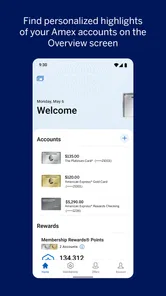
First off, downloading and setting up the Amex app was a breeze. The interface is sleek, with a clean design that doesn't overwhelm you with too much information at once. Navigating through the app felt intuitive, almost like it knew what I wanted to find before I even started looking for it. Whether you’re checking your balance, paying a bill, or looking up your rewards, everything is just a tap away.
That quick access is most useful when I have a specific question, not when I’m trying to build a full household budget. I might open the app to check where a card balance stands before making another purchase, or to confirm whether a payment has been made. That is different from a budgeting app that gathers spending across several banks and cards, categorizes it, and gives a broader monthly picture. If you want a detailed overview of all your money, Amex can be one useful piece, but it should not be mistaken for the whole dashboard.
For a realistic example, imagine I’m on my way home and remember a recurring bill is due soon. I can check the account, review the amount and payment options shown there, and decide whether to act now or return to it later. I would make that decision while focused, not while rushing through a checkout line: financial tasks deserve a quick pause to verify the account and amount before confirming. Keeping that small habit makes mobile access convenient without turning every notification or reminder into an automatic instruction.
Features That Stand Out
One of the standout features that caught my eye was the real-time notifications. Every time I make a purchase, I get an instant notification. It's great for keeping track of expenses and making sure there are no unauthorized transactions. Plus, the app's ability to manage multiple cards is a lifesaver for those of us juggling more than one account.
More From Our News Desk

 Weather - By Xiaomi
Weather by Xiaomi Review: Clear at a Glance, Less Clear Up Close
Xiaomi’s weather app makes everyday forecasts quick to scan, but its calm surface can leave useful details and recovery paths harder to find than they should be.

 X
X Under Pressure: Can It Recover When Posting Goes Wrong?
A resilience-focused review of X, examining setup, mistaken posts, interruptions, weak connections, and the gaps that matter when recovery needs to be dependable.

 Clash of Clans
 Is Won Between the Battles
Its raids are quick; its community is a long-term project of coordination, teaching, rivalry, and shared responsibility—with all the friction that entails.

 Android Auto
 Makes the Case for Quieter Car Software
The car interface is no longer judged by how much it can do, but by how quietly it helps. Android Auto shows what drivers now expect—and what still gets in the way.

 MobiOffice: Word, Sheets, PDF
MobiOffice: Transforming Mobile Productivity with Seamless Integration
MobiOffice: Word, Sheets, PDF is redefining mobile productivity with a surprising blend of functionality and innovation.

 EA SPORTS FC Soccer Mobile 26
EA SPORTS FC™ Mobile Soccer: Redefining Mobile Sports Gaming
Dive into EA SPORTS FC™ Mobile Soccer, where immersive gameplay and strategic depth transform mobile sports gaming.
Latest News



Notifications are useful as prompts to look more closely, not as a substitute for checking the account. If a transaction notification seems unfamiliar, I would open the account and inspect the details before deciding what to do; a phone alert alone does not explain every purchase, especially when a merchant name differs from the name I remember. For that reason, I’d treat alerts as an early-warning habit and review account activity directly when something doesn’t make sense. People who dislike frequent notifications may also want to consider which alerts they actually find useful, using the choices available on their device and in the app.
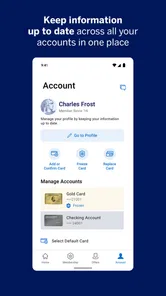
Managing multiple cards can reduce the hassle of switching between separate account views, particularly when I use different cards for different purposes. A practical routine is to check the relevant card before paying a bill, then verify the account afterward rather than assuming the last-used card is the right one. That small check helps avoid a common mobile-app mistake: moving quickly through a familiar screen and overlooking which account is selected. The convenience is strongest for someone already managing several Amex cards; it is less compelling if you only need an occasional balance check.
Another cool aspect is the rewards management. You can easily track your points and know exactly when and how to redeem them. It's all about getting the most bang for your buck, right? The app also offers personalized offers based on your spending habits, which is a nice touch.
I find rewards most useful when I check them before making a redemption decision, rather than treating a points balance as cash with a fixed value. The app can bring rewards information into the same place as card management, which makes it easier to consider whether an available option suits my plans. Still, I would compare the choices shown and read their terms before confirming; convenience does not remove the need to decide whether a redemption is worthwhile for me. Personalized offers are another reason to look carefully: an offer is only helpful when it fits spending I already intended to do, not when it encourages an unnecessary purchase.
A good low-effort workflow is to review rewards at a calm moment, note which redemption choices genuinely interest me, and return when I’m ready to act. That is more reliable than browsing offers under pressure or making a purchase just to chase a benefit. If you prefer one simple cash-back figure and do not want to think about points or offers, a card with a straightforward rewards structure may suit you better. The app makes rewards easier to inspect; it cannot decide whether a particular reward is a good personal trade-off.
Security and Support
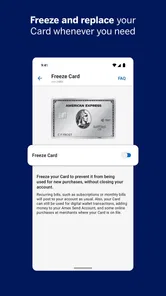
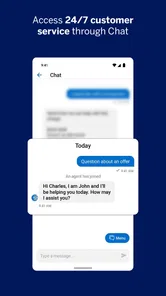
Security is always a big deal when it comes to financial apps, and the Amex app doesn't disappoint. It features biometric login options, like fingerprint and facial recognition, which adds an extra layer of protection. And if you ever run into issues, their customer support is just a tap away, with chat options that connect you to a representative pretty quickly.
Biometric sign-in can make returning to an account less cumbersome, but I see it as a convenience choice, not a reason to stop paying attention to the phone itself. Before enabling it, I would make sure I’m comfortable with the device’s own unlock settings and know how I can access the account if biometric recognition does not work. When travelling or sharing a device, I’d be especially careful not to leave an account open for someone else to use. These are sensible user habits, rather than claims about what the app can control on my behalf.
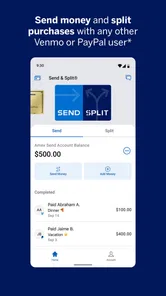
Payments are the moment I would slow down most. I’d check which account I’m using, review the amount and any displayed payment details, and only then confirm. If I’m unsure whether a payment has gone through, I’d look at the account activity before trying again, since repeating an action without checking can create confusion. The app’s role is to give me a way to manage the account; I remain responsible for reviewing the information on screen and deciding whether to proceed.
One thing that sets this app apart is its focus on user support. The FAQs section is comprehensive, and the app even offers tutorials for new users. It's like having a user manual built right into the app!
For an account question, in-app help is more convenient than leaving the account screen to search elsewhere, and chat can be useful when I need a person rather than an explanation page. I would still distinguish routine guidance from an urgent account concern: when the issue involves an unfamiliar transaction or access trouble, I’d use the support route presented by Amex and keep my description clear and specific. Help content can explain where to look, but it does not replace checking the actual account details.
Support is also a practical consideration for new users. If you’re not comfortable navigating financial services on a small screen, built-in guidance can lower the learning curve, but it does not make the app a substitute for understanding a payment or reward choice. I’d explore the help material before I need it, so I know where to find assistance without searching in a stressful moment. People who strongly prefer handling all account questions in person or on a desktop may find a phone-first workflow less comfortable.
Choosing It for the Right Job
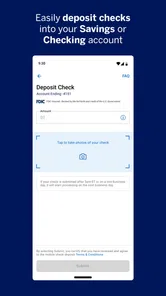
Compared with a bank’s general-purpose app, this one is focused on Amex card activity and related account tasks. That narrow focus can be an advantage: I’m not sorting through unrelated accounts just to reach a card balance or rewards area. On the other hand, if most of my financial life is at another bank, its app may be the better daily home base for transfers, deposits, and a consolidated account view. The sensible choice depends on which tasks I do most, not on trying to make one app cover every financial need.
Compared with a budgeting app, the Amex experience is more directly tied to the card relationship than to whole-household planning. A budgeting tool may be better when I want to compare spending across several institutions or set broader categories, while the Amex app is a more natural place to review Amex-specific activity and rewards. I wouldn’t replace a budget with a card app, nor would I expect a general budget tool to offer the same direct card-account workflow. For many people, using each for its own purpose is more useful than choosing only one.
The best fit, in my view, is an existing Amex cardholder who wants to check account details, make payments, review rewards, and keep an eye on more than one card from a phone. It can also suit someone who values quick access while travelling or between errands, provided they are comfortable doing financial tasks on a mobile device. A person who wants a single app for every bank, bill, and budget may prefer a broader financial dashboard. Someone who rarely uses an Amex account may have little reason to install a dedicated app.
Before relying on it as my regular account tool, I’d make a short setup check: confirm I can sign in, find the balance and payment area, locate rewards, and see where help is available. I’d also review the permission prompts and privacy choices presented on my device, then decide which notifications I want to receive. This isn’t a claim that the app offers a particular privacy switch; it is simply a useful way to make sure I understand the choices I’m actually shown before putting a finance app into my daily routine.
Another worthwhile habit is to separate checking from acting. I can open the app to review a balance without making a payment immediately, and I can browse rewards without redeeming them on the spot. That pause is especially useful if I’m distracted, using a small screen, or responding to an alert while doing something else. Mobile access makes account tasks easy to reach, but taking a moment to verify what I’m seeing is what makes that access feel considered rather than impulsive.
Final Thoughts
All in all, the Amex app is a solid choice for anyone looking to manage their finances on the go. It's user-friendly, packed with features, and offers robust security measures. Whether you're a frequent traveler racking up those points or just someone who likes to keep their financial house in order, this app has got you covered.
So, if you haven't already, give the Amex app a try. It might just change the way you manage your money, and who knows, you might even enjoy the process!
My recommendation comes with a clear boundary: I’d use it for convenient access to my Amex account, not as proof that every financial need is covered or that every on-screen option is right for me. The 3.6 average suggests opinions are mixed, so I wouldn’t assume the experience will feel effortless for everyone. I’d install it if I regularly manage an Amex card and want account tasks close at hand; I’d skip it if I need a complete multi-bank budgeting setup or simply prefer not to handle account management on a phone. Used with a little care at payment and redemption points, it can be a useful part of a broader money routine.
Amex Frequently Asked Questions
What should I check before installing the Amex app on my phone?
The Amex app is a finance app from American Express for accessing Amex account tools on a mobile device. Before downloading, check that your phone runs a compatible operating system: the app requires iOS 12 or later. It is free to download and has an Everyone content rating, making it suitable for a general audience.
Is the Amex app available for Android and iOS?
The Amex app is offered for mobile devices, and its availability depends on the app store and operating system you use. The iOS version requires iOS 12 or later. Search for Amex by American Express in your device’s official app store, then check that the version shown is compatible with your phone before installing.
What can I use the Amex app for if I already have an account?
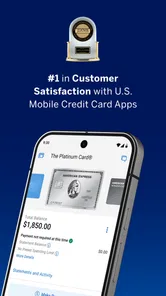
The app’s central purpose is secure access to Amex account management on mobile. Its store summary highlights viewing a balance, making payments, and redeeming rewards. These tools can make it easier to handle common account tasks from a phone, while the exact options you see depend on your Amex account and available account features.
Is the Amex app free, and what devices can I use it on?
The Amex app is free to download and is designed for managing Amex accounts on mobile devices. It is a finance app from American Express, and the current version is 7.25.0. Check that your device runs iOS 12 or later before installing. The app is rated Everyone, so its content is intended for a general audience.
Who is the Amex app intended for, and do I need an Amex account to use it?
The Amex app is intended for people who want to access and manage an American Express account from a mobile device. Its account tools include viewing a balance, making payments, and checking rewards. You will need relevant Amex account access to use account-specific features; downloading the app alone does not create an account or provide access to financial services.
Pros
- Strong fraud protection
- Exclusive offers & perks
- Wide travel insurance benefits
- Easy expense tracking
- User-friendly interface
Cons
- Limited global acceptance
- High annual fees
- Sparse reward program
- Customer service delays
- Not all features available