Alula Security
- 506.00
- 4.2
- Installs
- 100.00K
- Price
- Free

Screenshots
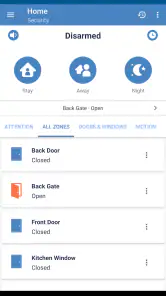
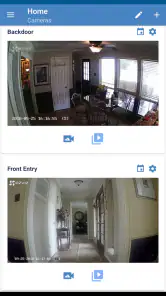
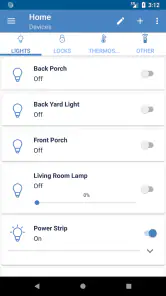
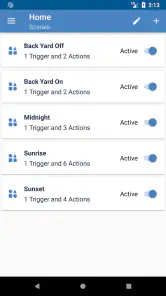
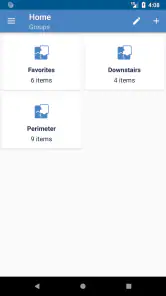
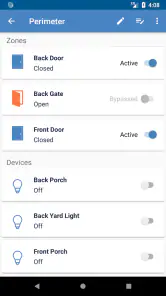
Analysis by Reviewed
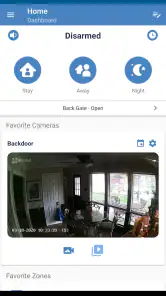
Home security apps deserve a different kind of review from ordinary smart-home tools. When an app can sit between you and an alarm, camera, or automation system, convenience matters, but so do account controls, visible choices, and the way the app handles sensitive moments. I spent time looking at Alula Security from that perspective. It is a free House & Home app from Alula, LLC, designed to give users smart control over compatible home automation and security equipment. My overall impression is practical rather than flashy: it is most useful when you already use the Alula ecosystem and want a phone-based way to interact with it.
The app has been available since March 13, 2018, and supports Android 8.0 or later. It is rated for Everyone, which makes the basic audience broad, although the real suitability depends less on age and more on whether your home already uses compatible Alula equipment. With an average rating of 4.2 from around three and a half thousand ratings, plus more than one hundred thousand installs, it has a meaningful user base without being so widespread that I would treat popularity alone as proof of reliability.
What I looked for before trusting a home-security app
My first question with an app like this is not whether the interface looks modern. It is whether the app gives me a clear, controlled path to the things I actually need: checking the state of my home, managing security actions, and using automation without feeling that every tap has an unclear consequence. Alula Security is best understood as a companion to an Alula installation, not as a universal replacement for every security brand or a standalone monitoring service.
That distinction is important. If you are shopping for your first alarm system and have not chosen hardware, installing this app by itself will not turn a phone into a complete security setup. Its value appears after the equipment and account arrangement are already in place. In that situation, the app can make the system feel less tied to a wall-mounted keypad or a single location in the house.
I also paid attention to how the app fits into ordinary routines. A security application is often opened at inconvenient times: while leaving with bags in both hands, after hearing a noise at night, or when someone needs access while you are away. Those moments expose whether the design is genuinely helpful. The strongest case for Alula Security is not constant browsing; it is having a direct mobile control point when the physical panel is out of reach.
Because this is a security-focused tool, I would avoid judging it by the same standard as a general smart-home dashboard. A broad platform may connect lights, speakers, thermostats, and devices from several manufacturers, while Alula Security is centered on the Alula environment. That narrower focus can be a strength when your installation matches it, but it is also the first reason some readers should skip the app.
Where it fits in a normal day
Imagine leaving home in a hurry on a rainy morning. You are already at the car when you wonder whether the security system was set correctly. With a compatible Alula setup and an active account, checking from the phone is more convenient than walking back inside to find the keypad. The same logic works when you are at work and need to manage an expected visit, or when a family member asks whether the house is secured.
The useful detail here is the reduction in small decisions. Instead of treating the security panel as a separate appliance, the app brings the interaction into a device you already carry. That does not remove the need to pay attention before confirming an action. It simply makes access more flexible, especially for homes where the main panel is not near the entrance used most often.
I would still build a habit around deliberate checking. A phone can be in a pocket, on silent, or temporarily unavailable. For that reason, I see the app as an additional control route rather than a reason to abandon familiar household routines. The best setup is one where everyone who needs access understands the normal process and knows what to do if the phone or network is not convenient.
Trust starts with the account, not the icon
For a security app, trust is closely tied to who can use the account and how carefully users handle access. Alula Security is therefore most comfortable for households that are willing to treat account credentials as seriously as physical keys. I would use a unique password, avoid sharing the primary login casually, and review who in the household genuinely needs control rather than giving access to every visitor.
This is not a criticism aimed only at Alula. It is a practical rule for any app that can influence home security. A convenient mobile control becomes a liability if the account is left signed in on a shared device or if old household members retain access after moving out. The app may simplify control, but the household still has to manage the people behind that control.
When evaluating the app, I would look for clear sign-in behavior, understandable account recovery, and visible confirmation before any sensitive action. Those are the moments where user confidence is built. If a screen makes it unclear whether I am viewing the current state or changing it, I would slow down and verify through the physical system or another trusted household check.
That cautious approach also answers a question many new users have: can this replace every other way of checking the home? I would not assume that. A mobile app is useful, but it should not be treated as the only source of truth in every situation. Hardware indicators, household procedures, and the account owner’s knowledge still matter, particularly when several people use the same system.
Visible control is more valuable than clever automation
The store summary presents the app as a way to control home automation and security, and that combination is significant. Automation can save time, but security actions deserve a different level of attention from turning on a light. I prefer workflows where the app makes the current state easy to understand and where an important command feels intentional rather than accidental.
One practical tip is to separate convenience from urgency in your own routine. Use the app for planned checks and normal household control, but do not rush through unfamiliar screens during a stressful event. If you are unsure whether a command has taken effect, repeating it immediately may create more confusion. Pause, inspect the displayed state, and use the household’s established backup method if the result is unclear.
Another useful habit is to decide in advance who handles remote control. In a family, several people may have phones, but not everyone needs the same level of authority. Keeping the number of regular users small can make unusual activity easier to recognize and reduces the chance of forgotten accounts. This is a user-management practice rather than a special feature claim, but it makes a real difference to how trustworthy a security app feels.
I also recommend testing the app during a calm period, not for the first time when you are already late or away from home. Learn where the status information appears, how the app presents a control, and what your household considers a successful confirmation. A short practice session can prevent a surprisingly stressful moment later.
Privacy-sensitive moments need deliberate choices
Security and automation apps naturally sit close to private parts of life. Even without making assumptions about particular data practices, I would treat account details, device status, household routines, and access history as sensitive. That means reviewing the choices shown during setup and sign-in, paying attention to what the app asks you to approve, and avoiding casual use on devices that other people can access.
The most important privacy moment may be the least dramatic one: adding another person to the household setup or leaving the app active on a tablet. Before doing that, I would consider whether the person needs full control, limited visibility, or no access at all. I would also remove access that is no longer appropriate. These small decisions give the owner more agency than simply accepting every invitation or keeping every device connected indefinitely.
Notifications deserve the same care. A security-related alert appearing on a locked screen can reveal information to anyone nearby. I would review the phone’s notification settings and choose a level of detail that fits the household. Someone living alone may prefer maximum visibility, while a shared office, dormitory, or busy family home may need more discretion.
There is a trade-off here. More visible information can make the app feel responsive and reassuring, but it can also expose household details at the wrong time. Less information protects privacy but may require opening the app more often. I would choose based on who can see the phone, rather than accepting the default as automatically appropriate.
For the same reason, I would be careful when using the app over public or borrowed devices. I would not sign in on a computer I do not control, and I would check that a shared phone is protected by its own screen lock. The app can offer mobile convenience, but convenience should not encourage careless account handling.
What the app does well for the right household
The clearest strength is focus. If your home already relies on Alula equipment, having a dedicated app from Alula, LLC can be more straightforward than assembling a collection of unrelated tools. You are not starting with a general-purpose automation platform and trying to make it understand a security setup it was not designed around. The app’s purpose is immediately relevant to the equipment it accompanies.
I also like the idea of a mobile control point for households with changing routines. People leave through different doors, return at different times, and may need to coordinate access without standing beside a panel. A phone-based option can reduce friction in those situations. It is particularly useful for someone who manages the home while traveling, provided the account is protected and the user understands that remote control is not the same as physical confirmation.
The free price lowers the barrier to trying the software once the compatible setup is available. The Everyone content rating also means the app is not presented as restricted entertainment or specialist software. Still, “free” should be interpreted as the app’s purchase price, not as a promise that the broader security installation has no equipment, service, or account considerations. I would evaluate the complete Alula arrangement separately from the app itself.
The user base gives the app some practical credibility, but I would not use the rating as a substitute for testing it with your own installation. A 4.2 average from around three and a half thousand ratings suggests generally positive reception with room for dissatisfaction, which is normal for an app tied to different hardware setups and household networks. Your experience may depend on the equipment, account configuration, phone, and connection involved.
Where the experience can become frustrating
The biggest limitation is ecosystem dependence. If your home uses another security manufacturer, Alula Security is unlikely to be the sensible choice simply because the app itself is free. A broader platform may be better for someone who wants one dashboard for mixed brands, while the manufacturer’s own app is usually the more natural route for a dedicated installation. I would choose compatibility first and interface preference second.
A second limitation is that mobile control can create false confidence. Seeing a screen on a phone may feel reassuring, but the app is still one part of a larger chain involving the account, the home equipment, and the connection between them. When something looks wrong, I would not keep tapping blindly. I would check the physical system and follow the support or household procedure associated with the installation.
There is also a learning cost for shared homes. The person who installs the app may understand the setup quickly, while other residents may not know which actions are safe, which screens show status, or how to respond to an unexpected event. That is not a reason to reject the app, but it is a reason to include other regular users in the setup conversation instead of assuming they will understand it automatically.
Finally, people who want rich cross-brand automation should set expectations carefully. Alula Security makes the most sense as a focused companion for Alula security and home automation, not as a universal command center for every connected product. If your priority is elaborate routines spanning many brands, compare the dedicated Alula experience with a broader smart-home platform before committing to one approach.
Who should use it and who should look elsewhere
I would recommend Alula Security to an Alula household that wants convenient phone access, has a clear account owner, and is willing to establish simple rules for shared use. It suits people who regularly leave home in a hurry, coordinate access remotely, or want to check their setup without returning to a fixed panel. The app is also a reasonable starting point for users who prefer a manufacturer-focused tool over a crowded general automation dashboard.
I would hesitate to recommend it to someone who has no Alula equipment, expects the app alone to provide complete protection, or wants one application to manage a wide mixture of brands. In those cases, a compatible manufacturer app or a broader platform may be a better match. I would also steer away from casual installation on a shared device unless the household has agreed on account and notification privacy.
Before relying on it, I would answer a few practical questions for myself: who owns the account, who needs access, what should appear in notifications, and what is the backup plan if the phone is unavailable? I would then install it on a supported Android device, sign in carefully, and test the normal workflow while at home. That process tells you more than a quick glance at the store page because it exposes whether the app fits your household’s habits.
A cautious verdict for everyday security control
After reviewing it as a trust-sensitive home tool, I see Alula Security as a sensible, focused companion rather than an app that should be judged in isolation. Its strongest case is simple: an existing Alula user gets a free mobile route to home automation and security control, with the convenience of carrying that access away from the main panel. That can be genuinely useful in ordinary life.
My recommendation comes with boundaries. Keep account access limited, inspect notification choices, learn the controls before an urgent moment, and remember that the app belongs to a wider hardware and household setup. I would not select it for a mixed-brand smart home or treat it as a substitute for a complete security plan. For the right Alula installation, though, it offers practical control without forcing users to manage their home from one fixed location.
In short, the best reason to choose Alula Security is controlled convenience, not novelty. It earns consideration from compatible households that value direct access and are prepared to manage privacy and account responsibility themselves. The app’s 4.2 average and more than one hundred thousand installs show that many people find value in it, but my final decision would still rest on compatibility, clear user roles, and whether its focused approach matches the way your home is actually secured.
Alula Security is free, intended for Everyone, and supports Android 8.0 and newer. Those details make trying the app relatively approachable, but the meaningful test is personal: install it only when your Alula setup is ready, explore the available controls at home, and decide whether the balance between convenience, visibility, and responsibility feels right for you.
Pros
- Simple interface makes core security tools easy to find.
- Useful alerts can help identify suspicious activity quickly.
- Lightweight design should have minimal impact on device performance.
- Provides added privacy protection when using unfamiliar networks.
- Regular security checks can encourage safer mobile habits.
Cons
- Some features may require a paid plan or in-app subscription.
- Security scans can occasionally produce alerts that need manual review.
- Advanced settings may feel limited for experienced users.
- Background protection could increase battery usage on some devices.
- Effectiveness depends on keeping the app and device regularly updated.

- Category
- House & Home
- Version
- Varies with device