Aloha Private Browser - VPN
- 4.72K
- 4.7
- Installs
- 10.00M
- Price
- Free

Screenshots


Analysis by Reviewed
When I choose a browser for everyday use, I want to know what it makes easier and what I would still need another app to do. Aloha Private Browser - VPN brings browsing and privacy tools together, which can be convenient when I’m moving between ordinary searches, personal accounts, and pages I’d rather not keep in my usual browsing routine. The main benefit is having those jobs in one place; the trade-off is that an all-in-one browser still needs to fit the way I manage tabs, downloads, and security.
A useful starting routine
I’d begin by treating Aloha as a separate browser for specific tasks rather than replacing every browser immediately. For example, I might use it when looking up a sensitive subject or opening a page on a shared device, then keep my regular browser for bookmarks and sites I visit all the time. That separation makes the choice intentional: I know which browsing context I’m in, instead of assuming every tab has the same privacy settings.
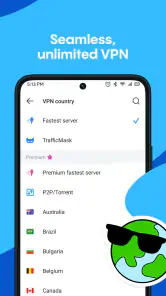
A practical habit is to check whether the VPN is active before beginning a session where I want that extra layer. A VPN can change how a connection is routed, but it does not make every website trustworthy or protect me from entering information on a deceptive page. I still look at the site itself, avoid sharing details I don’t need to share, and use a strong, unique password for important accounts.
Why Choose Aloha Private Browser?
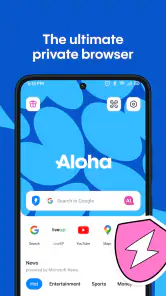
First off, let’s chat about what makes this app stand out. Imagine combining a fast browser with a built-in VPN. That’s exactly what Aloha offers. It’s got this sleek interface that doesn’t just look good but also works like a charm. The app doesn’t bombard you with ads, which is a huge win in my book.
Security and Privacy
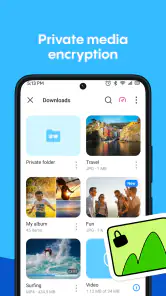
In today’s digital age, privacy is more than just a buzzword; it’s a necessity. Aloha has taken this to heart. The browser comes with a free unlimited VPN, meaning you can surf the web anonymously without a hitch. It’s like having your own invisibility cloak online. Plus, there’s an encrypted vault for your downloads and private files. Talk about peace of mind!
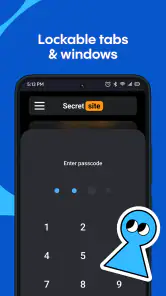
For a repeatable workflow, I’d use the vault selectively: it makes the most sense for files I want kept apart from my everyday downloads, not as a reason to store every sensitive document on my phone. I’d also check the app’s current privacy and VPN settings before relying on them for a particular task. A private browser can reduce casual exposure, but it is not a substitute for careful account security or a guarantee of complete anonymity.
Settings worth checking before settling in
The first few minutes are best spent learning where the privacy controls, VPN status, and appearance options sit. That small orientation pays off later: I can tell at a glance whether I’m using the browsing setup I intended, and I’m less likely to mix a private session with routine activity by accident. If I use the vault, I’d establish a simple rule for what belongs there and keep the rest of my files in their normal folders.
You May Like

Clash of Clans Is Won Between the Battles

Android Auto Makes the Case for Quieter Car Software

MobiOffice: Transforming Mobile Productivity with Seamless Integration

EA SPORTS FC™ Mobile Soccer: Redefining Mobile Sports Gaming

How Microsoft OneDrive Became a Mobile Productivity Giant

How Google Translate Breaks Language Barriers Effortlessly
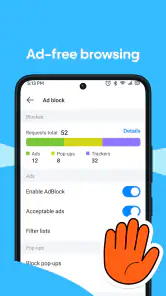
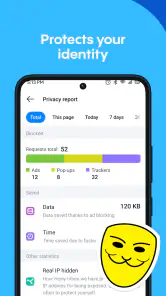
Ad blocking also works best as a practical aid rather than a promise that every page will look perfect. Some sites depend on advertising or scripts for parts of their layout, so if a page behaves oddly, I’d try reloading or adjusting the relevant setting before assuming the site is broken. This kind of small troubleshooting is a useful trade-off for a browser designed to limit interruptions.
One useful test is to open the same site with ad blocking enabled and then, only if something is missing, revisit the setting and reload. That helps distinguish a site issue from a browser issue without leaving the blocker off by default. I’d also avoid changing several privacy options at once; when something stops working, a single adjustment makes it much easier to work out what caused the change.
Browsing Speed and Experience
No one likes a sluggish browser, right? Aloha ensures that you won’t be left waiting. It’s engineered to provide a super-fast browsing experience and that’s no exaggeration. Pages load quickly and video streaming is smooth sailing. It genuinely feels like the app is working hard to keep everything running efficiently behind the scenes.
In an ordinary day, I can picture checking a travel detail on public Wi-Fi, reading a few pages, and then switching back to my regular browser for saved work links. That is where a built-in connection tool can feel more convenient than installing a separate VPN app and opening another browser. It is not automatically the best choice for every network-sensitive task, though: anyone who needs a particular VPN configuration or a tightly managed work setup should compare those requirements with the controls available in Aloha before depending on it.
For a quick trip-planning session, I’d use Aloha to check a venue, confirm opening information, and read local travel advice, then leave work accounts in the browser where I already manage them. The value is not that the two browsers make the same activity impossible to mix; it is that choosing one for a defined purpose gives me a simple mental boundary. That routine is especially helpful when I’m borrowing a phone briefly or browsing in a place where I don’t want to sign into every service.
Multimedia Features
Another feature that caught my eye is the download manager. It’s got a nifty option for downloading media directly from the web. So, if you stumble upon a video you want to watch later, Aloha’s got you covered. The app also supports VR content, which is a neat addition if you’re into that sort of thing. It’s like having a little entertainment hub right in your pocket.
I’d treat downloads as a deliberate part of the workflow: save something for a commute or a spotty connection, then organize or move on from it when I’m done. Before downloading, I’d make sure the content is yours to save and that the site permits it. This is more useful than assuming every video can be captured, and it keeps the browser’s media tools from turning into a cluttered pile of files.
A small but practical habit is to decide before a journey what I actually want available offline, rather than saving every interesting clip and sorting it out later. That keeps downloads purposeful and makes it easier to find the item I meant to watch. I would not treat a browser download as a replacement for a streaming service’s own offline option; availability and playback rules depend on the site and the content.
Faster habits and honest trade-offs
Once the basics feel familiar, I’d make the browser easier to use by choosing a small number of repeatable patterns: open Aloha for private lookups, check the VPN before those sessions, and use the vault only for files that need the extra separation. Keeping those habits consistent matters more than changing settings constantly. Themes and backgrounds can make the interface feel personal, but I’d prioritize finding the controls I actually use over spending time decorating it.
Aloha is a sensible fit for someone who wants a privacy-minded mobile browser with a VPN, ad blocking, and media tools in one app. It may be less appealing if you rely on a different browser’s established bookmarks, extensions, or account syncing, or if you want fine-grained network controls beyond a straightforward built-in option. In those cases, keeping your preferred browser and choosing a separate VPN may be the more flexible arrangement, even if it takes an extra step.
Compared with a standard browser, Aloha’s appeal is the collection of privacy and media tools in the browsing app itself. A conventional browser may be the better home for someone whose daily routine depends on a familiar account, synchronized bookmarks, or a particular extension. A standalone VPN paired with that browser can also suit people who need more control over their network setup. I’d choose Aloha when the simpler, bundled workflow matters more than keeping every specialized tool separate.
Shortcuts are most useful when they support that routine rather than add more things to remember. I’d keep a clear distinction between ordinary browsing and sessions where I deliberately check the VPN, and use the vault only when separating a file has a real purpose. If I find myself repeatedly switching settings for the same types of pages, I’d simplify the routine instead of turning every visit into a configuration exercise.
Who it suits, and what to expect
Made by Aloha Mobile, this free productivity app has a 4.7 average from around 297,000 ratings and over 10 million installs. It is rated for Everyone, runs on Android 10 or later, and version 7.11.2 is the current release. Optional in-app purchases range from $0.99 to $99.99 per item, so I’d check the purchase details in the app if I’m considering anything beyond the free experience.
For a casual user, the key question is whether convenience outweighs having separate tools. I like the idea of one browser that can handle a private search, a connection layer, and a saved media file without making me switch apps. For work that depends on specialized browser extensions, tightly controlled VPN endpoints, or one shared history across devices, I’d stick with a setup built around those needs instead.
I’d recommend trying it first for activities that are easy to evaluate: a few ordinary searches, a page where ad blocking might affect the layout, and a file you are permitted to save. That gives a clearer sense of whether its controls fit your habits than installing it and immediately moving every account over. If you’re choosing a browser for a family member, the Everyone content rating is useful context, but I’d still help them understand which browser they are using and what their privacy settings do.
One point worth keeping in mind is that a private browsing setup does not make shared or public devices fully private. Someone else may still control the device or network, and signing into an account can connect activity to that account. I’d use the browser as one part of a sensible routine, not as permission to ignore site security, device access, or the details of a purchase before confirming it.
My take after weighing the workflow
I appreciate an app that lets me tweak settings to my liking and Aloha delivers on that front. The user interface is intuitive and easy to navigate, even for those who aren’t super tech-savvy. You can personalize your browsing experience with various themes and backgrounds, making it not just functional but also visually pleasing.
My advice is to try it with a few low-stakes tasks first: browse a page with the VPN, save a permitted media file, and see whether the privacy controls feel easy to reach. That gives a clearer answer than judging it by a feature list. If those everyday actions feel smooth, it can earn a useful place beside a main browser; if you find yourself missing your usual sync or specialized controls, there is no need to force it into a role it was not chosen for.
For an experienced user, the best measure is whether the routine stays simple after the novelty wears off. I’d want to open the browser, recognize the current connection state, and reach the tools I rely on without hunting through settings every time. If I need to stop and reconsider the setup before each page, the convenience has disappeared; if the boundaries remain clear, Aloha can be a handy second browser rather than another app to manage.
In conclusion, if you’re on the lookout for a browser that doesn’t just talk the talk but walks the walk when it comes to combining speed, security, and a user-friendly interface, the Aloha Private Browser - VPN is definitely worth a download. It’s like having a Swiss Army knife for your online adventures. Give it a try and see how it elevates your browsing experience!
Aloha Private Browser - VPN Frequently Asked Questions
Is Aloha Private Browser safe for younger users or a shared family device?
Aloha Private Browser is rated Everyone, which can make it suitable to consider for a shared device. However, the app includes browsing and privacy tools, and it offers optional in-app purchases. If a child or another family member uses the device, review the browser’s settings and manage purchase permissions through the device’s controls so everyone understands what can be accessed or bought.
Who develops Aloha Private Browser, and is it widely used?
Aloha Private Browser is developed by Aloha Mobile. It has an average rating of 4.7 from around 297,000 ratings, with roughly 4,700 written reviews and over 10 million installs. Those figures suggest that many users have tried the app, but individual experiences can differ, so it is still worth considering whether its browsing and privacy features match what you need.
Is Aloha Private Browser suitable for everyday browsing?
Aloha Private Browser is a productivity app centered on everyday web browsing, with privacy-oriented tools included in the same app. Its store description highlights incognito browsing with ad blocking and a secure connection. If you want a browser that combines ordinary web access with features for protecting web activity, it may be worth considering; your choice should also depend on which browser features matter most to you.
What devices and operating systems can run Aloha Private Browser?
Aloha Private Browser is available for Android and iOS devices, so it can suit users of either mobile platform. On Android, the listed minimum operating-system requirement is Android 10, while the iOS version is available through Apple’s App Store. Before downloading, check your device’s software version and available storage, and make sure you choose the edition intended for your operating system.
What is Aloha Private Browser and what features does it offer?
Aloha Private Browser is a highly secure web browsing application designed for privacy-conscious users. It offers built-in VPN functionality, ensuring that your online activities remain private and encrypted. Other features include an ad blocker, media player, and support for VR videos. Aloha also provides a comprehensive download manager, making it easy to save files directly to your device.
Pros
- Built-in VPN for secure browsing.
- Blocks ads and trackers efficiently.
- Supports multiple tabs smoothly.
- User-friendly interface for easy navigation.
- Fast browsing with quick page loads.
Cons
- Limited VPN locations in free version.
- Occasional crashes on older devices.
- No desktop version available.
- Premium version is relatively costly.
- No dark mode option for night use.

- Category
- Productivity
- Version
- 7.11.2











