

All Video Downloader & Browser
- 8.49K
- 3.9
- Installs
- 50.00M
- Price
- Free

Screenshots
Analysis by Reviewed
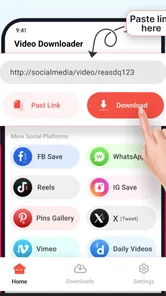
I tend to reach for a social-media downloader when I want to keep a short clip for a practical reason, not simply because my feed is moving too fast. A cooking trick I want to try, a visual reference I need to revisit, or a story I have permission to keep can be easier to find as a saved file than buried in a timeline. Video Downloader - Story Saver is built around that kind of quick save, though the process works best when I treat each link as something to check rather than assume.
Where people can get stuck
The basic link-and-save idea is easy to understand, but the actual result can depend on the post and the platform. A link that opens normally in a social app may not always lead to a downloadable file, and a story or post can become unavailable before you get back to it. I’d treat the app as a handy way to save eligible media, not as a guarantee that every link will work.
If a download does not begin, I would first check that I copied the complete link and that the original post is still accessible. I’d also try opening the post in its own platform before pasting the link again. These simple checks help separate a copying mistake from a limitation of the post itself.
That distinction matters because a failed save does not always mean the app itself is broken. A post may have changed, the source may not be accessible in the same way anymore, or the copied address may point somewhere other than the media. I find it more useful to test one link carefully than to keep repeating a step that has already failed.
Why You’ll Love Using It
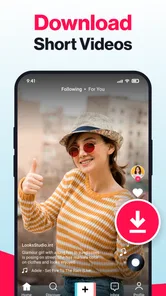
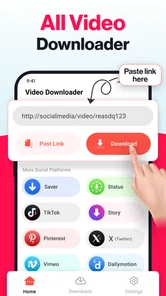
First off, the Video Downloader - Story Saver is incredibly easy to use. I mean, who has the time to fiddle around with complicated instructions when all you want to do is save that cute cat video? With this app, you simply copy the link of the video you want, paste it into the app, and voila! It's saved and ready for offline viewing.
Setup checks that make a difference
Before relying on a saved clip, I’d make sure it appears in the app and can play from there. That small check matters if you are collecting something for a trip or a place with weak connectivity: starting a download is not the same as confirming that a usable copy is ready. I’d also keep downloads organized soon after saving, rather than leaving a growing pile of clips to sort through later.
For everyday use, it suits someone who sees a recipe demonstration, a short exercise reference, or a creative idea and wants to revisit it without searching through a feed. For example, if I spot a quick cooking technique while planning dinner, I can save it and check the clip again in the kitchen. That is more practical than assuming I will remember the creator or find the post again.
More From Our News Desk

 Gmail
GmailGmail in a Busy Inbox: Who Benefits Most?
From first account to crowded workday, Gmail earns its place through dependable search and flexible sorting—but its best fit depends on how much inbox maintenance you can tolerate.

 Prime Video
Switching to Prime Video: What Changes in Your Viewing Routine
Prime Video can make a compelling second home for streaming, but switching means learning a different catalog, rental layer, and route from browsing to playback.

 Universal TV Remote Control
Universal TV Remote Control Works Best as a Reliable Backup
A phone remote earns its place through quick setup and reliable habits. Here is how to get more from Universal TV Remote Control—and where its limits show.

 Weather - By Xiaomi
Weather by Xiaomi Review: Clear at a Glance, Less Clear Up Close
Xiaomi’s weather app makes everyday forecasts quick to scan, but its calm surface can leave useful details and recovery paths harder to find than they should be.

 X
XX Under Pressure: Can It Recover When Posting Goes Wrong?
A resilience-focused review of X, examining setup, mistaken posts, interruptions, weak connections, and the gaps that matter when recovery needs to be dependable.

 Clash of Clans
Clash of Clans Is Won Between the Battles
Its raids are quick; its community is a long-term project of coordination, teaching, rivalry, and shared responsibility—with all the friction that entails.
Latest News



I’d build a small check into the routine: save one item, open it in the app, and confirm that it plays before saving a whole run of clips. It’s a simple way to catch a bad link early. If the clip is important, I’d also make sure I can identify it later; a saved file is only useful if I can recognize the right one when I need it.
For a shared household or a busy day, this can be especially helpful when the purpose is specific. I might save a short repair demonstration before starting a task, then keep the phone nearby to replay the relevant moment. That is different from trying to build a permanent archive of someone else’s entire account, which is neither a realistic expectation nor a sensible way to use a lightweight downloader.
Simplicity at Its Best
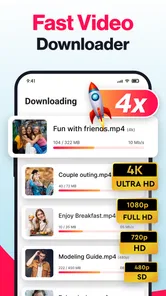
What really surprised me was the app's user-friendly interface. It's intuitive, straightforward, and doesn't require a manual to navigate. Whether you’re a tech-savvy teenager or someone who still struggles with emojis, this app caters to all. Plus, the download speed is impressive, which means no more waiting around forever for your videos to save.
That straightforward approach is a genuine advantage for a narrow task: I do not need to learn a complicated editing timeline just to keep a clip for reference. The trade-off is that a simple downloader is not a media-management system. If I want detailed folders, careful tagging, or a polished editing workflow, I would use tools designed for those jobs and keep this app focused on quick saves.
Recovering a workflow when a save fails
If a link fails repeatedly, I would avoid tapping through the same steps over and over. Recheck the copied address, confirm the post still opens, then try again with one item before adding more. This is especially useful when saving a group of posts: testing one first can prevent a batch of unusable entries. If the source has changed or is restricted, switching to a platform’s own save or bookmark option may be the more dependable choice.
There is also a useful trade-off in keeping downloads for later: offline access is convenient, but saved copies can take up device space and may be less current than the original post. I’d keep only media I have a clear reason to revisit and remove old files when they stop being useful.
When I am trying to recover a stalled attempt, I would change one thing at a time. First I’d reopen the source post; then I’d copy its link again and make a single fresh attempt. If that still does not work, I would stop rather than queueing the same item repeatedly. This keeps the process tidy and makes it easier to tell whether the problem follows the post instead of the app.
For a collection, I would save in small groups rather than treat a large batch as one operation. After each group, I’d check that the clips I expected are present and playable. The extra pause is worthwhile when a collection is for a particular event or task, because discovering missing items later can be more frustrating than spending a moment verifying them at the time.
More Than Just Video Downloads
The app isn't just about downloading videos. Oh no, it’s got some extra tricks up its sleeve. You can also save stories and highlights from Instagram, which is perfect if you want to keep a digital scrapbook of your favorite moments. It even supports multiple downloads at once, so you can save an entire collection without breaking a sweat.
Stories and short-lived posts call for a little more thought than ordinary reference clips. If I want to keep a moment, I’d do it while the post is still available and check the result right away. For personal use, a small, intentional collection is easier to manage than saving every passing item; it also makes the media I keep more meaningful instead of turning the app into another crowded feed.
Batch saving has an obvious convenience, but I would not start a large group of downloads without checking that the first item works. This is a practical compromise: it preserves the time-saving benefit while limiting the cleanup if a source link is unsuitable. It is also easier to spot which item caused a problem when I have not mixed it into a much bigger group.
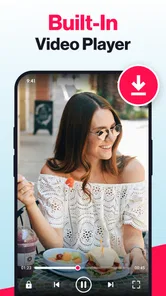
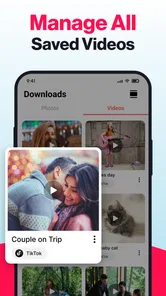
And let’s not forget the built-in media player. This feature means you can watch your saved videos directly in the app, no need to juggle between different apps or players. It’s like having a mini theater in your pocket!
Playing a saved clip inside the same app is useful when I just need to review the content, but I would still think about where I need to use it. If I only want to watch it again, keeping the process in one place is convenient. If I need to edit a clip, add it to a larger project, or manage it alongside footage I recorded myself, a dedicated editor or file-management workflow is likely a better match.
When another option is better
Compared with using a platform’s built-in bookmarks, a downloader is more useful when I specifically want a local copy to watch offline; bookmarks are often the simpler choice when I only need to find a post again. Likewise, if I mainly want to manage or edit footage I recorded myself, a dedicated video editor is a better fit than an app centered on saving social media media. This tool makes most sense for occasional personal collecting, not as a replacement for a full media library or editing workflow.
The app is free to install, with optional in-app purchases ranging from about three to twenty-five dollars per item. It is made by Fast Video Downloader & Story Saver - DevBay, and its current version is 1.16.53. It has an average rating of 3.9 from around 648,000 ratings and has been installed over 50 million times. It is rated for everyone and supports Android 7.0 and later. Those details make it easy to see that it is widely used, but they do not remove the practical need to check whether a particular post can be saved.
Its release was on May 18, 2020, and there are around 8,500 written reviews. I see the broad audience as a sign that the idea is familiar to many Android users, not proof that every source will behave consistently. The app sits in the video player and editor category, but its role is more specific than a general-purpose player or editing suite: it is for capturing eligible social media media and viewing what has been saved.
That makes the choice fairly clear. If I mostly want to keep track of posts, I would begin with the platform’s own bookmark feature because it keeps the content tied to its source. If I want a local copy for a particular offline use, this downloader is the more relevant option, provided the post can be saved and I have a legitimate reason to keep it. For people who create their own clips, the phone’s built-in tools or a dedicated editor are more useful for trimming, arranging, and preparing footage.
I would also think about the lifespan of what I save. A temporary reference for a recipe or a craft project may be worth keeping for a few days, while a clip I no longer need can be deleted. This small habit helps avoid treating a downloader as an unlimited archive and makes it easier to find the few items I actually want to revisit.
Privacy and Security
Now, I know what you’re thinking: Is it safe? Well, rest assured, your data privacy is a priority with Video Downloader - Story Saver. The app doesn’t collect personal data, and it ensures that your downloads are secure and private. So, you can go about your downloading spree without any worries.
My practical advice is to be selective about what I save and to use the app only for media I am allowed to keep. Private or personal moments deserve extra care, even when a download seems technically possible. A convenient save button does not change the creator’s expectations or make redistribution appropriate.
One thing to note, though, is to always respect copyright laws and the terms of service of the platforms you’re downloading from. It’s all fun and games until you get a notice from the copyright police!
For a clip I want to share with someone else, I would usually send the original post rather than pass around a downloaded copy. That preserves its connection to the creator and avoids confusing private viewing with permission to repost. If the goal is simply to remember something, a platform bookmark may be enough; if I save a local copy, I keep its purpose personal and specific.
My practical verdict
For someone who regularly wants to keep short social clips, stories, or visual references close at hand, I can see the appeal: the workflow is approachable, and watching saved media inside the app keeps the task focused. I would skip it if I only need to bookmark posts, want robust editing tools, or expect every social link to download successfully. The best approach is to use it selectively, test a link before relying on it, and keep the creator’s rights and platform rules in mind.
I think it fits best for Android users who have a concrete, occasional reason to keep a clip locally and are comfortable checking each result. It is less suitable for someone who wants automatic, dependable access to every post, a searchable long-term archive, or a full set of editing controls. Its free starting point makes it easy to try, while the optional purchases mean I would check what is offered in the app before deciding whether any paid option is worthwhile for my own routine.
If I were recommending it to a friend, I would describe it as a focused convenience rather than an essential social app. Try it with one public, accessible post you have a good reason to save, confirm that the saved version plays, and then decide whether the workflow earns a place on your phone. That small trial answers the most important personal question: not whether the idea sounds useful, but whether it works for the kinds of posts you actually encounter.
In conclusion, if you're looking for a reliable, easy-to-use app to save all those must-have videos and stories, Video Downloader - Story Saver is definitely worth checking out. Whether for entertainment, inspiration, or just to keep a little piece of the internet for yourself, this app has got you covered.
All Video Downloader & Browser Frequently Asked Questions
Is Video Downloader - Story Saver free to install?
Yes. Video Downloader - Story Saver is free to download, so you can install it without an upfront purchase. It also offers in-app purchases, with items priced from $2.99 to $24.99, so check the purchase options before confirming any transaction. Keep in mind that free installation does not necessarily mean every feature or use of the app is free.
Who makes Video Downloader - Story Saver?
Video Downloader - Story Saver is developed by Fast Video Downloader & Story Saver - DevBay. Knowing the developer can help you identify the app when searching for it and distinguish it from similarly named downloaders. Before installing, make sure the app name and developer match so you choose the intended product.
How widely used is Video Downloader - Story Saver?
Video Downloader - Story Saver has over 50 million installs and around 648,000 ratings, with an average rating of 3.9. Those figures suggest that many people have tried it, though ratings reflect different devices, expectations, and experiences. It has also received around 8,500 written reviews, which may offer additional perspectives before you decide whether it fits your needs.
What does Video Downloader - Story Saver do?
Video Downloader - Story Saver is a video downloader in the Video Players & Editors category. Its store summary describes downloading videos and photos and reposting them, while its short description presents it simply as Video Downloader. It may appeal to people who want a tool for saving media and sharing or reposting content, but remember to respect creators’ rights and the rules of the platform where content appears.
What Android version is required to run Video Downloader - Story Saver?
The listed minimum requirement is Android 7.0, so check your device’s Android version before installing. If your phone or tablet runs an older version, it may not be compatible. The app is free to download, though it also offers in-app purchases priced from $2.99 to $24.99 per item; consider those optional costs when deciding whether it suits you.
Pros
- Downloads videos quickly
- Supports multiple platforms
- Easy to use interface
- Saves stories effortlessly
- No watermark on downloads
Cons
- Contains ads
- Occasional download errors
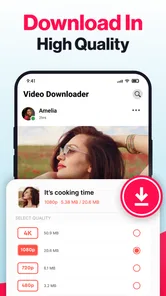
- Limited format options
- Requires internet connection
- No built-in video editor












