Alarmy - Alarm Clock & Sleep
- 79.53K
- 4.6
- Installs
- 10.00M
- Price
- Free

Screenshots


Analysis by Reviewed
I judge an alarm by what happens when I’m tired, rushed, or sharing a room—not just by how many options it offers. Alarmy - Alarm Clock & Sleep is a productivity app from Sleep Tracker & Alarm Clock by Delightroom, built around making it harder to dismiss an alarm without getting properly awake. It’s free to install, rated 4.6 on average from around two million ratings, and has more than ten million installs. For people who sleep through ordinary alarms, that focused idea is its main appeal; for everyone else, the extra steps can feel like more friction than help.
How the challenge changes the usual alarm routine
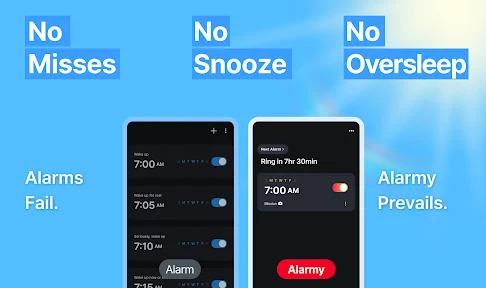
Most built-in phone alarms are designed to be quick: choose a time, hear a tone, tap a control, and get on with the morning. Alarmy takes a different approach by making dismissal depend on completing a task. That distinction matters more than the variety of challenges. The app is not simply a clock with a louder sound; it asks me to do something before I can return to bed, which can interrupt the automatic half-asleep habit of silencing an alarm and forgetting it ever rang.
That approach is useful when the problem is not hearing an alarm but responding to it. If I wake reliably and only need a reminder, a phone’s standard clock is simpler and less intrusive. If I regularly snooze without thinking, Alarmy gives the moment of waking a little structure. I would not treat it as a guaranteed solution to sleep difficulties, though: a challenging dismissal can encourage me to get moving, but it cannot replace enough sleep or fix a schedule that leaves me exhausted.
A challenge should fit the room and the person
Choosing a mission is more than a matter of picking the toughest one. A photo task can be useful when a particular destination makes sense every morning, but it can be awkward if that spot is occupied, inaccessible, or different when I travel. A mental task avoids needing to cross a room, yet it still asks me to concentrate while groggy. The best choice is the one I can complete safely and consistently, not the one that sounds most demanding when I’m wide awake.
I’d also test the entire sequence before depending on it for a work shift, an appointment, or a trip. Set the alarm for a time when waking is not critical, then try the chosen mission in the actual room and lighting conditions. That quick rehearsal can reveal whether the task is confusing, whether the required destination is practical, and whether I can complete it without disturbing another person. It is a small bit of preparation that makes the app’s central idea much less likely to become a morning surprise.
Waking Up on the Right Side of the Bed
Let’s face it, waking up is hard. But with Alarmy - Alarm Clock & Sleep, it’s like having a personal coach at your bedside. The app boasts a variety of unique alarm features that make sure you’re up and about when you need to be. From solving math problems to shaking your phone until your arm feels like it’s had a workout, this app makes sure you’re not just hitting snooze and rolling over.
Choosing a challenge that fits the morning
One of the standout features for me was the range of customizable challenges. Trust me, there’s something oddly satisfying about completing a mission first thing in the morning. Whether it’s taking a picture of your bathroom sink or doing a little math, these challenges are designed to kickstart your brain. Sure, it might sound a bit frustrating at first, but the sense of accomplishment is real!
You May Like

Clash of Clans Is Won Between the Battles

Android Auto Makes the Case for Quieter Car Software

MobiOffice: Transforming Mobile Productivity with Seamless Integration

EA SPORTS FC™ Mobile Soccer: Redefining Mobile Sports Gaming

How Microsoft OneDrive Became a Mobile Productivity Giant

How Google Translate Breaks Language Barriers Effortlessly
The useful trick is to match the task to the kind of morning you actually have. A photo challenge can get me out of bed and moving toward a fixed spot, while mental arithmetic is better when I need to be alert but can’t leave a shared room. I’d avoid choosing a task that depends on a location you might change or a routine that varies from day to day; an alarm should help, not turn a rushed morning into troubleshooting. Try the selected challenge when you’re fully awake before relying on it for an important start.
Sleep support and a calmer evening
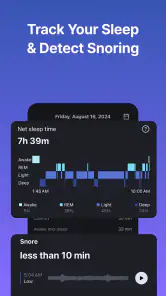
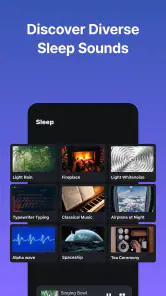
Alarmy isn’t just about getting you out of bed; it’s also about how you get there. The app includes features that help improve your sleep quality. With soothing sounds and relaxing music options, even the most stubborn insomniacs might find a bit of peace. It’s like having a lullaby for adults, and honestly, who doesn’t need a little help winding down after a long day?
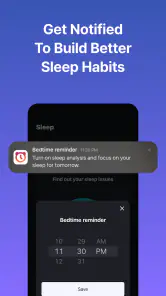
I see the bedtime sounds as a convenient companion, rather than a replacement for a dedicated sleep routine or a quiet room. If you already use a separate audio app at night, adding another step may not be worthwhile. But if you want one place to set a wake-up and wind down, keeping those choices together can make the routine easier to repeat. The trade-off is that an alarm with a required challenge is less suitable when you need a gentle wake-up or must keep noise low for someone sleeping nearby.
Readable setup, with practical limits
Now, I’ll admit, I’m not the most tech-savvy person around, but setting up Alarmy was a breeze. The user-friendly interface allows you to easily set alarms, choose challenges, and tweak sleep sounds without feeling like you're defusing a bomb. Everything is straightforward, which is a huge plus if you’re like me and want things simple and fuss-free.
For motor and sensory needs, the challenge itself matters as much as the layout. Shaking a phone may be uncomfortable or impractical for someone with limited movement, and a sound-based alarm may be a poor fit for someone who needs another way to wake. A math task or a photo task can offer a different kind of interaction, but neither is automatically accessible to everyone. I’d choose the least demanding option that still gets me out of bed, and check that it works comfortably before making it part of a daily routine.
Making it work on an ordinary weekday
Picture a morning when I have to leave for work, but I know I tend to silence a normal alarm before I’m fully conscious. The night before, I set the wake-up and choose a task that takes me away from the bedside without requiring a complicated route through the room. I try that mission once while alert, then leave the phone where I can reach it safely. In the morning, the task creates a clear transition: alarm first, get up to complete it, then start getting ready rather than slipping straight back under the covers.
The same setup would not suit every household. In a shared bedroom, I would consider whether the alarm and the movement involved might wake someone else, and whether a quieter task is more considerate. For a person who works changing shifts, a photo destination that is not available in every sleeping space may be less dependable than a challenge that can be completed wherever the phone is. The practical lesson is to choose for the room and schedule I actually have, not an idealized routine.
Who will benefit, and what to weigh
Alarmy is a good match for heavy sleepers, chronic snoozers, and anyone who responds better to a concrete task than to repeated beeping. It is less compelling for people who already wake reliably, need a very simple alarm, or share a bedroom where an active challenge could disturb someone else. The app is free, though it also offers in-app purchases ranging from around three dollars to about one hundred and sixty dollars per item, so I’d explore the basic routine before deciding whether any paid option is worth considering. It is rated for Everyone, and version 25.44.1 requires Android 9 or later.
Its place among alarm apps is fairly clear to me: a standard clock is the better pick for speed and minimal fuss, while Alarmy is for someone who wants a deliberate obstacle between the alarm and the snooze reflex. A separate bedtime-audio app may be preferable if winding down is the only thing I need, and a physical alarm may suit someone who does not want a phone involved at bedtime. Alarmy’s combination of wake-up challenges and sleep sounds is convenient, but convenience does not mean it should replace tools that already work well for a person’s specific needs.
Before settling into a routine, I would check a few practical questions through use rather than assumption. Can I complete the chosen task when I’m groggy? Does the sound level work for me and anyone nearby? Can I use the mission in the places where I actually sleep? And does the bedtime feature simplify my evening, or just add another thing to manage? Those checks help answer whether the app is a good fit without relying on its popularity or the promise of a more forceful alarm.
The app has been available since August 2012, and its scale—around eighty thousand written reviews alongside its ratings—suggests it has become a familiar choice for people seeking more than a standard clock. Still, popularity doesn’t settle whether its approach suits your body, bedroom, or schedule. I’d treat the first few mornings as a test: check that the challenge is manageable, the alarm is noticeable without being disruptive, and the routine doesn’t create stress. If any of those conditions fail, a conventional alarm or a quieter alternative may serve you better.
An inclusive choice, not a universal one
What I appreciate most is that Alarmy lets me think about waking as a sequence rather than a single sound: I can pair a challenge with an evening routine and adjust the task to the context. That flexibility can help people whose main barrier is an automatic snooze habit, but it does not make every interaction suitable for every ability. Movement, concentration, hearing, shared space, and changing routines all affect whether a particular setup is realistic.
My recommendation is to start with the least disruptive challenge that addresses the actual problem, rehearse it, and keep a simpler backup if waking on time is essential. If the task creates pain, confusion, anxiety, or too much noise, that is a good reason to choose another alarm approach rather than push through. For people who want a more active nudge and can comfortably use its missions, Alarmy can make mornings more intentional. For those who need the quietest, simplest, or most adaptable arrangement, a conventional clock or another personal setup may be kinder and more reliable.
In conclusion, if you’re looking for a way to make mornings less painful and nights more restful, Alarmy might just be your new best friend. It’s got the perfect blend of fun and functionality, making it a must-try for anyone struggling with their daily wake-up routine. So, why not give it a shot? Your mornings might thank you!
Alarmy - Alarm Clock & Sleep Frequently Asked Questions
Does Alarmy need special permissions or access to my phone to work properly?
Alarmy’s alarm and mission features may work best when the app can use relevant phone functions, such as the camera for a photo-based mission or motion sensors for a movement-based task. Before setting an alarm, review the permissions requested on your device and allow only the access you are comfortable with. Keeping your alarm setup simple is another option if you prefer not to use those missions.
Can I customize the sound and difficulty of an Alarmy alarm?
Alarmy is built to make waking up more demanding than dismissing a standard alarm, and its mission-based options let you choose tasks that involve movement or concentration. This gives you room to pick an approach that suits your mornings, whether you want a straightforward wake-up or a more active challenge. Explore the available alarm settings in the app to find a setup that feels practical for your routine.
Is Alarmy suitable for heavy sleepers who often sleep through regular alarms?
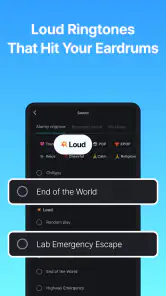
Alarmy is promoted as a loud alarm clock for heavy sleepers, and its mission-based dismissal options are intended to make turning off an alarm harder to do while half-asleep. You can choose tasks that require movement or concentration, rather than simply tapping a button. It may be worth trying if ordinary alarms are easy for you to ignore, though your experience can depend on your device and routine.
What features does Alarmy offer to ensure I wake up on time?
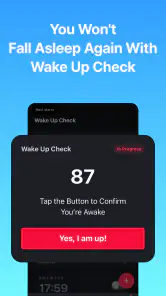
Alarmy is designed to be the most effective alarm clock app for those who struggle to wake up. It features a variety of missions such as taking a picture of a registered location, shaking the phone a certain number of times, or solving math problems to dismiss the alarm. These tasks ensure that users are fully awake before they can turn off the alarm, helping to eliminate oversleeping.
Is Alarmy free to use or does it require a subscription?
Alarmy offers a free version with basic features that are sufficient for most users. However, for those who want an enhanced experience, Alarmy provides in-app purchases for additional features such as more challenging missions, themes, and ad-free usage. In-app purchase prices range from about $2.90 to $159.99 per item, so check the options in the app before buying.
Pros
- Highly customizable alarm settings
- Effective for heavy sleepers
- Includes sleep tracking features
- User-friendly interface
- Variety of alarm tones available
Cons
- Contains in-app advertisements
- Some features require premium upgrade
- May drain battery quickly
- Occasional app crashes
- Limited free version features

- Category
- Productivity
- Version
- 25.44.1











