

Airthings
- 475.00
- 4.4
- Installs
- 100.00K
- Price
- Free

Screenshots
Analysis by Reviewed
I tend to judge a home-monitoring app by one practical question: does it help me understand my indoor environment without becoming another source of work? Airthings is built for that purpose. Developed by Airthings ASA, this free House & Home app brings the company’s devices into one mobile experience, so its value depends less on flashy presentation and more on how comfortably it fits into a daily routine.
My first impression is that it makes the most sense as a companion for someone who already uses Airthings hardware or is considering it. The app is not a general-purpose home dashboard that can replace every smart-home tool. Instead, it gives Airthings owners a focused place to check readings, notice changes, and follow indoor conditions over time. That narrow purpose is also its main strength: there is less clutter than I would expect from an app trying to control an entire home.
The app is free to install and suitable for Everyone. It appeared on December 10, 2022, and the current release is version 8.1.4, requiring at least iOS or Android 12. Its store summary describes it simply as being for all Airthings devices. That wording is brief, but it tells me what to expect: this is primarily a central companion for the manufacturer’s own ecosystem, not a standalone sensor app that becomes useful without compatible equipment.
How Airthings feels during everyday use
I use Airthings in short, purposeful visits rather than keeping a home dashboard open all day. In ordinary use, the key is knowing what I want to check and giving device readings enough context before acting on them. That makes the app feel most useful as a quiet reference point, and it leads naturally to the practical choices that shape how confidently I rely on it.
Speed expectations and the first setup decision
When I open an app like this, I am not looking for entertainment or a long browsing session. I want the current state of the home to be easy to find, and I want the app to get out of the way afterward. Airthings is best understood in that context. Its perceived speed matters because indoor readings are something I may check briefly while making coffee, opening a window, preparing a child’s room, or deciding whether a bedroom needs more ventilation.
The most important expectation to set is that the app cannot create useful environmental information by itself. Its usefulness begins when compatible Airthings devices are connected and reporting. That creates a different experience from a weather app, where I can install the software and immediately see information. Here, the app is the viewing and management layer for physical equipment, so the quality of the overall experience depends on both sides working together.
I also would not treat every screen refresh as a promise of an instant, live measurement. Home sensors may need time to measure, communicate, and update. If I open the app after changing the room, I would give the system enough time to reflect that change rather than assuming the first screen tells the complete story. This is a useful habit with any connected monitor, but it is especially important here because a single glance can otherwise encourage overconfident conclusions.
More From Our News Desk

 Instagram
Instagram’s Power Comes From Its Place in Your Phone
A close look at how Instagram turns Meta’s reach, recommendation systems and everyday camera habits into durable platform power—and what that costs users.

 Gmail
GmailGmail in a Busy Inbox: Who Benefits Most?
From first account to crowded workday, Gmail earns its place through dependable search and flexible sorting—but its best fit depends on how much inbox maintenance you can tolerate.

 Prime Video
Switching to Prime Video: What Changes in Your Viewing Routine
Prime Video can make a compelling second home for streaming, but switching means learning a different catalog, rental layer, and route from browsing to playback.

 Universal TV Remote Control
Universal TV Remote Control Works Best as a Reliable Backup
A phone remote earns its place through quick setup and reliable habits. Here is how to get more from Universal TV Remote Control—and where its limits show.

 Weather - By Xiaomi
Weather by Xiaomi Review: Clear at a Glance, Less Clear Up Close
Xiaomi’s weather app makes everyday forecasts quick to scan, but its calm surface can leave useful details and recovery paths harder to find than they should be.

 X
XX Under Pressure: Can It Recover When Posting Goes Wrong?
A resilience-focused review of X, examining setup, mistaken posts, interruptions, weak connections, and the gaps that matter when recovery needs to be dependable.
Latest News



For a fast daily check, the app’s focused role is helpful. I can approach it with a question such as “has the room changed since yesterday?” rather than wandering through unrelated smart-home controls. That makes the experience feel lighter than using a broad home-automation platform for a task it was never designed to prioritize.
What happens during heavier use
Heavier use does not necessarily mean leaving the app open all day. In my view, it means comparing rooms, reviewing a longer pattern, checking several devices, or returning repeatedly while investigating a change in the home. That is where a monitoring app has to do more than display one attractive number. It needs to help me interpret a situation without making every check feel like a technical project.
A realistic example would be a bedroom that feels stuffy in the morning. I might check the relevant Airthings device before opening a window, look again after airing the room, and then compare the result with another part of the home later. The useful workflow is not to react to every small movement. It is to establish a simple before-and-after routine, then use repeated observations to decide whether a habit—such as changing ventilation timing—is worth keeping.
Another practical use is checking a room that is not visited often. A basement, home office, or guest room can be easy to ignore because nobody spends time there every day. A central app gives that space a place in the same monitoring routine as the main living areas. The advantage is not just convenience; it can reduce the chance that I rely on memory or occasional guesswork when deciding which rooms deserve attention.
During this kind of use, I would keep the number of questions small. Looking at every available reading at once can turn a helpful tool into a stream of distractions. I find it more sensible to choose one purpose—comfort, ventilation, or checking a particular room—and review the information with that purpose in mind. The app is more valuable as a way to support decisions than as a scoreboard that demands constant checking.
Resource demands are also worth considering. Because this is a companion for connected devices, I would not expect it to behave like a lightweight calculator that does everything locally and closes the moment I leave it. It may need to communicate with the device ecosystem, and repeated monitoring can naturally involve more activity than a one-time utility. I would use it when I need the information, then close it rather than treating it as a permanent dashboard unless that is genuinely part of my routine.
Stability, interruptions, and recovery
Reliability for a monitoring app is not only about whether it opens. It is also about whether I can recover gracefully when a device, phone, or connection is not ready. A sensible approach is to treat the app as one part of a chain: the phone needs its operating system supported, the Airthings equipment needs to be available, and the connection between them needs to work well enough for information to move through.
If a reading appears delayed, I would avoid repeatedly forcing refreshes or immediately assuming the sensor is wrong. First, I would check whether the device is in the expected place, whether the phone is running a supported system, and whether the issue affects one device or the whole collection. That simple separation can save time. A problem isolated to one room points me toward that device or its connection; a problem affecting everything suggests looking at the app or broader setup.
The requirement for Android or iOS 12 or newer is reasonable for many current phones, but it creates a clear boundary for older devices. Anyone using an aging phone should check compatibility before building a monitoring routine around the app. This is not a minor detail for home technology: if the only available phone cannot run the companion software properly, the sensors become much less convenient to use.
I also appreciate the importance of recovery after interruptions. Phones change networks, batteries run low, and people move around the home. A good connected-device habit is to make one deliberate check after an interruption instead of assuming that a missing update means a permanent failure. If the app returns to normal after the connection is restored, that is a more useful sign than judging it by one awkward moment.
With an average rating of 4.4 from around 6,200 ratings and more than 100,000 installs, Airthings has attracted a meaningful user base for a specialized home app. Those figures suggest that it is not an obscure experiment, but they do not guarantee that every household will have the same experience. Sensor placement, phone age, network conditions, and the particular Airthings equipment in use can all affect how dependable the complete setup feels.
The limits created by the devices themselves
The biggest constraint is not likely to be the app’s category or appearance; it is the fact that the app is tied to Airthings hardware. That is a sensible design choice for a manufacturer’s companion, but it narrows the audience. If I want one screen for products from several brands, I would look at a broader smart-home platform instead. That alternative may offer wider compatibility, even if it is less focused on indoor monitoring.
This also affects how I would compare Airthings with a basic single-sensor solution. A simple device with its own display can be quicker for a person who only wants to glance at one room and never review patterns. Airthings becomes more compelling when I care about bringing the company’s devices into a shared mobile workflow. The trade-off is clear: more organized monitoring in exchange for depending on the Airthings ecosystem.
There is another human limitation that no interface can completely remove: environmental readings need context. A number may change because a door opened, several people entered the room, cooking took place, or ventilation changed. I would not use the app as a reason to make dramatic decisions based on one isolated observation. Its better role is helping me notice recurring patterns and connect them with things I can actually change.
For that reason, I would place the device in a meaningful location rather than wherever it is most convenient to reach. A reading from a corner, a drafty spot, or an unusually enclosed position may not represent the room as a whole. The app can organize what the sensor reports, but it cannot correct a poor placement choice. This is one of the less obvious trade-offs of connected monitoring: software polish cannot compensate for weak measurement habits.
I would also avoid treating the app as a substitute for professional advice or a guarantee of safety. It can support awareness of indoor conditions, but a phone dashboard is not the same thing as a complete diagnosis of a building. If I were dealing with a serious or persistent concern, I would use the app as supporting information while taking the appropriate practical steps outside it.
Three workflows that make the app more useful
The first workflow I would recommend is a baseline week. Rather than checking only when something feels wrong, I would look at the same room at roughly similar times and make a short note about what was happening there. The point is not to create a scientific study; it is to learn what normal looks like in that household. Once I have that reference, unusual changes become easier to recognize and less likely to be confused with ordinary daily variation.
The second is a ventilation experiment. I would check a room before opening a window or changing airflow, then check again after the change and later when the room has returned to normal use. This turns the app from a passive display into a decision aid. It can help me judge whether a habit is making a meaningful difference, while also reminding me not to expect every adjustment to show an instant or permanent result.
The third is a room-priority workflow. If several Airthings devices are in use, I would not give every room equal attention. I would identify the rooms where people sleep, work, or spend long periods, then use the less frequently visited spaces as occasional checks. This reduces notification fatigue and makes the information easier to act on. It is a small change, but it prevents the app from becoming another dashboard I open without knowing why.
A fourth useful habit is separating observation from action. I would first confirm that a change is repeated or connected to a recognizable event, then decide what to do. That prevents a single unusual reading from leading to unnecessary adjustments. It also makes the app more calming: I am using it to understand the home, not to chase every fluctuation.
Who should choose it, and who should skip it?
I would recommend Airthings to someone who owns Airthings devices and wants a dedicated mobile place to follow them. It is particularly suitable for people who enjoy practical home data, want to compare conditions across rooms, or are willing to build small routines around ventilation and room use. The app’s focused purpose is an advantage when I do not want lighting, media, locks, and other smart-home controls mixed into the same task.
I would be more cautious about recommending it to someone who has no Airthings hardware and is simply looking for a free indoor-environment app. The software alone cannot provide the same value without compatible devices, so the real decision includes the hardware ecosystem, not just the download. I would also steer away from it for a household that wants one app to combine many unrelated brands.
It may not suit a person who wants instant answers with no setup, no interpretation, and no ongoing attention. A basic display or a simpler single-purpose device could be preferable for that use case. Likewise, someone with an older phone should confirm that the operating-system requirement is met before investing time in setup.
The age rating of Everyone makes the app broadly approachable, but that does not mean every family member needs to use it constantly. In a shared home, one person can establish the monitoring routine and explain the practical meaning of changes to everyone else. That is often better than encouraging several people to interpret the same readings independently.
My performance verdict
After looking at the app through the lens of speed, heavier use, stability, and recovery, I see Airthings as a focused companion rather than a universal smart-home command center. Its performance value comes from reducing the effort required to consult Airthings equipment and turn observations into sensible household decisions. The experience is strongest when I use it deliberately, with compatible devices placed thoughtfully and a clear reason for checking.
The main friction is equally clear. The app is dependent on the Airthings ecosystem, supported phone software, and the quality of the connected setup. It cannot make uncertain readings meaningful by itself, and it is not the best choice for mixed-brand homes or people who want a completely hardware-free solution. Those are not deal-breakers; they are boundaries that should shape the purchase decision.
With a free price, an Everyone rating, a current version of 8.1.4, and a 4.4 average supported by roughly 6,200 ratings, it looks like a mature enough option to consider within its specific niche. Airthings ASA has kept the product centered on its own devices, which is exactly why I would choose it over a general home app when indoor monitoring is the priority.
My recommendation is straightforward: if you already use Airthings hardware, this is the natural app to try first. Use it as a calm reference for patterns, not as a source of constant alarms or instant conclusions. If you need broad device compatibility, a standalone display, or a no-hardware experience, another option will fit better. For the right household, though, Airthings turns scattered sensor information into a routine I can actually maintain—and that is more valuable than a crowded dashboard full of features I never use.
Airthings Frequently Asked Questions
Is Airthings available for my phone?
Airthings is available for phones running iOS 12 or later, making it worth checking your device’s operating system before downloading. The app is free and is intended to work alongside Airthings devices, so phone compatibility is only one part of the setup. You will also need to make sure your monitor is supported and that your phone can use the connection features required by that model.
Who is the Airthings app designed for?
Airthings is a House & Home app from Airthings ASA, intended for people who use Airthings devices to keep track of indoor air conditions. Its focus is practical home monitoring rather than general-purpose health advice: it brings device readings and related guidance together in one place. If you are considering it, think of it as a companion for an Airthings setup, not as a replacement for a monitor or professional assessment.
What is Airthings, and what does the app monitor?
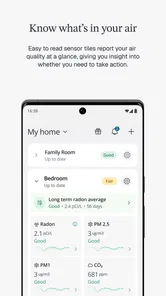
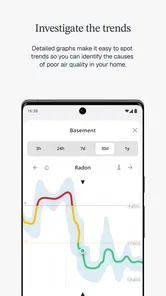
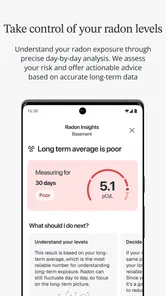
Airthings is a companion app for Airthings smart indoor-air-quality monitors. After connecting a compatible device, the app presents readings such as radon, carbon dioxide, particulate matter, humidity, temperature, air pressure, and volatile organic compounds, depending on the model. It also turns measurements into trends, notifications, and practical recommendations to help you understand and improve the air in your home or workplace.
Do I need an Airthings monitor to use the app?
Yes, the Airthings app is primarily designed to work with Airthings hardware rather than operate as a standalone air-quality detector. You generally need a compatible monitor and an Airthings account to receive meaningful readings. Before downloading, check the product compatibility list, because available sensors, connection methods, and features vary between Wave, View, Corentium, and other Airthings devices.
How accurate are the measurements shown in Airthings?
Airthings provides useful estimates from consumer-focused sensors, but the results should be treated as guidance rather than laboratory certification. Accuracy can be affected by placement, ventilation, temperature, humidity, calibration, and the age of the device. The app is excellent for identifying patterns and unusual changes over time, although serious health or safety decisions should also involve qualified professionals and appropriate certified testing.
Pros
- Clear graphs make indoor air trends easy to understand.
- Supports multiple Airthings monitors from one account.
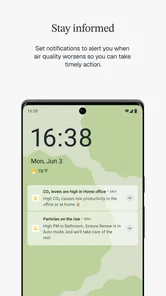
- Alerts can warn you when air quality changes significantly.
- Useful historical data helps identify recurring pollution patterns.
- Setup is generally quick with compatible Airthings devices.
Cons
- Most features require purchasing separate Airthings hardware.
- Some readings may take time to stabilize after installation.
- Battery status and connectivity can occasionally update slowly.
- Advanced insights may feel limited without a subscription plan.
- The app is less useful if you do not own an Airthings monitor.







