AirTalk Wireless
- 6.83K
- 4.6
- Installs
- 1.00M
- Price
- Free

Screenshots





Analysis by Reviewed
Before changing anything, I’d ask a simple question: what do I need my phone connection to do on an ordinary day, and where do I need it to work? That matters more than a plan sounding appealing in the abstract. AirTalk Wireless is a business app tied to a wireless service, so its value depends on both the account experience and whether the service suits your real routes, routines, and budget.
When the connection matters most
A wireless service is only useful when it works in the places and moments I rely on it: checking directions before a drive, making a call while away from home, or handling a quick task between errands. Those situations make coverage more than a map or a promise. They also explain why results can vary by neighborhood, building, and route. I’d check how any provider performs around the places you visit most before making it your only connection.
For a practical test, I’d use the phone as I normally do over several days: try calls from home and work, load a page while out, and notice whether service stays dependable along a regular commute. That kind of routine tells you more than a single successful test. If you depend on a connection for work calls or time-sensitive messages, keep your current service available until you’re confident the new arrangement suits your usual routes.
Getting Started with AirTalk Wireless
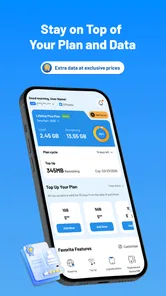
First things first, jumping into AirTalk Wireless was surprisingly smooth. The setup process is straightforward, which is a relief for those of us who are less tech-savvy. You can easily sign up through their app or website, and within minutes, you’re ready to go. The app itself is quite intuitive, offering a user-friendly interface that doesn’t overwhelm you with unnecessary features.
Coverage and Connectivity
This is where the rubber meets the road, right? In my experience, the coverage was pretty impressive. I live in a moderately populated area, and I had no issues with dropped calls or spotty data service. Even when I ventured out to more rural areas, the service held up better than I expected. It’s clear that AirTalk Wireless has invested in ensuring that their network is reliable, which is crucial for any wireless provider.
Planning around everyday mobile use
The app is best considered as the account-facing part of a wireless service, rather than a replacement for the phone’s own settings or a general-purpose connectivity tool. If you’re comparing it with a conventional carrier app, focus on the practical job you need done: getting started and managing your wireless choice. People who want a broad set of extras, detailed network controls, or a single app for every phone task may prefer a provider whose app is built around those needs.
A realistic routine might be checking service before leaving for a day of appointments, then relying on mobile data for navigation and messages between stops. I’d avoid assuming that a good experience at home guarantees the same result in a basement, a crowded venue, or a rural stretch. When possible, use Wi-Fi for large downloads and keep maps or important contact details accessible through your phone’s usual tools. These habits reduce the impact of weak reception without treating the app as if it can solve network conditions by itself.
More From Our News Desk

Weather by Xiaomi Review: Clear at a Glance, Less Clear Up Close

X Under Pressure: Can It Recover When Posting Goes Wrong?

Clash of Clans Is Won Between the Battles

Android Auto Makes the Case for Quieter Car Software

MobiOffice: Transforming Mobile Productivity with Seamless Integration

EA SPORTS FC™ Mobile Soccer: Redefining Mobile Sports Gaming
Plans and Pricing
One of the standout features of AirTalk Wireless is its pricing structure. They offer a variety of plans tailored to different usage needs. Whether you’re a heavy data user or just need the basics, there’s something for everyone. What I particularly liked was the transparency in their pricing—no hidden fees or surprises at the end of the month. This is a big win for anyone who’s tired of the usual billing shenanigans from other providers.
Before switching, I’d compare the plan that fits your actual use with what you already pay, rather than choosing on the headline price alone. Think about how often you stream away from Wi-Fi, make calls while travelling, and use your phone as a hotspot if that matters to you. A lower-cost option can be a good fit for someone who mainly needs everyday calls and modest mobile use; someone who needs consistently high data capacity or predictable coverage across many locations should weigh those priorities first.
Keeping expectations realistic when service falters
If a call drops or data stops loading, first check whether the problem follows you to another location; a local dead zone and an account or device issue call for different next steps. Restarting the phone and checking its network settings are sensible basic checks, but they won’t improve coverage where the signal is weak. I’d also avoid making an urgent switch while travelling: test the service in familiar surroundings, and keep another way to reach someone available during the transition.
Connectivity is also a data-budget decision. If your usage is tight, reserve mobile data for maps, messages, and other tasks you need away from Wi-Fi, and leave video streaming or large updates for a trusted Wi-Fi connection. This isn’t a special feature of the app; it’s a useful way to avoid surprises with any wireless plan. The right choice depends on how your own usage compares with the plan you select, not simply on whether the app feels easy to navigate.
Customer Service
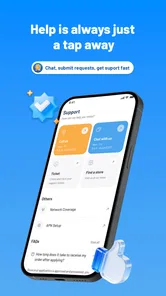
We all know that customer service can make or break your experience with a wireless provider. Thankfully, AirTalk Wireless doesn’t disappoint. I had a minor issue with my plan and reached out to their support team. I was pleasantly surprised by how quickly they responded and resolved my issue. It’s refreshing to deal with a company that genuinely seems to care about its customers.
For a business app, the key question is whether it helps with a real wireless-service decision rather than offering a collection of features you may never use. HTH Communications develops the app, which is free to install and rated for Everyone. Its 4.6 average from around 25,000 ratings, alongside more than a million installs, suggests that many people have tried it, though those figures can’t tell you how well coverage will work at your address. The current version is 2.5.5, and it runs on Android 7.0 or later.
Choosing it for the right kind of day
I see the strongest case for this app in a practical, budget-conscious household that wants to explore a wireless option without wrestling with a cluttered interface. It may also suit someone helping a relative compare service: the uncomplicated presentation can make it easier to discuss what the person needs before making a change. The important distinction is that an easy app does not automatically mean a suitable plan or reliable reception everywhere. Treat the app as the doorway to a service decision, not as proof that the service will fit every device and location.
For example, imagine a day with a morning appointment, a grocery stop, and a pickup across town. I’d check that the phone can place a call and load directions on the usual route, then pay attention to reception inside the buildings where I’ll spend time. If the phone is important for coordinating with family or work, I’d keep a backup contact method until I’m comfortable with the connection. This kind of ordinary trial is more revealing than testing only at home, where Wi-Fi can hide how much I’m relying on mobile service.
What to check before relying on it
People often want to know whether they can keep their existing number, whether their phone will work, and how long setup takes. Those are worth checking directly during the enrollment process, because the answers can depend on the phone and the service arrangement. I’d make sure I can access the account and any information needed for setup before starting, and I wouldn’t cancel an existing line until the new one is working as intended. That order reduces the chance of being cut off from calls or verification messages at an inconvenient moment.
Another useful question is what happens when a connection problem appears. Start by noting whether it happens in one place or everywhere; that simple distinction helps separate a local coverage issue from a phone or account problem. Then use the phone’s ordinary network checks and the provider’s support route if the problem persists. The app can be part of managing the service, but it cannot make a weak signal strong, and I wouldn’t treat a successful support interaction as a guarantee that every later issue will be resolved just as quickly.
How it compares with familiar alternatives
Compared with staying on a major carrier you already know, trying a different wireless service asks you to trade familiarity for the possibility of a better fit on cost or account experience. A carrier with more elaborate account tools may be preferable if you want extensive self-service controls; a service with coverage that you have already tested across your work and travel routes may be the safer choice if dependable reception is your top priority. AirTalk’s appeal is more focused: a straightforward app connected to a wireless option, rather than a hub for every phone-management task.
It is also not the same as relying on Wi-Fi alone. Wi-Fi can handle many calls, messages, and downloads at home or in familiar places, but it does not replace mobile coverage when you are moving between locations. If your routine rarely takes you away from dependable Wi-Fi, a full wireless plan may be more than you need. If you often navigate, coordinate pickups, or take calls while out, mobile service becomes more valuable, and the specific coverage you get matters more than the app’s clean layout.
Making the switch without creating a problem
I’d choose a calm day to explore a new service rather than starting right before a trip, a busy workday, or a deadline. First compare the plan with your actual habits, then check device compatibility and the setup requirements, and finally test calls and data in places you regularly visit. Keep access to essential accounts available in another way while making the change, especially if text messages are used to verify logins. This is a small precaution, but it can spare a lot of stress if activation or reception does not go as expected.
For data-conscious users, the most useful habit is to decide what deserves mobile data before leaving home. Directions and short messages are usually more important on the move than high-resolution video or a large update. I’d also check the phone’s own data-usage tools periodically rather than assuming that a plan’s headline description matches my personal pattern. That gives me a clearer basis for deciding whether the plan remains a good fit after the first few days of ordinary use.
If you mainly need a simple route into wireless service and are willing to test reception for yourself, this is a reasonable app to consider. If your priority is guaranteed performance in a particular building, unusually demanding data use, or a deep set of carrier controls, I’d compare other options and verify those needs before switching. The app is free, but the more important commitment is choosing a service that keeps you reachable where your life actually happens.
If you’re switching, make a short checklist before you begin: confirm the plan matches your use, check the phone’s compatibility and setup requirements, and consider how you’ll stay reachable if activation takes longer than expected. That’s especially useful if your number is tied to work, banking, or account recovery. The app’s straightforward presentation may suit someone who wants a simpler path into wireless service, while people who are satisfied with a current provider’s coverage and support may have little reason to change.
In conclusion, if you’re on the hunt for a wireless provider that offers solid coverage, reasonable prices, and stellar customer service, AirTalk Wireless might just be what you’re looking for. It’s not often that you find a provider that ticks all the right boxes, but in my experience, AirTalk Wireless comes pretty close. So, if you’re tired of your current provider’s antics, why not give them a shot?
AirTalk Wireless Frequently Asked Questions
What should I check before installing AirTalk Wireless?
Before downloading, consider what you want to do through the app and whether AirTalk Wireless service fits your needs. AirTalk Wireless is a business app from HTH Communications, and its store summary is “Free Wireless, No Gimmicks.” The app is free to download and has an Everyone content rating. If you use Android, check that your device runs Android 7.0 or later.
Can I use AirTalk Wireless without signing up for its service?
AirTalk Wireless is intended for people interested in its wireless service and provides a mobile way to engage with the provider. The app may be useful while exploring the service, but signing up for wireless service is a separate decision. If you are considering a new line, review the available options through AirTalk Wireless before choosing what suits your needs.
What is the AirTalk Wireless app, and who is it for?
AirTalk Wireless is a free business app from HTH Communications, with a store summary of “Free Wireless, No Gimmicks.” It is intended for people interested in AirTalk Wireless service and provides a mobile way to engage with the provider. The app has an Everyone content rating, so its listed age suitability is broad. Before installing, consider whether you want to manage or explore wireless service through an app rather than only through the provider’s website.
What is AirTalk Wireless and what services does it offer?
AirTalk Wireless is a mobile service provider that offers affordable wireless plans, providing essential communication services to consumers. With AirTalk Wireless, users can enjoy voice calls, text messaging, and data plans tailored to various needs. The service is designed to be budget-friendly and accessible, making it a popular choice for those seeking cost-effective mobile solutions. Users can also benefit from additional features like unlimited texting and rollover data, enhancing the overall value of their wireless plans.
How do I sign up for AirTalk Wireless service?
Signing up for AirTalk Wireless is a straightforward process. Interested customers can visit the AirTalk Wireless website and follow the step-by-step instructions to select a plan and activate a new line of service. The website provides a user-friendly interface where you can compare different plans and choose one that suits your needs. Alternatively, potential customers can contact AirTalk’s customer service for additional assistance in setting up their account and selecting the best plan.
Pros
- User-friendly interface
- Wide coverage area
- Affordable plans
- Easy setup process
- Reliable connectivity
Cons
- Limited international service
- Data speed throttling
- Customer service issues
- No unlimited data option
- Device compatibility concerns












