AirBrush: Face Photo Editor
- 30.18K
- 4.0
- Installs
- 50.00M
- Price
- Free

Screenshots
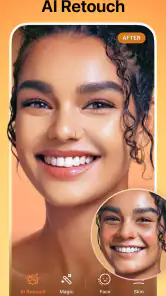
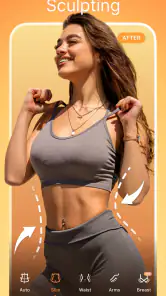
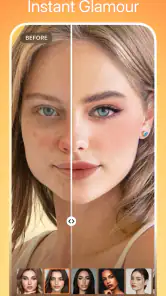
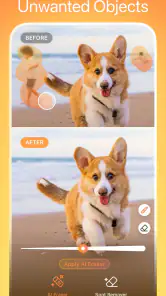
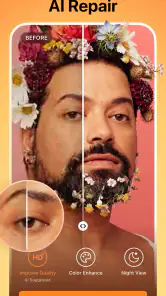
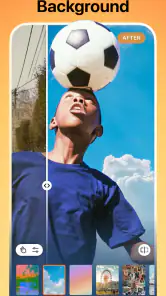
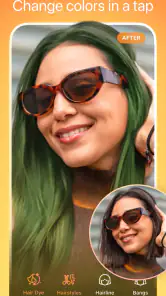
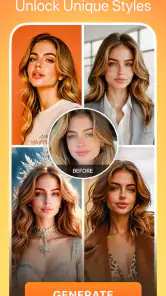
Analysis by Reviewed
I reach for AirBrush when a portrait needs a quick, focused touch-up rather than a full editing session. It is a photography app from PIXOCIAL LABS PTE. LTD., and its appeal is easy to understand: the controls feel approachable, while the edits are aimed at details people often want to adjust before sharing a picture. I would recommend it to someone who wants simple portrait tools on a phone, but I would not treat every automatic-looking result as an improvement.
Planning around the connection
Editing itself is only one part of using a mobile photo app. If you are browsing for effects or moving between editing and sharing, a connection can affect how smooth the overall session feels. I prefer to choose a photo and decide on the basic adjustments first, rather than start with an elaborate look and then have to recreate it if I switch tasks or lose momentum.
For a quick portrait before posting, that order matters: crop and check the lighting, make one or two targeted changes, then compare the result with the original. This keeps the edit manageable and helps me avoid piling on effects simply because they are available. If I am somewhere with an unreliable connection, I would keep expectations modest and avoid making the app the only place where an important image exists.
A useful habit is to separate the editing decision from the sharing decision. I can prepare a portrait while I have a moment, then decide later whether it belongs on a social profile, in a message, or nowhere at all. That prevents a weak connection or a rushed commute from turning a private image into an impulsive post. It also makes the app more useful as a finishing step rather than the center of my whole photo workflow.
Where it fits in a mobile routine
AirBrush: Photo/Video Editor makes most sense for people who regularly take selfies, prepare profile pictures, or want a portrait to look a little more polished without learning a desktop editor. Imagine taking a quick photo before a video call: a small blemish correction or subtle skin adjustment may be all you need. I find that restrained edits are usually more convincing than reshaping several features at once.
On a phone, I would use it for the image that needs attention now, not as a substitute for organizing a whole camera roll. A practical routine is to pick one photo, make the smallest correction that solves the problem, inspect it at normal viewing size, and save or share only after checking the before-and-after. That final full-screen look matters: details that seem subtle while zoomed in can look much stronger on a small profile thumbnail.
It is less compelling if your main goal is detailed landscape work, precise color grading, or a carefully layered composition. A general photo editor gives more room for broad exposure and color adjustments, while a desktop tool is better when exact control and repeatable results matter. AirBrush’s strength is the portrait-focused shortcut, not replacing every other editor.
More From Our News Desk

Weather by Xiaomi Review: Clear at a Glance, Less Clear Up Close

X Under Pressure: Can It Recover When Posting Goes Wrong?

Clash of Clans Is Won Between the Battles

Android Auto Makes the Case for Quieter Car Software

MobiOffice: Transforming Mobile Productivity with Seamless Integration

EA SPORTS FC™ Mobile Soccer: Redefining Mobile Sports Gaming
Unleashing Creativity with AirBrush
When I first downloaded AirBrush: Photo/Video Editor, I was curious to see what all the fuss was about. The app boasts a bunch of features that make it stand out in the sea of editing apps. The interface is super user-friendly, which is a big plus for someone like me, who doesn’t have the patience to go through endless tutorials.
That accessibility is most valuable when I already know what I want to fix. A first-time user can approach a portrait with one clear goal—soften a temporary blemish, for instance—instead of trying every control in sequence. I would not treat the number of available effects as a checklist. A small, deliberate edit is easier to judge and usually takes less time to undo if it changes the character of the photo.
Portrait tools and a natural finish
What caught my attention right away was the real-time editing feature. You can see changes as you make them, which is a game-changer. No more guesswork! Want to smooth out your skin, whiten your teeth, or even reshape your face? It’s all possible with just a few taps. And the magic doesn’t stop there. The app's built-in filters are top-notch, giving your photos a professional touch without needing to hire an actual photographer.
For a more natural finish, I suggest treating each correction as a separate decision: make one adjustment, pause, and inspect the whole face rather than zooming in on a tiny area alone. A close crop can make a strong edit seem reasonable, while the full portrait reveals when skin texture or facial proportions start to look unlike the original. Keeping an untouched copy also gives you an easy way to compare and reset your judgment.
One trade-off with face reshaping is that it can affect the feeling of a portrait more than the user expects. I would be especially cautious when the photo includes a familiar background, another person, or a straight edge near the face: visual changes are easier to notice when something nearby no longer looks consistent. For a profile picture, a minor cleanup may be enough; for a personal keepsake, I would favor preserving the original expression and proportions.
Filters are best judged against the purpose of the image, not just by whether they look striking in the editor. A bright treatment may suit a casual post but feel out of place on a work profile. I find it useful to look away for a moment, return to the original, and then compare the edited version at the size other people will see. That quick pause helps catch edits that looked appealing only because I had been staring at the same screen.
Short clips and the right tool for the job
Another standout feature is the video editing capabilities. Nowadays, videos are just as important as photos, if not more. With AirBrush, you can apply filters and effects to videos, making them pop and stand out on your social media feed. It’s like having a mini editing studio right in your pocket!
That can be handy for a short social clip when I want its appearance to sit closer to a finished portrait, but I would still choose a dedicated video editor for a project that depends on precise cuts, layered sound, or a longer sequence. A quick effect is not the same thing as a complete production workflow, and it is worth deciding which job you actually need done before spending time polishing a clip.
For a realistic everyday example, imagine I take a short clip and a selfie after meeting a friend, then want both to feel consistent in a post. I would use the portrait tools for the still image and keep any video treatment restrained, rather than trying to make two different formats look identical. If the clip needs careful pacing or a particular sequence, I would move to an editor designed around video assembly instead of stretching a portrait app beyond its strongest use.
That distinction also helps answer whether this is a good all-in-one choice. It is convenient when the job is a quick appearance adjustment, but convenience does not necessarily mean the best tool for every kind of media. People who mostly shoot and edit video should compare it with an editor built for timelines and clip control; people who mostly prepare selfies may appreciate having the portrait work close at hand.
What the audience and pricing tell me
What really sets AirBrush apart is its combination of ease of use and powerful editing tools. The app doesn’t bombard you with ads, which is a relief and allows you to focus on what you’re doing. Plus, the regular updates mean that they’re constantly adding new features and improving existing ones.
The app is free to download, though it offers in-app purchases ranging from $0.49 to $89.99 per item, so I would check what is included before committing to a purchase. It has a 4.0 average from around 1.6 million ratings and more than 50 million installs, which suggests a large audience, but popularity is not a guarantee that every tool or result will suit your taste. It is rated Everyone 10+ and requires Android 7.0 or later; the current version is 7.21.1.
I would start by using the free download to decide whether the editing style suits me, then treat any purchase prompt as a separate decision. The range of in-app purchase prices makes it particularly sensible to read the offer on screen rather than assume every paid option costs the same or is needed for a basic portrait edit. If I only need occasional cleanup, paying for more than I use would not improve the result.
For data-conscious use, I would avoid assuming that every editing or sharing step behaves the same way on every connection. If a photo is personal, take a moment to decide where you want the finished image to go before sharing it, and review any purchase prompt rather than tapping through automatically. I also like to keep the original image available outside an editing session, so an experiment does not become the only version I can use.
Connectivity can matter most at the edges of a session: when moving from browsing choices to editing, or from the finished image to sharing it. I would not plan a time-sensitive post around a last-minute effect search in a spotty signal area. Instead, I would pick the image and make the core adjustments first, leaving the upload or message for when the connection is dependable. This is a simple workflow choice, but it reduces frustration and makes it easier to judge the photo on its own merits.
If the app or a connection interrupts a session, my safest recovery plan is not complicated: keep the original, avoid assuming an unfinished change has been saved, and reopen the image before repeating work. For anything important, I would check the result in the destination where I intend to use it, rather than relying only on the editing view. The point is not to expect failure, but to avoid losing a good source photo or sharing a version I did not mean to use.
Who will enjoy it—and who may prefer another editor
From a personal perspective, I love how the app encourages creativity. It's not just about making yourself look good; it’s about expressing yourself and having fun while doing it. Whether you’re a casual user or a more serious content creator, there’s something in it for everyone.
I think it is especially suitable for someone who takes portraits often and wants a quick route from camera roll to a presentable image. A person preparing a new profile photo, touching up a selfie for a group chat, or making a short social clip look more finished can get value without first learning a complex editing system. Its portrait emphasis is also useful when a broad editor feels cluttered with controls that are irrelevant to a simple face correction.
That said, I would skip it if you dislike retouching or want an editor centered on manual, non-portrait adjustments. Even convenient face tools can make a photo feel less like you when pushed too far, and the most useful result may be a tiny correction rather than a dramatic makeover. For a polished selfie or a quick social post, that balance is exactly where this app works best.
It is also not my first pick for a photographer who needs repeatable color work across a batch, a designer assembling layers, or anyone who wants detailed control over a complete video. A conventional photo editor is a better match for exposure and color as the main task; a desktop editor is preferable when precision and a larger workspace matter. If privacy, predictable local file handling, and complete control are the top priorities, I would choose a workflow specifically organized around those needs rather than relying on a portrait-focused app alone.
One practical question is whether I need editing experience to use it. For basic portrait adjustments, I would say no: the approachable controls make experimentation possible without a long learning process. The harder part is not finding a tool, but knowing when to stop. If I want a subtle result, I make one change at a time and judge it at normal size instead of chasing a flawless-looking close-up.
Another reasonable question is whether the free download means every option is free. It does not: in-app purchases are available, so I would check the specific offer before buying and avoid treating a prompt as a requirement to finish an ordinary edit. And if I need an image for a high-stakes use, I would keep the original and inspect the final version carefully before sending it; a fast retouch is not a substitute for checking the details.
A measured recommendation
In conclusion, if you’re on the lookout for a photo and video editing app that’s easy to use yet packed with powerful features, give AirBrush: Photo/Video Editor a shot. It’s perfect for anyone wanting to enhance their photos and videos without spending too much time or effort. With its wide range of tools and effects, your creativity is the only limit. So, go ahead, download it, and let your imagination run wild!
My connectivity verdict is practical rather than absolute: I would use it for quick, low-stakes edits when I have a steady connection and keep a separate copy of anything important. If an edit must be completely predictable, private, and finely controlled from start to finish, I would choose a workflow built around a conventional editor and local file management instead. For everyday portrait touch-ups, AirBrush remains an approachable option—as long as I stay in charge of how much I change.
In short, I see it as a handy portrait companion rather than a universal editing solution. I would open it when the face is the focus, keep corrections modest, and make sure the source image remains available. That combination lets the convenience work in my favor without confusing a polished finish with a better photograph.
AirBrush: Face Photo Editor Frequently Asked Questions
Can AirBrush help me make targeted edits without changing an entire photo?
AirBrush focuses on portrait and appearance adjustments, so you can choose individual edits rather than applying a full transformation. For example, you might smooth skin or erase acne while leaving other parts of the image alone. The app also offers options such as whitening teeth, changing hairstyles, and reshaping the body, letting you decide which changes suit a particular photo.
Does AirBrush include tools for changing hairstyles and reshaping the body?
Yes. AirBrush includes hairstyle changes and body reshaping alongside portrait edits such as smoothing skin, whitening teeth, and removing acne. These options can give you more ways to adjust a portrait, but the result depends on how you use them and the look you want. You can select the edits that matter to you instead of changing every feature in an image.
Is AirBrush suitable for editing photos for social media?
AirBrush is a photography app built around portrait and appearance edits, including smoothing skin, removing acne, whitening teeth, changing hairstyles, and reshaping the body. These tools can help prepare an image for sharing, while filters offer another way to adjust its look. The editing choices are optional, so you can keep changes subtle or make a more noticeable transformation.
What should I know about AirBrush’s age rating and compatibility before downloading?
AirBrush is rated Everyone 10+ and is listed for devices running Android 7.0 or later. It is a photography app from PIXOCIAL LABS PTE. LTD., and its current version is 7.21.1. Check that your device meets the operating-system requirement before installing, and review the relevant app-store page for your device’s download options.
What are the main features of AirBrush: Photo/Video Editor?
AirBrush: Photo/Video Editor is a versatile tool offering features such as blemish and pimple removal, teeth whitening, eye brightening, and a variety of filters to enhance photos. It also includes video editing capabilities, allowing users to apply filters and effects to their videos. The app provides an easy-to-use interface, making it accessible for both beginners and experienced editors.
Pros
- User-friendly interface
- High-quality editing tools
- Regular updates with new features
- Supports both photo and video editing
- Wide range of filters and effects
Cons
- In-app purchases can be expensive
- Occasional ads disrupt workflow
- Limited free features
- Some tools require a learning curve
- Exporting can be slow for large files
- Category
- Photography
- Version
- 7.21.1












