

Air Canada + Aeroplan
- 819.00
- 4.7
- Installs
- 5.00M
- Price
- Free

Screenshots





Analysis by Reviewed
I judge a travel app by whether it helps before a trip and stays useful when plans get busy. Air Canada + Aeroplan is designed around booking and managing Air Canada travel alongside the Aeroplan loyalty program. I’d consider it most useful when I’m flying with the airline and want trip details and points in one place, rather than juggling a booking tool and a separate loyalty app.
What free access does—and doesn’t—tell you
The app is free to download, which makes trying it a low-commitment choice. That says something about access to the app, not the cost of flights, the value of Aeroplan points, or whether a particular trip is a good deal. I’d compare the total fare and the points required for the journey I actually want before deciding how to book.
Air Canada is the developer, and the app sits in the travel category. It has an average rating of 4.5 from around 38,000 ratings and more than five million installs. Those figures suggest many travelers use it, but they can’t tell me whether it suits my route, travel habits, or tolerance for managing plans on a phone. It’s rated for everyone, and the current version is 5.67.0.
Using the app around a real trip
I’d use this section to focus on the moments when an airline app can save effort: checking the trip before leaving, keeping the right itinerary easy to find, and responding calmly if plans shift. I’d also consider what I’d keep separately, such as arrangements with other providers, so the Air Canada app supports the journey without becoming my only travel reference.
Getting started and planning
First things first, downloading the app is a breeze. Available on both Android and iOS, the app is lightweight and installs in a jiffy. Once you're in, setting up your account is as simple as pie. You'll need your Aeroplan credentials, and if you don't have an account yet, the app guides you through creating one in no time.
For a practical example, imagine I’m planning a visit and already know my dates. I can use the app as a single place to look at flight options, keep the itinerary close at hand, and check Aeroplan details while I decide. I’d still compare the fare and schedule with other booking options before paying; an airline’s own app is convenient for its flights, while a broader travel search can be better when I’m open to different carriers.
Making an airline app part of the routine
A useful way to get more from an airline-specific app is to open it at three distinct moments: while choosing a flight, shortly before departure, and when something changes on the day. Those are different jobs. During planning, I care about the route, schedule, and cost; before leaving, I want the itinerary easy to find; during disruption, I need to notice new information quickly. Keeping those checks separate makes the app feel less like another place to browse and more like a focused travel tool.
More From Our News Desk

 Prime Video
Switching to Prime Video: What Changes in Your Viewing Routine
Prime Video can make a compelling second home for streaming, but switching means learning a different catalog, rental layer, and route from browsing to playback.

 Universal TV Remote Control
 Works Best as a Reliable Backup
A phone remote earns its place through quick setup and reliable habits. Here is how to get more from Universal TV Remote Control—and where its limits show.

 Weather - By Xiaomi
Weather by Xiaomi Review: Clear at a Glance, Less Clear Up Close
Xiaomi’s weather app makes everyday forecasts quick to scan, but its calm surface can leave useful details and recovery paths harder to find than they should be.

 X
X Under Pressure: Can It Recover When Posting Goes Wrong?
A resilience-focused review of X, examining setup, mistaken posts, interruptions, weak connections, and the gaps that matter when recovery needs to be dependable.

 Clash of Clans
 Is Won Between the Battles
Its raids are quick; its community is a long-term project of coordination, teaching, rivalry, and shared responsibility—with all the friction that entails.

 Android Auto
 Makes the Case for Quieter Car Software
The car interface is no longer judged by how much it can do, but by how quietly it helps. Android Auto shows what drivers now expect—and what still gets in the way.
Latest News



For example, if I’m arranging a weekend visit around a fixed appointment, I’d first compare the departure and return times against the actual schedule I need to keep. I wouldn’t choose a flight simply because it appears neatly in the app. A low fare can still be inconvenient if its timing leaves no margin for a meeting, a pickup, or a connection I have arranged separately. The app helps me manage the Air Canada portion; it cannot decide whether the whole day’s plan is realistic.
It is also worth checking that the trip displayed is the one I mean to manage, particularly if I’m organizing travel for someone else or have more than one journey coming up. Before heading out, I’d review the itinerary and keep essential details somewhere accessible offline as well. That is not a criticism unique to this app; it is sensible preparation for any phone-based travel plan. A dead battery or poor connection can turn even a well-organized screen into an unavailable one.
Your Travel Companion
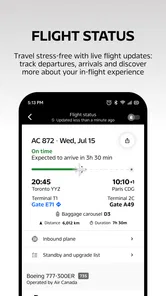
The home screen greets you with a clean, intuitive interface. Whether you're booking a flight, checking in, or managing your travel itinerary, everything is just a tap away. I found the flight booking process particularly seamless. The app provides comprehensive details about available flights, and you can easily filter through them based on your preferences. Plus, it offers real-time updates, so you're always in the loop about any changes to your flight schedule.
A useful habit is to check the itinerary before leaving for the airport and again when plans change, rather than relying only on a saved screenshot. That way, I can use the app’s flight updates as a live reference. I’d still pay attention to airport announcements and staff instructions: a phone is convenient, but it shouldn’t be my only source of information if connectivity or battery becomes an issue.
What to do when a plan shifts
Travel days rarely follow a perfect sequence, so I’d treat the app as one part of a simple response plan. If a flight update appears, I’d read the details, look at the airport information, and then decide what needs to change. If I’m meeting someone, I’d let them know directly rather than assume they can see my itinerary. If I have a separate ride or hotel arrangement, I’d check those plans independently; an airline app is not a universal trip coordinator.
This distinction matters most when timing is tight. A traveler with a connection or a pickup waiting may benefit from seeing airline notices promptly, but should not assume every part of the journey updates automatically. I’d leave reasonable time between separately booked arrangements and keep the relevant confirmations available. The app can make the Air Canada segment easier to follow, while the traveler remains responsible for joining those pieces into one workable plan.
Aeroplan Integration
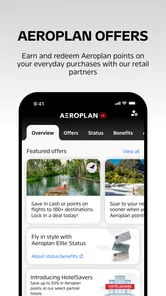
What sets the Air Canada + Aeroplan app apart is its integration with the Aeroplan loyalty program. Earning and redeeming points is straightforward, and you can track your points balance right from the app. It also offers suggestions on how to maximize your points, which is a neat feature for those looking to get the most bang for their buck.
That integration is most valuable if I already collect Aeroplan points or expect to fly with Air Canada again. Before redeeming, I’d compare the points option with paying for the same trip, since a balance alone doesn’t show whether a redemption is worthwhile. If I rarely fly with the airline and don’t care about its loyalty program, this part may add little to my routine; a carrier-neutral travel planner could be a better fit.
Making a considered points choice
I’d avoid treating a points balance as a discount without checking the complete booking choices in front of me. For a trip I’m already planning, I would compare the cash fare with the points needed for that same itinerary and consider whether I’d rather save the points for another use. The useful question is not simply whether I have enough points, but whether using them makes sense for this particular trip and its dates.
That comparison is especially helpful when my schedule is flexible. I can check more than one suitable departure rather than fixating on a single flight, then weigh the practical timing against the cash and points options available. If my dates are fixed, convenience may matter more than squeezing every possible benefit from a balance. The app puts the loyalty account near the travel task, but the final choice still depends on my priorities.
For someone who flies Air Canada only occasionally, Aeroplan integration may be a welcome extra rather than a reason on its own to install the app. I’d use it when a booking or existing points balance gives me a clear reason to return. If I travel with many airlines and prefer one account to track everything, I’d keep a broader travel organizer for the overall picture and use this app for Air Canada-specific details.
Stay Connected
One of the standout features is the notifications. The app sends timely alerts about gate changes, boarding times, and even baggage claim updates. No more scrambling around the airport; the app keeps everything organized. There's also an in-app chat feature, allowing you to connect with customer service without the hassle of long hold times on the phone.
For a tight connection or a busy departure day, alerts can help me notice a change without repeatedly searching through the itinerary. I’d keep notifications enabled for the travel period and check that the correct trip is visible before heading out. Still, an alert is a prompt to verify what’s happening, not a reason to ignore airport displays or announcements, especially when a gate or boarding detail changes quickly.
Using alerts without depending on them
Notifications are most useful when they reduce needless checking, not when they become the only way I learn what is happening. I’d make sure the app is allowed to send travel alerts and glance at it when an update matters, but I would still watch airport screens and listen for announcements. That combination is a more dependable routine than staring at a phone or assuming every notice will arrive at exactly the right moment.
The same practical caution applies to in-app support. A chat option can be convenient when I have a question and would rather start from the app than search for a contact route. For an urgent issue, I would use the fastest available channel and follow airport staff guidance instead of waiting on a single method. The presence of chat is useful, but it does not guarantee an instant resolution or replace judgment in a time-sensitive situation.
Another fantastic feature is the in-flight entertainment access. You can stream a variety of movies, TV shows, and music right from your device. Just make sure to pack your headphones, and you're set for an enjoyable flight.
Entertainment and sensible preparation
Entertainment access can make the app relevant after boarding, not just while preparing to travel. I’d think about it before leaving home: bring headphones, make sure my device has enough battery for the journey, and avoid counting on a phone as both my entertainment screen and my only source of essential travel information. A small amount of preparation makes this feature easier to enjoy without creating a new problem mid-trip.
This is also where expectations matter. The feature adds convenience for a traveler who wants to use a personal device, but it is not a reason to assume every flight will suit every viewing habit. I’d keep another offline activity available if I know I’ll want entertainment throughout the journey. That is a simple backup, and it keeps my travel plan from depending on one feature or one device.
Where it fits—and where it doesn’t
Compared with a general travel app, this one is more focused: its strongest case is keeping Air Canada booking, trip information, and Aeroplan activity together. A broad search service is usually the more practical starting point if I’m choosing among several airlines or building a trip around options beyond Air Canada. I’d use this app for the airline-specific part of travel, not assume it replaces every planning tool.
The choice between an airline app and a general travel service depends on what I need to solve. If I already know I’m flying Air Canada, having the airline’s trip information and loyalty activity together is a sensible convenience. If I’m still deciding between carriers, comparing a wider set of routes and schedules is the more useful first step. A general itinerary organizer can also make more sense when I want one overview of arrangements booked across different providers.
I would not expect one app to be best at every stage. A broad search tool helps me explore; the airline’s app is better suited to keeping track of the airline-specific trip; and my own calendar or notes can hold unrelated commitments. Using those tools together may sound less tidy than putting everything in one place, but it avoids asking an airline app to manage plans outside its natural scope.
It may also be the wrong choice for someone who prefers paper documents, avoids account-based services, or wants one app to organize trips across many carriers. The app’s minimum operating system is version 12, so I’d check device compatibility before relying on it. If I’m traveling with an older phone or expect to be offline, I’d prepare a separate backup of essential itinerary details rather than depend entirely on live access.
Who is likely to get real value
I’d recommend it most readily to someone who has an Air Canada booking and wants to keep the airline’s trip information close by, especially if Aeroplan already matters to them. It is also a reasonable choice for a traveler who prefers handling the practical airline tasks on a phone and is comfortable signing in to manage an account. The app is free to download, so trying it does not require paying for the app itself.
A first-time or infrequent flyer can still find it useful for a specific Air Canada journey, even without making loyalty points a major part of travel. The benefit is then practical rather than strategic: keeping the booking and airline-related tasks together. I’d be more cautious about recommending it as a routine download to someone whose trips rarely involve Air Canada, because the strongest reasons to return are tied to that airline and its loyalty program.
It is a weaker fit for a traveler who wants a single hub for several airlines, avoids digital accounts, or prefers to keep travel plans on paper. Someone who is choosing among carriers should begin with a comparison tool and only add this app if they decide to fly Air Canada. That order keeps the app useful without mistaking an airline companion for a neutral, all-purpose travel planner.
Final Thoughts
All in all, the Air Canada + Aeroplan app is a traveler’s best friend. It’s user-friendly, packed with features, and genuinely enhances the travel experience. Whether you're a frequent flyer or just planning a one-off trip, having this app in your arsenal is a no-brainer. So next time you're jet-setting across the skies, let this app be your trusty co-pilot. Happy travels!
My recommendation is more specific: I’d install it if I’m booking Air Canada, especially when I want Aeroplan information close by, and use it as a practical companion through the trip. I wouldn’t choose it as my only travel-planning tool if I’m comparing many airlines or need a cross-carrier organizer. Its free access makes trying it easy; the value comes from whether its airline and loyalty features match the way I travel.
Air Canada + Aeroplan Frequently Asked Questions
Can I use the Air Canada + Aeroplan app to book flights and keep travel plans organized?
Yes. The app brings flight booking and travel management together, so you can use it to arrange a trip and keep flight-related details close at hand. Its focus is captured by the phrase “Book, Fly, Aeroplan,” with tools for travelers flying with Air Canada and services connected to Aeroplan. It is designed to make common travel tasks easier to manage from a mobile device.
Do I need an Aeroplan account to use the Air Canada + Aeroplan app?
Aeroplan services are part of the app, including tools for viewing and managing points, while flight-related features are also available. Having an Aeroplan account is useful if you want to follow your points balance, review transactions, or redeem points for rewards. Travelers who mainly need to book or manage flights can still find the app’s Air Canada travel functions relevant.
Is the Air Canada + Aeroplan app free to download, and what devices can run it?
The Air Canada + Aeroplan app is free to download and is intended for travel planning and management. It is available for Android and iOS, with Android devices needing version 12 or later. Before installing, check that your device meets the operating-system requirement and has enough available storage for the app.
What features does the Air Canada + Aeroplan app offer for frequent travelers?
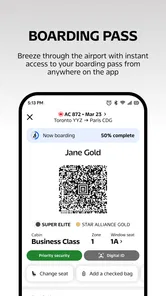
The Air Canada + Aeroplan app provides a seamless experience for frequent travelers by offering features such as flight booking, real-time flight status updates, Aeroplan points management, and mobile boarding passes. Users can also access exclusive offers and benefits through the app, making it a must-have for anyone who frequently flies with Air Canada.
How can I manage my Aeroplan points through the app?
Managing Aeroplan points through the app is straightforward. Users can view their current points balance, transaction history, and even redeem points for flights and other rewards directly from their mobile device. The app also provides notifications for point expiry dates, ensuring users can maximize their rewards efficiently.
Pros
- User-friendly interface for easy navigation.
- Integration with Aeroplan for seamless reward use.
- Frequent flyer benefits and exclusive offers.
- Real-time flight updates and notifications.
- Supports mobile boarding passes for convenience.
Cons
- Limited features for non-members.
- Occasional app crashes reported by users.
- Slow customer support response times.
- Requires internet connection for most functions.
- Some features are region-specific.











