

AiMagic - Kids Storybook Maker
- 5.00
- 3.0
- Installs
- 10.00K
- Price
- Free

Screenshots
Analysis by Reviewed
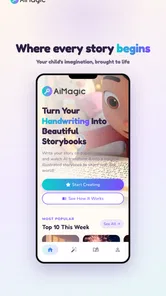
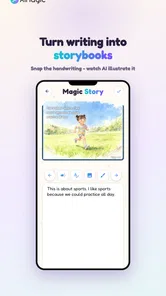
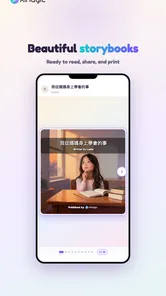
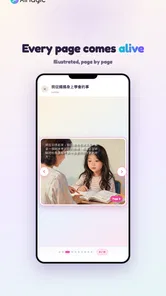
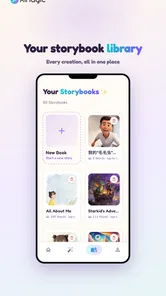
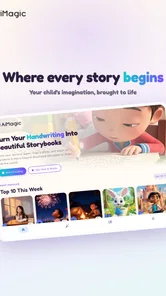
I approached AiMagic - Kids Storybook Maker as a parent-facing creative tool rather than as a conventional drawing app. Its central idea is appealing: a child writes something by hand, and the app turns that starting point into an illustrated storybook with help from AI. That makes it more focused than a general sketching program, but it also means the experience depends on how comfortable you are with sharing a child’s creative material with an AI-powered service and how much control the app gives you during that process.
In my experience, the best way to judge this app is not by asking whether it can replace a full art studio. It cannot. The more useful question is whether it can make a child’s handwritten idea feel like a finished little book without requiring advanced drawing or design skills. For a free Art & Design app from Starkid, available to Everyone and supporting Android devices from version 5.1 onward, that is a clear and worthwhile goal.
The public response is mixed rather than overwhelming: it holds an average rating of 3.0 from around eighty ratings, with a small number of written reviews, and it has passed the ten-thousand-install mark. I would read that as a reason to try it carefully, not as a final verdict. The concept is distinctive, but a creative app built around AI needs to be judged through its actual workflow, its choices around children’s content, and the amount of control it leaves with the family.
How the handwriting-to-story process feels in everyday use
The most natural use case is a child who has written a short story at school or at home and wants to see it become something more visual. Instead of asking the child to learn layers, brushes, canvas sizes, or typography, the app starts from a familiar activity: handwriting. That lowers the creative barrier. A child can concentrate on characters and events while the app handles much of the presentation work.
I can imagine using it after a rainy afternoon when a child has written a page about a lost puppy, a space trip, or an imaginary family of monsters. The parent can help prepare the handwritten material, let the child explain what the story means, and then review the illustrated result together. The strongest part of that scenario is not the AI image alone. It is the conversation that happens when the child sees an ordinary page transformed into a keepsake.
That workflow also reveals an important trade-off. Handwriting is personal, but it can be difficult for an automated system to interpret consistently. Young writers may use unusual letter shapes, uneven spacing, drawings mixed with words, or spelling that only a parent understands. If the app misreads a key name or event, the resulting story may look polished while quietly changing the child’s idea. I would therefore treat the generated book as an interpretation, not as a perfect transcription.
A useful habit is to begin with a short, clearly written page rather than a long story. Keep character names easy to distinguish, leave space between lines, and avoid placing drawings directly over the words. This is not just an aesthetic tip. It gives the app a cleaner starting point and makes it easier for an adult to spot where the result has drifted from the original.
More From Our News Desk

 Gmail
GmailGmail in a Busy Inbox: Who Benefits Most?
From first account to crowded workday, Gmail earns its place through dependable search and flexible sorting—but its best fit depends on how much inbox maintenance you can tolerate.

 Prime Video
Switching to Prime Video: What Changes in Your Viewing Routine
Prime Video can make a compelling second home for streaming, but switching means learning a different catalog, rental layer, and route from browsing to playback.

 Universal TV Remote Control
Universal TV Remote Control Works Best as a Reliable Backup
A phone remote earns its place through quick setup and reliable habits. Here is how to get more from Universal TV Remote Control—and where its limits show.

 Weather - By Xiaomi
Weather by Xiaomi Review: Clear at a Glance, Less Clear Up Close
Xiaomi’s weather app makes everyday forecasts quick to scan, but its calm surface can leave useful details and recovery paths harder to find than they should be.

 X
XX Under Pressure: Can It Recover When Posting Goes Wrong?
A resilience-focused review of X, examining setup, mistaken posts, interruptions, weak connections, and the gaps that matter when recovery needs to be dependable.

 Clash of Clans
Clash of Clans Is Won Between the Battles
Its raids are quick; its community is a long-term project of coordination, teaching, rivalry, and shared responsibility—with all the friction that entails.
Latest News



Where the app is more approachable than traditional art tools
Compared with a standard drawing app, this experience is less demanding for a child who has a story in mind but does not yet have the patience or coordination for detailed illustration. A drawing app gives precise control, but that control can become a chore. Here, the child’s handwriting remains the creative anchor, while the illustrated presentation supplies a sense of progress and surprise.
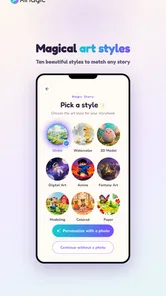
Compared with a conventional digital storybook maker, the handwriting-first approach feels more personal. Templates can produce tidy pages, but they often make every project look similar. AiMagic is better suited to families who want the child’s own writing to remain part of the identity of the book, even if the visual interpretation is automated.
There is a cost to that convenience. A manual editor is usually better when you need exact page breaks, precise wording, reliable character continuity, or a carefully controlled visual style. If your goal is a classroom publication, a polished portfolio, or a book that must reproduce a child’s text exactly, I would choose a conventional editor and add illustrations manually. This app is more convincing as a playful creation tool than as a precision publishing system.
Small workflow choices that make a big difference
One of the less obvious lessons is that the adult’s role matters. I would not simply hand over a phone and expect the child to manage the entire process. A better routine is to let the child write and describe the story, have an adult check the source material before processing, and then invite the child to compare the generated pages with the original. That turns possible mistakes into a creative editing exercise rather than a silent replacement of the child’s voice.
I would also save the original handwritten pages separately. Even when the generated version is attractive, the source page is the most direct record of the child’s work. Keeping both versions makes the project more meaningful and protects against disappointment if an output changes a name, omits a sentence, or gives a character an unexpected appearance.
Another practical tip is to make the first project deliberately small. A short story with one or two main characters is easier to evaluate than a complicated tale with several locations and many speaking parts. It lets you see how well the app handles the child’s writing and whether the visual result matches your family’s expectations before you invest more time in a larger project.
Trust, controls, and moments that deserve adult attention
Because this app is designed around children’s handwriting and AI illustration, trust is not a side issue. The material may include a child’s name, school references, drawings of family members, or details about daily life. I would review every visible choice the app presents before submitting anything, especially when a child is using the device directly.
The most responsible approach is to keep the first experiment simple and low in personal detail. A fictional character is a better starting point than a page containing a full name, school, address, or recognizable information about other children. This does not assume anything about the app’s data practices; it is simply a sensible way to reduce exposure when testing an AI creative workflow.
I would also pay attention to account and purchase screens. The app is free to install, but it includes in-app purchases ranging from $0.99 to $74.99 per item. That wide span makes it especially important for a parent to understand what each visible purchase option does before confirming it. On a shared family device, I would keep purchasing under adult control and avoid letting a child explore payment screens unsupervised.
The free starting point is useful because it allows a family to judge the basic experience before spending money. I would not pay immediately simply because a generated page looks exciting. First, I would test whether the handwriting is interpreted correctly, whether the illustrations fit the child’s idea, and whether the available controls are sufficient for the type of book we want to make.
What I would check before sharing a child’s page
Before processing a real page, I would inspect the app’s visible permission prompts, privacy explanations, account settings, and any confirmation screens. These are the places where a user can see what the app is asking to access and what choices are available. I would not treat a friendly design or a children’s category label as a substitute for reading those screens.
I would also look for clear ways to manage the account and purchases, such as whether a parent can remain the person approving transactions and whether there is an obvious route to change or remove account information. If those controls are easy to find, that improves confidence. If they are difficult to understand, I would keep usage limited to fictional material until I was satisfied with the available choices.
There is a difference between trusting an app with a child’s imagination and trusting it with a child’s identity. The first can often be tested with invented names and stories. The second deserves more care. I would avoid uploading pages that reveal personal schedules, contact details, medical information, or identifiable images of other people. That is a practical boundary I would apply even when the creative result is appealing.
Parents should also decide who gets to approve the finished story. A child may be proud of an image that looks funny or strange, while an adult may notice that it includes a detail the family would not want shared. Reviewing the result together gives the child a voice without removing the adult’s responsibility for publication or sharing decisions.
Keeping the child in control of the creative idea
AI can make the result feel magical, but it can also make the child feel that the machine created the important part. I would counter that by treating the handwriting as the main work and the illustration as a visual interpretation. Ask the child what must remain unchanged, what can be playful, and which parts of the generated page do not feel right.
This approach is particularly useful when the app produces an attractive but inaccurate scene. Rather than accepting it because it looks professional, compare it with the original story. If the child wrote about a small garden and the image turns it into a dramatic forest, that may be visually impressive but still wrong for the project. The app works best when the family keeps authorship with the child.
I would also be cautious about using it for sensitive emotional topics. A child may write about fear, family change, illness, or conflict as a way of expressing feelings. Turning that material into an AI-generated book could be meaningful, but it might also expose something private or produce imagery that feels upsetting. In those cases, I would discuss the purpose with the child first and consider keeping the project offline or using a manual art activity instead.
Who will enjoy it, and who should choose another tool
This app is a good match for families who want a quick bridge between handwriting and visual storytelling. It suits children who enjoy inventing characters, parents who want a shared creative activity, and relatives looking for a personal project that can be revisited later. It may also help a reluctant writer feel that a short paragraph is worth completing because there is a visible creative result at the end.
It is less suitable for users who need exact control over the final book. Older children who already enjoy detailed digital painting may find the automated approach limiting. Teachers handling many students may prefer a tool with clearer classroom management and editing controls, while privacy-conscious families may decide that handwritten material should not be processed by an AI service at all.
I would also skip it if the main goal is professional illustration, advanced page layout, or consistent character design across a long story. A dedicated drawing or publishing app will usually provide more predictable control. AiMagic makes more sense when speed, accessibility, and the emotional connection to a child’s handwriting matter more than fine-grained editing.
My cautious verdict after weighing the idea and the friction
AiMagic - Kids Storybook Maker has a genuinely appealing premise, and its focus on turning a child’s handwriting into an illustrated story gives it a clear identity within Art & Design apps. I like that it starts with something a child can already do instead of demanding a lesson in digital art. Used as a supervised family activity, it can turn a simple handwritten story into a memorable conversation piece.
At the same time, the AI element means the result should be checked rather than accepted automatically. Misread words, altered details, unexpected imagery, and unclear expectations around personal content are all reasons to keep an adult involved. The in-app purchase range also makes it sensible to explore the free experience and review purchase controls before committing to anything.
Starkid’s app is currently at version 1.25.5, and its Everyone age classification makes it approachable for a broad audience. Those labels do not remove the need for parental judgment when a child’s writing or personal details are involved. My recommendation is therefore positive but careful: start with a fictional, short story; keep the original page; inspect permissions and account choices; review every generated page; and only then decide whether the app deserves a regular place in your family’s creative routine.
The best reason to try it is not that AI can make a perfect book, but that it can give a child’s own words a new form. If you want an effortless, playful way to celebrate early writing, it is worth testing. If you need privacy certainty, exact editing, or professional-level control, a manual alternative will be the safer and more capable choice.
AiMagic - Kids Storybook Maker Frequently Asked Questions
What devices and operating systems can run AiMagic - Kids Storybook Maker?
AiMagic - Kids Storybook Maker is an Android app and requires Android 5.1 or later. Before downloading, check that your device meets this minimum requirement and has enough available storage for the app and any storybooks you create. The app is free to install, though some features may involve in-app purchases.
What is AiMagic - Kids Storybook Maker?
AiMagic - Kids Storybook Maker is a creative storytelling app designed to help families make personalized children’s books with artificial intelligence. You can usually enter a story idea, choose characters or themes, and generate illustrated pages from it. It is intended for parents, educators, and children who enjoy creating imaginative bedtime stories rather than simply reading a fixed library of books.
Is AiMagic - Kids Storybook Maker suitable for children?
The app is designed around children’s storytelling, but younger users may still need adult supervision. AI-generated text and images can occasionally contain unsuitable wording, confusing details, or unexpected interpretations of a prompt. Parents should review each story before sharing it with a child, check the available privacy settings, and guide children when entering personal information or interacting with creative features.
How do you create a story in AiMagic - Kids Storybook Maker?
Creating a book generally involves providing a short idea or choosing from available prompts, then selecting details such as the characters, setting, mood, or lesson. The app generates a story and accompanying illustrations, after which you can review the pages and make adjustments where supported. Results depend heavily on how clearly and specifically you describe the story you want.
Does AiMagic - Kids Storybook Maker require an internet connection or include in-app purchases?
AI story generation commonly depends on an internet connection because prompts and image requests may be processed online. Some basic features may be available without a connection, but creating new books could be limited when offline. The app is free to download and offers in-app purchases priced from $0.99 to $74.99 per item, so check the purchase details before using paid features.
Pros
- Simple tools let children create stories without advanced writing skills.
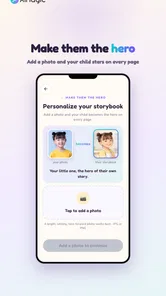
- Customizable characters and scenes make each book feel personal.
- Encourages imagination
- storytelling
- and creative expression.
- Visual story format can help keep younger children engaged.
- Useful for quiet-time activities
- travel
- or bedtime story creation.
Cons
- Some generated stories may need adult editing for quality or consistency.
- Creative options may feel limited compared with professional design apps.
- AI-generated content can occasionally include unsuitable wording or themes.
- Frequent use may require supervision to balance screen time.
- Certain features or content may be restricted behind in-app purchases.











