

Ai Tattoo ldeas-Art Generator
- 350.00
- 4.5
- Installs
- 100.00K
- Price
- Free
Screenshots
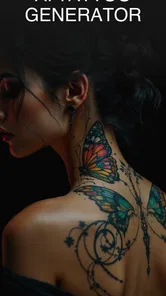
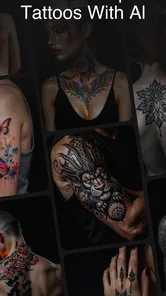
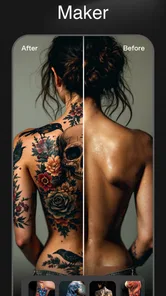
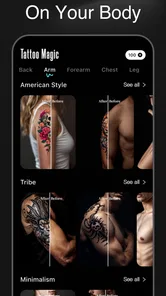
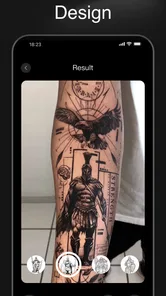
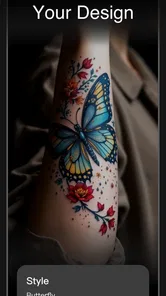
Analysis by Reviewed
When I want to explore a tattoo idea without committing to a sketchbook full of rough attempts, Ai Tattoo ldeas-Art Generator gives me a quick place to begin. It is a free art and design app from Leading Software Development Studio, aimed at turning a short concept into visual tattoo inspiration. I see it as an idea-finding tool rather than a complete tattoo-design studio, and that distinction matters before you start.
The app is useful at the earliest stage, when you know the feeling or subject you want but cannot yet explain the design clearly. A phrase such as a moon, a snake, and fine botanical details can become a starting point for discussion. The result is not something I would treat as ready for a tattoo needle without further work, but it can help replace a blank page with several directions to consider.
From a vague idea to a tattoo conversation
My preferred way to use Ai Tattoo ldeas-Art Generator is to begin with the starting condition, not with a demand for a finished masterpiece. I first decide what the tattoo should communicate, where it might sit, and which visual elements are essential. That preparation makes a bigger difference than simply typing a broad word such as “tattoo” and accepting the first attractive image.
For example, imagine someone preparing for an everyday consultation with a tattoo artist. They may want a small design inspired by a family pet, but they are unsure whether the image should feel delicate, bold, symbolic, or realistic. The app can help them explore those directions before the appointment. Instead of saying only “I want a dog tattoo,” they can arrive with a clearer sense of whether they prefer a clean outline, a decorative emblem, or a more detailed composition.
This is where the app’s artificial-intelligence approach is most helpful. It encourages visual experimentation without requiring drawing experience. I do not need to know how to construct anatomy, balance ornamental shapes, or choose a lettering style before beginning. I can focus on the meaning and mood, then judge which generated direction feels closest to my intention.
That convenience also creates the first important trade-off. A generated image may look impressive on a phone while being unsuitable for the body, the chosen placement, or the tattooing process. Fine details can become crowded, small gaps can disappear, and a design that looks balanced on a bright screen may not translate well to skin. I treat every output as a conversation starter, not as a technical stencil.
Writing inputs that produce useful directions
The strongest workflow is to describe the subject, visual language, mood, and practical scale separately. I might specify a raven, restrained linework, a calm rather than aggressive mood, and a compact composition for the forearm. This gives the generator more to work with than a single emotional word, while still leaving room for visual interpretation.
More From Our News Desk

 Gmail
GmailGmail in a Busy Inbox: Who Benefits Most?
From first account to crowded workday, Gmail earns its place through dependable search and flexible sorting—but its best fit depends on how much inbox maintenance you can tolerate.

 Prime Video
Switching to Prime Video: What Changes in Your Viewing Routine
Prime Video can make a compelling second home for streaming, but switching means learning a different catalog, rental layer, and route from browsing to playback.

 Universal TV Remote Control
Universal TV Remote Control Works Best as a Reliable Backup
A phone remote earns its place through quick setup and reliable habits. Here is how to get more from Universal TV Remote Control—and where its limits show.

 Weather - By Xiaomi
Weather by Xiaomi Review: Clear at a Glance, Less Clear Up Close
Xiaomi’s weather app makes everyday forecasts quick to scan, but its calm surface can leave useful details and recovery paths harder to find than they should be.

 X
XX Under Pressure: Can It Recover When Posting Goes Wrong?
A resilience-focused review of X, examining setup, mistaken posts, interruptions, weak connections, and the gaps that matter when recovery needs to be dependable.

 Clash of Clans
Clash of Clans Is Won Between the Battles
Its raids are quick; its community is a long-term project of coordination, teaching, rivalry, and shared responsibility—with all the friction that entails.
Latest News



I also avoid putting every possible idea into one request. If I combine a portrait, several symbols, a quote, flowers, geometric framing, and multiple styles, the result can lose its main subject. My more reliable approach is to test one central concept first, then adjust one variable at a time. That makes it easier to understand which change improved the direction and which one made it less usable.
A useful non-obvious step is to create variations based on the same core idea rather than constantly changing the subject. For instance, I can keep a mountain motif and explore a minimal outline, an ornamental version, and a darker illustrative interpretation. This produces a meaningful comparison. Randomly entering unrelated prompts may be entertaining, but it does not help much when the goal is to make a decision.
I would also keep the intended placement in mind from the beginning. A design for the wrist has different needs from one for the back or upper arm. The app can inspire the visual direction, but I still need to think about how the shape will sit on a curved surface and how much room the artist will have to work. That is one reason I would not skip the handoff to a professional.
Reviewing the generated direction instead of chasing perfection
Once an image appears, I look at it in three separate ways. First, does it express the original idea? Second, is the composition readable at the approximate size I have in mind? Third, which parts are genuinely useful to show an artist? Sometimes the answer is not the whole image. A symbol, frame, pose, or arrangement may be the valuable part, even when the complete design feels too busy.
This is an important workflow improvement: I do not judge an output only by whether I would tattoo it unchanged. I ask whether it helps me make a better decision. A generated concept can succeed by revealing that I prefer negative space, dislike heavy shading, or want the central subject larger. That kind of feedback is practical, even when the image itself needs substantial revision.
For someone who is nervous about choosing a permanent design, this exploratory stage can make the process less intimidating. It gives shape to preferences that are difficult to describe verbally. I find that visual comparison often exposes hidden disagreements with my own idea. A prompt may sound right until I see the composition, and then I realize that the mood, density, or balance is wrong.
At the same time, I would not use the app as a substitute for artistic judgment. It does not remove the need to understand line weight, aging, placement, contrast, or the difference between a reference image and a tattooable design. The app is strongest before those decisions are finalized, when imagination is the main obstacle.
The handoff to a tattoo artist
The most valuable outcome is usually the handoff. I would show the artist the generated concept, explain what I like, and point out what I do not want carried over. Saying “I like the framing but not the tiny interior detail” is much more useful than presenting an image and asking for an exact copy.
This approach protects the creative conversation. The artist can adapt the idea to the body area, suggest changes for longevity, and redraw elements that do not work at tattoo size. I would also bring a short written explanation of the intended meaning and a few clear preferences. The generated image supplies visual context, while the explanation prevents the artist from guessing which parts matter most.
There is a practical handoff issue that I would plan for before becoming attached to a result: the app’s concept may not contain the clean construction material an artist needs. A tattooer may need to redraw it, simplify it, separate layers mentally, or replace awkward details. That is not necessarily a weakness of the app; it is a reminder that inspiration and production are different stages.
If the design includes lettering, I would be especially cautious. Text needs exact spelling, a suitable type treatment, and enough space to remain readable over time. I would never rely on a generated image alone for a meaningful quote, name, or date. I would provide the artist with the exact wording separately and ask for a deliberate lettering design.
The same caution applies to faces, hands, animals, and recognizable symbols. Generated imagery can produce attractive but anatomically strange details. Those imperfections may be easy to overlook when browsing quickly. A professional review is essential if the tattoo depends on likeness, symmetry, or a culturally important symbol.
What the result is genuinely good for
In my experience, the app’s best result is a collection of visual directions that helps narrow a personal choice. It is particularly suitable for first-time tattoo planning, people who have a theme but no drawing skills, and anyone comparing styles before contacting an artist. It can also help friends discuss a shared idea when words alone keep producing misunderstandings.
A realistic everyday scenario would be planning a small commemorative tattoo after work. I might have only a short break to explore possibilities, so I enter the central subject and a few style constraints, review the resulting direction, and save the useful visual reference for a later conversation. The benefit is not that the app completes the tattoo during that break. The benefit is that I leave with a more specific brief.
It can also be useful for an artist’s client who keeps changing direction. Rather than requesting a completely new concept every time, the client can use the app to compare broad moods first. That can reduce indecision before a paid consultation, although the final design should still be developed with the artist’s expertise.
The app is less convincing for users who already draw confidently or who need precise professional control. If I require editable vector paths, exact dimensions, carefully managed layers, technical stencil preparation, or a reliable lettering workflow, I would choose a dedicated design application or work directly with a tattoo artist. This generator is about visual discovery, not detailed production control.
Compared with searching image boards or browsing ordinary tattoo galleries, the app offers a more direct route from personal wording to a tailored concept. Image searches can provide stronger examples of tattoos that have actually been applied to skin, which is valuable for judging scale and aging. However, they can also encourage copying or make it difficult to combine several personal ideas. The generator is better for exploration; real tattoo references and an artist are better for practical validation.
Where the workflow becomes less comfortable
The first point of friction is expectation. The store summary presents it as a creative tattoo design tool, and the short description focuses on artificial-intelligence tattoo ideas. That makes it easy to expect a polished final design. I think users will be happier if they approach it as a fast concept generator whose outputs require selection, editing, and professional interpretation.
Another limitation is that visual appeal can distract from tattoo practicality. Dense textures, narrow openings, tiny decorations, and complicated overlaps may look excellent in a generated image but age poorly or become difficult to reproduce. I make a habit of zooming out and imagining the design at its real body size. If the main shape is no longer clear, I treat that as a signal to simplify.
The free entry point is helpful for trying the basic experience, but the app also includes in-app purchases ranging from $3.99 to $59.99 per item. I would check the purchase screen carefully before committing to anything, especially if I am only experimenting. The presence of paid items does not automatically make the app poor value, but it does mean that casual users should decide how much exploration they actually need.
Device compatibility is another practical consideration. The app requires Android 8.0 or later, so someone using an older Android phone should check compatibility before planning around it. On a supported device, I would still prefer a larger screen when comparing details, because small tattoo elements are easy to misread on a compact display.
The app carries an Everyone content rating, which fits its general-purpose creative focus. That makes it approachable for a broad audience, but it should not be confused with professional suitability. A design being accessible to browse does not mean it has been evaluated for safe placement, lasting readability, or responsible tattoo practice.
Who should try it and who should skip it
I would recommend trying it if you have a personal theme, limited drawing ability, and a willingness to refine the result with a human artist. It is also a good fit if you are still deciding between visual styles and want to discover preferences through comparison rather than theory. The free price makes that initial exploration easy, provided you remain aware of optional purchases.
I would skip it if you want a finished stencil, exact production files, or a guarantee that every generated detail can be tattooed as shown. I would also avoid making it the main tool for a highly meaningful portrait, complex lettering, or a design that depends on precise cultural symbolism. In those cases, direct collaboration with an experienced artist is the better first move.
The app has reached over one hundred thousand installs and holds a 4.5 average from around seven thousand ratings, with hundreds of written reviews. Those figures suggest that many people find the concept useful, but they do not change my central advice: popularity cannot replace checking whether a particular output works for your body, style, and long-term plans.
My final decision after following the full workflow
Ai Tattoo ldeas-Art Generator works best when I use it as the first link in a longer chain: personal idea, written input, visual variations, careful selection, and a professional redraw. The result can make a vague wish concrete and give a tattoo artist a much clearer starting point. That is a real benefit, especially for people who struggle to communicate visual ideas.
The current version is 1.2.1, and I would judge it by that practical role rather than expecting it to replace a drawing program or a tattoo studio. Its strengths are speed, accessibility, and the ability to turn a concept into something discussable. Its weaknesses are the gap between attractive generated imagery and tattoo-ready construction, plus the need to watch optional spending.
My recommendation is positive but specific: use it to explore, compare, and prepare. Do not copy an output blindly, and do not treat a generated image as the final authority on linework, scale, placement, or longevity. The smartest workflow is to let the app start the conversation, then let a tattoo artist finish the design.
Ai Tattoo ldeas-Art Generator Frequently Asked Questions
What devices and operating systems can run Ai Tattoo Ideas-Art Generator?
Ai Tattoo Ideas-Art Generator is an Art & Design app for devices running Android 8.0 or later. Check your device’s operating system before downloading, as an older version may not be compatible. The app is free to download, though in-app purchases are available. Its age rating is Everyone, making it broadly accessible to users interested in exploring tattoo concepts.
What is Ai Tattoo Ideas-Art Generator and how does it work?
Ai Tattoo Ideas-Art Generator is a creative app designed to help users explore tattoo concepts with the assistance of artificial intelligence. You can enter a description, choose a visual style, or use available inspiration tools to generate design ideas. The results are intended for brainstorming and reference, so the final tattoo should always be reviewed and refined with a professional tattoo artist.
Can I create a tattoo design based on my own idea or personal meaning?
Yes, the app is most useful when you provide specific details about your concept, such as symbols, words, themes, preferred style, placement, and level of detail. More precise descriptions generally produce more relevant suggestions. However, AI-generated artwork may not perfectly understand names, lettering, cultural symbols, or highly personal references, so carefully check every result before using it as a tattoo stencil.
Are the tattoo designs generated by the app ready to tattoo immediately?
Not necessarily. The generated images are best treated as concept art rather than finished, tattoo-ready templates. Fine lines, shading, proportions, small text, and details may need correction before being transferred to skin. A qualified tattoo artist can redraw the design, adapt it to the chosen body area, improve its readability, and make sure it will age properly over time.
Is Ai Tattoo Ideas-Art Generator free to use?
The app is free to download, but it also offers in-app purchases. The listed purchase range is $3.99 to $59.99 per item, so check the purchase details in the app before paying. Availability of features may depend on the version of the app, platform, and any subscription or in-app purchase options offered by the developer. Some tools or generations may be limited, while premium access can provide additional styles, faster results, or fewer restrictions. Before downloading or starting a trial, review the current store listing carefully, including renewal terms and cancellation conditions.
Pros
- Generates many tattoo concepts from simple text prompts.
- Useful for exploring styles before consulting a professional tattoo artist.
- Creates inspiration quickly without requiring drawing skills.
- Offers ideas that can be tailored to different body placements.
- Convenient for comparing several designs in one session.
Cons
- AI designs may include distorted details or unrealistic anatomy.
- Results may not translate well to real tattoo techniques.
- Some features or designs may require in-app purchases.
- Generated artwork may resemble existing tattoos or online images.
- A stable internet connection may be needed for image generation.











