

AI Tattoo Generator & Maker
- 0.00
- 0.0
- Installs
- 50.00K
- Price
- Free
Screenshots
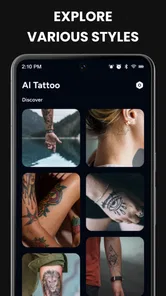
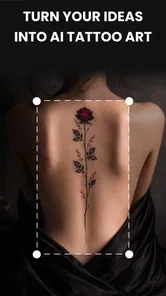
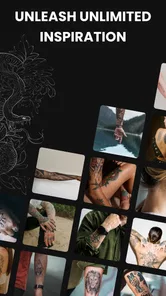
Analysis by Reviewed
I tried AI Tattoo Generator & Maker as an art and design app with a very specific purpose: helping turn a vague tattoo idea into something visual before committing it to skin. That makes it more useful than a simple image gallery, but it also means I judge it differently from a general drawing app. I want quick inspiration, a believable preview, and a practical way to take a promising concept to a professional tattoo artist.
The app is free, made by GLOBAL SOFT .LTD, and listed for Everyone. It has passed the early discovery stage with over 50 thousand installs, while version 1.0.5 is the version I would look for when checking compatibility. It runs on Android 8.0 or later. The important point, though, is not the download figure; it is whether the workflow helps you make a better decision about a permanent design.
How it works in a real household
The most natural use I found was not sitting alone and trying to produce a perfect tattoo immediately. It worked better as a shared idea board. One person can describe a symbol, animal, word, or mood, then show the resulting concept to a partner, friend, or family member. That makes the conversation more concrete than saying, “I want something minimal but meaningful.”
For example, imagine someone preparing for a birthday tattoo and using the app at the kitchen table. They might generate a few versions of a small botanical design, compare placement ideas with a partner, and save the strongest direction for a later consultation. The app is valuable in that early stage because it turns discussion into visible alternatives. It does not replace the conversation; it gives the conversation something specific to discuss.
Shared use also brings a small but important boundary: the design belongs to the person who will wear it. I would avoid treating a generated image as a group decision simply because several people like it. A household can offer opinions, but the final choice should stay with the future tattoo owner. That distinction matters especially when a design includes initials, dates, names, or symbols tied to a relationship.
I also found that a phone screen can encourage quick approval. A design that looks impressive at a glance may feel too busy when imagined on a wrist, finger, ankle, or rib area. I recommend viewing each favorite at normal screen size, then stepping away from it before deciding. The app is excellent for opening possibilities, but the user still has to slow down and test whether the idea has lasting appeal.
What the generator is genuinely good at
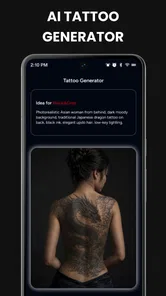
The strongest part of this app is the jump from a verbal idea to a visual starting point. Many people know the subject they want but not the composition. They may want a snake, flower, constellation, family emblem, or abstract mark, yet have no idea how those elements should be arranged. An AI-assisted design workflow can provide directions that would be difficult to sketch from scratch.
More From Our News Desk

 Gmail
GmailGmail in a Busy Inbox: Who Benefits Most?
From first account to crowded workday, Gmail earns its place through dependable search and flexible sorting—but its best fit depends on how much inbox maintenance you can tolerate.

 Prime Video
Switching to Prime Video: What Changes in Your Viewing Routine
Prime Video can make a compelling second home for streaming, but switching means learning a different catalog, rental layer, and route from browsing to playback.

 Universal TV Remote Control
Universal TV Remote Control Works Best as a Reliable Backup
A phone remote earns its place through quick setup and reliable habits. Here is how to get more from Universal TV Remote Control—and where its limits show.

 Weather - By Xiaomi
Weather by Xiaomi Review: Clear at a Glance, Less Clear Up Close
Xiaomi’s weather app makes everyday forecasts quick to scan, but its calm surface can leave useful details and recovery paths harder to find than they should be.

 X
XX Under Pressure: Can It Recover When Posting Goes Wrong?
A resilience-focused review of X, examining setup, mistaken posts, interruptions, weak connections, and the gaps that matter when recovery needs to be dependable.

 Clash of Clans
Clash of Clans Is Won Between the Battles
Its raids are quick; its community is a long-term project of coordination, teaching, rivalry, and shared responsibility—with all the friction that entails.
Latest News



I would use it for exploration rather than final artwork. Generate several related concepts, notice which shapes and arrangements keep attracting your attention, and then identify the common thread. That recurring detail is often more useful than any single image. It might be the thickness of a line, the amount of empty space, the angle of a figure, or the way text sits inside a symbol.
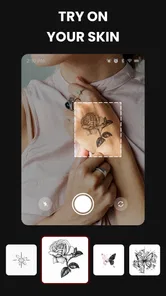
The app’s AR try-on idea is especially helpful for placement conversations. A design can look balanced as a flat image but feel oversized when imagined on the body. A preview gives you a better sense of scale and position before you contact a studio. I would still treat the result as an approximation, because a phone preview cannot account perfectly for body contours, movement, skin texture, or how a professional will adapt the stencil.
The stencil-maker function points toward a more practical stage of the process. It can help you think about the design as something that must be transferred and tattooed, not merely admired as polished digital art. That shift is useful: dense shading, tiny gaps, and delicate internal details may look attractive on a screen but become difficult to reproduce cleanly at a small size.
Setup boundaries before anyone starts designing
On a shared device, I would establish a simple rule before opening the app: do not assume that one person’s saved ideas represent everyone’s preferences. Tattoo concepts can be personal, and a casual session can easily mix serious plans with jokes, experiments, or designs intended only for a friend. Keeping that distinction clear prevents confusion later.
I would also separate inspiration from approval. A generated concept should not be treated as permission to copy a living artist’s signature style, reproduce a recognizable character without considering ownership, or use another person’s private image as a design source. The app can help explore visual directions, but the responsible next step is to discuss the concept with a tattoo professional and ask for an original adaptation.
Another useful boundary is physical: do not let a young child’s enthusiasm turn into a rushed permanent decision. The Everyone rating makes the app approachable for general audiences, but an age label does not mean every tattoo decision is appropriate for every age. Parents or guardians should keep the conversation focused on temporary exploration, personal meaning, and professional advice rather than treating the app as a shortcut to getting tattooed.
On Android, the minimum operating-system requirement is Android 8.0, so I would check the phone before planning a group session. That is a small practical detail, but it matters when one household member uses an older spare device. If the app cannot run on that phone, the group may end up passing one device around, which makes comparison less comfortable and increases the chance of losing track of which concept belongs to whom.
I would also avoid entering deeply personal details into prompts unless they are necessary for the design idea. A meaningful symbol can often be described without including a full name, private event, or identifying story. This is not a criticism of a specific policy; it is simply a sensible habit whenever an app is used around personal creative material.
Coordinating ideas without creating arguments
Tattoo planning often involves more than one opinion. A friend may prefer bold blackwork, while the wearer wants something delicate. A partner may dislike a placement that the wearer finds meaningful. The app can make these differences visible, which is useful, but it cannot settle them.
My preferred workflow is to create a small set of directions rather than asking everyone to judge an endless stream of images. Start with one subject and vary only one factor at a time: composition, level of detail, orientation, or placement. This makes feedback clearer. If everything changes between versions, nobody can explain what actually improved.
A practical household method is to give each person a different role. The future wearer decides whether the idea feels personal. A friend can look at visual balance. A partner can comment on how the design fits everyday clothing or visibility preferences. A tattoo artist should have the final say on line weight, longevity, skin placement, and what can realistically be tattooed. This division keeps casual opinions from being confused with technical advice.
The AR preview can support that discussion, but I would compare the same design in more than one position. A symbol that works on a flat forearm view may not suit a curved shoulder or a narrow ankle. Placement also changes how much detail is sensible. This is one of the less obvious benefits of using the app early: it encourages you to think about the relationship between artwork and body instead of choosing an image in isolation.
There is a trade-off here. Speed makes the app inviting, but speed can make a group overconfident. When several people react positively to a generated concept, it can feel finished even though it is still a draft. I recommend writing down what everyone likes before generating more versions. Otherwise the session can become a contest between increasingly elaborate images, with no clear decision about the original idea.
Age, trust, and the difference between browsing and committing
Because the app is marked for Everyone, I see it as suitable for browsing tattoo concepts in a general household setting. I would still keep supervision and context in mind when children are involved. The subject itself is permanent body art, and younger users may enjoy the visual design exercise without understanding the long-term implications of placement, visibility, pain, healing, or future school and work choices.
For teenagers, the app can be a constructive way to explore symbolism without immediately booking an appointment. A parent can ask the user to explain why a design matters, where it would go, and whether the idea still feels right after time has passed. That turns the app into a planning tool rather than a pressure tool. It also creates room to discuss temporary alternatives, professional consultation, and the importance of choosing a reputable studio.
Trust matters between adults as well. If a partner or roommate borrows the phone, I would not assume they should browse or alter another person’s tattoo concepts. The app may be used casually, but the designs can reveal private relationships, memories, or future plans. Shared-device use works best when people ask before opening another person’s creative work and avoid presenting a private concept to a wider group without permission.
I would also be careful with designs based on names, translations, or unfamiliar symbols. AI-generated artwork can make an idea look convincing while still requiring human verification. Before turning a word or script into a stencil, check spelling and meaning with a qualified source. A beautiful layout cannot fix an incorrect translation, and this is exactly the kind of mistake that is easy to miss when the image looks polished.
Where it beats ordinary alternatives
Compared with browsing tattoo photographs on social platforms, this app is more active. Instead of waiting for an existing image that happens to match your idea, you can begin with your own concept and explore variations. That is useful for people who want something personal but need help getting past the blank page.
Compared with a conventional drawing app, it lowers the technical barrier. A drawing app gives you direct control, but you need to understand layers, brushes, proportions, and composition. This generator is better for the first creative leap, especially if you are not confident drawing. The compromise is control: once a concept appears, you may still need a proper design tool or a tattoo artist to refine every line.
Compared with visiting a studio immediately, it helps you arrive with clearer questions. You can discuss whether the preferred version should be smaller, simplified, rotated, or adapted for a particular body area. That can make a consultation more efficient. However, a studio remains the better place for final judgment because artists understand skin, aging, needle work, stencil transfer, and the practical limits of scale.
Compared with a dedicated professional illustration workflow, this app is more accessible but less suited to exact production work. If you already know how to draw in vector software or work closely with an artist, you may prefer that route for precision. I would choose this app when the problem is imagination and direction, not when the problem is final technical execution.
Small workflow changes that improve the results
My first tip is to begin with constraints. Mention the intended mood, approximate placement, preferred level of detail, and whether the design should remain readable at a small size. A broad request can produce attractive but impractical concepts. Constraints make the exploration more relevant from the start.
My second tip is to compare silhouettes before details. Cover or ignore the internal decoration and ask whether the outer shape still feels balanced. Tattoos are often seen from a distance or in motion, so a strong silhouette can matter more than tiny accents. If the outline is awkward, extra shading will not solve the underlying problem.
My third tip is to use the stencil stage as a reality check. Look for narrow gaps, crowded lettering, fragile points, and elements that merge into one dark patch. A concept that only works as a glossy preview may need simplification. I would rather take a clean, readable idea to an artist than insist on every generated detail.
My fourth tip is to keep a short decision trail. Save the chosen direction, note what you want changed, and record the questions you plan to ask at the studio. This is particularly helpful when several household members have offered feedback. It prevents the final consultation from becoming a vague request such as “make it look like the app,” which is not enough guidance for a professional.
My fifth tip is to test emotional durability, not just visual appeal. Ask whether the design still represents you without the story being explained. If it depends entirely on a current trend, relationship, or inside joke, give yourself time. The app makes it easy to generate fresh excitement, so deliberate waiting is a useful counterbalance.
Limitations I would take seriously
The biggest limitation is that generated imagery can look more resolved than it really is. Smooth digital shading and perfect presentation may hide problems that appear during tattooing. I would never hand an image to an artist and expect a direct copy without revision. The professional needs room to adapt it to the body and to the realities of healed ink.
The AR preview is helpful for orientation, but it should not be mistaken for a precise measurement tool. Camera angle, lighting, distance, and body movement can change how a design appears. Use it to compare general placement and scale, then let the artist make the technical assessment.
There is also a creative limitation: AI exploration can pull users toward familiar visual patterns. If you want an unusually personal result, you may need to bring your own references, sketches, memories, or meaningful objects into the conversation rather than accepting the first attractive output. The app can broaden your options, but personal judgment is what keeps the tattoo from feeling generic.
Finally, this is not the right choice for someone who already has a fully developed design and needs exact editing, print-ready vector artwork, or detailed collaboration with an illustrator. In that situation, a professional design application or direct artist consultation is more appropriate. The value here is early-stage discovery, previewing, and preparation.
My household verdict
I recommend AI Tattoo Generator & Maker for people who are interested in a tattoo but cannot yet translate an idea into a workable visual direction. Its combination of AI concept generation, body previewing, and stencil-oriented thinking gives a casual user a more useful starting point than ordinary image browsing. I especially like it for a calm household discussion where the wearer remains in control and everyone treats the results as drafts.
I would skip it if you are looking for guaranteed final artwork, exact tattooing instructions, or a substitute for an experienced artist. The app can help you discover what you want, but it cannot decide whether a design will age well on your skin or whether a particular studio can execute it safely. Those decisions still belong to people with the right training.
For a free Art & Design app, it has a clear everyday role: reduce uncertainty before a permanent choice. Use it to test ideas, compare placement, identify details that need simplifying, and prepare better questions for a tattoo professional. If you keep those boundaries in place, I think it earns a place on the phone of anyone who wants to explore a tattoo thoughtfully rather than choosing one impulsively.
My final advice is simple: let the app start the conversation, not end it. Share concepts respectfully, protect personal ideas on a shared device, involve the actual wearer in every decision, and treat the stencil as a discussion draft. Used that way, AI Tattoo Generator & Maker is a practical creative companion for the uncertain stage between “I have an idea” and “I am ready to ask an artist.”
AI Tattoo Generator & Maker Frequently Asked Questions
Does AI Tattoo Generator & Maker include an AR try-on feature?
The app’s description highlights an AR try-on feature, which is intended to help you preview a tattoo idea on your body before deciding whether it suits you. Treat this as a visual aid rather than a precise mock-up of the finished tattoo: the result may not reflect how a design will look after it is adapted to your skin and placement by an artist.
What should I prepare before using the app?
It helps to have a clear idea of the tattoo you want, such as its subject, style, and the feeling you want it to convey. You can also gather reference ideas to guide your prompt. If you plan to use the AR preview, consider where you might want the tattoo placed. A thoughtful starting point makes it easier to compare concepts and decide what to discuss with a tattoo artist.
What is AI Tattoo Generator & Maker?
AI Tattoo Generator & Maker is a design tool that uses artificial intelligence to create tattoo concepts from written prompts, selected styles, or reference ideas. It can help you explore possibilities before visiting a tattoo artist, including symbols, lettering, animals, patterns, and more. The generated images are best treated as inspiration rather than final, professionally prepared tattoo stencils. It is an Art & Design app from GLOBAL SOFT .LTD.
How do I create a tattoo design with the app?
After opening the app, you typically describe the tattoo you want, choose a preferred style or visual direction, and submit the request for generation. Depending on the available options, you may be able to adjust elements such as placement, complexity, color, or size. Results can vary, so trying several detailed prompts usually produces more useful and personalized concepts.
Are the AI-generated designs ready to tattoo immediately?
Not necessarily. AI-generated artwork may contain unusual details, distorted lettering, uneven symmetry, or elements that do not translate well onto skin. Before using a design, show it to a qualified tattoo artist who can correct the artwork, adapt it to your body shape, improve line quality, and create a safe, printable stencil. Never rely on an unreviewed image as the final tattoo plan.
Pros
- Generates multiple tattoo concepts quickly from short text prompts.
- Useful for exploring styles before consulting a professional tattoo artist.
- Offers visual inspiration for placement
- themes
- and composition.
- Easy to experiment with unusual ideas without drawing skills.
- Can help users compare several designs before making a decision.
Cons
- AI results may include distorted details or awkward lettering.
- Generated designs may look generic or resemble existing artwork.
- Some features or exports may require payment or a subscription.
- Mockups may not accurately reflect how ink will look on real skin.
- Using generated art directly could raise originality or copyright concerns.











