AI Photo Enhancer - PixLift
- 631.00
- 4.4
- Installs
- 1.00M
- Price
- Free
Screenshots
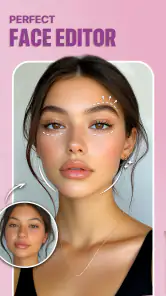

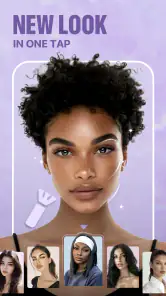


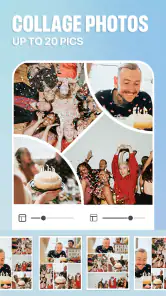
Analysis by Reviewed
I reach for a photo enhancer when I like the moment I captured but not the way the image came out: perhaps a face is soft, an old print looks tired, or a quick phone shot needs a little polish. AI Photo Enhancer - PixLift is built for that kind of rescue job. It is a free photography app from Daily AI Studio, and its focus on automatic improvement makes it approachable when I want a cleaner result without learning a full editing workflow.
Where PixLift fits in a photo routine
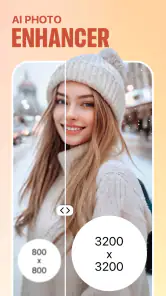
The app’s appeal is its narrow, practical purpose. Rather than asking me to begin by adjusting a long list of sliders, it offers AI-led enhancement, sharpening, restoration for older pictures, retouching, and filters. That makes it useful for casual edits and quick fixes, especially when I am working from a phone and want to decide quickly whether a photo is worth sharing or keeping.
A sensible workflow is to save the untouched original, try an enhancement, then compare the two at the same size before deciding. Sharpening can make edges look clearer, but it cannot recover detail that a camera never captured; on a very blurry face, I would treat the result as an approximation rather than a faithful reconstruction. The same caution applies to restoring old photos: the goal is a more presentable image, not proof that every generated detail matches the original.
Choosing the right image for an automatic edit
PixLift is most useful when the problem is easy to describe: a picture looks soft, an old image needs a lift, or a snapshot could use a modest retouch. Before applying anything, I would ask what I want the edit to accomplish. If the answer is simply “make this easier to see,” automatic enhancement is a reasonable first step. If I need to preserve a specific color, expression, or small inscription exactly, I would start with a less transformative method and keep the untouched file close at hand.
For older prints, a practical sequence is to photograph or scan the picture as evenly as possible, save that capture, and then test restoration on a separate copy. Crooked framing, glare, and shadows can become more noticeable after enhancement, so correcting the way the original is captured may help more than asking an AI editor to compensate for every flaw. This is a useful distinction: PixLift can work on the image you give it, but the input still sets a limit on what a convincing result can be.
Transforming Your Photos with Ease
We all love a good photo, right? But not all of us have the skills or the time to tweak every little detail. That's where AI Photo Enhancer - PixLift comes in. Using advanced AI algorithms, the app analyzes your photos and enhances them automatically. It’s almost like having a mini Photoshop in your pocket but without the steep learning curve.
Features That Stand Out
One of the first things I noticed about PixLift is its user-friendly interface. Even if you're not tech-savvy, you'll find navigating through the app a breeze. The app offers a variety of enhancement options, from adjusting brightness and contrast to sharpening blurry images. But what really caught my eye was the AI auto-enhance feature. It's like magic! With just a tap, your photos get a professional touch-up.
More From Our News Desk

Clash of Clans Is Won Between the Battles

Android Auto Makes the Case for Quieter Car Software

MobiOffice: Transforming Mobile Productivity with Seamless Integration

EA SPORTS FC™ Mobile Soccer: Redefining Mobile Sports Gaming

How Microsoft OneDrive Became a Mobile Productivity Giant

How Google Translate Breaks Language Barriers Effortlessly
Another cool feature is the batch editing mode. If you have a bunch of photos that need a quick fix, PixLift can handle them all at once. This is a huge time-saver for those of us who take hundreds of photos on vacation and want them all to look Instagram-ready. Batch work is most helpful when a set of images has similar lighting; I would still inspect each result, because one automatic treatment may not suit every subject or background equally well.
Making batch edits more dependable
When I have a group of pictures to process, I would first test the automatic treatment on one representative image rather than sending the whole group through immediately. A bright outdoor shot and a dim indoor portrait may need very different handling, even if they were taken on the same day. Sorting pictures into small groups by lighting and subject makes batch editing more predictable, and it reduces the chance that a single look will flatten the differences that make each photo feel real.
I would also avoid treating “batch” as a reason to skip review. A quick pass through the finished images can catch a face that looks over-smoothed, a background edge that has become distracting, or a color shift that stands out beside the rest. If the photos are for a shared album, consistency matters; if they are personal memories, preserving the mood of each frame matters more than making every image equally bright.
Personal Experience
When I first downloaded PixLift, I was skeptical. Could an app really make a noticeable difference in my photos? The answer is a resounding yes! I uploaded a picture I took on a cloudy day, and the app brightened it up, making the colors pop and the details stand out. It was like seeing my photo in a whole new light.
The app also offers a range of filters, perfect for those who like to add a bit of flair to their shots. Whether you're going for a vintage look or something more modern, PixLift has got you covered.
Everyday edits and a useful comparison
In a typical day, I might take a quick picture of a family gathering indoors, notice later that the image looks dim, and use PixLift for a fast lift before sharing it. I would keep the filter subtle if the photo is meant to preserve a memory, and compare the result with the original so skin tones and the room’s lighting still feel believable. For a faded family print, I would try restoration on a copy and keep the scan unchanged as a reference.
Compared with a conventional editor, PixLift is the easier starting point when I want an automatic correction rather than hands-on control. A manual editor is the better choice when I need precise color, selective adjustments, or a consistent look across a carefully assembled set. PixLift’s convenience is valuable, but an AI result is still an interpretation; I would not use it as the sole record of fine details in an important image.
When a different kind of editor is the better fit
The main trade-off is speed versus control. PixLift makes sense when I want a quick judgment from an automatic edit, while a conventional editor gives me more say over the exact strength and location of a change. A portrait that needs a tiny correction around one area, for example, may be better handled with a tool that lets me work selectively. For a large set of images that must share a carefully matched color treatment, a manual or preset-based workflow may also be easier to repeat consistently.
On the other hand, a full editing suite can be unnecessary for a single faded snapshot or a soft photo I only want to share with family. I would not spend time learning a complex workflow when an automatic result is good enough for the purpose. The useful question is not whether AI editing is always better, but whether its interpretation is acceptable for this particular image and audience.
Who should try it—and what to keep in mind
I think the app suits people who often edit on their phone, want to rescue everyday shots, or have older pictures they would like to make easier to view and share. It is less suitable for photographers who expect exact control over every adjustment, or anyone who needs a guaranteed faithful reconstruction of a damaged original. If you are deciding whether to keep an edit, check faces, text, and small edges closely; those details can reveal when an automatic treatment has gone too far.
PixLift is free to start, with optional in-app purchases ranging from $4.49 to $199.99 per item. I would look at the purchase details in the app before committing, especially if I only need an occasional repair. It is rated for Everyone, has a 4.4 average from around 20,000 ratings, and has passed one million installs. Those figures suggest broad interest, but I would still judge it by whether its results suit my own photos.
Checking the result before sharing
For an image that will appear small on a phone screen, a subtle enhancement may look convincing at a glance. I would still inspect the full image before posting or sending it, because sharpening and retouching can make small imperfections more visible rather than less. Faces, glasses, hairlines, patterned clothing, and printed words are useful places to check; if any of them look strangely smooth or uneven, I would compare with the original and choose the less altered version.
There is also a difference between making a picture more pleasant and making it more trustworthy. For a casual family chat, a brighter image may be all I need. For documentation, a record of an object, or an image where exact detail matters, I would preserve the unedited copy and avoid presenting generated-looking changes as original evidence. That boundary keeps a convenient enhancement tool in the right role.
A version with room to prove itself
The app was released on August 30, 2023, and its current version is 1.314.57. That tells me which version is current, but a version number by itself does not reveal what changed between releases, so I would not assume a particular new tool or improvement. For someone already using PixLift, the practical test is whether the current build handles their usual images reliably and whether any paid options are worthwhile for their needs. It supports Android 8.0 and later.
What a new user should test first
If I were trying PixLift for the first time, I would begin with a photo whose original I can easily compare: a slightly dim snapshot with a clear subject, rather than a badly damaged print or an image where every detail is important. That gives me a fair sense of the app’s style without confusing a difficult source image with the quality of the edit. I would then try a second, different kind of picture to see whether the same automatic approach suits both.
It is also sensible to decide in advance whether I am comfortable with the result being simply attractive or whether I need it to remain a faithful record. That small distinction helps answer the common question of whether an AI-enhanced photo is suitable for sharing: for an everyday post or a personal album, often yes; for exact archival or evidentiary use, I would keep the untouched original and rely on a more controlled process.
Ending Thoughts
Overall, I have to say, AI Photo Enhancer - PixLift is a game-changer for anyone looking to improve their photos without spending hours editing. It's user-friendly, efficient, and most importantly, it delivers on its promise to enhance your images. So why not give it a try? You might just find that it becomes your go-to app for all your photo editing needs.
Whether you're a social media influencer or just someone who loves taking photos, PixLift offers tools that can help your images look their best. In a world where a picture is worth a thousand words, make sure yours are saying the right things with PixLift.
What I would watch for over time
For regular users, I would pay attention to whether edits stay natural on different kinds of pictures, not just bright, clear portraits: low-light scenes, fine patterns, and old prints can expose the limits of automated enhancement. I would also check the before-and-after view before sharing, and keep a clean copy whenever the original matters. Those small habits help me enjoy the speed without mistaking a polished result for a more accurate one.
With 631 written reviews and a free entry point, PixLift is easy to explore, but the range of optional purchases makes it worth being deliberate about what I tap. If I only need a one-off improvement, I would test that task first rather than assume I need a subscription or a paid tool. For quick phone edits, it is a convenient option; for exact retouching or dependable archival work, I would choose a more controlled workflow and treat PixLift as a helpful extra rather than the final authority.
AI Photo Enhancer - PixLift Frequently Asked Questions
Can PixLift help improve blurry or low-quality photos?
PixLift is intended to sharpen images and improve their appearance with AI-assisted editing, so it may be useful for photos that look soft or lack detail. It can also restore old pictures and apply filters. The result depends on the original image and the edit selected, so preview the enhanced version and decide whether it looks right before saving or sharing it.
Can I use PixLift to restore old family photos?
Yes. Restoring old pictures is one of the uses highlighted for AI Photo Enhancer - PixLift. You can try it on a scanned or saved photo, then inspect the result to see whether the enhancement suits the image. Older pictures vary considerably in condition, so the outcome may differ from one photo to another; keep an untouched copy if you want to preserve the original.
Is PixLift suitable for editing portraits and selfies?
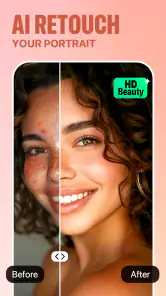
PixLift’s listed capabilities include retouching and AI filters, which may be useful when editing portraits or selfies. Its existing feature description also mentions face enhancement and blemish removal. These tools can change the look of a photo, so review adjustments carefully and choose a result that still feels natural to you. The app is designed for photo editing rather than replacing the original image.
What should I know about AI Photo Enhancer - PixLift before downloading it?
AI Photo Enhancer - PixLift is a photography app from Daily AI Studio for enhancing and editing images. It has an average rating of 4.4 from around 20,000 ratings, and more than 1 million installs. Its content rating is Everyone, and it is free to download, with in-app purchases available. These details can help you decide whether it suits your needs before installing.
What is AI Photo Enhancer - PixLift and what does it do?
AI Photo Enhancer - PixLift is an advanced photo editing app designed to enhance your images using artificial intelligence. It offers a range of features to improve photo quality, such as adjusting brightness, contrast, and color balance. The app can automatically detect and enhance faces, remove blemishes, and sharpen image details, making your photos look professional with minimal effort. Its store summary also highlights sharpening images, restoring old pictures, retouching, and applying AI filters.
Pros
- Enhances image quality significantly
- Easy to use interface
- Quick processing time
- Supports a wide range of image formats
- Doesn't require much storage
Cons
- Limited free features
- Requires internet connection
- Subscription can be costly
- Occasional processing errors
- Not all edits are perfect
- Category
- Photography
- Version
- 1.314.57