AI PDF Reader-All File Readers
- 53.00
- 4.3
- Installs
- 1.00M
- Price
- Free
Screenshots



Analysis by Reviewed
Hey there, tech enthusiasts! Today, I'm diving into the world of file management with the AI PDF Reader-All File Readers app. If you're like me and constantly juggling between different file types, this app might just be your new best friend. Let's break it down and see what makes this app a must-have tool in your digital arsenal.
Your Ultimate File Companion
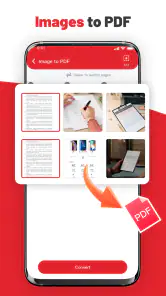
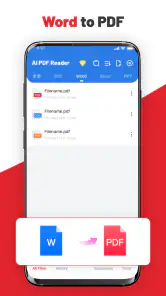
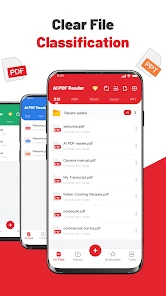
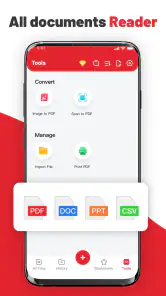
Ever found yourself stuck with incompatible file formats? Yeah, me too. That's where AI PDF Reader-All File Readers steps in. This app is like a Swiss army knife for files, supporting a wide range of formats including PDF, DOC, XLS, PPT, and more. It's perfect for those moments when you need to quickly open or convert a file without the hassle of switching between multiple apps.
First Impressions and User Interface
Upon launching the app, the first thing you'll notice is its sleek and intuitive design. The developers have really nailed the user interface, making it super easy to navigate. Whether you're a tech novice or a seasoned pro, you'll find everything you need right at your fingertips. The main dashboard is clean, with large icons that guide you to the specific file type you want to access.
Performance and Features
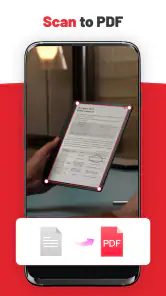
One of the standout features of this app is its speed. I was genuinely impressed by how quickly it opened large PDF files without any lag. The app also offers a handy document scanner feature, which allows you to convert physical documents into digital files in a snap. Plus, the built-in sharing options mean you can quickly send files to colleagues or friends directly from the app.
Another nifty feature is the annotation tool, which lets you highlight text, add notes, or even draw directly on the documents. It's a lifesaver for students and professionals who need to mark up documents on the go. And with the app's cloud integration, accessing your files from anywhere is a breeze.
Security and Privacy
In today's digital age, security is a big concern, and the developers of this app have taken it seriously. The app offers password protection for your sensitive documents, ensuring that your data stays safe and secure. Plus, it doesn't store your files on any external servers, which is a huge relief for those worried about privacy.
Overall, the AI PDF Reader-All File Readers app is a powerhouse when it comes to file management. It's packed with features that cater to both casual users and professionals alike. Whether you're managing work documents, school assignments, or just organizing personal files, this app has got you covered. So, if you're in the market for a reliable and versatile file reader, give this app a try. You won't be disappointed!
More From Our News Desk

Clash of Clans Is Won Between the Battles

Android Auto Makes the Case for Quieter Car Software

MobiOffice: Transforming Mobile Productivity with Seamless Integration

EA SPORTS FC™ Mobile Soccer: Redefining Mobile Sports Gaming

How Microsoft OneDrive Became a Mobile Productivity Giant

How Google Translate Breaks Language Barriers Effortlessly
AI PDF Reader-All File Readers Frequently Asked Questions
What is AI PDF Reader-All File Readers and what does it do?
AI PDF Reader-All File Readers is a versatile application designed to help users view, read, and manage various file formats, especially PDF files. It incorporates advanced AI features to enhance reading experiences, including text-to-speech, annotation tools, and file conversion capabilities, making it a comprehensive tool for document management on both Android and iOS devices.
Is AI PDF Reader-All File Readers compatible with all document formats?
While AI PDF Reader-All File Readers is primarily designed for PDF documents, it supports a wide range of other file formats such as Word, Excel, PowerPoint, and image files. This broad compatibility ensures that users can manage nearly all of their document needs within a single application, streamlining the workflow and enhancing productivity.
Does AI PDF Reader-All File Readers require an internet connection to function?
AI PDF Reader-All File Readers can function offline for most of its basic features like viewing and reading documents. However, certain features that involve AI processing, such as text recognition or cloud-based file conversions, might require an internet connection to function properly. This ensures that users receive the most accurate and efficient service possible.
Are there any in-app purchases or subscriptions in AI PDF Reader-All File Readers?
The app offers a free version with essential features, but for advanced functionalities like premium AI tools, ad-free experience, and cloud storage integration, users might need to make in-app purchases or subscribe to a premium plan. These additional features provide enhanced usability and convenience for professional use.
How user-friendly is AI PDF Reader-All File Readers for beginners?
AI PDF Reader-All File Readers boasts an intuitive user interface designed to be user-friendly for both beginners and experienced users. The app offers guided tutorials and a well-organized layout, helping newcomers quickly understand and utilize its features effectively. This ease of use makes it accessible for anyone looking to manage their documents efficiently.
Pros
- Supports multiple file formats seamlessly
- Fast and efficient document loading
- User-friendly interface with easy navigation
- Offline access to downloaded files
- Annotations and highlighting features included
Cons
- Limited cloud storage integration
- Ads present in free version
- Some features require in-app purchases
- Occasional crashes on older devices
- No text-to-speech functionality
- Category
- Productivity
- Version
- 2.2.8











