

AI Music Video Maker - Rap AI
- 121.00
- 4.5
- Installs
- 100.00K
- Price
- Free

Screenshots

Analysis by Reviewed
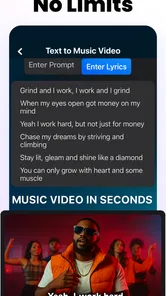
I approached AI Music Video Maker - Rap AI as a practical creative tool rather than a novelty generator. It sits in the art and design category, but its real appeal is closer to a fast idea-to-video workspace: you begin with text, audio, or video, then use artificial intelligence to turn that starting point into a music-focused visual concept. That makes it interesting for people who want to experiment without learning a full desktop editor first.
My first impression was that the app is aimed at speed. It is not trying to replace every part of a professional production workflow. Instead, it is designed for the moment when you have a lyric idea, a beat, a rough recording, or a visual prompt and want to see what that idea could become. The promise of unlimited AI video music creation is attractive, especially for short-form creators who need several concepts before choosing one to polish.
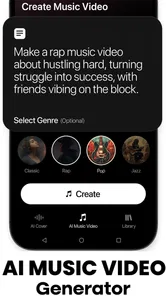
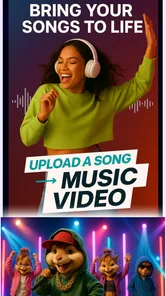
There is also a useful range in the input approach. You are not restricted to starting with a finished song. A text-based idea can be the seed, while audio and video give you a more concrete foundation. The inclusion of Sora 2 and Veo 3 in the store summary signals that the app is positioned around current AI video generation workflows, although I would still treat the output as a creative draft until I had reviewed it carefully.
How I would decide whether it fits my workflow
The first decision is not simply whether you like AI-generated visuals. It is whether you value rapid exploration more than precise manual control. If your goal is to place every cut, transition, camera movement, title, and effect exactly where you want it, a conventional video editor remains the safer choice. If your goal is to turn a musical mood into a presentable visual direction quickly, this app makes more sense.
I would also ask what kind of music content I usually make. Rap, demos, social clips, visualizers, mood pieces, and experimental music videos are natural matches because they can benefit from strong atmosphere and quick variation. A creator who wants to test several visual identities for one track may get more value here than someone who already has a detailed storyboard and only needs accurate assembly.
The app is free to start, with optional in-app purchases ranging from a few dollars to just under twenty dollars per item. That makes the initial decision relatively easy: install it, test the creative flow, and decide whether the paid options improve your results enough to justify them. I would not pay immediately. I would first check how well the app handles my own lyrics, audio style, and preferred visual tone.
It is listed for Everyone and runs on Android starting with version 7.0, which keeps the technical entry point broad. The current version is 1.6.1. Those details matter for someone using an older phone, although the practical experience will still depend on how demanding the generation process is and how smoothly the device handles previews and exports.
More From Our News Desk

 Gmail
GmailGmail in a Busy Inbox: Who Benefits Most?
From first account to crowded workday, Gmail earns its place through dependable search and flexible sorting—but its best fit depends on how much inbox maintenance you can tolerate.

 Prime Video
Switching to Prime Video: What Changes in Your Viewing Routine
Prime Video can make a compelling second home for streaming, but switching means learning a different catalog, rental layer, and route from browsing to playback.

 Universal TV Remote Control
Universal TV Remote Control Works Best as a Reliable Backup
A phone remote earns its place through quick setup and reliable habits. Here is how to get more from Universal TV Remote Control—and where its limits show.

 Weather - By Xiaomi
Weather by Xiaomi Review: Clear at a Glance, Less Clear Up Close
Xiaomi’s weather app makes everyday forecasts quick to scan, but its calm surface can leave useful details and recovery paths harder to find than they should be.

 X
XX Under Pressure: Can It Recover When Posting Goes Wrong?
A resilience-focused review of X, examining setup, mistaken posts, interruptions, weak connections, and the gaps that matter when recovery needs to be dependable.

 Clash of Clans
Clash of Clans Is Won Between the Battles
Its raids are quick; its community is a long-term project of coordination, teaching, rivalry, and shared responsibility—with all the friction that entails.
Latest News



What I look for before committing
My main test would be repeatability. One attractive result is not enough. I would create several prompts around the same song and see whether the app gives me genuinely different directions or merely small variations of the same visual language. This is one of the most important differences between a fun demo and a tool I would actually keep using.
I would also pay attention to how much cleanup is needed afterward. AI-generated video can be useful even when it is imperfect, but strange motion, inconsistent subjects, or visuals that do not match the rhythm can turn a fast workflow into a slow repair job. The key question is not whether every frame looks perfect; it is whether the app helps me reach a usable draft faster than starting from an empty timeline.
A third test is prompt discipline. I would avoid writing a long paragraph full of unrelated instructions. Instead, I would separate the musical mood, subject, setting, color direction, camera feeling, and desired energy. For example, I might describe a tense nighttime performance, a limited color palette, quick movement, and a gritty urban atmosphere. That gives the generator a clearer creative brief than simply asking for a “cool rap video.”
Where the app is most convincing
The strongest part of this app is the distance between an idea and a first visual result. Traditional editing apps expect you to gather clips, import them, trim them, arrange them, and build a visual rhythm yourself. That control is valuable, but it also creates friction. Here, the starting point can be a thought rather than a folder full of footage.
That matters in everyday situations. Imagine I have written a chorus during a commute and recorded a rough vocal memo. Instead of waiting until I have a finished instrumental and filmed performance, I can use the text or audio as a creative starting point and explore the mood of the eventual video. Even if the result is not final, it can help me decide whether the song feels cinematic, aggressive, playful, or introspective.
I can also see the app helping a small creator prepare a pitch. A musician who wants to explain a video concept to a collaborator often struggles to communicate an image using words alone. A generated draft can make that conversation more concrete. It may reveal that the proposed setting is too busy, that the color direction does not suit the track, or that a simple performance concept works better than an elaborate one.
The ability to work from video is another potentially useful angle. If I already have a basic clip, the app can serve as a way to explore a more stylized direction instead of forcing me to start over. That is particularly useful for creators who have limited equipment or only a short amount of footage. I would treat the generated version as an interpretation of the source, not as a guaranteed faithful enhancement.
For me, the most interesting workflow is making several short visual experiments before producing one longer piece. I would take a song section, create a few distinct concepts, and compare them side by side. One might emphasize performance, another might lean into abstract imagery, and a third might focus on a narrative setting. This is more efficient than spending hours building a complete edit around the first idea that comes to mind.
Practical techniques that improve the result
I would keep the first prompt focused on one visual identity. Mixing a concert stage, a surreal landscape, a street chase, and a romantic storyline in one request usually makes the result harder to judge. Once I know which direction works, I would introduce additional details gradually. This staged approach makes it easier to identify which instruction improved or weakened the output.
I would also design the music video around sections rather than expecting one generation to carry an entire song perfectly. A verse may need a different visual pace from the hook. A short sequence for the chorus can be generated with stronger movement, while a quieter bridge can use more restrained imagery. Building a set of related moments gives me more control than asking for one uninterrupted visual journey.
Another useful habit is to save the original creative brief before changing it. If a later experiment becomes less coherent, I can return to the earlier wording instead of trying to reconstruct it from memory. This sounds simple, but it is important in AI-assisted work because small prompt changes can alter the mood, composition, and subject in ways that are not immediately obvious.
I would judge results at two levels: as individual images and as a sequence. A beautiful clip can still fail when placed next to another clip with a completely different style. Consistent color, subject treatment, and emotional tone are often more important than having the most impressive isolated shot. This is where human editing judgment remains essential, even when the app does much of the visual generation.
Where conventional alternatives may fit better
The usual alternative is a standard mobile video editor. That type of app is better when I already have my footage and need dependable trimming, timing, captions, audio balancing, and arrangement. It gives me direct control over the material I captured. AI Music Video Maker - Rap AI is more useful earlier in the process, when I am still discovering what the video should look like.
A template-based editor may also be the better choice for someone who wants predictable social content. Templates can provide a fixed structure for lyrics, beat cuts, transitions, and branding. They are less exploratory, but they are often easier to repeat when I need a consistent format for regular posts. This app is a stronger fit when originality and experimentation matter more than identical output from one project to the next.
For advanced creators, desktop software remains preferable for detailed finishing. If I need frame-level synchronization, complex compositing, carefully managed color, or a large library of assets, a dedicated editor gives me more dependable control. The mobile AI approach saves time during ideation, but it should not be confused with a complete professional post-production environment.
There is also a creative trade-off in using generated visuals. The app can help me move beyond the limitations of my camera, location, or budget, but the result may feel less personal if I accept the first output without adding my own decisions. A filmed performance, even with modest production value, can carry an artist’s identity in a way that a generated sequence may not. I would use the app to strengthen a concept, not to erase the performer from it.
The real cost of switching into this workflow
Because the app is free to download, the financial barrier is low. The more meaningful cost is learning how to direct it. I would need to spend time understanding which prompts produce coherent scenes, how much detail is helpful, and when a generated clip is better replaced by a simpler visual. That learning period is not a flaw unique to this app, but it is easy to underestimate when the interface appears simple.
The optional purchases also deserve a measured approach. Since individual items can cost from $2.99 to $19.99, I would first identify the exact feature or generation option that solves a problem in my workflow. Paying for access without knowing whether the output suits my music could lead to disappointment. A small experiment is more sensible than treating the purchase as a guarantee of professional results.
Switching from a conventional editor may also change how I plan projects. Instead of collecting all footage first, I would begin with a visual brief and create tests. That can be liberating, but it may feel indirect for someone who prefers working with tangible clips. I would keep my original audio, lyrics, and source video organized separately so that I can move the successful concept into another editor if the final assembly requires more precision.
One advantage of this hybrid approach is that I do not have to choose one tool for everything. I can use the app for concept generation, visual experiments, and rough music-video directions, then use a familiar editor for exact timing and final cleanup. This reduces the risk of asking an AI tool to handle tasks where manual control is clearly more efficient.
Who should try it, and who should skip it
I would recommend trying it if you are a musician, lyricist, short-form creator, or visual experimenter who often has ideas but lacks footage. It is especially appealing when you want to test several moods quickly or create a visual reference before working with another person. The combination of text, audio, and video inputs gives you more than one way to begin, which is useful when every song starts differently.
I would be more cautious if your work depends on strict continuity. A narrative video with one character, one wardrobe, and carefully repeated locations can expose the weaknesses of generated imagery. In that situation, filmed material or a controlled animation workflow may be a better foundation. I would also skip this app as my main tool if I need detailed audio mixing or exact editorial control.
It is worth remembering that a high average rating can indicate a positive reception, but it does not tell me whether the app suits my particular creative process. The app has an average of 4.6 from over six hundred ratings, with more than one hundred written reviews, and it has passed one hundred thousand installs. I read that as evidence of meaningful interest, not as a substitute for testing it with my own material.
My recommendation after weighing the trade-offs
My recommendation is to treat AI Music Video Maker - Rap AI as an idea accelerator and visual sketchbook. Its best use is not replacing every editing tool I own. Its best use is helping me answer creative questions quickly: What atmosphere fits this track? Would a performance-led concept work better than an abstract one? Can this lyric become a visual scene? Which direction is worth developing?
I would start with a short section of one song, create several clearly different briefs, and compare the results as a sequence rather than judging only the most attractive frame. I would keep the strongest visual direction, then decide whether to finish inside the app or move the material into a more controlled editor. This workflow gives the app room to show its strengths without making me dependent on its limitations.
For a beginner, the free entry point makes experimentation reasonable. For an experienced editor, the value depends on whether faster ideation saves more time than the cleanup requires. For someone seeking a fully manual production environment, another category of app will be a better fit. But for creators who want to turn words, sounds, and rough footage into visual possibilities, this is a focused and approachable option from Mobobi LLC.
In short, I would recommend it to a friend with one condition: use it to explore, compare, and discover, then apply your own taste before calling the result finished. The strongest results come from treating AI as a creative collaborator, not as an automatic substitute for direction. That mindset makes the app considerably more useful than its short description suggests and helps keep expectations realistic while still leaving plenty of room for inventive music-video work.
AI Music Video Maker - Rap AI Frequently Asked Questions
Who develops AI Music Video Maker - Rap AI, and what is its age rating?
AI Music Video Maker - Rap AI is developed by Mobobi LLC and is listed for Everyone. That rating makes it suitable for a broad audience, though parents may still want to review the app’s creative tools and any content users generate. The app focuses on making AI-assisted music videos, so its appeal is likely strongest for people interested in rap, music, and visual creation.
What is AI Music Video Maker - Rap AI?
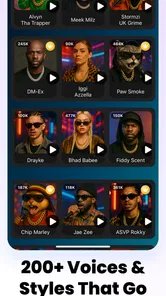
AI Music Video Maker - Rap AI is a creative mobile app designed to help users produce rap-inspired music videos with artificial intelligence. It typically combines generated or imported audio, lyrics, visual effects, avatars, and video templates in one workflow. The app is aimed at beginners who want to experiment with music content without needing advanced editing or production experience. Its Art & Design category reflects that creative focus.
Can I create a complete rap song with the app?
The app may help you build a rap project by combining lyrics, beats, vocal ideas, and visual content, but the exact tools can vary by version and device. Some features may focus more on generating a music video than producing a fully mastered song. Before downloading, check whether it supports custom lyrics, voice generation, audio uploads, beat selection, and exporting the finished track. Its store summary describes creating AI music videos and drama from text, audio, and video.
Is AI Music Video Maker - Rap AI free to use?
The application is free to download, while some tools may require in-app purchases. Individual purchases range from $2.99 to $19.99, so check the purchase details before using paid features. Premium restrictions can include higher-quality exports, additional templates, longer videos, watermark removal, extra AI generations, or access to advanced voices and effects. Review the pricing information in your app store before starting a trial.
Can I use my own lyrics, music, or images?
Many users will want to personalize their projects with original lyrics, beats, photos, or audio recordings. Depending on the current version, AI Music Video Maker - Rap AI may support some of these options, although file formats, duration limits, and copyright rules can apply. Only upload material you created yourself or have permission to use, especially if you plan to publish the result. The app’s described workflow includes text, audio, and video.
Pros
- Turns written lyrics into rap-style videos with minimal editing.
- Useful AI tools help beginners create music content quickly.
- Offers visual effects suited to short-form social media videos.
- Can spark creative ideas when you lack lyrics or video concepts.
- Simple workflow makes experimentation fast and approachable.
Cons
- AI-generated vocals may sound repetitive or lack natural emotion.
- Results can vary greatly depending on the prompt and lyrics.
- Advanced customization may be limited compared with full video editors.
- Some features or exports may require in-app purchases.
- Video generation can take time and may use considerable device storage.











