AI Art, Image & Logo Generator
- 613.00
- 4.1
- Installs
- 500.00K
- Price
- Free
Screenshots
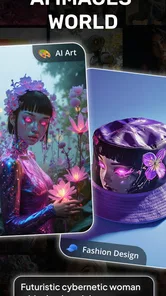
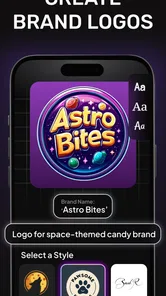
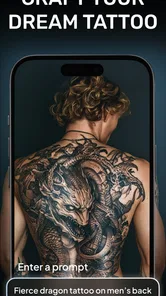
Analysis by Reviewed
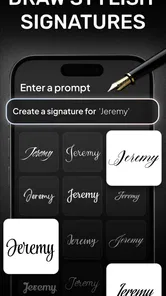
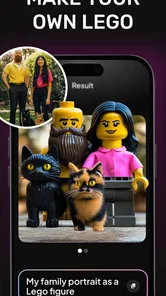
When I have an image in mind but no sketch or design file to start from, I want a quick way to explore what that idea could look like. That is where AI Image Generator - Dali makes sense to me: I can begin with words, look at the visual direction they produce, and decide whether it is worth developing. I find it most useful as a creative starting point, not as a promise that every prompt will turn into finished artwork.
A small idea is enough to begin
I’d reach for Dali when I have a visual notion but no finished drawing skills or a clear plan for building it in a design program. For example, if I’m putting together a casual invitation and want a playful background, I can start with a short description of the mood and subject, then judge the generated images against the purpose. That makes the app useful for brainstorming and personal projects, rather than a guaranteed shortcut to polished commercial artwork.
It is a free art-and-design app from Codespace Dijital, with optional in-app purchases ranging from $1.49 to $39.99 per item. Its audience rating is Teen. The current version is 1.1.7, and it runs on Android 6.0 or later. Those details make it easy to decide whether it fits your device and comfort level before trying it; the purchase range is also a reminder to check what a paid option offers before spending.
Unleashing Creativity with AI
The first thing that struck me about AI Image Generator - Dali is how effortlessly it blends technology with creativity. The app uses cutting-edge AI to transform simple inputs into stunning pieces of art. All you need is a few words or a concept, and the AI works its magic, presenting you with an array of images that capture your idea perfectly. It’s like having a personal artist at your fingertips.
Easy to Use Interface
One of the biggest perks of this app is its user-friendly interface. Right from the moment you open it, everything feels intuitive. The design is sleek, and navigating through the app is as smooth as butter. Whether you're a seasoned artist or a complete newbie, the app makes it easy to dive right in and start creating. You don’t have to sift through endless menus or tutorials; everything is straightforward and accessible.
Making the prompt do more work
A practical way to get more useful results is to describe the image’s job, not only its subject. For that invitation background, I’d mention the intended mood and leave room for text, rather than asking for a busy finished poster. Then I can compare the options for composition and choose one that supports the wording I’ll add elsewhere. This is a small but important trade-off: AI can give me a starting visual, while exact typography and layout are better handled in a dedicated design or editing app.
If the first result is close but not quite right, I’d change one part of the description at a time—such as the setting or visual style—so it’s easier to see what affected the outcome. Trying several unrelated ideas in one prompt can make the result harder to steer. This approach is useful for exploring a concept, but it doesn’t replace the control of a traditional drawing tool when I need precise shapes, consistent characters, or exact brand colors.
More From Our News Desk

Weather by Xiaomi Review: Clear at a Glance, Less Clear Up Close

X Under Pressure: Can It Recover When Posting Goes Wrong?

Clash of Clans Is Won Between the Battles

Android Auto Makes the Case for Quieter Car Software

MobiOffice: Transforming Mobile Productivity with Seamless Integration

EA SPORTS FC™ Mobile Soccer: Redefining Mobile Sports Gaming
Customization Galore
What’s art without a bit of personalization? The app offers a plethora of customization options that let you tweak the generated images to your heart's content. You can adjust colors, styles, and even the intricacy of your creations. It's perfect for those who like to add a personal touch to their art. Plus, seeing your initial idea evolve into a masterpiece is incredibly satisfying.
From image idea to finished project
I see the generated artwork as one stage in a larger workflow. Once I have an image that suits the invitation, I can use it as inspiration or bring it into a separate tool for adding readable text, cropping, and arranging the final page. That handoff matters: an image generator helps with visual direction, while a layout editor is usually the better place to prepare something that must print cleanly or fit a specific template.
The same process suits a quick mood board, a personal avatar concept, or a visual prompt for a craft project. It is less suitable when a client needs repeatable assets, exact revisions, or a carefully controlled series of matching illustrations. In those cases, I’d use Dali to explore possibilities, then move to software built for detailed editing rather than expecting a generated image to behave like a layered design file.
Endless Possibilities
With AI Image Generator - Dali, the possibilities are virtually endless. Whether you're looking to create abstract art, realistic landscapes, or even quirky cartoonish images, this app has got you covered. The diversity in styles and outputs means you're never really stuck in a creative rut. Each session with the app feels like a fresh adventure, and honestly, it can get a bit addictive.
There is a useful balance to keep in mind when comparing it with the usual alternatives. A blank-canvas drawing app gives more direct control but asks for more time and technique; a template-based design app is often better for structured documents and precise text. Dali’s appeal is the quick leap from a written thought to a visual direction. I’d choose it when experimentation matters more than exact repeatability, and skip it if my main need is a finished, editable layout.
Who will get the most from it
In practice, I’d recommend it to curious beginners, hobbyists, and anyone who wants to test visual ideas without first learning a complex art program. It can also help when I’m stuck choosing a direction: generate a few concepts, notice which one feels right, and use that as a brief for later work. The app has an average rating of 4.1 from around 13,000 ratings, with over 500,000 installs, which suggests a sizable audience has tried it, though those figures don’t tell me whether a particular result will suit my project.
I’d be more cautious if I needed guaranteed precision, a consistent character across a set of images, or production-ready files that another designer can edit in detail. Before relying on it for a deadline, I’d try the exact kind of prompt I expect to use and check whether the results are practical for the intended destination. That quick test is more informative than assuming every idea will translate equally well into an image.
A practical test before committing to a project
For an everyday trial, I’d use a low-stakes task with a clear purpose: say, choosing a visual for a group chat invitation or finding a mood for a handmade card. I would write down the audience and where the image will appear before opening the prompt box. That gives me a useful test of whether the output feels appropriate, rather than judging it only by whether it looks striking on its own.
I’d also keep the first prompt focused on one subject and one atmosphere, then make a small revision if the composition misses the mark. If the image is attractive but leaves no calm space for a title, I would change the description to request a simpler background rather than starting over with a completely different idea. This is a practical way to reduce guesswork: decide what the final image needs to do, then assess each result against that need.
Where the handoff can become the hard part
The generated image may be only the beginning of the work. A social post, invitation, or presentation graphic often needs a crop that suits its destination, readable lettering, and room for other information. I’d plan to do those finishing jobs in a separate editor, especially if the final piece must follow a specific layout. That extra step is not a flaw if I’m exploring, but it does matter when I want one app to take an idea all the way to a ready-to-share design.
Before I choose a result, I’d inspect it at the size and shape I expect to use, not just while it fills the screen. A composition that looks balanced at first glance can become awkward once a title or crop is added. I’d save time by generating with the intended use in mind and keeping the most flexible option, rather than picking the most elaborate image and trying to force it into a layout afterward.
Choosing between AI generation and familiar art tools
Compared with drawing by hand, Dali can help me get past the intimidating blank page, but it cannot offer the same deliberate control over every line. Compared with template-driven design software, it is better suited to inventing a visual concept than arranging a document with exact text and spacing. Those are different jobs, so I would not treat one as a replacement for the other. For an original visual direction, I’d start here; for careful retouching or a strict brand system, I’d move to a tool designed around editing.
It can also be a useful companion to sketching. I might generate a few directions, notice a color mood or composition I like, and then draw my own version with more control. That approach keeps the app from deciding the whole creative outcome for me. It is especially sensible when I want inspiration but still care about making the final artwork feel personal and consistent.
Cost, expectations, and a sensible first try
The app is free to try, while optional purchases are listed from $1.49 to $39.99 per item. I would start without paying and first see whether the kind of images I need are useful in my own workflow. If a paid option appears relevant, I’d check its details in the app before buying rather than assuming it solves a particular limitation. This is a modest but worthwhile bit of caution with any creative tool that offers optional purchases.
It has 613 written reviews alongside its average rating, and the overall response can help set expectations about how many people have used it, not predict my own results. I would judge it with a real prompt tied to a project I care about, then decide whether the amount of refinement feels reasonable. The Teen content rating is another consideration for families, particularly if a younger user will be exploring image ideas without close guidance.
When I would choose something else
I would skip Dali as my main tool if the assignment required exact measurements, editable layers, controlled typography, or a matching set of images that had to stay consistent. A conventional illustration app is a better choice for precise manual work, while a layout editor makes more sense for forms, flyers, and polished documents. If I am working to a firm deadline, I would test the intended prompt early and keep a backup plan instead of relying on one generated result to be ready immediately.
It is also not the best fit for someone who enjoys building every part of an image by hand and wants close control over each decision. The fast, text-led approach is the point, but that convenience comes with a trade-off: the result may need interpretation and finishing elsewhere. Knowing that before starting makes the app easier to use well, because I can treat the output as a suggestion rather than a final answer.
To wrap it up, AI Image Generator - Dali is a fantastic tool for anyone interested in art and creativity. It’s simple to use, offers incredible customization, and lets you explore endless artistic possibilities. Whether you're looking to create professional-grade art or just doodle around for fun, this app is definitely worth a try. So go ahead, unleash your creativity and see what masterpieces you can conjure up with just a few taps!
My recommendation is to treat it as an idea generator first and a finished-art solution second. If you enjoy experimenting and are happy to refine the strongest result elsewhere, it’s an inviting place to start. If you want complete control from sketch to final layout, a conventional drawing or design app will likely be a better fit. For a free first try, I’d begin with one clear, low-stakes idea and see whether its interpretation matches the way I like to work.
AI Art, Image & Logo Generator Frequently Asked Questions
Who developed AI Image Generator - Dali?
AI Image Generator - Dali is developed by Codespace Dijital. If you are choosing among creative apps, knowing the developer can help you identify the product and distinguish it from similarly named image-generation tools. The app focuses on turning text ideas into AI art, images, and logos, so it may be worth considering if those are the kinds of visual projects you want to explore.
What should I know about its age rating before downloading?
AI Image Generator - Dali has a Teen content rating. That guidance is worth considering if the app is being installed for a younger user or on a family device. Parents and guardians can decide whether it suits their household, while individual users may want to keep the rating in mind alongside the app’s creative focus on generating artwork and images from written prompts.
Who is AI Image Generator - Dali designed for?
AI Image Generator - Dali is an Art & Design app for people who want to turn text ideas into visual creations. Its focus on generating images, artwork, and logos may appeal to artists, designers, and anyone exploring digital creativity. It is rated Teen, so users and families may want to consider that age guidance before downloading.
What is AI Image Generator - Dali, and how does it work?
AI Image Generator - Dali is an innovative application that leverages artificial intelligence to create stunning images. By inputting text prompts, users can generate unique artwork, illustrations, or designs. The app uses advanced algorithms to interpret the text and translate it into visual art, making it a fascinating tool for artists, designers, and anyone interested in digital creativity.
Is AI Image Generator - Dali easy to use for beginners?
Absolutely! AI Image Generator - Dali is designed with user-friendliness in mind. The interface is intuitive, allowing both novices and experienced users to navigate the app easily. It provides step-by-step guidance for generating images, making it accessible for all skill levels. Whether you're a professional artist or a hobbyist, you'll find it straightforward to create impressive visuals.
Pros
- Intuitive interface for easy use
- High-quality image outputs
- Fast processing times
- Multiple style options available
- Supports high-resolution images
Cons
- Limited free version features
- Requires internet connection
- Occasional server downtime
- Subscription is pricey
- Limited customization options












