AI Chat Assistant - Gain AI
- 499.00
- 4.2
- Installs
- 500.00K
- Price
- Free

Screenshots
Analysis by Reviewed
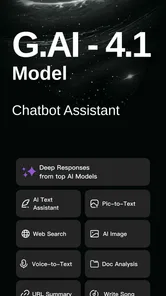
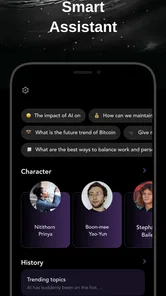
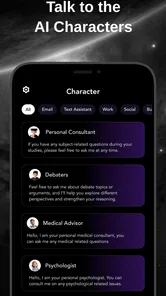
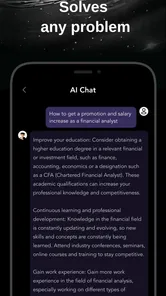
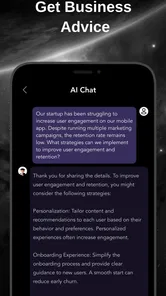
I approached AI Chat Assistant - Gain AI as a practical productivity tool rather than a novelty chatbot. Its main appeal is simple: instead of keeping separate apps open for Grok, Gemini, ChatGPT, Claude and other assistants, it brings those conversations into one place. That sounds like a small convenience, but it changes how I handle everyday questions, drafting, brainstorming and comparison work.
The app comes from Chat AI Labs and is available free of charge, with optional in-app purchases ranging from $6.99 to $199.99 per item. It is listed for Teen users and runs on Android 8.0 or later. The current version is 2.7.5, and the app has already passed the half-million-install mark with an average score of 4.2 from roughly 9,800 ratings. Those figures suggest a healthy level of interest, although they do not replace the more important question: does the combined-chat approach actually make work easier?
How I use Gain AI for a dependable daily workflow
My most useful starting point was to stop treating the app as one magical answer box. Each assistant can respond differently to the same request, so I use the app as a small workspace for choosing the right kind of help. For a quick rewrite, I ask for a direct version. For brainstorming, I allow a wider response. For a decision involving several alternatives, I compare answers rather than accepting the first polished paragraph.
A typical session begins with a clearly framed request. Instead of typing “write an email,” I explain who the recipient is, what result I want, the tone I prefer and any details that must remain unchanged. This matters even more when moving between different AI services inside one app, because a vague prompt tends to produce vague output regardless of which assistant handles it.
I also keep separate conversations for separate jobs. One thread may be for planning a trip, another for improving work messages and another for learning a difficult topic. This prevents useful context from becoming mixed together. If I put every question into one long conversation, the assistant may rely on old details that no longer apply. Starting a clean thread is often more effective than repeatedly correcting an answer.
The strongest everyday use case is comparison. If I am unsure whether a paragraph sounds too formal, I can ask one assistant to simplify it and another to make it warmer, then choose the version that fits my purpose. For research-style questions, I treat the answers as drafts to inspect, not as unquestionable facts. The ability to switch between recognizable AI options is valuable here because it encourages a second opinion without forcing me to leave the same app.
A realistic example is preparing for a busy morning. I might paste rough notes from a meeting and ask for three outputs: a short summary, a list of follow-up tasks and a polite message for a colleague. I then use another assistant to challenge unclear assumptions in the summary. Gain AI is especially convenient in this kind of sequence because the work stays centered on one mobile tool instead of being scattered across several separate chatbot interfaces.
More From Our News Desk

Weather by Xiaomi Review: Clear at a Glance, Less Clear Up Close

X Under Pressure: Can It Recover When Posting Goes Wrong?

Clash of Clans Is Won Between the Battles

Android Auto Makes the Case for Quieter Car Software

MobiOffice: Transforming Mobile Productivity with Seamless Integration

EA SPORTS FC™ Mobile Soccer: Redefining Mobile Sports Gaming
There is an important trade-off, though. A single app does not automatically create a single shared memory across every assistant. I should expect to repeat context when changing models or conversations. That extra step is worthwhile when I want independent answers, but it can feel slower when I only need one continuous conversation. People who prefer one assistant with a deeply established personal history may find a dedicated official app more comfortable.
The settings I would check before relying on it
My first recommendation is to review the available account, conversation and response settings before starting serious work. The exact choices can vary with the release and the service being used, so I would not assume that a preference selected in one part of the app applies equally everywhere. I pay attention to which assistant is active, whether a new chat is being created and whether the current conversation contains information I would rather not reuse.
The assistant selector deserves more attention than it may receive. I use it deliberately instead of choosing whichever option appears first. A fast answer is useful for a simple wording change, while a more careful response may be preferable for outlining a complicated task. Since the app’s purpose is to place several AI assistants together, the real skill is learning when to switch rather than asking every service the same question without a reason.
I also check the purchase path before exploring heavily. The app is free to install and use as an entry point, but optional items can cost between $6.99 and $199.99. I would read each offer carefully and avoid assuming that a payment unlocks identical capabilities across every assistant. Anyone sharing a device with family members should be especially cautious around purchase confirmation and account selection.
For privacy, my rule is straightforward: I do not paste sensitive documents, private account details, confidential workplace information or identifying material unless I have a clear reason and understand where the content is going. A combined interface feels convenient, but convenience can make it easier to forget that different AI services may handle requests separately. I remove names and replace real figures with placeholders when I only need help with structure or tone.
Notifications and sign-in choices are also worth considering. I prefer not to let a productivity app interrupt me for every possible update, because that turns a helpful writing tool into another source of distraction. If the app offers a choice between continuing an existing session and starting fresh, I choose based on the task: continuity for an ongoing draft, a clean conversation for a new subject.
One setting-related habit has helped me avoid weak results: I decide the desired output format before sending the prompt. I might request a short paragraph, numbered steps, a comparison or a checklist. This is not a hidden feature; it is simply a better way to use a multi-assistant environment. Giving the app a clear shape for the answer makes differences between assistants easier to judge.
Faster patterns that save time without lowering standards
The fastest workflow I found is a three-pass pattern. First, I ask for a rough answer. Second, I ask a different assistant to identify missing points or questionable assumptions. Third, I ask for a final version in the format I actually need. This avoids spending too long polishing an answer that may be based on a faulty premise. It also uses the app’s central advantage—access to several assistants—without turning every small question into an elaborate process.
For writing, I keep a reusable prompt structure in my notes. It includes the audience, purpose, tone, length and details that must not change. I paste that framework into a new conversation and adapt only the task-specific part. Because the app is designed for chatting with multiple AI services, a consistent prompt makes the comparison fairer. Otherwise, one assistant may receive much more guidance than another and appear better simply because the request was clearer.
A second useful pattern is “critic before editor.” When a draft feels almost right, I first ask for a list of weaknesses without requesting a rewrite. Only after seeing the issues do I ask for a revised version. This helps me keep control of the message and prevents the app from replacing a sentence that was intentional. It works well for emails, application letters, study notes and short explanations.
For learning, I use progressive questioning. I begin by asking for a plain-language explanation, then request an example, then ask what would make the example fail. The last step is valuable because a smooth explanation can hide important exceptions. Switching assistants between stages can expose different explanations, but I still verify technical or factual claims through trustworthy sources when accuracy matters.
Another practical habit is to ask for a compact answer first and expand only the section I need. On a phone, a long response can be difficult to scan, and excessive detail often hides the useful point. I would rather request five clear bullets and then ask one follow-up about the second bullet than receive a huge essay immediately. This keeps the conversation manageable and reduces the time spent searching through irrelevant text.
Gain AI is also useful for transforming material rather than inventing it. I can provide my own rough outline and ask for organization, clearer wording or a more suitable tone. That is safer and more predictable than asking for an entire document from nothing. The app becomes a flexible editing desk: one assistant can restructure, another can challenge, and a final pass can make the result sound more natural.
For people who use the app repeatedly, the best shortcut is not a button but a routine. I name the task in the first line, state the constraints immediately and finish by checking the answer against the original request. This reduces back-and-forth messages. It also makes the app easier to judge, because I can tell whether a poor result came from the selected assistant, an unclear prompt or an unrealistic expectation.
Where the multi-assistant idea reaches its limits
The biggest limitation is that variety can create friction. I may gain access to several recognizable assistants, but I still have to decide which one to use, repeat context when necessary and compare answers carefully. For a simple question, that choice can be unnecessary overhead. A single official chatbot app may be faster if I already know its behavior and do not need a second opinion.
There is also a risk of mistaking fluent writing for reliable information. Having several answers does not guarantee that one is correct. If all of them receive the same incomplete prompt, they may share the same misunderstanding. I therefore use comparison to find disagreement and missing context, not as proof that the most confident response is accurate.
Long conversations can become difficult to manage on a mobile screen. When a thread contains planning, revisions and unrelated follow-ups, finding the important instruction takes effort. My solution is to start a fresh chat once the subject changes substantially and to keep a short summary of decisions that I may need later. This is a simple discipline, but it prevents old context from quietly influencing new work.
Cost is another point to consider. The free entry point is attractive, but the range of optional purchase prices means I would not commit money until I understood exactly what I was buying and how often I would use it. Someone who only wants occasional grammar help may find the free experience sufficient. A heavy user should examine the value of the relevant purchase rather than assuming that access to multiple assistants automatically makes every paid option worthwhile.
The Teen content rating makes the app suitable for a broad audience, but I would still guide younger users through responsible use. AI-generated answers can be persuasive while remaining incomplete, and schoolwork should not become a copy-and-submit exercise. The better use is to request explanations, examples, revision suggestions and questions that test understanding.
I would also skip this app if my main requirement is a specialized professional workflow with strict document controls, deep project organization or a single assistant that remembers a large body of personal context. Gain AI is centered on conversational access and comparison. It is not automatically a replacement for a dedicated notes system, a full office suite or a specialist research platform.
Who will get the most from it?
I think the app suits curious users who regularly move between brainstorming, rewriting, explanation and idea testing. Students can use it to compare explanations and turn class notes into practice questions. Freelancers can use it to shape proposals or clarify client messages. Office workers can turn rough notes into organized drafts, provided they remove confidential details first.
It is particularly useful for people who have tried several AI assistants and dislike switching between separate apps. Gain AI reduces that repeated navigation and makes experimentation more approachable. The benefit is strongest when I have a reason to compare responses, not merely a desire to collect every available chatbot in one place.
On the other hand, casual users who ask only occasional questions may prefer the simplicity of the assistant they already know. The extra choice can feel like a menu when all they wanted was one quick answer. Users with strict privacy requirements or highly specialized professional needs should also evaluate the app cautiously and consider whether a dedicated, officially supported tool fits better.
My verdict after building a repeatable habit
AI Chat Assistant - Gain AI works best when I use it as a comparison and editing workspace, not as an automatic authority. Its free availability, Android compatibility from version 8.0 onward and access to Grok, Gemini, ChatGPT, Claude and more make it convenient for mobile users who want several conversational options in one place. Chat AI Labs has chosen a clear productivity angle, and the app delivers the most value when that choice is used intentionally.
My strongest recommendation is to establish a simple routine: select the assistant based on the task, write a precise prompt, request a manageable format and review the result before using it. For important work, add a second pass that challenges assumptions. That habit turns a collection of chat windows into a useful process.
The app is not frictionless. Switching services can require repeated context, answers still need judgment, and optional purchases deserve careful attention. Yet those limits are manageable if I keep conversations organized and avoid sharing sensitive material casually. The 4.2 average from around 9,800 ratings and more than 500,000 installs indicate that many people find the approach worthwhile, while my own experience suggests its success depends heavily on how deliberately it is used.
If you want one familiar chatbot with the least possible decision-making, choose a dedicated alternative. If you want to test different AI perspectives, refine drafts through several passes and keep that work inside one mobile productivity app, I think Gain AI is a sensible free starting point. Its real strength is not simply having many assistants; it is giving experienced users a practical place to compare, critique and improve their work.
AI Chat Assistant - Gain AI Frequently Asked Questions
Which AI models can I chat with in AI Chat Assistant - Gain AI?
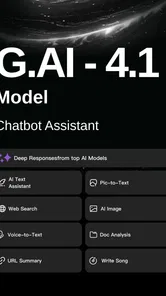
AI Chat Assistant - Gain AI brings several well-known assistants together in one app, including Grok, Gemini, ChatGPT, and Claude. That can make it convenient to explore different AI tools without switching between separate apps. The available choices and features may depend on the version you use, so check the options shown in the app before relying on a particular assistant for a specific task.
Who develops AI Chat Assistant - Gain AI, and what kind of app is it?
AI Chat Assistant - Gain AI is a productivity app developed by Chat AI Labs. It is designed as a place to interact with AI assistants and get help with tasks such as drafting, rewriting, and brainstorming. The app is rated for Teen users, so families may want to review its use and the content generated by AI before younger users get started.
What is AI Chat Assistant - Gain AI, and what can I use it for?
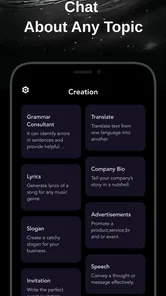
AI Chat Assistant - Gain AI is designed to help users generate and improve text through artificial intelligence. Depending on the available tools, you can use it for answering questions, brainstorming ideas, rewriting messages, creating social media captions, summarizing information, translating text, or preparing drafts for school and work. It is best viewed as a writing and productivity aid rather than a replacement for professional advice or independent research.
Is AI Chat Assistant - Gain AI free to download and use?
The application is free to download, but some features may require an in-app purchase. Listed purchases range from $6.99 to $199.99 per item, so check the pricing details in the app carefully before confirming a payment. Review what a purchase includes and any applicable billing terms, especially if you plan to use premium tools regularly.
Does AI Chat Assistant - Gain AI require an internet connection?
Most AI assistants need an active internet connection because requests are processed on remote servers rather than entirely on the phone. You may be able to open the app or view saved content offline, but generating new answers, images, or rewritten text could fail without Wi-Fi or mobile data. Performance also depends on connection quality, server availability, and the complexity of your request.
Pros
- Clear
- conversational answers for everyday questions and tasks.
- Useful writing help for emails
- posts
- summaries
- and brainstorming.
- Simple interface makes starting a chat quick and intuitive.
- Can help explain complex topics in more accessible language.
- Convenient AI assistance available on a mobile device.
Cons
- Some answers may be inaccurate and require independent verification.
- Advanced features may depend on a subscription or usage limits.
- Response quality can vary depending on prompt wording.
- Privacy concerns may arise when entering sensitive personal information.
- Requires an internet connection for most AI features.











