AI Chat App - AI Chatbot
- 971.00
- 4.0
- Installs
- 5.00M
- Price
- Free

Screenshots

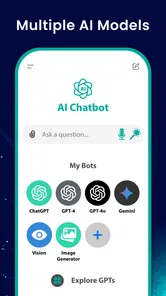


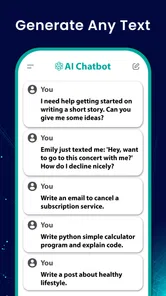
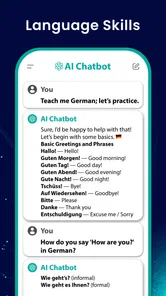
Analysis by Reviewed
I often lose more time than I expect switching between a blank page, a search box, and a proofreading tool just to get a small task moving. AI Chat App - AI Chatbot is aimed at that everyday stall: it gives you a place to ask for a draft, clarify an idea, or tidy up wording through a conversation. I find that approach handy when I know what I need but cannot quite find the first sentence. It is best treated as a capable helper, not an authority whose answers are automatically ready to use.
A quick start that works best with a clear request
The app is a free productivity tool from Airport Flights Status™. It is rated for Everyone, has an average rating of 4.0 from around 91,000 ratings, and has been installed over 5 million times. Version 1.4.2 supports Android 6.0 and later, while in-app purchases range from $3.99 to $59.99 per item. Those figures suggest a widely used option, but they do not tell me whether its responses will suit a particular task; the quality still depends on what I ask and how carefully I check the result.
For a useful first session, I would try a small, low-stakes job rather than hand it a complicated project. Ask for a short email draft, a clearer version of a paragraph, or a few ways to organize a list of ideas. Then add context in a follow-up: who the message is for, what tone you want, or what must not change. That simple second prompt is often more effective than expecting one vague request to produce a finished answer.
Where the chat saves time—and where it needs supervision
I find this kind of chat most useful when it turns a stalled task into a draft I can actually judge, rather than promising to finish the work for me. In this section, I’d focus on choosing small requests, adding context in a follow-up, and checking the result before using it; those habits make the time saved more dependable. The next section looks at where that lighter workflow fits into an ordinary day.
Give the assistant a job, not an open-ended brief
One useful way to start is to describe the result you need, the reader who will receive it, and the limits the response should respect. For example, instead of asking for help with a work message in general, ask for a brief update that explains a delay without sounding defensive. Then read the draft for tone and specifics before using it. This gives the conversation a clear target and makes it easier to judge whether the answer is actually useful.
I would also treat the chat as a sequence of small decisions rather than a single command. Ask for a few possible openings, pick one, and then request a complete draft in that direction. If the first answer misunderstands the situation, correct that point before asking it to polish the wording. This approach limits the chance of a polished response quietly carrying forward a wrong assumption.
Good for turning a rough thought into a usable draft
The app’s focus on chat, writing, and proofreading makes it useful when a task has a clear purpose but needs help getting started. For example, before sending a note to a landlord about a repair, I could describe the issue and ask for a polite, concise draft. I would still check that the details are right and adjust any wording that does not sound like me, but having a first version to edit can be quicker than composing from scratch.
More From Our News Desk

Weather by Xiaomi Review: Clear at a Glance, Less Clear Up Close

X Under Pressure: Can It Recover When Posting Goes Wrong?

Clash of Clans Is Won Between the Battles

Android Auto Makes the Case for Quieter Car Software

MobiOffice: Transforming Mobile Productivity with Seamless Integration

EA SPORTS FC™ Mobile Soccer: Redefining Mobile Sports Gaming
It can also help with everyday language work: rephrasing a sentence that feels awkward, tightening a long message, or asking for a plain-language explanation of a topic. A practical tip is to give it boundaries—such as “keep the meaning, use a friendly tone, and stay brief”—then review the response for changed facts or missing nuance. That review matters especially for proofreading: smoother wording is not proof that every claim is accurate.
Small tasks are a better test than big promises
For a student, a low-risk use might be asking for a clearer explanation of a difficult paragraph, then comparing that explanation with the original material rather than treating it as a replacement. For someone juggling household plans, it could help turn a scattered list into a more readable message for other people. In both cases, the advantage is a quick first pass; the user still decides what is correct and what belongs in the final version.
A less obvious trade-off is that conversational refinement can be helpful but also tempting to overdo. Each follow-up takes attention, and repeated requests to make wording “better” can gradually move a message away from the writer’s natural voice. I would stop once the draft is clear, accurate, and appropriate for its reader, rather than polishing every sentence until it sounds generic.
A conversational workflow has trade-offs
Compared with a conventional search engine, a chatbot is more convenient when I want a response shaped around a specific question or a draft I can refine through follow-ups. Search is the better choice when I need to compare original sources, verify a current detail, or see where a claim came from. Compared with a dedicated word processor, chat can be a faster place to explore phrasing, but it is not a substitute for careful document editing and final checks.
To keep a conversation useful, I would split a multi-part task into steps: ask for an outline first, choose a direction, then request a draft. This makes it easier to spot misunderstandings before they spread through a long answer. I would avoid sharing private or sensitive material unless I am comfortable entering it into an AI chat, and I would not rely on the app alone for medical, legal, financial, or other consequential decisions.
Where it fits among everyday tools
The main alternative is not always another chatbot. If the task is “what time does this place close?” or “where did this claim come from?”, a search engine is more direct because I can inspect the source and check whether it is current. If I already have a document open and need exact formatting, tracked changes, or precise control over a long file, a word processor is the more suitable workspace. This app makes the most sense in the gap between having a thought and knowing how to phrase it.
That distinction also helps answer whether it can replace a writing app: I would not use it as my only editing step. I might ask it to suggest a shorter version of a paragraph, but I would make the final edits in the place where the finished document belongs. Keeping drafting and verification separate is a small habit that reduces the risk of accepting a fluent answer just because it reads smoothly.
Who is likely to get the most from it?
I can see this being a good fit for students working through wording, people who regularly write short messages, and anyone who wants a conversational starting point for ideas. It may be less useful if you mainly need live, source-backed research, dependable automation across phone apps, or a specialist writing environment with detailed document controls. If those are your priorities, a search tool, a dedicated editor, or the relevant built-in phone feature may be a better match.
A realistic routine might be drafting a meeting follow-up during a short break: ask for a concise recap from notes you are comfortable sharing, check names and commitments, then copy the parts that sound right into your usual email app. The time saving comes from reducing the blank-page pause, not from skipping the final read. I would also try a few different prompts before deciding whether the responses consistently fit my voice; if they need substantial rewriting, the convenience may not outweigh the extra review.
Think about cost before making it a habit
The app is free to install, but optional in-app purchases are part of the picture. I would begin with the free experience and work out whether I return to it for tasks that genuinely save effort before considering any purchase. The listed purchase range is broad, so it is worth checking the exact item and terms shown in the app rather than assuming every paid option offers the same thing or suits your needs.
This is particularly relevant if your use is occasional. A person who only wants help with a message now and then may not need to pay for anything; someone who uses an AI assistant often should still judge any upgrade against the value they actually get. I would not pay on the strength of an impressive answer to one prompt alone. Try it on several ordinary tasks, and notice whether the results reduce editing time rather than simply moving the work around.
My experience with the app
Hey there! If you've ever wished for a personal assistant who never sleeps, remembers everything, and can chat with you about anything under the sun, then the AI Chat App might just be your new best friend. As someone who's spent quite a bit of time chatting with this app, let me take you through my experience.
Getting Started with AI Chat App
First things first, downloading and setting up the AI Chat App is a breeze. Whether you're on Android or iOS, you'll find it in the app store ready to be your digital companion. The installation process is straightforward, and within minutes, you'll find yourself chatting away. The app's interface is sleek and intuitive, making it easy for anyone to dive right in without needing a tutorial. It's like picking up a conversation with an old friend.
Features That Stand Out
So, what can this app do? Well, the list is quite impressive. You can ask it to set reminders, answer trivia, or even tell you a joke when you're down. The AI behind this chatbot is quite sophisticated, allowing it to learn from your interactions and provide more personalized responses over time. This adaptability is one of its strongest suits. It's like having a friend who knows exactly what you need.
One of the features I found particularly useful is its ability to integrate with other apps on your phone. Whether it's pulling up your schedule from your calendar or sending a quick email, it does it all with a simple command. It's almost like having a virtual secretary at your fingertips.
Real-Life Applications
Now, you might wonder, "How often would I actually use this app?" Trust me, once you start, it becomes part of your daily routine. I found myself using it to check weather updates before heading out, or even translating phrases when traveling. It's like having a Swiss Army knife of information and utility right in your pocket.
For those concerned about privacy, the app provides robust settings to control what information is stored and shared. You can easily customize these settings to match your comfort level, which I found reassuring.
Choose it for drafting, not unquestioned answers
For me, the strongest reason to keep a conversational writing tool around is that it can turn a vague intention into something I can react to. That is useful on a rushed day: I can review a first draft, keep the parts that sound right, and correct what does not. It is a modest benefit, but repeated small saves can make a tool feel worthwhile when the workflow fits.
The trade-off is that an AI response can sound confident even when it needs checking, and a friendly chat format can make it easy to forget that distinction. I would use it for brainstorming, wording, and low-stakes explanations, but switch to original sources when accuracy or freshness matters. If you want a tool to perform actions across your phone or manage a complex document from start to finish, I would choose a product built specifically for that job.
Final Thoughts
In a world that's increasingly digital, having a reliable and efficient AI companion can make life just a tad bit easier. The AI Chat App is more than just a chatbot; it's a tool that enhances productivity and adds a bit of fun to mundane tasks. Whether you're a tech-savvy individual or someone just looking to simplify their digital interactions, this app is worth a try. So go ahead, give it a whirl, and who knows? You might just find your new favorite app.
AI Chat App - AI Chatbot Frequently Asked Questions
Can I use AI Chat App - AI Chatbot to help with writing and proofreading?
Yes. The app is presented as an AI chatbot assistant, proofreader, and AI writer, so it may help you draft text or polish a piece of writing. You can use it as a starting point for ideas or revisions, then read through the result yourself to make sure the wording, facts, and tone fit what you need.
What should I consider before sharing personal or sensitive information with the chatbot?
It is sensible to avoid entering sensitive details into any chatbot unless you have reviewed how the app handles them and are comfortable with its privacy practices. For everyday prompts, you can often describe a situation without including names, account details, or other identifying information. Take a moment to check the app’s privacy settings and relevant policies before sharing anything personal.
Is AI Chat App - AI Chatbot suitable for everyday productivity tasks?
AI Chat App - AI Chatbot is presented as a productivity app, with an AI chatbot assistant, proofreader, and AI writer aimed at making everyday tasks easier. It may be useful when you want help drafting or polishing text, or when you want to ask a question through a chat interface. Its suitability depends on the task and the responses you receive, so review important outputs before relying on them.
What features does the AI Chat App offer?
The AI Chat App offers a wide range of features designed to enhance your chatting experience. Users can engage with an AI chatbot for various purposes, including answering questions, learning new information, and even just having casual conversations. The app also supports language translation, voice commands, and personalized responses to fit individual user preferences.
Is the AI Chat App free to use?
The AI Chat App is free to download, with in-app purchases available for users who want to explore paid options. Its price range runs from $3.99 to $59.99 per item, so check the purchase details in the app before confirming anything. Whether the free experience meets your needs will depend on how you plan to use the app and which features you want to access.
Pros
- User-friendly interface for easy navigation.
- Supports multiple languages for global use.
- Offers real-time responses and interactions.
- Customizable chatbot personalities.
- Integrates well with other apps and services.
Cons
- Requires internet connection to function.
- Limited free features
- premium needed.
- Occasional inaccurate responses.
- Privacy concerns with data usage.
- May lag on older device models.











