

Adult Coloring Book - Bloom
- 152.00
- 4.2
- Installs
- 50.00K
- Price
- Free

Screenshots
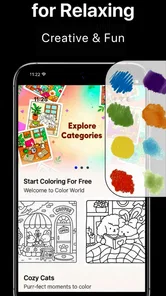
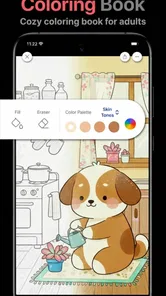
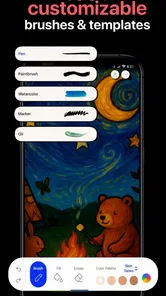
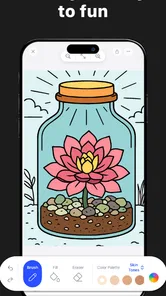
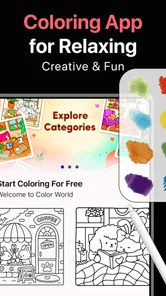
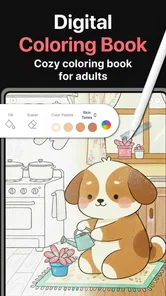
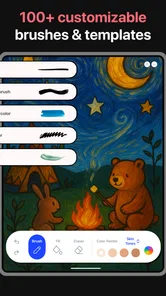
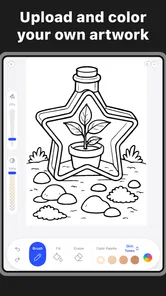
Analysis by Reviewed
I found Adult Coloring Book - Bloom, made by Koi Apps, to be a quiet, low-pressure art app rather than a serious drawing studio. Its appeal is simple: open it when your mind feels busy, choose a coloring page, and spend a few minutes filling areas at your own pace. That makes it a natural fit for short breaks, evening winding-down, or anyone who enjoys coloring but does not want to prepare paper, pencils, or a large creative project.
My review focuses especially on how comfortably the app works for different people and situations. A coloring app can look welcoming while still becoming tiring if its controls are hard to read, its touch targets are awkward, or its visual style demands too much concentration. Bloom gets many of the basics right for a casual experience, but it is not automatically ideal for every user. The important question is whether its simple approach matches the way you want to relax.
How the interface feels during ordinary use
I find that the interface’s main strength is how quickly it lets me settle into coloring instead of learning a drawing tool. In ordinary use, that simplicity makes short sessions feel approachable, though comfort still depends on screen size, vision, and how precisely you can tap. I’d pay attention to those practical details first, because they shape whether the app’s focused approach feels calming or limiting.
Readable enough for a calm, focused session
The strongest part of the experience is the straightforward relationship between the page and the coloring action. You are not learning a complex illustration workflow or managing layers, brushes, and technical settings. That matters for people who want the relaxing part of coloring without first studying an art application. The adult coloring book format also gives the session a clear purpose: select an area, choose a color, and continue until the image feels complete.
In my experience, this kind of direct layout is easier to approach than a general-purpose drawing app. Traditional digital art tools often place many controls around the canvas, which can make a short relaxation break feel like work. Bloom’s identity is narrower, and that narrow focus is useful. I could think about color choices instead of wondering which tool, brush, or canvas setting I should use.
The app is listed for Everyone, which suits its gentle concept, although the “adult” description is better understood as a style of relaxing coloring book rather than a reason to expect mature content. Parents or caregivers choosing it for another person should still look at the pages and interface themselves, because an age label does not tell you whether the visual density or interaction style will suit a particular child or adult.
There is also a practical advantage in not needing artistic confidence. If you normally avoid drawing because a blank canvas feels intimidating, a prepared coloring page gives you a starting point. You can experiment with unusual combinations without having to create outlines or proportions. That makes the app approachable for beginners, people returning to art after a long break, and users who want a result that feels finished without spending an hour learning technique.
More From Our News Desk

 Gmail
GmailGmail in a Busy Inbox: Who Benefits Most?
From first account to crowded workday, Gmail earns its place through dependable search and flexible sorting—but its best fit depends on how much inbox maintenance you can tolerate.

 Prime Video
Switching to Prime Video: What Changes in Your Viewing Routine
Prime Video can make a compelling second home for streaming, but switching means learning a different catalog, rental layer, and route from browsing to playback.

 Universal TV Remote Control
Universal TV Remote Control Works Best as a Reliable Backup
A phone remote earns its place through quick setup and reliable habits. Here is how to get more from Universal TV Remote Control—and where its limits show.

 Weather - By Xiaomi
Weather by Xiaomi Review: Clear at a Glance, Less Clear Up Close
Xiaomi’s weather app makes everyday forecasts quick to scan, but its calm surface can leave useful details and recovery paths harder to find than they should be.

 X
XX Under Pressure: Can It Recover When Posting Goes Wrong?
A resilience-focused review of X, examining setup, mistaken posts, interruptions, weak connections, and the gaps that matter when recovery needs to be dependable.

 Clash of Clans
Clash of Clans Is Won Between the Battles
Its raids are quick; its community is a long-term project of coordination, teaching, rivalry, and shared responsibility—with all the friction that entails.
Latest News



Navigation is simple, but simplicity has limits
The same focused design that helps new users can feel restrictive to experienced artists. Bloom is not a replacement for a full illustration app, photo editor, or sketching tool. If your goal is to draw your own shapes, edit line work, build a personal palette system, or control brush texture, you will probably find a dedicated art application more suitable.
That trade-off is important when deciding whether to install it. I would recommend Bloom to a friend who says, “I want something relaxing to color,” not to someone who says, “I want to learn digital painting.” The former gets a focused activity; the latter may quickly notice that the app’s value comes from guided coloring rather than open-ended creation.
For everyday navigation, I would approach each session with a small plan. Pick one page, choose a limited group of colors, and avoid treating the image like a task that must be completed. This reduces visual searching and makes the app easier to use when concentration is low. A limited palette also helps users who become overwhelmed by too many choices, while still leaving room for personal expression.
What the version and platform details mean in practice
The current version is 1.9, and the minimum operating system is iOS 12 or later. That relatively broad system requirement may make Bloom usable on a range of devices that are not running the newest software, but compatibility alone does not guarantee an equally comfortable experience on every screen size. A larger display can make detailed coloring less tiring, while a smaller phone may encourage shorter sessions and more careful tapping.
The app is free to download, with optional in-app purchases ranging from $0.49 to $89.99 per item. I would treat that range as a reason to check what is included before committing to a long-term coloring habit. A free starting point is helpful for testing the interface, but users who want a broader selection or extra content should pay attention to purchase prompts and decide in advance what they are comfortable spending.
Koi Apps has positioned Bloom as a focused art and design app, and that category fits the experience better than a productivity label would. It is not trying to organize your day or teach a structured course. Its usefulness comes from giving your hands and attention one small, visually clear activity.
Touch control and motor comfort
Coloring by touch can be friendly to people who do not want to use a stylus, but it can also expose the main physical challenge of this format: precision. Small sections require more controlled taps, and repeated movement across a page may become uncomfortable for users with tremors, joint pain, reduced dexterity, or fatigue. I would not assume that a simple interface automatically means effortless physical access.
A useful approach is to treat the app as a short-session activity. Rest your hand between pages, change how you hold the device, and avoid trying to complete a highly detailed image in one sitting. If a page demands repeated tiny touches, choosing broader areas or stopping early may be more enjoyable than forcing accuracy. The relaxation benefit disappears when every missed section becomes frustrating.
Users who rely on a stylus may find touch coloring more manageable if their device supports the accessory they already use, but I would not choose Bloom specifically for advanced stylus control. Its appeal is casual interaction, not professional pen input. If precise line work and pressure-sensitive drawing are essential, a dedicated drawing app remains the better option.
Another non-obvious consideration is hand position. Holding a phone in one hand while coloring with the other can be tiring because the device gradually shifts as you reach toward different parts of the image. A stand or a table can make a noticeable difference during longer sessions. This is a small change, but it turns the app from a fidgeting activity into a more stable desktop-style break.
Visual and sensory considerations
Coloring is visually engaging, but that does not make it comfortable for everyone. Detailed pages can create a lot of visual information at once, especially for users who are sensitive to busy patterns, strong contrast, or prolonged screen focus. I would start with a less crowded page and lower the surrounding distractions rather than opening Bloom while notifications, bright lighting, and other visual demands compete for attention.
The app works best when the screen is treated as part of a calm environment. Night-time use may be pleasant, but anyone sensitive to bright displays should adjust the device’s system brightness or use a warmer display setting if available on their device. That is not a special Bloom feature; it is a practical way to make any screen-based coloring session less demanding.
Color choice can also become an accessibility issue. Some users distinguish certain hues less easily than others, and a page that looks clearly separated to one person may feel confusing to another. I found that using strong differences in lightness, not just different shades, is a sensible workaround. For example, pairing a very light tone with a dark one usually creates clearer visual separation than choosing several similar colors.
This is also where Bloom differs from paper coloring books. Digital coloring avoids the mess of pencils and markers, and it can be easier to undo a mistake than on paper. On the other hand, a screen may cause eye strain, reflections, or discomfort that physical materials do not. People who already spend much of the day looking at displays may prefer paper for their evening routine, even if the app is more convenient.
Using Bloom in real-life situations
I can see Bloom fitting naturally into a commute, a waiting room, or a short pause between responsibilities, provided the environment allows you to focus on the screen. A ten-minute session can feel complete because the activity does not require setup or cleanup. That is one of its clearest advantages over paper: the coloring book is already with you, and you do not need to carry a pencil case.
At the same time, public use has drawbacks. Reflections can make detailed areas harder to see, and a moving vehicle can make accurate tapping unpleasant. In a noisy place, the visual task may still be possible, but it may not feel relaxing. I would use it in a quiet waiting area more readily than on a crowded bus or while walking, where attention should remain on the surroundings.
For an evening routine, the app can work well as a transition between demanding activities and sleep. I would keep the session short and avoid turning completion into a target. The benefit is the steady attention given to color selection and small decisions, not the number of pages finished. If you tend to become competitive with yourself, a paper book may actually be better because it makes progress feel less like a digital checklist.
Bloom may also suit shared, low-pressure use. One person can suggest a color mood while another fills the page, or a family member can help with areas that require more precision. However, the experience is still centered on individual screen interaction, so it should not be mistaken for a full collaborative art space. Its social value comes from conversation around the activity rather than from built-in group creation.
Where the app may create friction
The biggest limitation is the gap between “easy to start” and “easy for every hand and eye.” A prepared coloring page removes the difficulty of drawing outlines, but it does not remove the need to tap accurately or look at a screen for a sustained period. People with motor limitations should try the free experience cautiously and judge comfort by the smallest areas, not by the first broad section that feels effortless.
Purchase decisions are another point to handle carefully. Because the app is free but includes individual purchases from $0.49 to $89.99, the best value depends on how much content you actually use. Someone who colors occasionally may be satisfied without spending much, while a frequent user should compare the cost of continued digital coloring with a physical book or another app before unlocking more. I would not buy extras simply because a prompt appears during a relaxing session.
There is also a creative limitation that will matter to some readers. Bloom can provide a finished-looking coloring experience, but it does not replace the satisfaction of making an image from nothing. If you want to practice anatomy, perspective, lettering, or painting technique, this app is too guided. If you want a quiet choice-based activity with a clear visual endpoint, that same guidance becomes its strength.
People who need strong accessibility customization should be especially thoughtful. I would not select Bloom on the assumption that it includes every display, input, or assistive option you may need. Instead, test it with the device settings and input methods you already depend on. The most honest recommendation is conditional: it can be comfortable for many casual users, but personal testing matters when small touch targets, color distinction, or visual fatigue affect daily use.
How it compares with paper and general art apps
Compared with a paper adult coloring book, Bloom wins on portability and cleanliness. You do not need to store pages, sharpen pencils, or accept a permanent mistake. It also makes spontaneous coloring easier: a phone is often already nearby when you have a few spare minutes. Paper wins on tactile feedback, freedom from screen glare, and the ability to see the entire page without navigating a digital display.
Compared with a general digital drawing app, Bloom wins by reducing decisions. You are not confronted with a large brush library or a blank canvas. That makes it more welcoming when you are tired or uncertain about your artistic ability. A general art app wins for customization, original drawing, and skill development. Choosing between them is less about quality than about whether you want guided relaxation or creative control.
Its average rating is 4.2 from around 2.1 thousand ratings, and the app has passed 50 thousand installs. Those figures suggest that Bloom has found a real audience, but they should not replace your own judgment about physical comfort and visual demands. A popular coloring app can still be the wrong match for someone who needs larger controls, non-screen materials, or professional drawing tools.
Who should try it, and who should skip it
I would suggest Bloom to beginners, casual colorists, and people who want a compact way to occupy their attention without learning a complicated art system. It is particularly appealing if you enjoy choosing palettes, prefer guided images to blank canvases, and want an activity that can fit into an unpredictable day. The Everyone content rating also makes the basic concept broadly approachable, while the adult coloring label communicates the intended relaxing style.
I would be more cautious recommending it to users with significant touch-precision difficulties, strong screen sensitivity, or a need for extensive accessibility customization. I would also point professional artists and serious learners elsewhere. They will likely get more from an app built around layers, brushes, export workflows, and detailed control rather than a coloring-book structure.
My practical advice is to begin with a short trial on the device you will actually use. Test a page with both large and small sections, notice whether your hand remains comfortable, and see whether the colors are easy for you to distinguish. Then decide whether the free experience is enough or whether optional purchases make sense for your habits. This approach answers the most important questions more reliably than judging the app from its category alone.
A balanced recommendation for accessible relaxation
After using Adult Coloring Book - Bloom, I see it as a focused, approachable coloring companion with a clear place in the Art & Design category. Koi Apps keeps the idea easy to understand: this is for relaxing with color, not for becoming a digital illustrator. The free entry point makes it reasonable to test, and the current 1.9 release supports the impression of an actively presented app without changing its uncomplicated purpose.
My recommendation is positive, with a comfort check before you commit. Bloom is at its best when you want a quiet, guided activity that fits into a small pocket of time. It is less convincing when you need highly customizable controls, tactile paper materials, or a serious drawing workspace. For me, its inclusive value comes from lowering the creative barrier, while its remaining barriers come from touch precision, screen viewing, and the possible cost of optional content.
If that balance matches your needs, Adult Coloring Book - Bloom is worth trying as a gentle digital coloring option. Start slowly, use contrasting colors, support your device on a stable surface, and stop before the session becomes tiring. Those small choices make the experience more welcoming across different abilities and settings, while keeping the app’s main promise intact: a simple way to give your attention one calm, colorful place to rest.
Adult Coloring Book - Bloom Frequently Asked Questions
Who develops Adult Coloring Book - Bloom, and what devices can run it?
Adult Coloring Book - Bloom is an Art & Design app from Koi Apps. It requires Android 12 or later, so check your device’s operating system before downloading. The app is free to install, and its Everyone age rating makes it accessible to a broad audience. If you use an iPhone or iPad, check the relevant store page to confirm compatibility before proceeding.
What is Adult Coloring Book - Bloom?
Adult Coloring Book - Bloom is a relaxing digital coloring app designed for users who enjoy filling detailed illustrations with colors. It typically includes categories such as flowers, animals, mandalas, patterns, and other decorative artwork. The app is intended for casual entertainment and stress relief, allowing you to color on a phone or tablet without needing physical supplies, while saving your creations for later viewing or sharing. Its short description is simply “Adult Coloring Book,” and its store summary invites users to relax and color with Bloom.
Is Adult Coloring Book - Bloom free to download and use?
The app is free to download, but it offers optional in-app purchases ranging from $0.49 to $89.99 per item. Some artwork, tools, color palettes, or extra features may be restricted behind advertisements or purchases. Check the purchase details in the app before confirming a transaction, and consider using device-level purchase controls if other people share your device. There is no need to buy anything just to begin exploring the app.
Does Adult Coloring Book - Bloom work without an internet connection?
Some basic coloring functions may work offline after the application and its available content have been installed. However, an internet connection may still be required to load new pictures, display advertisements, synchronize progress, access cloud features, or complete purchases. Offline availability can also depend on whether an illustration was previously downloaded. For the most reliable experience, open desired pages while connected before traveling or using mobile data restrictions.
What features does Adult Coloring Book - Bloom offer?
Adult Coloring Book - Bloom focuses on an easy coloring experience with a selection of illustrations, multiple colors, and tools intended to make detailed artwork simpler to complete. Depending on the version, you may find zoom controls, undo and redo options, color palettes, progress saving, and the ability to share finished images. The exact catalog and tools can differ by device, region, and app updates.
Pros
- Large variety of floral and relaxing coloring pages
- Simple controls make coloring comfortable for beginners
- Works well as a calming activity during short breaks
- Color palettes can inspire creative combinations
- Suitable for users who enjoy offline-style casual entertainment
Cons
- Some artwork and features may require in-app purchases
- Detailed designs can feel difficult on smaller phone screens
- Ads may interrupt the coloring experience
- Limited tools compared with professional digital art apps
- Saving or sharing options may vary between devices











