AdBlock for Samsung Internet
- 966.00
- 3.5
- Installs
- 10.00M
- Price
- Free

Screenshots


Analysis by Reviewed
My first question with any browser add-on is whether it fits the way I already browse or asks me to rebuild my habits around it. AdBlock for Samsung Internet is designed specifically for Samsung Internet, so it makes sense when that is already the browser I open on my phone. It is a free productivity app from eyeo GmbH, and its purpose is narrower than a general-purpose privacy tool: it helps reduce disruptive advertising during everyday browsing.
Start with the browser you actually use
Before installing an ad blocker, I would look at where my links normally open. If Samsung Internet is already my default for reading, shopping, or searching, this add-on has a clear job. If I spend most of my time in another browser, installing it may not change much about my day. That simple check prevents the common disappointment of expecting one browser add-on to affect every app on a phone.
The useful distinction is between changing a browsing session and changing the whole device. This app belongs to the first category: its value comes when I browse with Samsung Internet. It is not a replacement for the browser, and it is not a general switch that makes every app ad-free. I would choose it when I want to keep Samsung Internet’s familiar setup but make the pages I visit there less cluttered.
From an ad-heavy page to a calmer read
A realistic use case is catching up on a long article during a commute or looking up a recipe while cooking. I open the page in Samsung Internet, let the blocker do its work, and can concentrate more easily when fewer ad elements compete with the text. Blocking advertising may also make pages feel quicker and use less data, though the result depends on the site and its content. I would treat that as a useful possibility, not a guarantee that every page will load instantly.
For a practical test, I would use a few familiar pages rather than judge the app from one unusually busy site. A news article, a recipe page, and a search result can behave differently, so trying the same routine across them gives a more realistic sense of whether the change helps. I would also compare the page’s readability, not just how quickly it appears: fewer interruptions matter most when they make the information easier to follow.
The handoff matters: this is not a standalone browser that replaces Samsung Internet. I install the add-on, then continue browsing in Samsung Internet, where its blocking is relevant. If I usually open links in another browser, I should not expect this app to clean up those sessions. That distinction is easy to miss if I assume an ad blocker works across the whole phone.
Deciding when a site should be an exception
Whitelisting is more than a convenience. When a site I rely on asks readers to view its ads, I can make an exception for that site rather than turning blocking off everywhere. I would start with sites whose content I genuinely value, then revisit the choice if a page behaves oddly. The trade-off is straightforward: fewer interruptions on most pages, while selected sites can keep their usual advertising experience.
You May Like

Clash of Clans Is Won Between the Battles

Android Auto Makes the Case for Quieter Car Software

MobiOffice: Transforming Mobile Productivity with Seamless Integration

EA SPORTS FC™ Mobile Soccer: Redefining Mobile Sports Gaming

How Microsoft OneDrive Became a Mobile Productivity Giant

How Google Translate Breaks Language Barriers Effortlessly
This also gives me a more deliberate way to support a publisher without abandoning the blocker everywhere else. If I return to a particular publication often, I can decide whether its normal page experience is worth allowing. That is a better fit than repeatedly switching my whole browsing setup on and off, especially when I want different choices for different sites.
There is also a practical troubleshooting step: if a page’s menu, video, or sign-in flow stops working, I would first check whether blocking is the cause by allowing that site, then reload it. Some websites depend on scripts or ad-related elements in ways that make a strict blocking setup awkward. A blocker is most useful when I can recognize that occasional breakage is a site-specific exception, not assume every problem comes from the app.
Keeping Samsung Internet in the workflow
First things first, getting started with AdBlock for Samsung Internet is as easy as pie. The installation process is straightforward, and once you have it installed, it integrates beautifully with the Samsung Internet browser. You don’t have to be a tech wizard to get this up and running, which is always a win in my book!
The first handoff is from installation to the browser itself: I still open Samsung Internet to search or follow a link, then assess the page there. I would not expect the add-on to change how a message, social app, or other browser handles its own built-in content. Keeping that boundary in mind makes the setup easier to evaluate and avoids treating a browser-specific tool as a phone-wide filter.
What changes during ordinary browsing
Now, the real magic happens when you start browsing. With this app, those annoying ads are no longer an issue. The browsing experience becomes smoother, pages load faster, and you can finally focus on the content that matters to you. It’s like having a personal bodyguard that fends off all unwanted distractions, keeping your online experience clean and efficient.
I would describe the benefit more cautiously in everyday use: the pages that show fewer disruptive elements can be easier to read, but a particular site may still have promotions or other material that does not disappear. That is why I would judge the result by whether I can get through the content with less interruption, rather than expecting every page to look completely bare.
Making a selective browsing routine
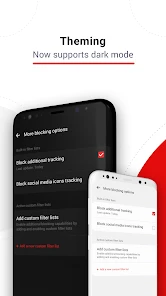
One of the features I absolutely love is the level of customization it offers. You can whitelist your favorite websites to support them, ensuring you’re not blocking ads from sites you’d like to support. This feature gives you control over your browsing environment, making it feel personalized and tailored to your needs.
A helpful way to use that control is to treat exceptions as an intentional list, not a reflex. If a site breaks, I would allow it temporarily as a test, reload, and see whether the part I need now works. If it does, I can decide whether that site belongs on my regular exception list. If it does not, I can restore the blocking and look for another explanation rather than leaving the whole browser unprotected from interruptions.
Privacy expectations and sensible limits
Beyond just blocking ads, this app takes it a step further by enhancing your online privacy and security. It blocks trackers that follow you around the web, which is a huge plus for anyone concerned about their online footprint. Knowing that my data is a little more secure with each site I visit gives me peace of mind.
I would still keep the word “privacy” in perspective. Reducing some tracking and advertising is useful, but it does not turn a browser add-on into a complete security plan or make every online action anonymous. I would continue to be careful about what I share, which sites I trust, and where I sign in. The app is most convincing as one practical adjustment to a browser routine, not a reason to stop thinking about online safety.
Who is likely to find it worthwhile
I would recommend it first to people who already use Samsung Internet and regularly read ad-heavy pages on a phone. It is also a sensible option for someone who wants a focused, free tool rather than a new browser with its own interface to learn. On Google Play, it has a 3.5 average from around 23,000 ratings, so the reception is mixed rather than universally glowing. That fits my view: the basic idea is useful, but the experience can vary with the sites you visit.
It can suit someone who reads articles in short gaps during the day, checks instructions while doing another task, or uses mobile data and would welcome less unnecessary page content. The strongest case is not that every page becomes perfect; it is that the browser they already prefer may become more comfortable for repeated reading. For that person, a small change to an existing routine can be more appealing than moving bookmarks and habits to another browser.
I would skip it if I rarely use Samsung Internet, want one blocker to cover several browsers, or expect an ad-free experience inside every app. Someone who relies on a site whose layout or playback depends on elements affected by blocking may also prefer to leave that site unfiltered. The right choice depends on whether the convenience of fewer interruptions outweighs the occasional need to make a site-specific exception.
For a household or shared phone, I would also think about who uses the browser and which sites they depend on. A person who mainly reads general pages may appreciate the calmer layout, while another who needs a particular site’s menus or media could encounter more friction. Testing the pages each person actually uses is more helpful than assuming one setting will suit every browsing habit.
Comparing it with the usual alternatives
Compared with switching to a different browser that includes blocking features, this approach lets me keep Samsung Internet and its familiar layout. A separate browser may be a better choice if I want blocking and browsing managed in one place, or if I move between several browsers. The advantage here is the lighter change to my routine; the limitation is that the benefit stays tied to Samsung Internet.
A browser with built-in blocking can be more convenient for someone who is already willing to change browsers, because there is no separate add-on handoff to think about. A broader privacy tool may make more sense for someone whose concern extends beyond web pages in Samsung Internet. I would not call either route universally better: the choice comes down to whether keeping the current browser matters more than consolidating tools or covering a wider set of activities.
Another alternative is to leave blocking off and manage interruptions site by site, but that can become tedious if many pages are cluttered. This add-on offers a middle ground: use the browser as usual, then make exceptions when a trusted site or a broken page calls for one. I find that approach practical when most browsing benefits from blocking but a handful of destinations deserve a different treatment.
Small checks that save time
One useful habit is to keep a short mental list of sites where I want ads allowed, especially publishers I visit often. Another is to test a troublesome page with an exception before uninstalling the blocker or changing browsers. These small checks make it easier to tell whether the issue is a compatibility problem on one site or a mismatch between the app and my browsing setup.
When a page behaves differently, I would change one thing at a time. First I would reload it; if the problem remains, I would try an exception for that site. If the page still fails, the blocker may not be the cause, and I can avoid making a wider change based on a mistaken diagnosis. This simple sequence is particularly useful for forms and sign-in pages, where a missing step matters more than a cleaner layout.
It is also worth remembering where a link opens. If a page looks unchanged, I would check that it opened in Samsung Internet rather than assume the blocker has stopped working. This is an easy handoff to overlook when links come from messages or other apps, and it can explain why the browsing experience differs between two pages opened from the same phone.
What to expect before installing
The app is rated for Everyone, has more than 10 million installs, and its current version is 3.4.7; it supports Android 5.0 and later. It was released on January 25, 2016, and has around 966 written reviews. Those details suggest an established option, but they do not promise that every ad will disappear or every page will behave perfectly. I would install it for a cleaner Samsung Internet session, then judge it by the sites I actually use.
For the most useful trial, I would pick a handful of pages I visit regularly and use Samsung Internet for each one. That gives me a grounded answer to the practical questions: does reading feel less interrupted, do the pages I need still work, and am I comfortable making exceptions where necessary? If those answers are mostly yes, the app is doing the job I wanted from it. If not, moving to a different browser or choosing a tool that matches my wider browsing habits may be the more sensible outcome.
The rating and written feedback also make me cautious about promising a flawless experience. A broad user base tells me this is an established option, while a middling average suggests that people’s results are not identical. I would take that as a reason to test my own sites rather than as a reason to dismiss the app or assume it will solve every browsing annoyance.
My bottom line for Samsung Internet users
All in all, if you’re using the Samsung Internet browser, AdBlock for Samsung Internet is a no-brainer. It’s user-friendly, efficient, and adds an extra layer of privacy to your browsing. Whether you’re tired of ads slowing down your browsing or just want a cleaner, more secure online experience, this app is definitely worth checking out. Don’t just take my word for it—give it a try and see the difference for yourself!
My recommendation is strongest for someone who already browses in Samsung Internet and wants a straightforward way to reduce interruptions without changing browsers. I would start with normal reading, keep an eye on any page that misbehaves, and use exceptions selectively. If the browser itself is not part of your routine, or if you need a solution that follows you across apps, I would choose an option built for that broader need instead.
AdBlock for Samsung Internet Frequently Asked Questions
Is AdBlock for Samsung Internet compatible with my Android device?
AdBlock for Samsung Internet is intended for use with Samsung Internet on Android, rather than as a general ad blocker for every browser or app. The app supports Android 5.0 and later, so check your device’s software version before downloading. You will also need Samsung Internet to use its browsing features; the blocker is designed around that browser.
Do I need to install Samsung Internet separately to use AdBlock?
Yes, AdBlock for Samsung Internet is designed to work with the Samsung Internet browser, so you need that browser to make use of its ad-blocking features. The two apps serve different purposes: Samsung Internet is where you browse, while AdBlock is intended to filter ads during that browsing. If you already use Samsung Internet, the app is aimed at that setup.
Does AdBlock for Samsung Internet work with browsers other than Samsung Internet?
AdBlock for Samsung Internet is built specifically for Samsung Internet, so its ad-blocking features are intended for browsing in that app. If you usually use another browser, do not expect this extension to filter ads there. It is best suited to people who want to keep using Samsung Internet while reducing interruptions from ads and trackers.
What is AdBlock for Samsung Internet and how does it work?
AdBlock for Samsung Internet is a browser extension designed to block unwanted ads, pop-ups, and trackers while you browse the web on your Samsung device. It enhances your browsing experience by providing a cleaner and faster web page loading. The extension works by filtering out ad content before it reaches your screen, using predefined filters and customized settings to ensure that only the content you want to see is displayed.
Is AdBlock for Samsung Internet safe to use?
Yes, AdBlock for Samsung Internet is generally considered safe to use. It does not collect your personal data or browsing history. The app is designed to protect your privacy by blocking tracking scripts used by advertisers. However, it's important to download the app from a reputable source, such as the official Samsung Galaxy Store, to ensure you are getting the legitimate version.
Pros
- Seamless integration with Samsung Internet
- Blocks most ads effectively
- Improves browsing speed
- Reduces data usage significantly
- User-friendly interface
Cons
- Limited to Samsung Internet only
- May block some non-intrusive ads
- Occasional issues with video ads
- No customization for blocking options
- Requires periodic updates for new ads

- Category
- Productivity
- Version
- 3.4.7













