Action Network: Sports Tracker
- 1.13K
- 3.0
- Installs
- 500.00K
- Price
- Free

Screenshots




Analysis by Reviewed
I approached Action Network: Sports Tracker as a practical sports companion rather than a simple scores app. Its focus is broader: it brings scores, live odds, bet tracking, expert picks, and betting analysis into one place. That combination makes it interesting for someone who follows several games and wants to keep personal betting information organized, but it also means the app asks more from the user than a basic scoreboard does.
The app sits in the Sports category and is developed by The Action Network, Inc. It is free to install, carries a Teen content rating, and offers in-app purchases ranging from $4.99 to $99.99 per item. The current version is 6.8.0, and it supports devices running Android 7.0 or later. With more than 500 thousand installs, it has clearly found an audience, although its average rating of 3.0 from roughly 3 thousand ratings suggests that the experience is not equally satisfying for everyone.
How I built a useful everyday workflow
My first recommendation is to avoid treating the app as a stream of information that you must constantly watch. It works better when you decide what you want to monitor before opening it. For me, that means separating three jobs: checking what is happening now, reviewing a possible wager, and recording what I actually played. Those tasks overlap, but they are not identical, and mixing them together can make the interface feel busier than it needs to be.
For a normal game day, I would begin with the scores and schedule view. This gives me a quick sense of which events are active and which ones are still ahead. I then move to the odds or analysis only for the matchups that matter to me. That small habit is more valuable than endlessly scrolling through every available market because it keeps the app focused on decisions rather than turning it into background noise.
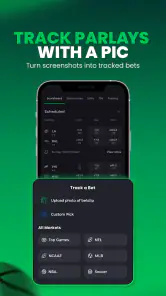
The bet-tracking side is where the app becomes more useful over time. Instead of relying on memory, I can use it as a record of what I intended to play and then compare that record with the result later. I find this especially helpful when several bets are placed across different games. A paper note or phone spreadsheet can do something similar, but having the tracking function beside the relevant sports information reduces the amount of switching between tools.
A realistic example would be a weekend afternoon when I am following a few games while doing errands. I can check the current score, review the available odds for one event, and record a wager before leaving the app. Later, rather than trying to remember whether a selection was a straight bet or part of a larger plan, I can return to the tracking area. That workflow is not flashy, but it is the kind of routine that makes the app worthwhile.
I also learned not to confuse an expert pick with a guaranteed answer. The analysis can help me understand how someone is approaching a matchup, but I still need to examine the odds, the timing, and my own tolerance for risk. The most responsible way to use this part of the app is as a second opinion or research aid, not as an automatic instruction to place a bet.
More From Our News Desk

Clash of Clans Is Won Between the Battles

Android Auto Makes the Case for Quieter Car Software

MobiOffice: Transforming Mobile Productivity with Seamless Integration

EA SPORTS FC™ Mobile Soccer: Redefining Mobile Sports Gaming

How Microsoft OneDrive Became a Mobile Productivity Giant

How Google Translate Breaks Language Barriers Effortlessly
What the first setup should accomplish
On the first few visits, I would spend time deciding which sports and events genuinely deserve attention. The app contains several kinds of information, and the temptation is to activate everything immediately. That usually creates a cluttered experience. A narrower starting point makes it easier to notice whether the scores, odds, analysis, or tracking tools are the features you will actually use.
I would also establish a personal rule for recording activity. For example, I might enter a wager as soon as I make it, not at the end of the day. That avoids the common problem of remembering the outcome but forgetting the original odds or selection. The app can only help with record keeping if I use it consistently; an incomplete log is less useful than a simple, accurate one.
Another useful habit is to review completed entries separately from live information. Live odds encourage quick reactions, while historical tracking encourages reflection. Keeping those moments distinct makes it easier to ask whether a decision was sensible at the time, rather than judging it only because the final result was positive or negative.
Settings and choices worth checking early
The most important settings are the ones that control how much information reaches me and how quickly I can find it. I would check notification preferences before settling into regular use. If alerts are too broad, the app may interrupt me for events I do not care about. If they are too limited, I may miss the scores or updates that brought me to the app in the first place. The right balance depends on whether I use it as an occasional reference or as a live companion.
I would also look at the way odds are displayed and make sure I understand the format before comparing selections. This is a small point with real consequences: a number can look attractive while being misunderstood if the user is unfamiliar with the presentation. I prefer to pause and confirm what I am reading instead of making a decision based on a quick visual comparison.
Account and purchase choices deserve attention as well. The app is free, but optional in-app purchases are available, with individual items priced from $4.99 up to $99.99. I would not pay simply because a premium-looking option appears beside free information. First, I would use the basic workflow long enough to identify a specific limitation. If a paid feature does not solve a problem I actually have, it is probably not worth adding to my routine.
The Teen rating is also relevant. This is not an app I would hand to a child as a casual sports game or harmless score widget. Its betting-related content makes it more appropriate for mature users who understand the financial and emotional risks involved. Even for adults, I would keep a firm separation between following sports and spending money on wagers.
One setting-related trade-off is convenience versus concentration. More alerts and more tracked events can make the app feel comprehensive, but they also increase the chance that I react to information simply because it appeared on screen. Experienced use is often quieter: I keep the events I care about visible and reduce distractions everywhere else.
Faster patterns for regular users
Once the basic routine is comfortable, the biggest speed improvement comes from using the same sequence every time. I like to check the schedule first, narrow my attention to selected events, inspect the relevant odds or analysis, and record any decision immediately. Repeating that order prevents me from bouncing randomly between screens and makes it easier to notice when a new piece of information actually changes my view.
A second pattern is to prepare before live action begins. If I wait until a game is already moving quickly, I am more likely to make rushed choices. Reviewing the matchup and deciding what information matters beforehand lets me use the live section for updates rather than trying to learn everything under pressure. The app is more useful when it supports preparation, not when it becomes a substitute for it.
I also prefer to use the tracking tool as a feedback loop. After an event is finished, I can look back at what I recorded and ask practical questions: Did I enter the selection correctly? Was I following a consistent approach? Did I make decisions only after seeing a score change? This kind of review is more valuable than merely counting wins because it exposes habits that may otherwise remain invisible.
For users who follow multiple sports, I would create separate mental sessions rather than one continuous stream. I might check one sport in the morning, another later, and then return only to the events I have deliberately marked for attention. This reduces the risk of confusing different leagues, start times, or types of odds. It also makes the app feel less like an endless feed.
The expert-pick section can fit into this pattern without taking over. I would read the reasoning, compare it with the available market, and note whether the argument depends on a particular line or price. That last step matters because a recommendation can be less appealing when the odds move. Even without advanced statistical tools, I can avoid blindly following a label by asking what assumption supports it.
Another non-obvious benefit of a repeatable process is that it reveals when I do not need the app open. If I have already checked the relevant event, recorded my decision, and set sensible notifications, repeatedly refreshing the screen adds little. Knowing when to close the app is part of using it well, especially for anyone vulnerable to impulsive betting.
Where it beats simpler alternatives
A conventional scores app is usually better if all I want is a fast result with minimal context. Such an app may feel cleaner because it does not place odds, picks, and tracking beside the score. For a casual fan checking one final score, Action Network can therefore feel like more tool than necessary.
On the other hand, a spreadsheet or notebook can offer more control over personal records. I can design my own columns, formulas, and categories, while the app gives me a ready-made environment connected to sports information. The trade-off is flexibility versus convenience. I would choose the app when I want speed and context, and a spreadsheet when detailed long-term analysis matters more than quick entry.
Betting-focused alternatives may offer a narrower experience with more emphasis on transactions or a particular operator. Action Network is more appealing to me when I want research, live information, and personal tracking together rather than a single-purpose betting interface. It is less compelling if my only goal is to place a wager as quickly as possible.
The app’s average rating of 3.0 is worth keeping in mind when setting expectations. It does not make the product unusable, but it suggests that interface preferences, reliability, or expectations may vary from person to person. I would test the free experience on my own device before considering any purchase, especially if I need a very polished, distraction-free scores experience.
Limits that become clearer with advanced use
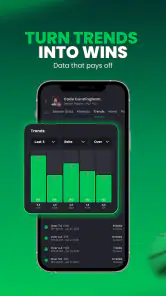
The more seriously I use the tracker, the more I notice the difference between recording information and analyzing it. The app can help me keep a history of activity, but a user who wants highly customized reporting may eventually want another tool alongside it. I would not expect a built-in tracker to replace a dedicated personal finance or statistical system.
There is also a psychological limit. Live odds and expert analysis can make every small change feel important. That can encourage over-monitoring, especially when a game is close. I find the app healthiest when I decide my limits before opening it and treat the tracking record as an accountability tool. Without that discipline, the convenience of having everything together may work against me.
Another limitation is that the product serves several audiences at once. A fan interested only in scores may see betting features as clutter, while a serious bettor may want deeper customization than a general sports app provides. Its strongest audience is in the middle: people who want more than scores but still value a straightforward way to review events, odds, picks, and personal activity.
I would also be cautious about assuming that every expert opinion fits my situation. Analysis can be useful, but it is still an interpretation. The correct response is to understand the reasoning and decide whether it applies to the specific market and timing I am considering. If I want fully independent research, I should compare perspectives rather than letting one section of one app become my entire process.
Who should use it and who should skip it
I would recommend it to a sports follower who wants one place to monitor scores and odds while keeping a record of betting decisions. It is particularly suitable for someone who enjoys comparing viewpoints and wants a repeatable routine instead of relying on memory. The free entry point makes it easy to explore before deciding whether optional purchases have any value.
I would suggest skipping it if you only need occasional scores, dislike betting-related content, or want an extremely simple interface. A dedicated score app will probably be faster for that purpose. I would also steer away from it if live odds make you feel pressured to act. No feature is worth losing control of your spending or attention.
For new users, my practical advice is to begin with one sport, a small set of events, and manual tracking. Learn how the information is organized before adding more alerts or considering paid items. For experienced users, the better challenge is not collecting more data; it is building a consistent process that makes each entry meaningful.
After using it in that way, my view is balanced. The app is strongest as a connected workflow for scores, betting research, and personal records, not as a universal replacement for every sports tool. Its breadth is useful, but that breadth can also create noise, and the betting context demands mature judgment.
Ultimately, I see Action Network: Sports Tracker as a free sports app worth trying when you want more structure around following games and recording wagers. I would keep the basic experience, test the settings, and judge optional purchases against a real need rather than curiosity. If you can maintain clear limits and use the app deliberately, it can become a practical daily reference. If you simply want a clean score, a simpler alternative will likely serve you better.
Action Network: Sports Tracker Frequently Asked Questions
Is Action Network: Sports Tracker available for my device?
Action Network: Sports Tracker is a sports app for Android and iOS users. Its current version is 6.8.0, and it requires Android 7.0 or later on Android devices. The app is free to download, with in-app purchases available. Before installing, check that your device’s operating system is compatible and that you are downloading the official app from your platform’s app store.
Who develops Action Network: Sports Tracker, and what is its reputation among users?
The app is developed by The Action Network, Inc. It has an average rating of 3.0 from around 3,000 ratings, with about 1,100 written reviews and over 500,000 installs. Those figures suggest that many sports fans have tried it, while user experiences are mixed. Reading recent reviews can help you decide whether its features and overall experience suit the way you follow sports.
What is Action Network: Sports Tracker used for?
Action Network: Sports Tracker is designed for sports fans who want to follow games, monitor betting lines, research matchups, and keep track of picks in one place. The app typically combines live scores, odds movement, expert analysis, articles, alerts, and personalized watchlists. It is especially useful for users who want more information than a basic scoreboard provides, although the exact features available may vary by sport, location, and subscription level.
Does Action Network: Sports Tracker support live scores, odds, and game alerts?
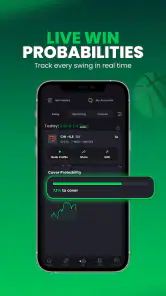
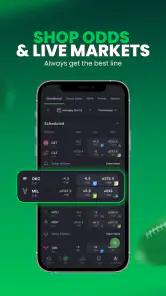
Yes, the app focuses on real-time sports tracking, including scores, schedules, betting odds, line movement, and game-related updates. After selecting your favorite teams, leagues, or markets, you can generally personalize notifications so important changes are easier to follow. Because live data depends on external providers and regional availability, updates may occasionally be delayed, and some betting information may not be accessible in every country.
Is Action Network: Sports Tracker free to download and use?
The application can generally be downloaded at no initial cost, but not every feature is necessarily free. Basic score tracking, selected news, and limited analysis may be available without payment, while advanced tools, premium picks, detailed projections, or exclusive content can require a subscription or in-app purchase. Before signing up, review the current pricing, renewal terms, and trial conditions shown in your app store.
Pros
- Tracks bets
- odds
- and sports picks in one organized dashboard.
- Offers detailed stats and analysis for several major sports.
- Live updates help users follow games and betting markets in real time.
- Community picks and expert insights can support research before wagering.
- Clean interface makes it easy to switch between teams
- games
- and markets.
Cons
- Coverage and features may vary depending on your location and supported leagues.
- Some advanced tools or content may require a paid subscription.
- Live data can occasionally lag during busy games or major events.
- The large amount of betting information may feel overwhelming for beginners.
- Gambling-related features may encourage impulsive betting without careful limits.
- Category
- Sports
- Version
- 6.8.0





