Acorns: Save & Invest Money
- 77.83K
- 4.7
- Installs
- 10.00M
- Price
- Free

Screenshots

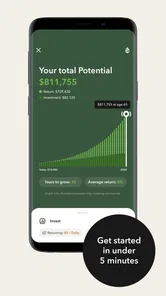
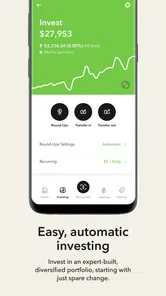

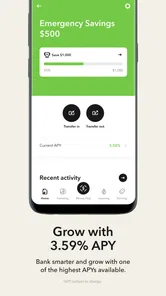


Analysis by Reviewed
When I judge an investing app, I look beyond whether it can move money automatically: I want to know whether I can understand what it is doing, use it comfortably in different situations, and make sensible choices without feeling rushed. Acorns: Invest For Your Future is a finance app from Acorns built around small, repeatable steps. Its approachable style may suit someone who finds investing intimidating, though the same hands-off approach will not fit every goal or learning style.
Readability and finding your way around
The interface feels clean and relatively easy to follow, which matters when financial terms already make an app feel demanding. In my experience, a straightforward layout can lower the effort of checking an account or finding educational material. Acorns also includes a Grow section with articles and tutorials that explain financial ideas in smaller pieces. That makes the app more useful than a place to set up automatic transfers and then forget why you chose them.
Still, simple navigation is not the same as a complete investing education. I would treat the learning material as a starting point, then take time to understand the choices and risks involved before relying on an automated routine. A useful habit is to review the account when you are calm and have time, rather than making decisions in a hurry between errands.
Motor, sensory, and attention needs
Round-Ups and Recurring Investments can reduce the need to make repeated manual deposits, which may be helpful if frequent small interactions are tiring or hard to keep up with. The trade-off is that automation can make money movement less visible day to day. I would check the activity periodically and make sure the linked spending account still has room for ordinary bills and purchases.
For people who find dense financial explanations difficult, the bite-sized educational approach may be easier to approach than a long investing guide. On the other hand, anyone who needs a particular text size, screen-reader behavior, contrast setting, or alternative control method should test the app on their own device before depending on it. I would not assume that a simple-looking screen automatically works equally well for every sensory or motor need.
Using it in real life—and knowing its limits
Picture a busy week of commuting, groceries, and small card purchases. Round-Ups can turn those transactions into a low-effort investing routine, while a recurring contribution can make saving more intentional. Found Money may add another route when shopping with participating brands, but I would not buy something solely to trigger an investment. The purchase should make sense without the incentive.
Acorns is aimed at making investing approachable, not at replacing careful planning. Its automatic approach may be a poor fit if you want to choose and adjust every investment yourself, keep cash completely separate from market risk, or compare a wide range of account options before acting. In those situations, a self-directed brokerage or a savings account may be more suitable. I would also check the current account terms and costs before signing up, since “free” to download does not by itself tell you what using a financial service may cost.
More From Our News Desk

 Instagram
’s Power Comes From Its Place in Your Phone
A close look at how Instagram turns Meta’s reach, recommendation systems and everyday camera habits into durable platform power—and what that costs users.

 Gmail
Gmail in a Busy Inbox: Who Benefits Most?
From first account to crowded workday, Gmail earns its place through dependable search and flexible sorting—but its best fit depends on how much inbox maintenance you can tolerate.

 Prime Video
Switching to Prime Video: What Changes in Your Viewing Routine
Prime Video can make a compelling second home for streaming, but switching means learning a different catalog, rental layer, and route from browsing to playback.

 Universal TV Remote Control
 Works Best as a Reliable Backup
A phone remote earns its place through quick setup and reliable habits. Here is how to get more from Universal TV Remote Control—and where its limits show.

 Weather - By Xiaomi
Weather by Xiaomi Review: Clear at a Glance, Less Clear Up Close
Xiaomi’s weather app makes everyday forecasts quick to scan, but its calm surface can leave useful details and recovery paths harder to find than they should be.

 X
X Under Pressure: Can It Recover When Posting Goes Wrong?
A resilience-focused review of X, examining setup, mistaken posts, interruptions, weak connections, and the gaps that matter when recovery needs to be dependable.
Latest News



The app is free to download, is rated for Everyone, and has a 4.7 average from around 375,000 ratings. It has passed 10 million installs, and its current version is 4.172.0; it first appeared on October 7, 2014, and requires iOS 9 or later. Those figures suggest broad reach, but they cannot tell you whether the experience will work for your particular needs. My practical test would be to explore the screens, read the account details, and decide whether the automatic style feels clear rather than merely convenient.
Choosing a routine that stays manageable
The key decision is not simply whether to switch on every automatic option. It is whether the combined activity fits your cash flow. I would begin by deciding what amount I can comfortably invest without affecting rent, bills, or a planned purchase, then consider whether Round-Ups, Recurring Investments, or a mix makes that amount predictable. Small transactions can accumulate unevenly, so treating spare change as a bonus rather than a guaranteed contribution helps avoid expecting a precise monthly total.
A practical safeguard is to check the linked account around the same time as a regular budget review. If you notice that daily purchases are producing more investing activity than expected, you can reconsider the routine rather than letting convenience make the decision for you. Conversely, someone with irregular income may prefer to avoid a schedule they could struggle to maintain and use a more flexible approach. Automation is useful when it supports a plan; it is not a substitute for one.
Who benefits most from the hands-off approach
I see the strongest case for Acorns in someone who wants a gentle introduction to investing and already has room in their budget for gradual contributions. It can also suit a person who has good intentions but tends to forget manual transfers, provided they are comfortable checking how automatic activity affects their available balance. The Grow material gives curious beginners a way to build familiarity alongside the routine, rather than treating investing as a mysterious background process.
I would be more cautious if you are carrying urgent bills, need to preserve every dollar for near-term expenses, or expect the app to make investing risk-free. Market investing can fluctuate, and an easy setup does not remove the possibility of losses. If your priority is keeping money stable and immediately available, a savings product may better match that need. If your priority is detailed control over investments, a self-directed platform is likely a better place to compare options.
It is also worth asking what kind of feedback helps you stay engaged. Some people like seeing small actions happen with little effort; others learn more by choosing each deposit and tracking the decision. Acorns favors the first style. If you would feel uneasy not selecting each investment yourself, that discomfort is useful information, not a problem you need to push past.
Everyday use, without letting the app set the budget
Imagine you have just started a new job and are trying to build a savings habit while learning your monthly spending pattern. You could first watch your regular expenses and keep enough in your spending account for essentials. Once the budget feels stable, a modest recurring contribution may create a deliberate routine, while Round-Ups can add a variable extra amount as purchases happen. Checking the activity during a weekly money review helps you catch surprises before they become stress.
Found Money is best treated as an occasional extra, not a shopping strategy. Before using a participating brand, I would compare the item with what I already planned to buy and ignore the investment incentive if the purchase is unnecessary. That simple test keeps a reward from nudging you into spending more than you intended. It also makes the feature easier to evaluate honestly: the investment benefit is worthwhile only when the underlying purchase already makes sense.
For someone who shares household finances, it may help to agree on which account is linked and what level of automatic investing feels comfortable before setting things up. This is less about a special app feature than about preventing one person’s routine from creating a cash-flow surprise for everyone. A short, regular check-in can keep the app’s quiet automation visible without turning every small transaction into a decision.
How it compares with other ways to invest
Compared with a traditional self-directed brokerage, Acorns puts less emphasis on choosing and managing investments transaction by transaction. That can reduce the learning burden for a beginner, but it also means it is not the natural choice for someone who wants to research individual investments or actively adjust a portfolio. The trade-off is convenience for control, and I would choose based on which one I genuinely want rather than assuming that more automation is always better.
Compared with saving in a bank account, investing has a different purpose and risk profile. A savings account is usually the more sensible place for money needed soon or for a cash cushion you do not want exposed to market movement. Acorns makes more sense for money you can leave invested with a longer view. Keeping those jobs separate can make the app easier to use responsibly: do not ask a small investing habit to replace emergency savings or money earmarked for an imminent expense.
Compared with simply setting a manual transfer through a bank, the app’s distinctive appeal is the combination of recurring contributions, purchase-linked Round-Ups, and educational content. But a plain scheduled transfer may be enough for someone who already knows what they want and prefers to keep fewer financial services in the mix. I would not add an app just because a spare-change mechanism sounds clever; I would add it if the structure helps me follow through.
Questions worth settling before you begin
A common practical question is whether spare-change investing alone will build a meaningful habit. It can make investing feel approachable, but its contribution varies with spending, so I would not rely on it as a predictable plan for a particular goal. If consistency matters, a recurring contribution is the more deliberate part of the routine; Round-Ups can remain an add-on rather than the whole strategy.
Another question is whether the app can replace learning about money. I would say no. The Grow section can make concepts easier to approach, but short articles and tutorials are not a reason to skip understanding risk, time horizon, and the account terms that apply to you. Read before committing, and revisit the material when your goals or circumstances change.
People also reasonably ask whether it is suitable for quick access to cash. I would not treat an investment account as a substitute for money you may need immediately. Before putting money into any investing routine, decide what should remain available for bills and unexpected costs, and make sure the account’s terms and withdrawal process suit your plans.
Finally, if you rely on specific accessibility settings, test the screens and controls that matter to you before building a routine around them. Try the tasks you will actually repeat, such as reviewing activity and navigating educational material, using your usual device settings. That is a more useful test than judging accessibility from a clean-looking first screen alone.
Getting Started is a Breeze
First things first, setting up Acorns is a walk in the park. You simply link your bank account, and the app does its magic by rounding up your purchases to the nearest dollar, investing the difference. I mean, how cool is that? You’re literally investing without lifting a finger. Plus, the app’s interface is clean and intuitive, which is a major plus for someone like me who isn't exactly a financial guru.
Features That Make a Difference
One of the features that truly stands out is the ‘Round-Ups’ feature. This nifty little tool takes the spare change from your everyday purchases and invests it automatically. You’d be surprised at how quickly those pennies add up.
Another thing I love about Acorns is the ‘Found Money’ feature. This is where the app partners with various brands to invest in your account when you shop with them. So, you’re essentially getting paid to shop. It’s like a cashback on steroids.
On top of all that, there’s a feature called ‘Recurring Investments’. This allows you to set up a schedule to automatically add funds to your investment account. It’s perfect for those of us who need a little nudge to save consistently.
Learning and Growing
Not only does Acorns handle your investments, but it also offers educational content to help you understand the world of finance. The ‘Grow’ section is packed with articles and tutorials, breaking down complex financial concepts into bite-sized pieces. It’s like having a finance class in your pocket. I found this super helpful as I navigated through my investment journey.
Security and Trust
Of course, when it comes to money, security is paramount. Acorns employs bank-level security measures to protect your data, which gives me peace of mind. Plus, it’s backed by some big names in the industry, so you know it’s legit.
In summary, if you’re looking to dip your toes into the world of investing without the hassle of managing your portfolio, Acorns: Invest For Your Future is a fantastic choice. It’s user-friendly, educational, and it literally invests your spare change. So, if you're anything like me and want to start growing your wealth without the stress, give Acorns a shot. You might just find yourself a little more financially savvy along the way!
Acorns: Save & Invest Money Frequently Asked Questions
Can I use Acorns if I have never invested before?
Yes. Acorns is aimed at making investing feel more approachable, so it may suit someone who is just beginning to learn about building wealth. The app’s small-contribution approach can help you get familiar with investing without having to make every decision yourself. Before starting, consider your goals and remember that investments can rise or fall with the market.
What should I check before signing up for Acorns?
Think about whether an investing app fits your financial goals and your comfort with market risk. Acorns is designed to help users save and invest over time, rather than guarantee a particular outcome. It is also worth checking that your device is compatible and reviewing the app’s costs before you decide whether to create an account.
Who is Acorns designed for, and what should I expect from a finance app?
Acorns is a finance app from Acorns, built around the idea of making investing approachable through small, regular contributions. It may appeal to people who want to get familiar with investing without managing every decision themselves. As with any investment app, balances can change with the market, so it is worth considering your goals and comfort with risk before getting started.
What is Acorns: Invest For Your Future all about?
Acorns: Invest For Your Future is a micro-investing app that helps you save and invest money effortlessly. It rounds up your daily purchases and invests the spare change into diversified portfolios, making investing accessible for everyone, even those new to the financial market. It's designed to help users build wealth over time with minimal effort.
How does the round-up feature work in Acorns?
The round-up feature in Acorns automatically rounds up your everyday purchases to the nearest dollar and invests the difference. For example, if you spend $3.50 on coffee, Acorns will round it up to $4.00 and invest the 50 cents. This small change accumulates over time, allowing users to invest without altering their spending habits significantly.
Pros
- Easy-to-use interface for beginners.
- Automated savings and investment feature.
- Educational resources for users.
- Low starting investment requirement.
- Portfolio diversification options.
Cons
- Monthly fees can add up over time.
- Limited investment control options.
- Customer support can be slow.
- Not ideal for advanced investors.
- Requires bank account linking.