

Acorns Early: Kids Money App
- 537.00
- 4.5
- Installs
- 100.00K
- Price
- Free

Screenshots
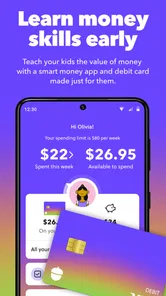


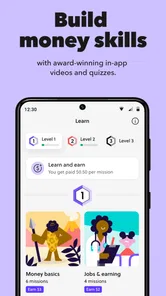
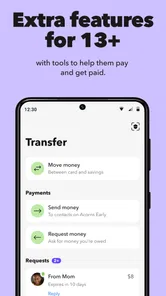
Analysis by Reviewed
If you are trying to help a child or teenager build better money habits, Acorns Early: Kids Money App takes a more guided route than a standard budgeting app. I found its main appeal in the way it connects a young person’s financial learning with an investing plan, rather than treating money as something that only belongs in a savings jar or spending tracker. That makes it interesting for parents who want to start conversations about long-term choices without turning every lesson into a lecture.
It is a free finance app from Acorns, aimed at Everyone, and its store presence shows a 4.5 average from around 3,200 ratings, with more than 100,000 installs. The app was released on November 8, 2024, and version 9.7.0 requires Android 7.0 or later. Those details make it accessible to families using older Android devices, although the experience still depends on how comfortable both the adult and the child are with financial language.
What to expect before you begin
The first thing I would clarify is what this app is—and what it is not. I would not approach it as a full replacement for a family budget, a bank account, or a detailed investing platform. Its strongest role is as a bridge between adult guidance and a child’s growing understanding of money. The central idea is to make financial wellness feel like an ongoing family activity instead of a once-a-year conversation.
That distinction matters because younger users usually need context more than charts. A child may understand that money can be saved, spent, or invested, but still struggle to connect a small decision today with a future result. Acorns Early is designed around that longer view. In my experience, it works best when a parent uses it as a prompt for discussion: why a goal matters, why investing takes patience, and why not every financial choice should be judged by an immediate reward.
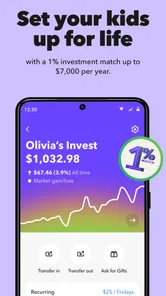
The store summary focuses on building a child’s or teen’s financial wellness through a smart investing plan. I would read that as an invitation to participate together, not as a promise that the app will teach every part of personal finance automatically. The adult still has to explain unfamiliar terms, set expectations, and decide how much independence is appropriate.
That shared responsibility is one of the app’s most important trade-offs. A parent who wants a completely automatic educational experience may find it too dependent on their involvement. On the other hand, a family that already wants a practical way to talk about money may appreciate having a concrete activity around which to organize those conversations.
Compared with a conventional savings tracker, the investing focus gives the app a different rhythm. A tracker tends to reward frequent checking and visible progress toward a short-term target. An investing plan encourages patience and makes market-related uncertainty part of the lesson. That is useful, but it also means the app may feel less satisfying to a child who expects every action to produce an immediate, predictable result.
More From Our News Desk

 Instagram
Instagram’s Power Comes From Its Place in Your Phone
A close look at how Instagram turns Meta’s reach, recommendation systems and everyday camera habits into durable platform power—and what that costs users.

 Gmail
GmailGmail in a Busy Inbox: Who Benefits Most?
From first account to crowded workday, Gmail earns its place through dependable search and flexible sorting—but its best fit depends on how much inbox maintenance you can tolerate.

 Prime Video
Switching to Prime Video: What Changes in Your Viewing Routine
Prime Video can make a compelling second home for streaming, but switching means learning a different catalog, rental layer, and route from browsing to playback.

 Universal TV Remote Control
Universal TV Remote Control Works Best as a Reliable Backup
A phone remote earns its place through quick setup and reliable habits. Here is how to get more from Universal TV Remote Control—and where its limits show.

 Weather - By Xiaomi
Weather by Xiaomi Review: Clear at a Glance, Less Clear Up Close
Xiaomi’s weather app makes everyday forecasts quick to scan, but its calm surface can leave useful details and recovery paths harder to find than they should be.

 X
XX Under Pressure: Can It Recover When Posting Goes Wrong?
A resilience-focused review of X, examining setup, mistaken posts, interruptions, weak connections, and the gaps that matter when recovery needs to be dependable.
Latest News



Who will get the most from it
I see the best fit as a parent or guardian who wants to introduce financial ideas gradually, especially with a school-age child or teenager who is beginning to ask where money goes. It can also suit families who have tried verbal explanations and found that abstract examples do not stick. A shared app gives those conversations a place to start and makes the subject feel less distant.
It is less suitable for someone looking for advanced portfolio control, detailed research tools, or a hands-off investing service. It is also not the right first choice if the family has not agreed on basic rules for discussing money. The technology can support the conversation, but it cannot decide whether a child is ready to see every financial detail or understand the difference between a plan and a guaranteed result.
From installation to the first useful result
I’d use the first session to turn setup into a small, understandable lesson rather than a race through screens. Choosing one question the child can answer afterward—such as why a future goal calls for a different approach than money they plan to spend soon—makes it easier to tell whether the app is helping. That gives the next section a practical starting point: deciding what the adult should guide and what the child can explore.
Start with the adult’s goal, not the child’s screen
After installing the app, I would begin by deciding what I want the first session to accomplish. “Learn about investing” is too broad for a first attempt. A more practical goal is to help the child understand one idea, such as the difference between saving for soon and investing for later. This keeps the setup from becoming a long tour through financial vocabulary.
Before handing over the phone, I would also choose a real example from the child’s life. It could be a future purchase, an activity they care about, or a general conversation about how money can serve both present and future needs. The point is not to attach every feature to a reward. The point is to give the investing plan a purpose that the child can recognize.
Because this is a family-oriented finance product, adults should expect to take the lead during the initial setup. I would read each screen carefully, check that the information belongs to the right family member, and avoid rushing simply because the app looks approachable. Financial products deserve the same attention as any other service involving money, even when the interface is designed for younger users.
A useful setup habit is to keep a short list of questions beside you. What does the child already know? Which terms need an explanation? What should remain an adult decision? Writing those questions down prevents the first session from becoming a series of taps with no lasting understanding.
Make the first action deliberately small
The first meaningful success should not be “we finished registration.” It should be a moment when the child can explain what the plan is intended to do. Once the account and family details are ready, I would walk through the plan slowly and ask the child to describe it in their own words. If they can say what the money is for and why the timeline matters, the setup has already become educational.
This is where the app’s investing angle can be used well. I would explain that an investing plan is not the same as a promise of a fixed outcome. Even if the app presents the process simply, the adult should add the missing real-world nuance: values can change, time matters, and a long-term plan should not be judged by a single day’s movement.
For a first session, I would stop after that explanation rather than trying to cover every possible money topic. A child who leaves with one clear idea is better served than one who has seen every screen but remembers none of them. The first success is understanding, not speed.
One non-obvious strength of this approach is that it gives parents a way to test readiness. If the child can discuss the purpose of the plan but becomes confused by uncertainty, that is useful information. It may mean the family should spend more time on saving and goals before going deeper into investing. If the child asks thoughtful questions about time and choices, the app can become a foundation for more independent learning.
A realistic family scenario
Imagine a teenager who receives occasional money and wants to spend it immediately. Instead of arguing over every purchase, a parent could use the app to separate the conversation into two parts: what the money can do now and what a longer-term plan is meant to support. The parent might ask the teenager to explain why some money belongs in a future-focused plan, then revisit that explanation later rather than demanding a perfect decision on the spot.
In that situation, the app is not replacing the parent’s judgment. It is giving both people a shared reference point. The teenager gets a more concrete way to think about the future, while the parent can move the discussion away from “because I said so.” That is a stronger use case than simply showing a balance and calling the lesson complete.
Confusion that is easy to mistake for a problem
One likely source of confusion is the difference between an investing plan and a spending balance. Children often expect money to behave like a visible counter that only moves upward. Investing does not work that way, so I would explain this before the child starts checking progress repeatedly. A changing value is not automatically evidence that the plan is failing, just as a rising value is not proof that every future result is secure.
Another point to make clear is the difference between a goal and a guarantee. A family may choose a purpose for the plan, but that purpose does not remove uncertainty. I would use plain language and avoid presenting the app as a shortcut to wealth. The educational value is stronger when the child learns that planning and patience improve decision-making without eliminating risk.
Parents may also wonder how much control to give a child. I would treat independence as something to increase gradually. A younger child may only need to understand the basic purpose, while a teenager may be ready to discuss choices, time horizons, and trade-offs in greater detail. The right level is not determined by the app alone; it depends on maturity, family rules, and the child’s ability to handle financial information responsibly.
There is also a practical difference between using the app occasionally and building a routine around it. Opening it once can create curiosity, but a short recurring conversation is more likely to create a habit. I would avoid daily checking, which can encourage the wrong focus, and instead choose a calm interval for reviewing the plan and discussing one question. The precise schedule matters less than keeping it consistent and low-pressure.
Three useful habits that are easy to miss
- Translate every financial term into a family example. If a word cannot be connected to something the child already understands, pause and explain it before moving on. This prevents the app from becoming a collection of impressive-sounding labels.
- Use the plan to discuss time, not just money. Ask what makes a future goal different from an immediate purchase. This helps the child see why patience is part of investing rather than an inconvenience imposed by adults.
- Review the reason for the plan before reviewing its progress. Starting with the purpose reduces the temptation to treat a changing value like a score. It also gives the family a chance to decide whether the plan still matches the child’s needs.
These habits reveal a trade-off that is easy to overlook: the app can make investing more approachable, but a friendly interface may also make a serious subject feel simpler than it really is. I would keep the tone relaxed while still naming uncertainty clearly. That balance is especially important with teenagers, who may be ready for more independence but may also overestimate how quickly financial results arrive.
How it compares with familiar alternatives
A traditional savings jar is easier to understand and offers a more immediate connection between an action and a visible result. If the child is learning the basics of setting money aside, that simplicity may be better than introducing investing too soon. A basic budgeting app, meanwhile, is usually stronger for tracking income, spending categories, and short-term limits. Families focused on everyday spending control may prefer that kind of tool.
Acorns Early stands apart when the goal is to combine a child’s financial education with a longer-term investing plan. Its value is not that it covers every money task better than alternatives. Its value is that it can help a parent and child discuss future-oriented decisions through one shared experience. I would choose it over a simple tracker when the family is ready for that conversation, but I would not use it as the only financial education tool.
Families should also think about emotional fit. Some children enjoy watching progress and asking questions, while others become anxious when a value changes. For the second group, a straightforward savings routine may create healthier habits at first. The app can still become useful later, but forcing the investing discussion before the child is comfortable with uncertainty may undermine the lesson.
What I would do after the first session
Once the child understands the basic purpose, I would set a modest next step: explain one new term, connect the plan to one real goal, or revisit the difference between short-term saving and long-term investing. I would not turn the next session into a test. The aim is to make the child more confident asking questions, not to make them sound like an adult investor.
I would also keep adult expectations realistic. The app can support a plan, but it does not remove the need to monitor family decisions, protect private information, and check that the arrangement still suits the child. If the household’s priorities change, the conversation should change too. A plan created for one stage of childhood may need a different explanation later.
For teenagers, the next step could be a more direct discussion about trade-offs: choosing between an immediate want and a future goal, understanding why a plan needs time, and recognizing that investment results are not fixed. For younger children, the better next step may simply be repeating the same explanation with a familiar example until the idea feels natural.
I would also decide whether the app is helping the family communicate. If every session produces arguments, confusion, or anxious checking, that is a signal to slow down or use a simpler method. The best financial tool is the one that encourages sensible behavior, not the one with the most sophisticated subject matter.
Overall, I see Acorns Early as a focused family finance app rather than a complete money-management system. Its free price and Everyone rating make it approachable, and its broad availability on Android 7.0 or later lowers the device barrier for many households. The 4.5 average from roughly 3,200 ratings suggests that many users respond positively to the concept, while the more than 100,000 installs show that it has reached a meaningful audience.
My recommendation is straightforward: try it if you want a structured way to introduce a child or teenager to long-term financial thinking and you are willing to stay involved. Start with one clear goal, explain uncertainty before discussing progress, and treat the first successful action as understanding the plan rather than completing a form. If you only need a spending tracker or a simple savings method, another category of app may serve you better. But for families ready to make investing part of a calm, ongoing money conversation, this is a thoughtful place to begin.
Acorns Early: Kids Money App Frequently Asked Questions
What devices and operating systems can run Acorns Early: Kids Money App?
Acorns Early is a finance app from Acorns, and its current version is 9.7.0. It requires Android 7.0 or later, so it may not install on an older Android device. Before downloading, check that your phone or tablet meets the minimum requirement and has enough available space. The app is free to download, while access to its family features may involve a separate plan or service.
What is Acorns Early: Kids Money App, and who is it designed for?
Acorns Early is a family-focused money app designed to help parents introduce children to saving, spending, earning, and basic financial responsibility. Parents can use it to manage allowances, assign chores, and provide age-appropriate opportunities for kids to learn about money. It is generally aimed at families with children, although the available features and account requirements may depend on the parent’s Acorns subscription, location, and the child’s age.
Can children use Acorns Early independently, or do parents control the account?
The app is built around parental supervision rather than completely independent child access. Parents typically create and manage the family account, set allowances or tasks, and monitor activity, while children may receive a simplified experience for viewing progress and learning about money. Before downloading, parents should review the current permissions, linked account requirements, notification settings, and available controls to understand exactly what children can see and do.
Does Acorns Early include chores, allowances, or educational money features?
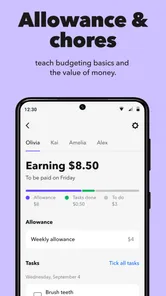
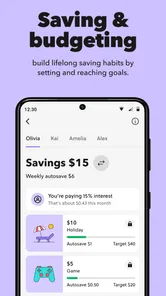
Acorns Early focuses on practical money habits, so its features may include tools for organizing allowances, connecting payments to completed chores, and encouraging children to set savings goals. These features can make financial lessons more concrete than simply discussing money. However, the exact tools may vary by plan and platform, so families should check the latest app description and subscription details before relying on a specific chore, reward, or educational feature.
Is Acorns Early free to download, and are there subscription or other costs?
The app is free to download, but access to Acorns Early features can be connected to an Acorns family plan, membership, or other paid service. Additional costs, eligibility rules, and included benefits may change over time. Parents should carefully read the pricing information in the App Store or Google Play listing and review Acorns’ current terms before creating an account or linking payment information.
Pros
- Teaches saving
- spending
- and giving through age-appropriate activities.
- Parents can set up recurring allowances and automate money lessons.
- Child-friendly interface makes financial concepts easier to understand.
- Supports shared conversations between parents and children about money.
- Useful foundation for building healthy financial habits early.
Cons
- Requires a parent account and setup before children can use it.
- Some features may depend on an eligible Acorns subscription or plan.
- Investment-related lessons may be too advanced for younger children.
- Parents may need to supervise activities for meaningful learning.
- Availability and features can vary by country or account type.












