6Sense
- 264.00
- 4.3
- Installs
- 500.00K
- Price
- Free

Screenshots
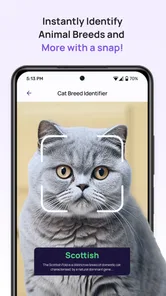
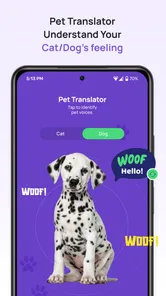
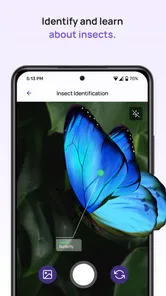
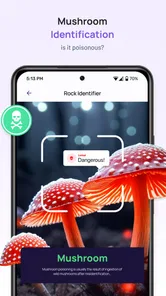
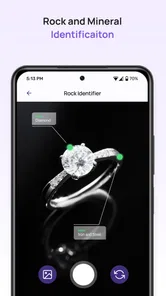
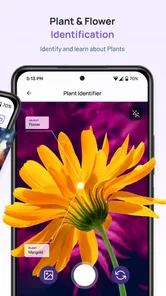
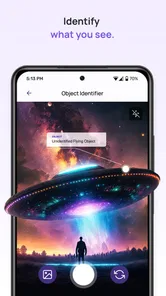

Analysis by Reviewed
I approached 6Sense as a practical question rather than a novelty: can an AI pet translator and identification tool actually help during an ordinary moment with an animal? My answer is cautiously positive. It is an easy-to-try productivity app from Mechideas, aimed at people who want a quick interpretation or identification aid without committing to a complicated specialist service. The experience is most useful when I treat its output as a starting point for observation, not as a definitive explanation of what an animal thinks or needs.
The app is free to install and is rated for Everyone, which makes the first step uncomplicated for families, curious pet owners, and anyone who wants to test the idea before deciding whether it belongs in their routine. Its current version is 1.7.4, and it runs on Android 9 or later. There are optional in-app purchases ranging from around twelve dollars to around forty-nine dollars per item, so I would explore the free experience first and only consider paying after understanding exactly how often I would use it.
From a curious pet moment to a usable answer
I start with the ordinary moment that makes me reach for an animal app: a pet does something unexpected, and I want a useful way to think about it. That curiosity matters even more when several people share the same home and may see the same behavior differently. I’ll look at how to turn that shared moment into a careful observation before considering what the app can—and cannot—tell us.
The starting condition matters more than the novelty
The best time to open 6Sense is when I have a clear, specific question. A dog is staring at the door, a cat is behaving differently around a new object, or I have come across an animal I cannot identify. Those situations give the app something concrete to work with. Opening it simply to ask a vague question such as “What is my pet thinking?” creates expectations that an AI-based tool cannot reliably satisfy.
I also found it helpful to begin with a calm subject. A blurred image, poor lighting, an obstructed face, or a pet moving constantly can make any visual interpretation less useful. Before starting, I would place the animal in a familiar, comfortable setting and avoid turning the process into a performance. That small choice improves the quality of the input and prevents the app from becoming a source of unnecessary excitement for the pet.
For identification, the starting condition is even more important. I would capture the animal from a sensible distance, include enough of its body or surroundings to provide context, and avoid relying on a single tiny detail. An identification result should be treated as a likely match rather than proof, particularly when several animals share similar coloring, shape, or behavior.
This is where the app differs from a conventional productivity tool. A notes app begins with information I already know, while 6Sense begins with an image, an observation, or a question that needs interpretation. Its value depends heavily on how thoughtfully I frame that input. The app can make the first step faster, but it cannot replace the care taken before the first scan or interaction.
More From Our News Desk

Weather by Xiaomi Review: Clear at a Glance, Less Clear Up Close

X Under Pressure: Can It Recover When Posting Goes Wrong?

Clash of Clans Is Won Between the Battles

Android Auto Makes the Case for Quieter Car Software

MobiOffice: Transforming Mobile Productivity with Seamless Integration

EA SPORTS FC™ Mobile Soccer: Redefining Mobile Sports Gaming
A simple step-by-step workflow
I would use the app in four deliberate stages. First, I decide whether the task is identification or interpretation. Keeping those goals separate avoids confusing a visual guess about what an animal is with an AI-generated suggestion about what it may be expressing. Second, I prepare the clearest available input instead of rushing to capture whatever happens to be on screen.
Third, I review the result slowly. The temptation with this kind of tool is to accept the first answer because it feels personal and immediate. I prefer to compare it with what I can actually see: posture, movement, surroundings, recent changes, and the animal’s normal habits. If the result fits those observations, it may be a useful prompt for further attention. If it conflicts with them, my direct observation deserves more weight.
Fourth, I turn the result into a small action. That could mean checking whether a pet has access to water, giving it a quieter space, taking another image in better light, or looking up reliable information about a possible identification. This final step is important because an interpretation without a follow-up is mostly entertainment. The app becomes more useful when it helps me notice something and then decide what to do next.
A practical tip is to keep the question narrow. Instead of asking for a complete explanation of a pet’s behavior, I would focus on the immediate situation: a new sound, a particular posture, or a change in attention. Narrow prompts reduce the chance that I will read too much into a broad answer. They also make it easier to compare the app’s suggestion with the real circumstances around the animal.
How I would use it in an everyday scenario
Imagine that my cat spends an evening sitting near a closed room and repeatedly looking toward the handle. I could open 6Sense, capture a clear image, and use the result as one clue. I would then check the obvious context: whether the cat has heard a noise, whether food or another animal is on the other side, and whether anything in the room has recently changed.
If the app suggests a general emotional interpretation, I would not treat that as a diagnosis. Instead, I would use it to guide observation. Does the cat look relaxed, tense, curious, or ready to retreat? Is the behavior repeated at another time? Does the cat respond normally to food and familiar interaction? The application can help me pause and examine the scene, but the responsible outcome comes from combining its suggestion with ordinary care.
The same workflow applies to an unfamiliar animal. I could take a clear image, review the identification suggestion, and then verify it with a trusted reference before making decisions about handling, feeding, or approaching the animal. That verification step is especially important outdoors, where a wrong identification can lead to unsafe behavior. 6Sense is convenient for generating a first possibility; it is not a substitute for expert confirmation when the stakes are high.
Handoffs: where the app ends and I take over
The most important handoff is between automated interpretation and human judgment. The app produces an answer, but I remain responsible for deciding whether it makes sense. That sounds obvious, yet the friendly tone of a pet-focused tool can make an uncertain result feel more authoritative than it is. I would keep a clear mental boundary: the application offers a suggestion, while the animal’s condition and behavior provide the evidence.
A second handoff occurs when the result points toward a health or welfare concern. If a pet is lethargic, in pain, struggling to breathe, refusing food, or showing a sudden serious change, I would contact a veterinarian rather than use a translator as a decision-maker. No AI interpretation should delay professional care. In that situation, 6Sense might help me describe what I noticed, but it should not be the endpoint.
A third handoff involves identification. If the result affects whether I approach an unfamiliar animal, move it, touch it, or decide what it might eat, I would verify the suggestion through a dependable animal-care source or a qualified person. A likely label is useful for research, but it is not enough for a safety-sensitive action.
There is also a personal handoff involving privacy and comfort. Before using any camera-based feature, I would make sure the image contains only what I intend to share with the app. I would avoid including private documents, visible addresses, or other people unnecessarily. The habit is simple: frame the animal, not the entire room. That keeps the workflow focused and reduces accidental exposure of unrelated details.
What the result is genuinely good for
6Sense works best as a low-pressure observation aid. It can encourage me to pay closer attention to an animal’s surroundings and behavior, especially when I might otherwise dismiss a small change. For a new pet owner, that can be helpful because it turns a vague concern into a concrete observation to investigate. For a curious user, identification can make it easier to begin learning about an unfamiliar animal.
The productivity angle becomes clearer when I use the app as part of a repeatable routine. I can observe a situation, request an interpretation, compare it with what I see, and record a practical next step elsewhere if needed. The app does not need to solve everything to be useful; it only needs to shorten the distance between noticing something and thinking about it carefully.
Another non-obvious strength is that it can act as a conversation starter between people caring for the same pet. One person may notice a behavior while another has more knowledge of the animal’s routine. Sharing the observation and discussing whether the app’s suggestion fits can make the household more attentive. The result is not valuable because it is automatically correct; it is valuable when it prompts better questions.
For children, the Everyone age rating makes the concept approachable, but I would still supervise use. A child may interpret a playful translation as literal communication or become worried by an unexpected result. Used together with an adult, the app can support curiosity about animals. Used without explanation, it may blur the line between an entertaining interpretation and reliable animal knowledge.
Where the workflow breaks down
The biggest weakness is the gap between the promise of a pet translator and the limits of interpreting animal behavior. Animals do not communicate through a direct human-language channel, so any translation-like output should be understood as an AI interpretation. That does not make it worthless, but it does mean I would never use it as proof of an animal’s feelings, intentions, or medical condition.
Input quality is another point of friction. If the image is dark, the animal is partly hidden, or the scene is visually confusing, the result may be less useful. A busy environment can also encourage me to blame the app when the real problem is that the question was too broad or the subject was not clearly presented. Retaking the image and narrowing the situation may help, but there will still be moments when the tool cannot provide a dependable answer.
The identification side has a similar trade-off. It is appealing to receive a quick possibility, but visually similar species and breeds can be difficult to distinguish. I would not use a single result to make decisions involving safety, feeding, relocation, or treatment. A conventional search with several trusted references is slower, yet it is the better choice when accuracy matters more than convenience.
There is also a practical limit to how much value I would get from repeated use. If I already understand my pet’s routines and prefer advice from a veterinarian, trainer, or established animal-care guide, 6Sense may feel more like a novelty than a daily productivity tool. The free entry point lowers the risk of trying it, but optional purchases mean I would pay only if the app repeatedly helps with real observations rather than occasional amusement.
Who should try it, and who should choose something else
I would recommend trying 6Sense to curious pet owners, families who enjoy observing animals, and users who want a quick first pass at identification or behavior-related questions. It is particularly suitable for someone who understands that AI output needs context and verification. The app’s straightforward concept makes it accessible, while its usefulness depends on the user’s willingness to think beyond the generated result.
I would be more cautious recommending it to someone looking for medical guidance, guaranteed species identification, or a scientifically validated translation of animal language. In those cases, a veterinarian, qualified behavior professional, wildlife specialist, or carefully sourced reference is a better fit. The app can sit beside those resources as an observation aid, but it should not replace them.
Compared with a standard search engine, 6Sense offers a more direct image-centered starting point. I do not have to know the right terminology before asking for help. The trade-off is that a search engine can lead me to detailed sources, comparisons, and expert explanations, while an AI result may feel more immediate but require more checking. Compared with a pet journal, 6Sense is better at generating a quick interpretation, whereas a journal is better for tracking patterns over days or weeks. I would use the two together if recurring behavior were the real concern.
Compared with dedicated animal-care apps, this tool is more focused on the initial moment of curiosity than on long-term records, structured training, or professional consultation. That makes it lighter and easier to approach, but also less suitable for users who want a complete pet-management system. Choosing it depends on whether I need a fast prompt or an ongoing care platform.
My final assessment after following the full workflow
6Sense is an interesting productivity app because it turns an animal image or observation into an immediate point of discussion. Mechideas has built something approachable for people who want to explore identification and pet-focused AI without a complicated setup. Its average rating is around 4.3 from roughly thirteen thousand ratings, and it has passed half a million installs, which suggests that the idea has found a sizeable audience.
Those figures do not change my central judgment: the app is most successful when I use it modestly. I would capture a thoughtful input, read the result as a suggestion, compare it with the real situation, and hand serious questions to a qualified source. That workflow gives the app a clear role instead of asking it to perform an impossible one.
My recommendation is to try the free version if you are curious about AI-assisted pet interpretation or quick animal identification. Spend a little time testing how well it fits your normal situations before considering any optional purchase. If you approach it as a helpful prompt rather than a mind reader, it can add an enjoyable and occasionally useful step to everyday observation. If you need certainty, diagnosis, or detailed long-term care, I would skip the translator framing and choose a more authoritative alternative.
6Sense Frequently Asked Questions
Is 6Sense intended for consumers, or is it mainly a business tool?
6Sense is primarily a business-oriented productivity app, rather than a general-purpose tool for everyday personal tasks. Its store summary describes it as an AI identification and pet translator, while the wider 6Sense name is also associated with sales and marketing technology. Before downloading, consider which purpose you need and whether the app’s available features match it. The app is free to download, with in-app purchases offered.
What devices can run 6Sense, and which version should I expect?
6Sense is available for Android devices running Android 9 or later, and its current version is 1.7.4. Check your device’s operating system before installing so you can confirm compatibility. The app is rated for Everyone, making it suitable for a broad audience. As with any app, keeping it updated can help you use the latest available version and maintain compatibility with your device.
What is 6Sense and what can I use it for?
6Sense is a business-focused platform designed to help sales and marketing teams identify potential buyers, understand account activity, and prioritize outreach. Rather than functioning like a typical consumer app, it usually works as part of an organization’s revenue technology stack. Depending on your company’s setup, you may use it to review account intent, research prospects, discover contacts, monitor buying signals, and coordinate sales or marketing campaigns.
Is 6Sense free to download and use?
6Sense is free to download, but it also offers in-app purchases priced from $11.99 to $48.99 per item. The features available to you may depend on the app’s purchase options and your organization’s configuration if you are using business-related tools. Before making a purchase, review the options shown in the app and consider whether they fit your needs. An organization’s account or permissions may also affect access.
What information does 6Sense provide to sales and marketing users?
The information available in 6Sense can vary by subscription and company configuration, but the platform may include account intelligence, buyer intent signals, engagement activity, contact and company details, audience information, and recommended actions. These insights are intended to help teams decide which accounts deserve attention. Users should remember that data can change, may be incomplete, and should be verified before it is used for important business decisions or direct outreach.
Pros
- Identifies buying signals to help prioritize high-value accounts.
- Combines intent
- engagement
- and account data in one platform.
- Supports account-based marketing and sales coordination.
- Customizable dashboards make campaign performance easier to monitor.
- Useful integrations can connect insights with existing marketing tools.
Cons
- May be expensive for small businesses or individual users.
- Requires quality CRM and marketing data for accurate insights.
- The interface can feel complex for first-time users.
- Some features require training and ongoing platform management.
- Intent data may be less reliable for niche or low-traffic markets.











