Spades: Classic Card Game 2026
- 253.00
- 4.6
- Installs
- 100.00K
- Price
- Free

Screenshots
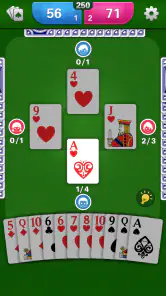
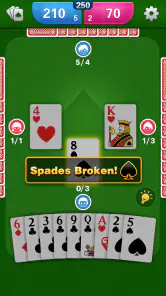
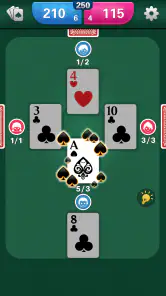
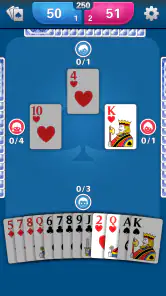
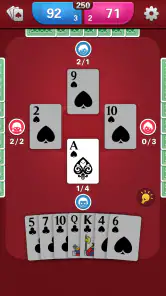
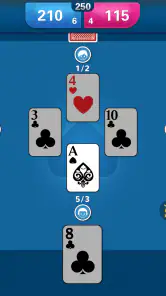
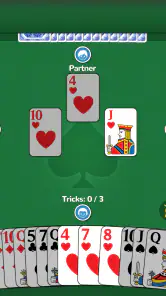
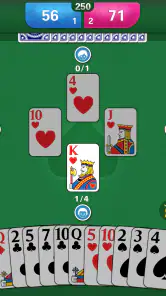
Analysis by Reviewed
I enjoy card games most when they remove the ceremony and let me start a hand quickly. Spades: Classic Card Game 2026 takes that straightforward approach: it is a free card game from Card Games, Inc, built around the familiar Spades format rather than a large collection of unrelated modes. After spending time with it, I see the appeal clearly. It is easy to understand, comfortable for short sessions, and suitable for anyone who wants a traditional trick-taking game on a phone or tablet.
That simplicity is also where the review needs to be honest. A compact card game can feel effortless once it opens, but small setup problems, unclear expectations, or a poor network situation can make the first few minutes more frustrating than the actual play. My experience is that the best way to enjoy this title is to treat it as a focused Spades table: start with the basics, check the device environment, and avoid expecting the broader features of a large multiplayer platform.
Getting into a hand without unnecessary friction
The first useful thing to know is what this game is not. It is not trying to replace every card game in one package, and it is not a deep strategy suite with a long learning campaign. Its purpose is narrower and more approachable: give me a familiar Spades experience whenever I want a quick round. That makes it a natural fit for people who already know the rules, as well as newcomers who want to learn through repeated hands rather than reading a long manual.
Spades itself is easy to recognize but not completely casual once the cards are moving. Players estimate how many tricks they can win, follow suit when possible, and use spades carefully because they are the trump suit. The interesting decisions arrive before and during the hand. A strong-looking hand can still fail if I bid too aggressively, while a modest hand may become valuable when I can control the timing of my spades. This app benefits from that built-in tension because the rules create variety without requiring a complicated interface.
Where users can get stuck is often not the card logic but the expectation of instant perfection. If the opening screen takes longer than expected, the game appears to pause between screens, or a hand does not begin immediately, I would first give the app a moment rather than repeatedly tapping. Rapid taps can make a simple transition feel confusing, especially on an older device. Closing and reopening the game is a sensible first recovery step if the screen genuinely stops responding.
I also recommend starting with a relaxed hand instead of trying to prove that I understand the game immediately. The first few rounds are useful for observing how bids, trick results, and scoring are presented. That matters because different digital Spades games emphasize information differently. Some show every detail prominently; others keep the table cleaner and expect the player to follow the flow. Learning the app’s visual rhythm early makes later decisions easier.
The game is rated for Everyone, which matches its accessible card-table presentation. I would still distinguish “easy to access” from “easy to master.” A child or new player may understand the basic actions quickly, but bidding and partnership judgment take practice. For an adult looking for a quiet mental break, that balance is a strength: there is enough decision-making to stay engaged without the burden of a complicated control scheme.
More From Our News Desk

Weather by Xiaomi Review: Clear at a Glance, Less Clear Up Close

X Under Pressure: Can It Recover When Posting Goes Wrong?

Clash of Clans Is Won Between the Battles

Android Auto Makes the Case for Quieter Car Software

MobiOffice: Transforming Mobile Productivity with Seamless Integration

EA SPORTS FC™ Mobile Soccer: Redefining Mobile Sports Gaming
What to check before blaming the game
When a card game behaves oddly, I use a simple setup routine. First, I confirm that the device has a stable connection if the current screen appears to depend on online loading. I then check whether other apps are responding normally. If several apps are slow, the problem is more likely to be the device or connection than this particular game. This is basic troubleshooting, but it prevents unnecessary reinstalling and lost progress.
The listed minimum operating system is Android 7.0, so compatibility is worth checking before installation or troubleshooting. A supported system does not guarantee identical performance on every phone, but it does give a practical starting point. I would also keep some free storage available and close demanding apps if the device is older. Card games are visually lighter than many modern games, yet a crowded or strained device can still make menus and transitions feel unreliable.
Because the game is free, I can test the basic experience without committing money at the start. That is helpful when deciding whether the interface suits me. The app includes optional purchases priced from $4.99 to $6.99 per item, so I would avoid treating any purchase as a solution to a loading or control problem. Buying something cannot repair a weak connection, a frozen screen, or an operating-system issue. I prefer to play several hands first and decide later whether the paid options add value to my routine.
One practical check is to notice whether the problem happens once or repeatedly at the same point. A single delayed opening may be temporary. A repeatable issue after every launch suggests a local problem worth addressing through a restart, available updates, or a clean installation. Before reinstalling, I would make sure I am comfortable with the possibility that locally stored progress or preferences may not return. That is a general precaution, not a criticism unique to this game.
The current version is 1.3.0, and keeping the installed build current is sensible when a game has display or stability trouble. I would use the normal app-store update process rather than searching for unofficial files. That keeps the installation cleaner and avoids introducing a separate security risk into what should be a simple card-game setup.
A reliable routine for recovering a disrupted session
My preferred recovery workflow is deliberately boring. I stop tapping, wait briefly, and return to the game only after the screen responds. If it remains stuck, I close the app fully and launch it again. Next, I test whether the same problem appears in another hand. If only one session was affected, I continue cautiously; if every session fails in the same way, I move on to checking the connection, device space, system version, and available app update.
This approach is especially useful when a hand seems to have stopped after an action. I first look for a visible prompt, a selected card, or a turn indicator before assuming the game has failed. In a trick-taking game, the table may be waiting for a choice that is easy to miss if I am concentrating on the cards. I find that slowing down and reading the whole screen is often more effective than pressing the same area repeatedly.
For everyday use, I would create a small habit around session length. If I have only a few minutes while waiting for an appointment, I start a hand only when I am prepared to finish it or accept an interruption. A Spades round is not like a disposable puzzle where abandoning the screen has no consequence. This is a partnership card game, so leaving halfway through can break the flow and make the return less satisfying. The app works best when I give it a focused pocket of time.
Another useful workflow is to separate learning from competition. During the first sessions, I pay attention to how the game handles bidding, card selection, trick completion, and scoring. Once those steps feel automatic, I can focus on strategy. This prevents a common mistake: judging the game’s intelligence or fairness before I have learned how its table communicates the state of play.
I also keep purchases out of the troubleshooting loop. If an optional item is visible, I treat it as a separate decision from whether the free game works properly. The sensible order is to establish that the app launches, the table is understandable, and the basic play is enjoyable. Only then does it make sense to consider spending anything. That separation protects the user from paying out of frustration.
When the app may not be the real cause
Not every interruption points to a defect in the game. A weak Wi-Fi signal, an overloaded phone, aggressive battery management, or a system update running in the background can all affect responsiveness. If the game is the only app misbehaving, it deserves closer attention. If several apps show the same delay, I would address the device environment first and then try the game again.
Screen size can also change the experience. On a small phone, cards and status information may feel more compressed, especially for someone who prefers large visual targets. A tablet or larger display may be more comfortable for long sessions, but I would not assume that bigger is always better; the right choice depends on how I hold the device and how clearly I can read the table. If selecting cards feels awkward, changing orientation or adjusting the device’s display settings may help, provided the game responds well to that setup.
Notifications are another source of confusion. A message, call, or system prompt can pull attention away just as a decision is waiting. When I return, I may mistake the pause for a frozen game. For a serious hand, I prefer a quiet setting and enough battery to avoid power-saving interruptions. This is particularly relevant when I am playing in a public place or during travel, where connectivity and interruptions are less predictable.
There is also a difference between a strategic loss and a technical problem. Spades can punish a bid that looked reasonable, and a bad result does not mean the game made an incorrect move. I judge the experience by whether the rules are presented consistently and whether my choices are clear, not by whether every hand goes my way. The app is more rewarding when I accept that uncertainty is part of the card game rather than expecting a guaranteed winning streak.
Compared with a physical deck, this version is more convenient and less social. I do not need a table, four people, or someone to keep score, which is exactly why it works for solo downtime. The trade-off is that a phone cannot reproduce the conversation, gestures, and shared atmosphere of playing with friends. Compared with a broad card-game collection, it is more focused but less varied. If I want solitaire, rummy, or several unrelated formats in one installation, another app may be a better fit. If I specifically want Spades without carrying a deck, this focused approach is easier to appreciate.
Who will enjoy it most
I would recommend this game to a player who already likes classic Spades and wants a readily available digital table. It is also a reasonable starting point for someone learning the format, as long as they are willing to spend a few hands understanding bidding and trick management. The free entry makes experimentation easy, while the Everyone rating keeps the presentation broadly approachable.
It suits short breaks, quiet evenings, and travel when I want something more thoughtful than a reflex game. A realistic example is a train ride with an unreliable schedule: I can begin a session, concentrate on a few hands, and put the phone away when needed. The game does not demand the visual intensity or fast reactions of an action title, so it is comfortable when I want a calmer activity.
I would be more cautious recommending it to someone seeking a large online community, extensive customization, or a long progression system. The appeal here is the card table itself. Players who need constant novelty may find a dedicated Spades game narrow after the initial interest fades. Likewise, anyone who dislikes optional purchases should review the purchase prompts carefully and stay with the free experience if it already meets their needs.
The audience response gives the app a 4.6 average from around 1.2 thousand ratings, with over 100 thousand installs. I read that as a useful sign of broad interest rather than a guarantee that every device or playing style will feel perfect. The review count is around 250, which provides additional feedback but still leaves room for individual differences in hardware, expectations, and preferred Spades rules.
My practical verdict after using the card table
Spades: Classic Card Game 2026 succeeds because it stays close to the reason people open a Spades app in the first place: they want to play Spades. I like that the concept is immediately understandable and that the game can occupy a short break without asking me to learn a whole ecosystem. Its strongest quality is focus, not spectacle.
The main limitation is the same focus. Players looking for a busy social hub, many card formats, or a deep set of visible extras should compare it with a broader card-game alternative. I would also approach setup patiently on older devices and treat freezes, delays, and interrupted hands methodically rather than assuming every inconvenience comes from the game. Checking the operating system, connection, storage, updates, and background activity solves more problems than repeated tapping.
As a free download with optional items between $4.99 and $6.99, it is easy to try without an upfront payment. I would play the basic version first, learn how the table communicates bids and tricks, and decide whether it earns a regular place on my phone. For me, it is a good recommendation when the goal is a familiar, low-pressure Spades session anywhere. It is not the right choice when I need a complete card-game library or the atmosphere of a real group around a table, but within its narrower purpose, it delivers a pleasantly direct way to play.
Spades: Classic Card Game 2026 Frequently Asked Questions
What devices can run Spades: Classic Card Game 2026?
Spades: Classic Card Game 2026 is a card game for mobile devices, and its minimum operating-system requirement is version 7.0. Before downloading, check that your device meets this requirement and has enough available space for the installation. The game is free to download, so you can try its classic Spades experience without paying upfront.
Is Spades: Classic Card Game 2026 suitable for all ages?
The game has an Everyone content rating, making it suitable for a broad audience, including families and younger players. Its focus is on the rules and strategy of the classic card game: bidding, taking tricks, and playing with a partner. Parents may still want to review the purchase settings on a device used by a child, since optional in-app purchases are available.
What is Spades: Classic Card Game 2026?
Spades: Classic Card Game 2026 is a digital version of the traditional trick-taking card game for mobile devices. It is designed for players who enjoy strategic bidding, partnership play, and competitive rounds. Depending on the available modes, you may be able to play against computer opponents or challenge other players. The main objective is to estimate your tricks accurately and work effectively with your partner.
How do you play Spades: Classic Card Game 2026?
Each player receives cards and bids on how many tricks they expect to win during the round. Spades are always the trump suit, meaning a spade can beat cards from other suits when spades have been played. Players must usually follow the suit led if possible, while the highest card in the leading suit or the highest spade wins the trick. Successful bidding and careful card management are essential.
Can I play Spades: Classic Card Game 2026 offline?
Offline availability may depend on the specific version and game mode offered by the developer. Single-player games against computer-controlled opponents are commonly available without an internet connection, while online multiplayer, leaderboards, advertisements, cloud saves, or daily challenges may require access to the internet. It is best to check the app listing and test the desired mode after installation, especially when traveling or using limited mobile data.
Pros
- Easy-to-learn rules make it suitable for casual and new card players.
- Offline play lets you enjoy matches without Wi-Fi or mobile data.
- Quick rounds fit well into short breaks or daily commutes.
- Several difficulty levels offer a challenge as your skills improve.
- Simple card-game format provides a relaxing alternative to action games.
Cons
- AI opponents may feel predictable after extended play.
- Ads can interrupt the experience
- especially between matches.
- Limited variation may reduce long-term appeal for experienced players.
- Some features may require in-app purchases or premium upgrades.
- Players seeking real opponents may find the multiplayer options limited.
- Category
- Card
- Version
- 1.3.0